Record from SoundCard - HELP!!!

kmy

New member
Local time
12:08 AM
Messages
11
Location
Mn
I need help setting up for my computer to record from my SOUNDCARD, digitally. NOT from my mic. I used to have Winds Vista and it works for me but this new Winds 7 I got DOES NOT work at all.

When I got to the "PlayBack Devices" box, the "PlayBack" & "Recording" tabs ONLY have ONE device there. I even check the "Show disabled devices" & "show disconnected devices" but NOPE. Only thing thats there for the "Playback" tab is my default audio speakers(Realtek HD Audio Speakers) & only thing there for the "Recording" tab is my Default device, "Mic Realtek HD audio"

This is a 1 mo. old laptop Winds 7 Sony Vaio VPCEB15FM

Here's the full specs: VPCEB15FM/T | VAIO® E Series Notebook PC | Sony | Sony Style USA

How do I get it to work? do I got a weak/low end sound card or what?

Recording from my SoundCard is what I do 1/2 of my computer time. If it doesn't work then my computer is pretty much useless for me other then buying crap online.

Please help me out any way you guys can. Thanks in advance...
 

My Computer

OS
Windows 7
So you want what is being played, to be recored, as if being picked up by your mic. I have been trying to do this for sometime and can not find a way to do this with software alone. I did get it to work at one time by plugging an audio cable into both sockets on my laptop. I hope someone else has a different solution because this has been bothering me a little as well.
 

My Computer

Computer type
Laptop
Computer Manufacturer/Model Number
Toshiba P775-S7100
OS
Windows 7 Professional SP1 64-bit
CPU
Intel Core i5-2450M @2.5 GHz
Memory
6 GB DDR3 1333MHz
Graphics Card(s)
Intel HD 3000
Monitor(s) Displays
Built-in 17.3" LED; 22" Insignia NS-L22Q-10A
Screen Resolution
1600x900; 1360x768
Hard Drives
750 GB Hitachi
1TB Seagate FreeAgent External
Internet Speed
Verizon DSL Speed(Down/Up): 3360 Kbps / 800 Kbps
Antivirus
MSE and MBAM Pro
Browser
IE10
Hi kmy, welcome to Seven Forums.

If I look at the specs of your laptop, it looks like you only have a microphone input.
It doesn't say if it's a mono or stereo input and if it can be used as a line-in.
Sometimes if you plug in a line-in cable it will automatically switch to line-in.
Maybe there is more information on that in the users manual otherwise you have to try it yourself.
If that's not working the other option is to use a usb soundcard.

MK2
 

My Computer

OS
7
The lack of the "System Mixer" (SoundBlaster calls it "What You Hear") on new PC's is a common complaint - from all vendors. On SOME systems installing a different sound driver MAY give you the feature, but that is the only way that I know of with the existing hardware on the PC.

I have an Acer laptop with Realtek audio and it does not have the System Mixer. This is a hot subject on the Dell users forum. I installed a HP desktop for a client and it did not have the System Mixer.
 

My Computer

Computer type
PC/Desktop
Computer Manufacturer/Model Number
My Own Build
OS
Windows 10 64 bit
CPU
Intel i7 6700K
Motherboard
ASUS ROG Maximus VIII Hero
Memory
16GB Corsair Dominator
Graphics Card(s)
Intel CPU Graphics
Sound Card
RealTek
Monitor(s) Displays
27" Dell S2719dgf
Screen Resolution
2560X1440
Hard Drives
1 TB Samsung 850 EVO SSD for Win 10 Pro
500GB Samsung 850 EVO SSD for Win 10 Insider
2 TB drive for backup
PSU
EVGA Supernova 750G2
Case
BeQuiet Silent Base 600
Cooling
Deepcool Captain 120EX
Keyboard
Microsoft Wireless 2000
Mouse
Microsoft wireless
Internet Speed
100 MB/sec (Cable)
Antivirus
Microsoft Defender and Malwarebytes
Browser
Edge/Firefox
Other Info
Cakewalk (Sonar) by BandLab and Studio One 4.1 Pro recording studio software. MOTU 896Mk3 Hybrid recording interface, Frontier Tranzport wireless control unit, Behringer X-Touch Control Surface.
Five USB connected optical drives for CD Audio production using Nero BurningROM
So the only way is to try is to get a USB SOUNDCARD? Will any brand work, bc they are pretty much plug-&-play.
 

My Computer

OS
Windows 7
So the only way is to try is to get a USB SOUNDCARD? Will any brand work, bc they are pretty much plug-&-play.


Since you have a Realtek audio system the first thing I'd do is download the latest Realtek drivers and install them.

Realtek

Doesn't guarantee anything but worth a shot.

Ap
 
Last edited:

My Computer

Computer Manufacturer/Model Number
Assembled in my workshop
OS
Windows 7 Home Premium
CPU
Intel Core 2 Duo @ 3.00gHz
Motherboard
Gigabyte GA-P35-S3G
Memory
4 GB
Graphics Card(s)
ATI Radeon HD 2600 XT
Sound Card
RME 24/96 Card, Realtek Internal Audio PreSonus FireStudio
Monitor(s) Displays
Acer 1917 (x2)
Screen Resolution
1280 x 1024 on both monitors
Hard Drives
Three 250GB Seagate SATA Barracuda 7200rpm
PSU
Rosewill 500-watt
Case
Rosewill mid-tower
Cooling
Noctua NH-U9B (CPU), PwrSupply fan + single large case Fan
Keyboard
Macally w/2/USB ports.
Mouse
Trackman Wheel
Other Info
Event 20/20 bas studio monitors, Yamaha sub.
Rackmount Korg/Roland/Yamaha synthesizers,
Cubase MIDI/audio recording. Sony Soundforge audio/mastering software. CD Architect Mastering. RME & Presonus audio interfaces.
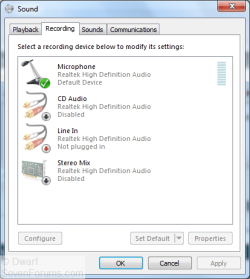
Right-click the Speaker icon in the notification area (not the Realtek HD Audio Manager icon) and select Recording devices.

Capture.PNG

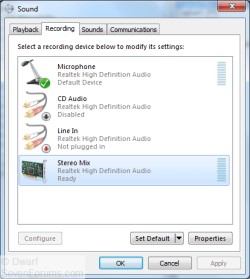
Right-click on a blank space and ensure that the options Show Disabled Devices and Show Disconnected Devices are both selected (ticked).

Capture1.PNG

The option we are looking for is called Stereo Mix, so right-click on it and choose Enable. You may want to adjust the other properties, such as levels and balance, after enabling.
 

My Computer

Computer type
PC/Desktop
Computer Manufacturer/Model Number
Dwarf Dwf/11/2012 r09/2013
OS
Windows 8.1 Pro RTM x64
CPU
Intel Core-i5-3570K 4-core @ 3.4GHz (Ivy Bridge) (OC 4.4GHz)
Motherboard
ASRock Z77 Extreme4-M
Memory
4 x 4GB DDR3-1600 Corsair Vengeance CMZ8GX3M2A1600C9B (16GB)
Graphics Card(s)
MSI GeForce GTX770 Gaming OC 2GB
Sound Card
Realtek High Definition on board solution (ALC 898)
Monitor(s) Displays
ViewSonic VA1912w Widescreen (VGA)
Screen Resolution
1440x900
Hard Drives
OCZ Agility 3 SSD 120GB SATA III x2 (RAID 0)
Samsung HD501LJ 500GB SATA II x2
Hitachi HDS721010CLA332 1TB SATA II
Iomega 1.5TB Ext USB 2.0
WD 2.0TB Ext USB 3.0
PSU
XFX Pro Series 850W Semi-Modular
Case
Gigabyte IF233
Cooling
1 x 120mm Front Inlet 1 x 120mm Rear Exhaust
Keyboard
Microsoft Comfort Curve Keyboard 3000 (USB)
Mouse
Microsoft Comfort Mouse 3000 for Business (USB)
Internet Speed
NetGear DG834Gv3 ADSL Modem/Router (Ethernet) ~4.0 Mb/s (O2)
Antivirus
Avast! 8.0.1497
Browser
IE 11
Other Info
Optical Drive: HL-DT-ST BD-RE BH10LS30 SATA Bluray
Lexmark S305 Printer/Scanner/Copier (USB)
WEI Score: 8.1/8.1/8.5/8.5/8.25
Asus Eee PC 1011PX Netbook (Windows 7 x86 Starter)
Do you have an input port on your laptop? like a mic in or line in? What i do is use an auxilary cable out from my sound and back in, and record it with Audacity. It isn't the best way, but it does work
 

My Computer

Computer Manufacturer/Model Number
Custom Build #2
OS
Windows 7 Ultimate 32-Bit
CPU
Intel Core 2 Duo E6300 O.C.'d to 2.80 GHz (For Now >:) )
Motherboard
Gigabyte P43-ES3G
Memory
4x1GB OCZ Dual Channel RAM
Graphics Card(s)
HIS ATI Radeon HD 5770 1GB
Sound Card
Onboard Sound
Monitor(s) Displays
Asus VH-236
Screen Resolution
1920x1080
Hard Drives
WD Caviar-Blue 250 GB SATA
WD Caviar-Green 1.5 TB SATA
PSU
Raidmax RX-630SS
Case
Apevia X-Dreamer
Cooling
Case: Arctic Cooling CPU:Rosewill RCX Z2
To be sure, do you want to record from an outside source or something on the computer itself?

It's always worth a try to reinstall/install the newest drivers for your soundcard.

If it's something you want to record from the computer itself, normally you should use the stereo mix function.

If it's from an outside source, you should use a line-in, as I mentioned in my post you
might try yourself to connect a stereo jack cable to your mic-in and see if it automatically switches to line-in.
 

My Computer

OS
7
@ DwarF...if it works then I wouldn't have this thread. Thats my problem I dont see the "Stereo Mix" function even after I click on "Show hidden devices" & "Show disconnected Devices".

Keep in mind guys this is a LAPTOP. The only audio signal input/output I got is the MIC & HeadPhone. The rest are USB's, HDMI, card Readers, etc...ports.

I'm trying to record from my computer(online). Not from an external device.

It is the LATEST driver. I also tried the previous driver too and NOPE, nothing.

Oh yea, I dont know if this helps or not but I have WINDOWS 7 PROFESSIONAL.
 

My Computer

OS
Windows 7
It looks like the only solution for RealTek sound cards is the aux cable mentioned before.
6ft35mmma2-300x223.jpg
 
Last edited:

My Computer

Computer type
Laptop
Computer Manufacturer/Model Number
Toshiba P775-S7100
OS
Windows 7 Professional SP1 64-bit
CPU
Intel Core i5-2450M @2.5 GHz
Memory
6 GB DDR3 1333MHz
Graphics Card(s)
Intel HD 3000
Monitor(s) Displays
Built-in 17.3" LED; 22" Insignia NS-L22Q-10A
Screen Resolution
1600x900; 1360x768
Hard Drives
750 GB Hitachi
1TB Seagate FreeAgent External
Internet Speed
Verizon DSL Speed(Down/Up): 3360 Kbps / 800 Kbps
Antivirus
MSE and MBAM Pro
Browser
IE10
@ DwarF...if it works then I wouldn't have this thread. Thats my problem I dont see the "Stereo Mix" function even after I click on "Show hidden devices" & "Show disconnected Devices".

Your first post mentions looking under "Playback Devices". If you have a Stereo Mix option, it will be under "Recording Devices".

Ap
 

My Computer

Computer Manufacturer/Model Number
Assembled in my workshop
OS
Windows 7 Home Premium
CPU
Intel Core 2 Duo @ 3.00gHz
Motherboard
Gigabyte GA-P35-S3G
Memory
4 GB
Graphics Card(s)
ATI Radeon HD 2600 XT
Sound Card
RME 24/96 Card, Realtek Internal Audio PreSonus FireStudio
Monitor(s) Displays
Acer 1917 (x2)
Screen Resolution
1280 x 1024 on both monitors
Hard Drives
Three 250GB Seagate SATA Barracuda 7200rpm
PSU
Rosewill 500-watt
Case
Rosewill mid-tower
Cooling
Noctua NH-U9B (CPU), PwrSupply fan + single large case Fan
Keyboard
Macally w/2/USB ports.
Mouse
Trackman Wheel
Other Info
Event 20/20 bas studio monitors, Yamaha sub.
Rackmount Korg/Roland/Yamaha synthesizers,
Cubase MIDI/audio recording. Sony Soundforge audio/mastering software. CD Architect Mastering. RME & Presonus audio interfaces.
Ah so I did misunderstand, I thought you wanted to record from an external source.

Did you already try to uninstall the realtek drivers and let windows look for the drivers?

I also had a look at the specs of your laptop but I could not find the exact specs of your audio codec otherwise you could look for some other drivers that might have the stereo mix option.
 

My Computer

OS
7
^...How do I look for/install different drivers?

and I'm assuming if I want to try the AUX cable. One end goes in MIC & the other goes in Headphone input? but isn't this a mono signal though? otherwise if it works then I'll get a External soundcard then try the aux cable.
 

My Computer

OS
Windows 7
I think it's a mono signal but I can't be sure, it's not mentioned in the specification or the users manual.
The only way to find out is to test it yourself with a cable, also I doubt if it gives a good audio quality.

If you want to unload the realtek drivers and load the standard windows drivers:

go to configuration, device manager, audio/video/games, select your audio device
go to drivers, uninstall the drivers
restart the computer and let windows install the audio drivers.

Some names might be a bit different as a discribed because i use a Dutch language version of windows.

MK2
 

My Computer

OS
7
Well, usually a mic input will be stereo, but if it is mono, you'll know, because the cable won't fit in the jack.
Also, just in case the cable fits for some reason, if you set your recording program to record in stereo, you'll only get 1 channel recording if it is a mono jack.
 

My Computer

Computer Manufacturer/Model Number
Custom Build #2
OS
Windows 7 Ultimate 32-Bit
CPU
Intel Core 2 Duo E6300 O.C.'d to 2.80 GHz (For Now >:) )
Motherboard
Gigabyte P43-ES3G
Memory
4x1GB OCZ Dual Channel RAM
Graphics Card(s)
HIS ATI Radeon HD 5770 1GB
Sound Card
Onboard Sound
Monitor(s) Displays
Asus VH-236
Screen Resolution
1920x1080
Hard Drives
WD Caviar-Blue 250 GB SATA
WD Caviar-Green 1.5 TB SATA
PSU
Raidmax RX-630SS
Case
Apevia X-Dreamer
Cooling
Case: Arctic Cooling CPU:Rosewill RCX Z2
ok, I just bought a AUX cable and tried it. It WORKS but I can't hear what I'm recording so I'll have to buy a split "Y" Aux cable tomorrow so one end could go to the MIC in-put and the 2nd end goes to my external speakers. I tried recording a song from online and relisten to it, its pretty much the same audio quality but is noticeable if you actually compare the two carefully. I can live with that.

Thanks soo much guys. Now I dont have to buy another used computer for this purpose(although I was very disappointed that my $750 Sony laptop didn't have a simple thing on the sound card like cheaper computers).
 

My Computer

OS
Windows 7
^...I'll give the doanloads a try too. If it works then I'll refund my cables otherwise the cables are worth it. thanks
 

My Computer

OS
Windows 7
Recording from Soundcard in Win &

I couldn't figure out a way to do this other than downloading "Freecorder", recording the mp3 there, then opening it in audacity to make edits.
 

My Computer

OS
Windows 7 home premium 32 bit
Back
Top