Quick summary: what is the option to view recording level when running sndvol.exe. It is no longer /r.
Full problem:
I have 2 objectives - to try and get volume control to more or less work as it did in XP and, to get it wotking with Adobe Audition.
I have a SpeedLink sound card, which has a C-Media chip. I have downloaded and installed the Windows 7 driver.
If I right-click the volume control and select recording devices I get a list of inputs (no wave, thanks to C-Media). All are currently unavailable, except which ever one I make the default device. This seems like a "fix" to me, and not the way one would expect it to work. For a start, it means you cannot mix inputs.
Nevertheless, by making line-in the default device I can get audio into Adobe Audition.
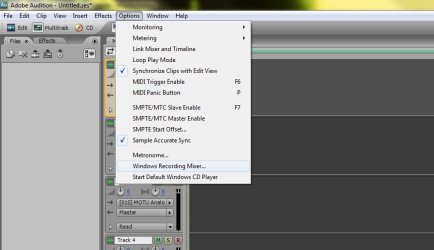
To "see" the recording level control, you have to tell Audition where the program is. Problem number one is that it used to be called sndvol32.dll. It is now called sndvol.exe.
Still, I can put this info into Audition. But the next problem is that, in the good old days, to be able to control input volumes one used sndvol32.dll /r. The /r does not work with sndvol.exe. Does anyone know what it should be?
To be able to set input levels with anything, never mind Audition, one has to right-click volume control, select recording devices, make sure that the input you want is the default device, right-click it and select properties, go to the levels tab and adjust it there.
Not a very elegant solution, and a giant leap backwards for mankind.
I understand that one can download a Windows 7 type volume control for XP, now all we need is for someone to write an XP type volume control for Windows 7!
Full problem:
I have 2 objectives - to try and get volume control to more or less work as it did in XP and, to get it wotking with Adobe Audition.
I have a SpeedLink sound card, which has a C-Media chip. I have downloaded and installed the Windows 7 driver.
If I right-click the volume control and select recording devices I get a list of inputs (no wave, thanks to C-Media). All are currently unavailable, except which ever one I make the default device. This seems like a "fix" to me, and not the way one would expect it to work. For a start, it means you cannot mix inputs.
Nevertheless, by making line-in the default device I can get audio into Adobe Audition.
To "see" the recording level control, you have to tell Audition where the program is. Problem number one is that it used to be called sndvol32.dll. It is now called sndvol.exe.
Still, I can put this info into Audition. But the next problem is that, in the good old days, to be able to control input volumes one used sndvol32.dll /r. The /r does not work with sndvol.exe. Does anyone know what it should be?
To be able to set input levels with anything, never mind Audition, one has to right-click volume control, select recording devices, make sure that the input you want is the default device, right-click it and select properties, go to the levels tab and adjust it there.
Not a very elegant solution, and a giant leap backwards for mankind.
I understand that one can download a Windows 7 type volume control for XP, now all we need is for someone to write an XP type volume control for Windows 7!
My Computer
- Computer type
- PC/Desktop
- Computer Manufacturer/Model Number
- Built-up
- OS
- Windows 7 Professional SP1 64-bit
- CPU
- Intel i3-3220 3.3GHz
- Motherboard
- Gigabyte
- Memory
- 4GB
- Graphics Card(s)
- NVIDIA GeForce GTX650 1GB
- Sound Card
- On-board Realtek
- Monitor(s) Displays
- LGL1719S
- Screen Resolution
- 1280 x 1024
- Hard Drives
- Samsung HD321HJ, Samsung HD103SI, Seagate ST2000DL, Seagate ST3100524AS
- PSU
- 450W
- Case
- AOpen
- Cooling
- Case fan, CPU fan, PSU fanf.
- Keyboard
- Microsoft
- Mouse
- AOpen
- Internet Speed
- 1Mb/s
- Antivirus
- MSSE
- Browser
- Firefox