Recording output

jago86

= )
Member
Local time
1:57 AM
Messages
61
Location
San Jose, Trinidad
hey, does anyone know how to record the output sound in windows? I did it in XP years ago but i can't seem to figure out how to do it in Win 7

I wanna record the output sound from a game (Fifa Manager 09)

I have sound forge 9 and audacity, but i cant find the right settings to enable me to do this. I'm using the onboard sound from my motherboard AC'97 Audio
 

My Computer

Computer type
PC/Desktop
Computer Manufacturer/Model Number
My build
OS
Windows 8.1 Pro x64 (Update 1)
CPU
AMD Phenom II X4 3.4Ghz (965 Deneb)
Motherboard
MSI 970A-G46
Memory
Kingston 16GB DDR3 1333
Graphics Card(s)
nVidia GTX 680 - 2GB - MSI Twin Frozr III OverClocked
Sound Card
Realtek HD 5.1 Audio - ALC892
Monitor(s) Displays
Samsung 32" 403 LCD Television
Screen Resolution
1360 x 768
Hard Drives
Seagate - 500GB @7200 rpm (OS)
Hitachi - 500GB @7200 rpm (Data)
PSU
Thermaltake 600W TR2
Case
Thermaltake V3
Cooling
Corsair H80i High Performance Liquid CPU Cooler
Keyboard
Klip Xtreme Multimedia Keyboard
Mouse
Genius GX Gaming MAURUS
Internet Speed
50Mbps (Flow Trinidad)
Antivirus
Symantec Endpoint Protection
Browser
Chrome / Opera / IE
Other Info
Speakers - Logitech Z906 5.1 Surround Sound
rec outpu

hey, does anyone know how to record the output sound in windows? I did it in XP years ago but i can't seem to figure out how to do it in Win 7

I wanna record the output sound from a game (Fifa Manager 09)

I have sound forge 9 and audacity, but i cant find the right settings to enable me to do this. I'm using the onboard sound from my motherboard AC'97 Audio

I also use audacity, and sound forge, and have built in audio. the way I do it is to take the headphone jack and a splitter. One side of the splitter goes to mic jack the other side of the splitter to either headphones or external speakers. Level is not a problem.

Hope this helps

Ken
 

My Computer

Computer Manufacturer/Model Number
HP Pavillion dv-7 1005 Tx
OS
Win 8 Release candidate 8400
CPU
[email protected]
Memory
4 gigs
Graphics Card(s)
Nvidia 9600M
Sound Card
HD built-in
Monitor(s) Displays
17" Wxga
Screen Resolution
1440x900
Cooling
none
Internet Speed
45Mb down 5Mb up
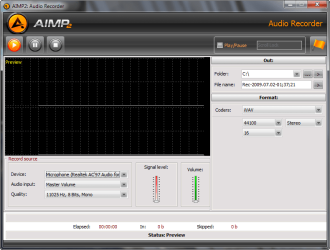
Not sure that this would satisfy your needs but AIMP2 the great little media player also has an audio recorder built in.
aimp.png
I've used it to record Radio and since it's simply making a copy of anything coming from your sound card you should be able to tweak it for your game sounds.

Its free, and runs fine in 7 (tho I have had some issues with their new beta). Also downloadable from the usual download repositories.
 
Last edited:

My Computer

Computer Manufacturer/Model Number
AMD Athlon 64 3200+, Lenovo G560 i3
OS
Windows 7 Ultimate, Ubuntu
Motherboard
Gigabyte K8T8000
Memory
DDR 2Gb (!)
Graphics Card(s)
6600GT
Monitor(s) Displays
MultiMonitor (2) LCD
Hard Drives
Old Seagate 75
Big Western Digital
Samsung 500Gb pulled out of an external drive and installed
Ext: Maxtor (Firewire), 1Gb Lacie (Samsung)
Mouse
Logitech MX620 Cordless
thanx guys for your help.

AIMP2 worked great!
 

My Computer

Computer type
PC/Desktop
Computer Manufacturer/Model Number
My build
OS
Windows 8.1 Pro x64 (Update 1)
CPU
AMD Phenom II X4 3.4Ghz (965 Deneb)
Motherboard
MSI 970A-G46
Memory
Kingston 16GB DDR3 1333
Graphics Card(s)
nVidia GTX 680 - 2GB - MSI Twin Frozr III OverClocked
Sound Card
Realtek HD 5.1 Audio - ALC892
Monitor(s) Displays
Samsung 32" 403 LCD Television
Screen Resolution
1360 x 768
Hard Drives
Seagate - 500GB @7200 rpm (OS)
Hitachi - 500GB @7200 rpm (Data)
PSU
Thermaltake 600W TR2
Case
Thermaltake V3
Cooling
Corsair H80i High Performance Liquid CPU Cooler
Keyboard
Klip Xtreme Multimedia Keyboard
Mouse
Genius GX Gaming MAURUS
Internet Speed
50Mbps (Flow Trinidad)
Antivirus
Symantec Endpoint Protection
Browser
Chrome / Opera / IE
Other Info
Speakers - Logitech Z906 5.1 Surround Sound

My Computer

Computer Manufacturer/Model Number
AMD Athlon 64 3200+, Lenovo G560 i3
OS
Windows 7 Ultimate, Ubuntu
Motherboard
Gigabyte K8T8000
Memory
DDR 2Gb (!)
Graphics Card(s)
6600GT
Monitor(s) Displays
MultiMonitor (2) LCD
Hard Drives
Old Seagate 75
Big Western Digital
Samsung 500Gb pulled out of an external drive and installed
Ext: Maxtor (Firewire), 1Gb Lacie (Samsung)
Mouse
Logitech MX620 Cordless
simple question - what if your audio device driver is not listed as a "recording" device?
I have done this easily in the past in Win XP with a cool program called Mp3MyMp3 (weird name I know) - but it
worked fantastic on an older laptop that I have with a Realtek audio driver. I didn't have to use any sort of
output cables looped back to my microphone input either (who the heck would want that sort of setup???)

I now have a "new" Toshiba laptop with Win7 Home Premium (running in 64-bit mode) and they have an
Audio device driver called Conexant HD (High definition) audio. It has the standard output for speakers and
headphones etc - but only the Microphone is listed as a "recording device." I have already looked at other
forums and they have suggested to make sure that the undefined and unlisted audio devices are "checked"
in the Recording device tab. I have already done this and it doesn't help whatsoever - nothing is added and
it does not show the Output in the devices for "Recording." I have also read that Microsoft
in Win7 doesn't want you to "record" output. To me this is insane!! I should be able to directly record anything
I please being output from my laptop (legal issues being mine not Microsoft's thank-you). I hate this "control" that Microsoft is trying to force users into.

Anyway - I sure as heck don't want a hardware loopback cable going back into my Microphone input because of
this ridiculous restriction (if it is one) that MS has "imposed" on Win7 users. I would rather go and reinstall WinXP
if I can't find a solution.

The other forums also suggested to try to install Realtek audio drivers - but of course they aren't recognized and
refuse to be installed. Other suggestions included writing a program (unbelievable!) to try to get around this.

Any real advice would be appreciated.
- John
 

My Computer

OS
Windows 7 Home Premium 64bit
Back
Top