Recording Problem

Elliott564

New member
Local time
2:55 PM
Messages
24
by any chance does anyone know how to fix this? when i plug in my headset with microphone to record my voice, i hear my voice through the speakers and it records my voice at a very low volume. please help. :D
 

My Computer

Computer Manufacturer/Model Number
Dell Inspiron M5010
OS
64 bit Windows 7 Ultimate
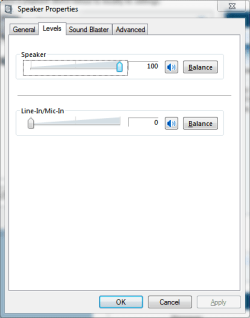
You need to go into your speaker settings and turn your microphone input down all of the way.

speakermic.png

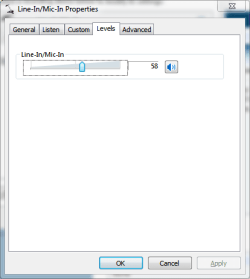
Then turn your microphone input up in your microphone settings.

micmic.png

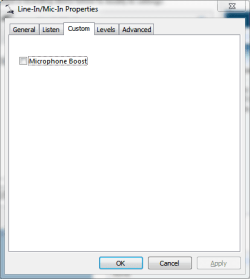
You can also turn on microphone boost in your microphone settings.

miccustom.png

To do all of this you simply go to "Control Panel (All Items View) > Sound." Now select the device you'd like to edit, i.e. Sound under Playback, Mic Input under Recording.

speakerrightclick.png
 

My Computer

Computer Manufacturer/Model Number
Apple Macbook Pro (April 2009)
OS
W7 Ult. x64 | OS X
CPU
Intel Mobile Core 2 Duo 2.93Ghz [T9800 Penryn]
Motherboard
NVIDIA nForce 730i Rev. B1 [Mac-F2268EC8 (U2E1)]
Memory
4096MB Samsung DDR3 Dual Channel [PC3-8500F 1066Mhz]
Graphics Card(s)
NVIDIA GeForce 9600M GT 512MB [G96M Rev. C1]
Sound Card
SB X-Fi Surround 5.1 USB | Onboard Realtek (Disabled)
Monitor(s) Displays
Acer x223wbd 22" | Apple Anti-Glare 17" (Disabled)
Screen Resolution
{Current} 1440x900 {Acer} 1680x1050 {Apple} 1920x1200
Hard Drives
{Internal}
Seagate Momentus 320GB 2.5" 7200RPM [ST9320421AS]

{Externals}
LaCie 320GB USB 2.0 HDD [301284UR]
LaCie 750GB USB 2.0 FW400 eSATA HDD [301314U]
LaCie 1TB USB 2.0 HDD [301304UR]
PSU
Magsafe
Case
Aluminum/Unibody (MBP52)
Cooling
2 x 6000 RPM Fans
Keyboard
Logitech G-15v2 [PN 920-000379]
Mouse
Logitech G-9 [PN 910-000338]
Internet Speed
12Mbps/2.5Mbps w/ 24Mbps Speed Boost [Comcast]
Other Info
Logitech X-540 Speakers [PN 970223-0122]
Sennheiser PC-151 Headset
If you have a Realtek unit, you can also make settings in their Audio Manager. Type Realtek into start/search and it will show up.
 

My Computer

Computer Manufacturer/Model Number
HP, Dell, Gateway, Toshiba - 4 laptops and 2 desktops
OS
Vista, Windows7, Mint Mate, Zorin, Windows 8
CPU
from 1.6GHz Duo to i7
Monitor(s) Displays
2x HP w2207
Hard Drives
5x HDD, 7x SSD, 12x Externals
Keyboard
with trackball - no mices
Mouse
Trackball mice
Internet Speed
DSL 6000
i have a problem. when i go to speaker properties there is no bar saying line-in/mic-in.
i think it doesn't show up because of the certain type of headphones i'm using. i'm using a headset with a microphone by logitech, i think it's called the logitech clearchat headset.
 

My Computer

Computer Manufacturer/Model Number
Dell Inspiron M5010
OS
64 bit Windows 7 Ultimate
any help???
 

My Computer

Computer Manufacturer/Model Number
Dell Inspiron M5010
OS
64 bit Windows 7 Ultimate
Back
Top