

- Local time
- 4:46 PM
- Messages
- 134
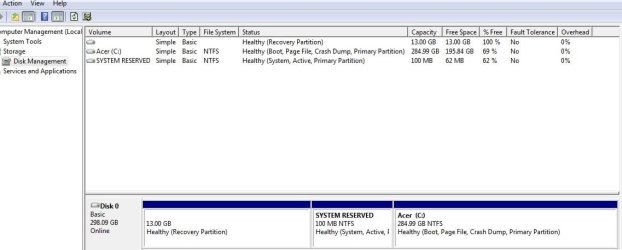
If anybody has some time could you help me with some instrucktions to gain control of this 13Gb partition, maybe turn it to a useable d:\ drive.
And while we at it is there a way to "default" X:\system reserved with the Windows 7 64 bit stuff that goes on there when windows got installed.
Thanks i'm just a gamer, sure like to keep stuff working correctly and this is my sisters laptop, it was in a bad shape (486), these last few tweaks should get it running optimal (i3) again, if you could post something much appriciated.
...Edit...
Ah yes that's it ...thanks "VistaUltimate' & "gregrocker" for sparking my thought processes again"
*Here's what I think should work: Boot into win setup dvd or usb. Delete, format and repartition these partitions, while leaving the working win install untouched (if Pc allows me to do it there). Exit setup before windows gets installed, and that should get the defaults back on the system reserved too at the same time, just had to use this tutorial (http://www.sevenforums.com/tutorials/104341-bootmgr-missing-fix.html) to fix the broken bootmgr. Three reapers, one bullet.
And while we at it is there a way to "default" X:\system reserved with the Windows 7 64 bit stuff that goes on there when windows got installed.
Thanks i'm just a gamer, sure like to keep stuff working correctly and this is my sisters laptop, it was in a bad shape (486), these last few tweaks should get it running optimal (i3) again, if you could post something much appriciated.
...Edit...
Ah yes that's it ...thanks "VistaUltimate' & "gregrocker" for sparking my thought processes again"
*Here's what I think should work: Boot into win setup dvd or usb. Delete, format and repartition these partitions, while leaving the working win install untouched (if Pc allows me to do it there). Exit setup before windows gets installed, and that should get the defaults back on the system reserved too at the same time, just had to use this tutorial (http://www.sevenforums.com/tutorials/104341-bootmgr-missing-fix.html) to fix the broken bootmgr. Three reapers, one bullet.
Attachments
Last edited:
My Computer
At a glance
[Genuine Custom DOS 5.0] & [Genuine Custom Wi...
- OS
- [Genuine Custom DOS 5.0] & [Genuine Custom Windows 7 Home Premium 64Bit SP1]
