Recover partition and files

ozzyfat2000

New member
Local time
1:45 AM
Messages
4
I have windows 7(64 bit) on my system and decide to use windows xp but when I install it,all of my hard formatted
and my drives and old partition loosed.
when I restart my PC default OS is XP and don't see windows7 in OS list.
How can I restore windows7 and lost partition???
 

My Computer My Computer

At a glance

windows 7Intel® 75002 GBGF 9500
OS
windows 7
CPU
Intel® 7500
Motherboard
Gigabyte P55-UDR3
Memory
2 GB
Graphics Card(s)
GF 9500
Hard Drives
500 GB
If you formatted your hard drive you'll have a hard time recovering the lost data. It normally costs lots of money to be done by professionals and takes inordinate amounts of time. Here are some links to some programs, but I highly recommend that you forget about the data unless there's something that you need so badly that you can't go on without it.

http://stellar.fileburstcdn.net/stellar/StellarPhoenixWindowsDataRecovery.exe
Data Recovery Software Products - Runtime Software Products

By the way, even if you were to recover the data from those hard drives, I highly doubt that you would be able to boot into the Windows 7 partition. Like I said, unless you need something on that hard drive badly, just forget about it and perform a clean installation.

In the future, read a few tutorials before performing any major computer changes.
 

My Computer My Computer

At a glance

W7 Ult. x64 | OS XIntel Mobile Core 2 Duo 2.93Ghz [T9800 Penryn]4096MB Samsung DDR3 Dual Channel [PC3-8500F 1...NVIDIA GeForce 9600M GT 512MB [G96M Rev. C1]
Computer Manufacturer/Model Number
Apple Macbook Pro (April 2009)
OS
W7 Ult. x64 | OS X
CPU
Intel Mobile Core 2 Duo 2.93Ghz [T9800 Penryn]
Motherboard
NVIDIA nForce 730i Rev. B1 [Mac-F2268EC8 (U2E1)]
Memory
4096MB Samsung DDR3 Dual Channel [PC3-8500F 1066Mhz]
Graphics Card(s)
NVIDIA GeForce 9600M GT 512MB [G96M Rev. C1]
Sound Card
SB X-Fi Surround 5.1 USB | Onboard Realtek (Disabled)
Monitor(s) Displays
Acer x223wbd 22" | Apple Anti-Glare 17" (Disabled)
Screen Resolution
{Current} 1440x900 {Acer} 1680x1050 {Apple} 1920x1200
Hard Drives
{Internal}
Seagate Momentus 320GB 2.5" 7200RPM [ST9320421AS]

{Externals}
LaCie 320GB USB 2.0 HDD [301284UR]
LaCie 750GB USB 2.0 FW400 eSATA HDD [301314U]
LaCie 1TB USB 2.0 HDD [301304UR]
PSU
Magsafe
Case
Aluminum/Unibody (MBP52)
Cooling
2 x 6000 RPM Fans
Keyboard
Logitech G-15v2 [PN 920-000379]
Mouse
Logitech G-9 [PN 910-000338]
Internet Speed
12Mbps/2.5Mbps w/ 24Mbps Speed Boost [Comcast]
Other Info
Logitech X-540 Speakers [PN 970223-0122]
Sennheiser PC-151 Headset
I agree that it would be very difficult if not impossible to recover afer formt, but if you feel that you will still attempt to do so, use the hard drive as little as possible. Every use makes it more difficult to do a recovery.
 

My Computer My Computer

At a glance

Windows 10, Home Clean InstallIntel Core2 processsor Q8200(2.33Ghz 1333FSB)...6 gbATI Radeon 256MB HD3650
Computer type
PC/Desktop
Computer Manufacturer/Model Number
Dell XPS 420
OS
Windows 10, Home Clean Install
CPU
Intel Core2 processsor Q8200(2.33Ghz 1333FSB) Quad Core Tech
Motherboard
Dell
Memory
6 gb
Graphics Card(s)
ATI Radeon 256MB HD3650
Sound Card
Intergrated 7.1 Channel Audio
Monitor(s) Displays
Dell SP2009W 20"
Hard Drives
640 GB Serial ATA Hard drive
Cooling
Fan
Keyboard
Dell USB Keyboard
Mouse
Dell Premium Optical USB
Internet Speed
DSL 2.85
I have windows 7(64 bit) on my system and decide to use windows xp but when I install it,all of my hard formatted
and my drives and old partition loosed.
when I restart my PC default OS is XP and don't see windows7 in OS list.
How can I restore windows7 and lost partition???
You have a single hard drive where windows 7 was installed. While installing xp, you formatted the entire hard drive ?

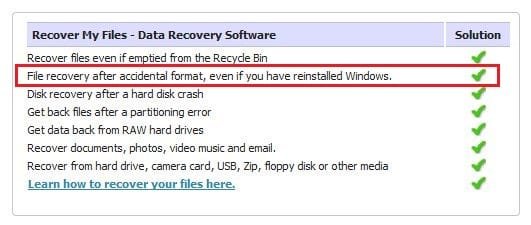
If you want to get your data back now, I think Recover My Files is the best solution here. Its a snapshot from their site, look the red box. But at first stop using the disk and get a data recovered . It will take a great time ... it may take 3 or four days ... or even more depending the size of your disk :(
 

Attachments

  • Capture.JPG
    Capture.JPG
    27 KB · Views: 15

My Computer My Computer

At a glance

Microsoft Windows 10 Pro Insider Preview 64-bitIntel(R) Core(TM) i3-4130 CPU @ 3.40GHzCorsair Vengence 4GB x2 (8.00GB Dual-Channel ...2047MB GeForce GTS 450 (ZOTAC International)
Computer type
PC/Desktop
Computer Manufacturer/Model Number
Self Assembled
OS
Microsoft Windows 10 Pro Insider Preview 64-bit
CPU
Intel(R) Core(TM) i3-4130 CPU @ 3.40GHz
Motherboard
Gigabyte Technology Co., Ltd. B85M-D3H
Memory
Corsair Vengence 4GB x2 (8.00GB Dual-Channel DDR3 @ 798MHz)
Graphics Card(s)
2047MB GeForce GTS 450 (ZOTAC International)
Sound Card
Onboard (Realtek High Definition Audio)
Monitor(s) Displays
LG Flatron E2040T
Screen Resolution
1600x900
Hard Drives
Western Digital 1 TB
Seagate 500 GB
PSU
Corsair VS550
Case
Cooler Master K380
Cooling
Cooler Master Seidon 120V Plus
Keyboard
Logitech MK260r
Mouse
Logitech MK260r
Internet Speed
PMPL Broadband
Antivirus
Windows Defender + MBAM
Browser
Firefox
Other Info
Dell Studio 15" Laptop
No,I just format E:\ drive that beforehand created in win7 to install win xp.
I just format my E:\ drive not all of hard.
win 7 is in c:\ drive but I have some memorial movies in F:\ dive that when I boot PC
only show win xp in boot list and when load win xp I have ONE dive (c:\) ,size of this drive is whole of hard.
How can I recover my movies.It's so important for me.
thanks for help.
 

My Computer My Computer

At a glance

windows 7Intel® 75002 GBGF 9500
OS
windows 7
CPU
Intel® 7500
Motherboard
Gigabyte P55-UDR3
Memory
2 GB
Graphics Card(s)
GF 9500
Hard Drives
500 GB
No,I just format E:\ drive that beforehand created in win7 to install win xp.
I just format my E:\ drive not all of hard.
win 7 is in c:\ drive but I have some memorial movies in F:\ dive that when I boot PC
only show win xp in boot list and when load win xp I have ONE dive (c:\) ,size of this drive is whole of hard.
How can I recover my movies.It's so important for me.
thanks for help.
It seems that while formatting the E drive you unwillingly formatted your entire hard drive; otherwise the C drive shouldn't be the entire hard drive, it would be of the size of E only.

If only E is formatted, then when you installed XP while having 7 installed, the windows seven bootloader may corrupt, and it is recoverable, if the installation is there. To get back win 7 boot record, you are to run http://www.sevenforums.com/tutorials/681-startup-repair.html for at least three consecutive times. If you dont have a windows 7 dvd, you may download system repair disk from neosmart and run the said startup repair. If it works, no problem. But if it doesnot work, apply the Recover my files program.
 

My Computer My Computer

At a glance

Microsoft Windows 10 Pro Insider Preview 64-bitIntel(R) Core(TM) i3-4130 CPU @ 3.40GHzCorsair Vengence 4GB x2 (8.00GB Dual-Channel ...2047MB GeForce GTS 450 (ZOTAC International)
Computer type
PC/Desktop
Computer Manufacturer/Model Number
Self Assembled
OS
Microsoft Windows 10 Pro Insider Preview 64-bit
CPU
Intel(R) Core(TM) i3-4130 CPU @ 3.40GHz
Motherboard
Gigabyte Technology Co., Ltd. B85M-D3H
Memory
Corsair Vengence 4GB x2 (8.00GB Dual-Channel DDR3 @ 798MHz)
Graphics Card(s)
2047MB GeForce GTS 450 (ZOTAC International)
Sound Card
Onboard (Realtek High Definition Audio)
Monitor(s) Displays
LG Flatron E2040T
Screen Resolution
1600x900
Hard Drives
Western Digital 1 TB
Seagate 500 GB
PSU
Corsair VS550
Case
Cooler Master K380
Cooling
Cooler Master Seidon 120V Plus
Keyboard
Logitech MK260r
Mouse
Logitech MK260r
Internet Speed
PMPL Broadband
Antivirus
Windows Defender + MBAM
Browser
Firefox
Other Info
Dell Studio 15" Laptop
If the files are recoveable, likely Recuva will retrieve them.

You may also download the trial of Kernel Data Recovery, and see if it can find your files. If so, you will need to purchase the program.
 

My Computer My Computer

At a glance

Windows 7 Professional x64Intel i7 2600K OC'd @ 4620 MHz16GB GSkill Sniper 2133 Mhz (4x4GB)EVGA GeForce GTX 480 SuperClocked+
Computer Manufacturer/Model Number
Custom
OS
Windows 7 Professional x64
CPU
Intel i7 2600K OC'd @ 4620 MHz
Motherboard
Asus P8Z68-V Pro
Memory
16GB GSkill Sniper 2133 Mhz (4x4GB)
Graphics Card(s)
EVGA GeForce GTX 480 SuperClocked+
Sound Card
Realtek High Definition Audio
Monitor(s) Displays
2x Acer S273HLbmii 27"
Screen Resolution
2 x 1920x1080
Hard Drives
64GB Crucial M4 SSD

Storage: Hitachi 1TB 5400RPM, Samsung 1.5TB 5400RPM
PSU
Corsair HW Series 750w (modular)
Case
Cooler Master HAF 932 Advanced Blue Edition
Cooling
CM Hyper 212+ CPU cooler, 3x 230mm + 1x 140mm case fans
Keyboard
Logitech MK320 (wireless)
Mouse
Logitech MK320 (wireless)
Internet Speed
30 Mb/s : 2 Mb/s
As theog says, with a Disk management screenshot we can steer you how to recover Win7 if possible, create a Dual Boot, or if your files are recoverable.

To recover Win7, you'll need to mark it's partiton Active first in Disk Management before running Win7 DVD or Repair CD Startup Repair 3 times with reboots.

If you can get into Win7 first, then posting the Disk Management screenshot is easier using the Snipping Tool in Start Menu, attach file using Paper Clip in Reply box.
 
Last edited:
If you installed XP after Win 7 and you can no longer get to Win 7, try this.

Boot to the Win 7 install DVD and go to the repair option and command prompt. Type the following:

bootsect /nt60 sys

Hit enter and wait for a response. This should replace the Nt boot with a Win 7 boot.
 

My Computer My Computer

At a glance

Windows 7 x64i7-2600K8 GGTX 480
Computer Manufacturer/Model Number
Homebuilt
OS
Windows 7 x64
CPU
i7-2600K
Motherboard
Asus P8Z77-v Pro
Memory
8 G
Graphics Card(s)
GTX 480
Sound Card
Onboard
Monitor(s) Displays
LG W2753V
Screen Resolution
1920x1080
Hard Drives
Crucial M4 128 G SSD
no way!!! I use recover myfile to recover all losted files!!!
 

My Computer My Computer

At a glance

windows 7Intel® 75002 GBGF 9500
OS
windows 7
CPU
Intel® 7500
Motherboard
Gigabyte P55-UDR3
Memory
2 GB
Graphics Card(s)
GF 9500
Hard Drives
500 GB

My Computer My Computer

At a glance

Microsoft Windows 10 Pro Insider Preview 64-bitIntel(R) Core(TM) i3-4130 CPU @ 3.40GHzCorsair Vengence 4GB x2 (8.00GB Dual-Channel ...2047MB GeForce GTS 450 (ZOTAC International)
Computer type
PC/Desktop
Computer Manufacturer/Model Number
Self Assembled
OS
Microsoft Windows 10 Pro Insider Preview 64-bit
CPU
Intel(R) Core(TM) i3-4130 CPU @ 3.40GHz
Motherboard
Gigabyte Technology Co., Ltd. B85M-D3H
Memory
Corsair Vengence 4GB x2 (8.00GB Dual-Channel DDR3 @ 798MHz)
Graphics Card(s)
2047MB GeForce GTS 450 (ZOTAC International)
Sound Card
Onboard (Realtek High Definition Audio)
Monitor(s) Displays
LG Flatron E2040T
Screen Resolution
1600x900
Hard Drives
Western Digital 1 TB
Seagate 500 GB
PSU
Corsair VS550
Case
Cooler Master K380
Cooling
Cooler Master Seidon 120V Plus
Keyboard
Logitech MK260r
Mouse
Logitech MK260r
Internet Speed
PMPL Broadband
Antivirus
Windows Defender + MBAM
Browser
Firefox
Other Info
Dell Studio 15" Laptop
I recover my file with "Recover Myfiles" but corrupt all movie upper than 10mb ,how can I recover my movies,it's so important 4 me.
 

My Computer My Computer

At a glance

windows 7Intel® 75002 GBGF 9500
OS
windows 7
CPU
Intel® 7500
Motherboard
Gigabyte P55-UDR3
Memory
2 GB
Graphics Card(s)
GF 9500
Hard Drives
500 GB
Try Recuva and DiskDigger.

If they don't work, download the trial of Kernel Data Recovery. I've had good luck with that program.

The trial will let you see what can be recovered, but you can't actually recover it unless you purchase the program ($40).
 

My Computer My Computer

At a glance

Windows 7 Professional x64Intel i7 2600K OC'd @ 4620 MHz16GB GSkill Sniper 2133 Mhz (4x4GB)EVGA GeForce GTX 480 SuperClocked+
Computer Manufacturer/Model Number
Custom
OS
Windows 7 Professional x64
CPU
Intel i7 2600K OC'd @ 4620 MHz
Motherboard
Asus P8Z68-V Pro
Memory
16GB GSkill Sniper 2133 Mhz (4x4GB)
Graphics Card(s)
EVGA GeForce GTX 480 SuperClocked+
Sound Card
Realtek High Definition Audio
Monitor(s) Displays
2x Acer S273HLbmii 27"
Screen Resolution
2 x 1920x1080
Hard Drives
64GB Crucial M4 SSD

Storage: Hitachi 1TB 5400RPM, Samsung 1.5TB 5400RPM
PSU
Corsair HW Series 750w (modular)
Case
Cooler Master HAF 932 Advanced Blue Edition
Cooling
CM Hyper 212+ CPU cooler, 3x 230mm + 1x 140mm case fans
Keyboard
Logitech MK320 (wireless)
Mouse
Logitech MK320 (wireless)
Internet Speed
30 Mb/s : 2 Mb/s
No,I just format E:\ drive that beforehand created in win7 to install win xp.
I just format my E:\ drive not all of hard.
win 7 is in c:\ drive but I have some memorial movies in F:\ dive that when I boot PC
only show win xp in boot list and when load win xp I have ONE dive (c:\) ,size of this drive is whole of hard.
How can I recover my movies.It's so important for me.
thanks for help.

If you only formatted E before install, then let's see if we can find the other partitions which are not showing in XP.

First look in Disk Management to see if there are any partitions showing that do not have a letter. If so, rightclick and add a letter to see if they appear in Explorer.

Next Download and burn to CD free Partition Wizard bootable CD. Boot the CD, files load, select 1 for screen resolution. Now what partitions does it show? You can rightclick on each to Explore and see exactly what files still exist. Make sure each data partition is assigned a letter.

You can also try the Partition Recovery Wizard on the PW Wizards tab.

If you find your missing partitions and confirm the data is there with Explore, then next look at the labels on the partitions. Does the XP partition say System Active Boot? What does the Win7 partition say?

What I would then do is rightclick Win7 partition>Modify>Set to Active, OK, Apply. Next boot the WIn7 DVD Repair console or Repair CD, click through to Recovery Tools list to run Startup Repair up to 3 separate times with reboots to write the MBR to Win7.

When Win7 starts, install EasyBCD 2.0 beta after doing quick registration to use beta in forum there. Now Add XP, accept offered boot files, let autocomplete, Save, Restart to Dual Boot menu.

 
Last edited:
Back
Top