Recover Second Partition

BigOnTech

New member
Local time
5:33 PM
Messages
17
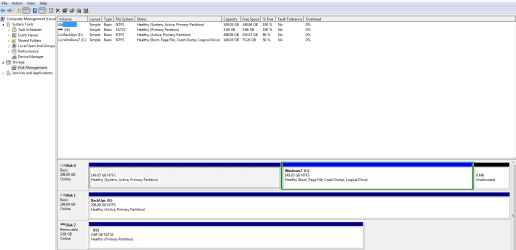
When I first started using Windows 7 I had a windows XP partition along with a windows vista. I had all 3 OS's running smoothly and of course fell in love with 7. After getting my hand on a copy of 7 Ultimate I decided to buh bye Vista and Hello 7 as a whole OS, mind you I kept the XP installation running as well. After thinking about it for a while I decided to get rid of XP for good and just go with 7 to rule my PC, and somehow in the process I have the partition that used to be XP unoccupied but yet cannot use it. It says it is a Health (system, Active Primary partition) this is a 150GB partition which completes the other half to where my windows 7 is. I want to recover that space so I can have one full 300GB. How can I do that, and any ideas how I messed that up? My system is working fine as it is, and I can really live with it, but mind you that's 150GB of space that's just not being used.
I was thinking partition Magic could help me on this one.

Any helps on how I can get that back?

Thanks in advance.

-B.O.T
 

Attachments
  • disk man.PNG
    disk man.PNG
    24.3 KB · Views: 42
Last edited:

My Computer

OS
Windows 7 x64 ULTIMATE
CPU
Core 2 Duo 6420
Motherboard
Intel DQ965f
Memory
2GB at the moment
Graphics Card(s)
Nvidia 7300GT
Sound Card
Integrated
Monitor(s) Displays
RCA HDTV 720P
Hard Drives
2 Drives. One i
Cooling
Fan
Keyboard
MICROSOFT 3000 WIRELESS
Mouse
MICROSOFT 3000 WIRELESS
Internet Speed
COMCAST 6MB
Partition magic could indeed help. Is it possible to post a screenshot of your 'Disk Management'?


tyhtry.png
 

My Computer

Computer Manufacturer/Model Number
HP Touchsmart IQ771.uk
OS
Windows 7 Ultimate x64
CPU
AMD Turion(tm) 64 X2 Mobile Technology TL-56
Motherboard
ASUS Pheonix
Memory
3GB Nanya PC2-6400 DDR2-SDRAM SO-DIM (400MHz)
Graphics Card(s)
NVIDIA GeForce Go 7600 256MB GDDR3 SDRAM
Sound Card
High Definition Intergrated NVIDIA MCP51
Monitor(s) Displays
46" Sony Bravia HDTV
Screen Resolution
1600x1200
Hard Drives
1.5TB Samsug
320GB Seagate ST3320820AS - SATA 3Gb/s 8MB
500GB Maxtor Basics STM305003EHD301-RK
Internet Speed
↓6.32 Mb/s ↑0.35 Mb/s ↔26ms
Other Info
BIOS - American Megatrends Inc. 5.07
Ethernet Port - NVIDIA nForce 10/100/1000 Mbps
DVD Drive - TSSTcorp DVDR/RW TS-T632L

My Computer

Computer Manufacturer/Model Number
Blue Shards 1.0
OS
Windows 7 Ultimate 64bit
CPU
AMD Phenom II 555 Black Edition Quad Core OC'd to 4.0GHz
Motherboard
ASUS M4A88T-M
Memory
G Skill RipJaw 1333MHz 4GB
Graphics Card(s)
ATI raideon 4250 HD/XFX ATI Radeon 1GB HD4650
Sound Card
Realteck HD Audio
Monitor(s) Displays
2x 22" Widescreen HD Monitors
Hard Drives
500GB Sata 7500RPM
80GB IDE
PSU
850W OCUK Modular
Case
Antec Dark Fleet DF-30
Cooling
Titan Fenrir Pro (CPU)
Keyboard
Logitech Wireless
Mouse
Logitech Wireless
Internet Speed
24Meg
Other Info
Getting soon-
2TB 7200RPM HDD
+8GB RAM
30GB SSD
HD6950/70
Yeah I thought about doing that. Here it is
paritions.th.jpg

paritions.jpg
 

My Computer

OS
Windows 7 x64 ULTIMATE
CPU
Core 2 Duo 6420
Motherboard
Intel DQ965f
Memory
2GB at the moment
Graphics Card(s)
Nvidia 7300GT
Sound Card
Integrated
Monitor(s) Displays
RCA HDTV 720P
Hard Drives
2 Drives. One i
Cooling
Fan
Keyboard
MICROSOFT 3000 WIRELESS
Mouse
MICROSOFT 3000 WIRELESS
Internet Speed
COMCAST 6MB

My Computer

OS
Windows 7 x64 ULTIMATE
CPU
Core 2 Duo 6420
Motherboard
Intel DQ965f
Memory
2GB at the moment
Graphics Card(s)
Nvidia 7300GT
Sound Card
Integrated
Monitor(s) Displays
RCA HDTV 720P
Hard Drives
2 Drives. One i
Cooling
Fan
Keyboard
MICROSOFT 3000 WIRELESS
Mouse
MICROSOFT 3000 WIRELESS
Internet Speed
COMCAST 6MB
Could you upload a bigger pic and copy the IMG link over?
 

My Computer

Computer Manufacturer/Model Number
Blue Shards 1.0
OS
Windows 7 Ultimate 64bit
CPU
AMD Phenom II 555 Black Edition Quad Core OC'd to 4.0GHz
Motherboard
ASUS M4A88T-M
Memory
G Skill RipJaw 1333MHz 4GB
Graphics Card(s)
ATI raideon 4250 HD/XFX ATI Radeon 1GB HD4650
Sound Card
Realteck HD Audio
Monitor(s) Displays
2x 22" Widescreen HD Monitors
Hard Drives
500GB Sata 7500RPM
80GB IDE
PSU
850W OCUK Modular
Case
Antec Dark Fleet DF-30
Cooling
Titan Fenrir Pro (CPU)
Keyboard
Logitech Wireless
Mouse
Logitech Wireless
Internet Speed
24Meg
Other Info
Getting soon-
2TB 7200RPM HDD
+8GB RAM
30GB SSD
HD6950/70
Edit: You guys are fast today...


Welcome to Seven Forums.

That can be adjusted, it's your boot files.

Can you post a screen shot of disk Management?

Use the Snipping tool on the start button.

How to Post a Screenshot in Seven Forums
 

My Computer

Computer type
PC/Desktop
Computer Manufacturer/Model Number
76~2.0
OS
Windows 7 Ult x64 - SP1/ Windows 8 Pro x64
CPU
Intel Core i5-3570K 4.6GHz
Motherboard
Gigabyte GA-Z77X UD3H, f18
Memory
8GB (2X4GB) DDR3 1600 Corsair Vengeance CL8 1.5v
Graphics Card(s)
Sapphire HD 7770 Vapor-X OC 1GB DDR5
Sound Card
Onboard VIA VT2021
Monitor(s) Displays
22" LCD Dell
Screen Resolution
1680x1050
Hard Drives
Samsung 840Pro 128GB SSD,
Seagate Barracuda 500GB SATA2 7200rpm 32MB cache, Seagate Barracuda 1TB SATA2 7200rpm 32MB cache,
PSU
Corsair HX650W
Case
Cooler Master Storm Scout
Cooling
Corsair H80 2x12cm Noctua NF P12 , 2x14cm case fans
Keyboard
Logitech Wave
Mouse
CM Sentinel
Internet Speed
Dismal
Antivirus
Avast
Browser
Opera Next
Other Info
Haswell laptop: HP Envy 17t-j, i7-4700MQ, GeForce 740M 2GB DDR3, 17.3" Full HD 1920x1080, 16GB RAM, Samsung 840 Pro 128GB, 1TB Hitachi 7200 HDD,
Desktop: eSATA ports,
External eSATA Seagate 500GB SATA2 7200rpm,
External WD USB 500GB

My Computer

Computer type
PC/Desktop
Computer Manufacturer/Model Number
Built them myself, Science Experiments !
OS
Win7 Enterprise, Win7 x86 (Ult 7600), Win7 x64 Ult 7600, TechNet RTM on AMD x64 (2.8Ghz)
CPU
AMD fx8350 4ghz, AMD-32 2400mhz, AMD-64 3200mhz, AMDx64 2.8G
Motherboard
SIS 755, ECS-K8M890M-M (Ult 7600), GigaByte & others
Memory
2gb, 4gb on the Ult 7600, 4gb on Technet RTM, 32gb on FX8350
Graphics Card(s)
Draw my own Graphics, several nVidia cards
Sound Card
on motherboard
Monitor(s) Displays
19" flat scr, 28" I-Inc widescr,22" Emprex Widescr, 23" Acer
Screen Resolution
1280 x 1024, 1440 x 900, 1920 x 1080
Hard Drives
6 pata Ide HD's & 2 Sata HD's
added 80gb external on Ult 7600 computer,
numerous extra 1tb, 2TB, 3Tb SATA HD's
A collection of ext HD Docks w/ HDs
PSU
430w, 550w, 600w, 700, 800, etc
Case
All Generic Full Towers
Cooling
Open Air & a few fans, some w/ colored LEDs
Keyboard
Compaq & Dell recycled from GoodWill
Mouse
Made in China Optical Wired Mouse
Internet Speed
Fast Cable InterNet
Antivirus
AVG Free on 24 different Desktops, NO Problems!
Browser
IE 8 is preferred, but use FireFox sometimes
Other Info
Linksys Routers, switches, & Hubs
Too Many USB Flash Drives to count, Biggest is 64GB !
Eight computers in my home network.
Sixteen computers at my business network.
Linked via TeamViewer !
Lots of old used spare computer parts everywhere!
I dont get the option to extend that partition, only one available is to shrink it.
Ok,i got the same thing so i used Partition Wizard.

Personally id follow whatever advice of rsvr85 can give you,if they've got the badge,they know their sh.. lol
 

My Computer

Computer Manufacturer/Model Number
Blue Shards 1.0
OS
Windows 7 Ultimate 64bit
CPU
AMD Phenom II 555 Black Edition Quad Core OC'd to 4.0GHz
Motherboard
ASUS M4A88T-M
Memory
G Skill RipJaw 1333MHz 4GB
Graphics Card(s)
ATI raideon 4250 HD/XFX ATI Radeon 1GB HD4650
Sound Card
Realteck HD Audio
Monitor(s) Displays
2x 22" Widescreen HD Monitors
Hard Drives
500GB Sata 7500RPM
80GB IDE
PSU
850W OCUK Modular
Case
Antec Dark Fleet DF-30
Cooling
Titan Fenrir Pro (CPU)
Keyboard
Logitech Wireless
Mouse
Logitech Wireless
Internet Speed
24Meg
Other Info
Getting soon-
2TB 7200RPM HDD
+8GB RAM
30GB SSD
HD6950/70
Ok i posted the image...sorry the first one didnt work. And thanks Dave76 on the tip to add the image. Major Kudos.
 

My Computer

OS
Windows 7 x64 ULTIMATE
CPU
Core 2 Duo 6420
Motherboard
Intel DQ965f
Memory
2GB at the moment
Graphics Card(s)
Nvidia 7300GT
Sound Card
Integrated
Monitor(s) Displays
RCA HDTV 720P
Hard Drives
2 Drives. One i
Cooling
Fan
Keyboard
MICROSOFT 3000 WIRELESS
Mouse
MICROSOFT 3000 WIRELESS
Internet Speed
COMCAST 6MB
Boot into Partition Wizard disk, mark Win7 Active, delete XP, copy Win7 partition into the deleted-XP unallocated space.

Boot into WIndows installer Repair console and run Startup Repair

SIW2 should arrive momentarily to correct anything :D
 
zzzzzzzzzzzzzzzzzz-2009-10-31_051349.jpg

That's slightly better, LOL.

There you go Greg - have fun with that.

Hint: 7 partition is logical.
 

My Computers

System One System Two

  • Computer type
    PC/Desktop
    OS
    7 X64
    CPU
    i5 8400
    Motherboard
    gigabyte b365m ds3h
    Memory
    2x8gb 3200mhz
    Hard Drives
    various
    PSU
    pure power 11 400w cm
    Case
    Coolermaster
    Cooling
    cryorig m9i
  • Computer type
    PC/Desktop
    OS
    7x64
    CPU
    g5400
    Motherboard
    ga b365m ds3h
    Memory
    8gb ddr4 2400
    PSU
    xfx pro 450w
I dont get the option to extend that partition, only one available is to shrink it.
Ok,i got the same thing so i used Partition Wizard.

Personally id follow whatever advice of rsvr85 can give you,if they've got the badge,they know their sh.. lol


What was your purpose of using partition wizard? Was it to recover a partition like I am, or was it to recover your XP partition and make it bootable again? Remember...all I want is the space back so that later on I can merge it and have me a full 300GB
 

My Computer

OS
Windows 7 x64 ULTIMATE
CPU
Core 2 Duo 6420
Motherboard
Intel DQ965f
Memory
2GB at the moment
Graphics Card(s)
Nvidia 7300GT
Sound Card
Integrated
Monitor(s) Displays
RCA HDTV 720P
Hard Drives
2 Drives. One i
Cooling
Fan
Keyboard
MICROSOFT 3000 WIRELESS
Mouse
MICROSOFT 3000 WIRELESS
Internet Speed
COMCAST 6MB
I dont get the option to extend that partition, only one available is to shrink it.
Ok,i got the same thing so i used Partition Wizard.

Personally id follow whatever advice of rsvr85 can give you,if they've got the badge,they know their sh.. lol


What was your purpose of using partition wizard? Was it to recover a partition like I am, or was it to recover your XP partition and make it bootable again? Remember...all I want is the space back so that later on I can merge it and have me a full 300GB

I wanted to do exactly what you are doing.

Last time Greg and SW12 helped me.

Hope it works well for you.

Dan
 

My Computer

Computer Manufacturer/Model Number
Blue Shards 1.0
OS
Windows 7 Ultimate 64bit
CPU
AMD Phenom II 555 Black Edition Quad Core OC'd to 4.0GHz
Motherboard
ASUS M4A88T-M
Memory
G Skill RipJaw 1333MHz 4GB
Graphics Card(s)
ATI raideon 4250 HD/XFX ATI Radeon 1GB HD4650
Sound Card
Realteck HD Audio
Monitor(s) Displays
2x 22" Widescreen HD Monitors
Hard Drives
500GB Sata 7500RPM
80GB IDE
PSU
850W OCUK Modular
Case
Antec Dark Fleet DF-30
Cooling
Titan Fenrir Pro (CPU)
Keyboard
Logitech Wireless
Mouse
Logitech Wireless
Internet Speed
24Meg
Other Info
Getting soon-
2TB 7200RPM HDD
+8GB RAM
30GB SSD
HD6950/70

My Computer

Computer Manufacturer/Model Number
Blue Shards 1.0
OS
Windows 7 Ultimate 64bit
CPU
AMD Phenom II 555 Black Edition Quad Core OC'd to 4.0GHz
Motherboard
ASUS M4A88T-M
Memory
G Skill RipJaw 1333MHz 4GB
Graphics Card(s)
ATI raideon 4250 HD/XFX ATI Radeon 1GB HD4650
Sound Card
Realteck HD Audio
Monitor(s) Displays
2x 22" Widescreen HD Monitors
Hard Drives
500GB Sata 7500RPM
80GB IDE
PSU
850W OCUK Modular
Case
Antec Dark Fleet DF-30
Cooling
Titan Fenrir Pro (CPU)
Keyboard
Logitech Wireless
Mouse
Logitech Wireless
Internet Speed
24Meg
Other Info
Getting soon-
2TB 7200RPM HDD
+8GB RAM
30GB SSD
HD6950/70
View attachment 34093

That's slightly better, LOL.

There you go Greg - have fun with that.

Hint: 7 partition is logical.

Need to see the drive map.

You say XP is deleted paritition on first half of Win7 drive but I don't see it.

You are right Dan it needs to be converted to Logical using PW, then marked active and copied onto XP space, run Win 7 Startup repair 3 times.

SIW2? Can you sort this w/o disk map? See no XP partition on Win7 drive.

Can you put the Drive map on as well as the listings from Disk Mgmt?
 
Ok,i got the same thing so i used Partition Wizard.

Personally id follow whatever advice of rsvr85 can give you,if they've got the badge,they know their sh.. lol


What was your purpose of using partition wizard? Was it to recover a partition like I am, or was it to recover your XP partition and make it bootable again? Remember...all I want is the space back so that later on I can merge it and have me a full 300GB

I wanted to do exactly what you are doing.

Last time Greg and SW12 helped me.

Hope it works well for you.

Dan

Thanks.
So basically just run the partition wizard and let it take care of everything?
Any specific steps I should take. And thanks gregrocker for your answer.
 

My Computer

OS
Windows 7 x64 ULTIMATE
CPU
Core 2 Duo 6420
Motherboard
Intel DQ965f
Memory
2GB at the moment
Graphics Card(s)
Nvidia 7300GT
Sound Card
Integrated
Monitor(s) Displays
RCA HDTV 720P
Hard Drives
2 Drives. One i
Cooling
Fan
Keyboard
MICROSOFT 3000 WIRELESS
Mouse
MICROSOFT 3000 WIRELESS
Internet Speed
COMCAST 6MB
OK I see your drive map on OP.

CONFIRMED. Boot into Partition Wizard, delete first partition

Right click on Win7 partition, Modify>Convert to Primary

Right click Win7, copy into First partition's unallocated space.**

Boot into Win7 installer repair console, run startup repair repeatedly until it boots up

**SIW2 - You recommended the other night not to delete old Win7 partition before running startup repair. How will he know which Win7 installation to run startup repair on? In the past I have deleted the old Win7 after successfully copying it over into first partition space, then run Startup Repair. OK by you?
 
View attachment 34093

That's slightly better, LOL.

There you go Greg - have fun with that.

Hint: 7 partition is logical.

Need to see the drive map.

You say XP is deleted paritition on first half of Win7 drive but I don't see it.

You are right Dan it needs to be converted to Logical using PW, then marked active and copied onto XP space, run Win 7 Startup repair 3 times.

SIW2? Can you sort this w/o disk map? See no XP partition on Win7 drive.

Can you put the Drive map on as well as the listings from Disk Mgmt?

Drive map is posted on the image that's in the original Post. I will give Partition Wizard a try hoping I dont mess things up. Thanks for all the help. Will Post back with results!
 

My Computer

OS
Windows 7 x64 ULTIMATE
CPU
Core 2 Duo 6420
Motherboard
Intel DQ965f
Memory
2GB at the moment
Graphics Card(s)
Nvidia 7300GT
Sound Card
Integrated
Monitor(s) Displays
RCA HDTV 720P
Hard Drives
2 Drives. One i
Cooling
Fan
Keyboard
MICROSOFT 3000 WIRELESS
Mouse
MICROSOFT 3000 WIRELESS
Internet Speed
COMCAST 6MB
Need to see the drive map.

You say XP is deleted paritition on first half of Win7 drive but I don't see it.

You are right Dan it needs to be converted to Logical using PW, then marked active and copied onto XP space, run Win 7 Startup repair 3 times.

SIW2? Can you sort this w/o disk map? See no XP partition on Win7 drive.

Can you put the Drive map on as well as the listings from Disk Mgmt?
I think you got a bit mixed up.

The first partiton (the one with no letter) used to have xp on it,something went wrong i think he said in the first post.Also the Win7 has the boot.

So would it go..

Delete System Partition (First Partition)>Make Win7 Partition Primary>Copy onto first partiton>set as active>boot up>delete old win7 partition?
 

My Computer

Computer Manufacturer/Model Number
Blue Shards 1.0
OS
Windows 7 Ultimate 64bit
CPU
AMD Phenom II 555 Black Edition Quad Core OC'd to 4.0GHz
Motherboard
ASUS M4A88T-M
Memory
G Skill RipJaw 1333MHz 4GB
Graphics Card(s)
ATI raideon 4250 HD/XFX ATI Radeon 1GB HD4650
Sound Card
Realteck HD Audio
Monitor(s) Displays
2x 22" Widescreen HD Monitors
Hard Drives
500GB Sata 7500RPM
80GB IDE
PSU
850W OCUK Modular
Case
Antec Dark Fleet DF-30
Cooling
Titan Fenrir Pro (CPU)
Keyboard
Logitech Wireless
Mouse
Logitech Wireless
Internet Speed
24Meg
Other Info
Getting soon-
2TB 7200RPM HDD
+8GB RAM
30GB SSD
HD6950/70
Back
Top