(Recovered)

Tooz

New member
Local time
4:19 PM
Messages
3
I recently installed Win7 and XP on two different disks. I used to only have Win7 running on my main. A few days ago, I added another drive and installed XP on it. It didn't really screw up the installation, but it would not allow Win7 to start when I booted from the Win7 drive. So I went into the installation disk and repaired the installation, and everything seems to be good. However, I see this (recovered) tag to the right whenever my computer talks about its operating system (i.e. "Windows 7 Ultimate (recovered)"). Is there a way to remove this tag, and is this an indicator that I need to reinstall windows (I don't see any problems right now)?
 

My Computer

OS
Windows 7
Hi,

Your installation should be fine - if you want to change the name that is displayed, there are a couple of ways to do this .

First boot into the o/s whose name you wish to change - in this case Windows 7 Ultimate (recovered)

1. Using bcdedit.

Open an elevated cmd prompt and backup your existing settings like this:

at the prompt, type:

bcdedit /export C:\BCDBACKUP {enter}

Then type:

bcdedit /set {current} description "Win 7" {enter}

Whatever you typed between the "" will be the new name or description.

N.B. ( if you ever want to restore that backup, type :

bcdedit /import C:\BCDBACKUP {enter} )

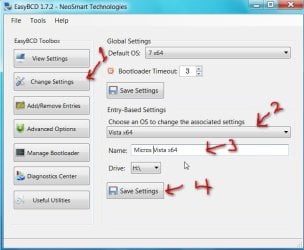
2. Alternatively , you can use the free Easybcd

Download EasyBCD 1.7.2 - NeoSmart Technologies


EASYBCD2009-01-23_142941.jpg

1. Click Change Settings.

2. Select the o/s whose name you want to change in the drop down flap.

3. Click where it says Name to put the cursor there, type any name you want.

4. Click Save Settings.

Hope it helps

SIW2
 

My Computers

System One System Two

  • Computer type
    PC/Desktop
    OS
    7 X64
    CPU
    i5 8400
    Motherboard
    gigabyte b365m ds3h
    Memory
    2x8gb 3200mhz
    Hard Drives
    various
    PSU
    pure power 11 400w cm
    Case
    Coolermaster
    Cooling
    cryorig m9i
  • Computer type
    PC/Desktop
    OS
    7x64
    CPU
    g5400
    Motherboard
    ga b365m ds3h
    Memory
    8gb ddr4 2400
    PSU
    xfx pro 450w
Hi,

Your installation should be fine - if you want to change the name that is displayed, there are a couple of ways to do this .

First boot into the o/s whose name you wish to change - in this case Windows 7 Ultimate (recovered)

1. Using bcdedit.

Open an elevated cmd prompt and backup your existing settings like this:

at the prompt, type:

bcdedit /export C:\BCDBACKUP {enter}

( if you ever want to restore that backup, type :

bcdedit /import C:\BCDBACKUP {enter} )

Then type:

bcdedit /set {current} description "Win 7" {enter}

Whatever you typed between the "" will be the new name or description.

2. Alternatively , you can use the free Easybcd

Download EasyBCD 1.7.2 - NeoSmart Technologies


View attachment 5637

1. Click Change Settings.

2. Select the o/s whose name you want to change in the drop down flap.

3. Click where it says Name to put the cursor there, type any name you want.

4. Click Save Settings.

Hope it helps

SIW2

Thank you so much! You can't imagine how much I appreciate the help.
 

My Computer

OS
Windows 7
Tooz , you are very welcome:D
 

My Computers

System One System Two

  • Computer type
    PC/Desktop
    OS
    7 X64
    CPU
    i5 8400
    Motherboard
    gigabyte b365m ds3h
    Memory
    2x8gb 3200mhz
    Hard Drives
    various
    PSU
    pure power 11 400w cm
    Case
    Coolermaster
    Cooling
    cryorig m9i
  • Computer type
    PC/Desktop
    OS
    7x64
    CPU
    g5400
    Motherboard
    ga b365m ds3h
    Memory
    8gb ddr4 2400
    PSU
    xfx pro 450w
i just found this cmd. i had always had this on vista because i was dual booting with xp and vista using easybcd. somehow along the way and i dont remember exactly what happened but i had to use recovery mode thru repair via the vista dvd and it made it say (recovered) after that. i always hated that and wished i'd seen this sooner.

well it happened again to me only this time i am dual booting win7. all i can say is google is your friend!

and thanks SIW2 :) i used the bcedit.exe method :tup:
 

My Computer

OS
Windows 7 Ultimate 64-bit
Directly related

I only hope you're still a member of this FORUM because I want to say THANK YOU THANK YOU THANK YOU THANK YOU!!! :D

WINDOWS 7 ULTIMATE - INTEL RAID 0
WINDOWS 8 PRO - LSI RAID 10

Looks sooo much better than

WINDOWS 7 ULTIMATE (RECOVERED)
WINDOWS 8 PRO (RECOVERED)

OMGG... AND THERE'S ALL THOSE OTHER OPTIONS TOO! :party:
 

My Computers

System One System Two

  • Computer type
    PC/Desktop
    Computer Manufacturer/Model Number
    ASUS CUSTOM BUILD IN THERMALTAKE LEVEL 10 GT CASE
    OS
    Windows 7 Ultimate, Windows 8.1 Pro, Linux Mint/Cinnimon (Triple Boot)
    CPU
    INTEL 6900K
    Motherboard
    X99-E WS USB 3.1
    Memory
    CORSAIR DOMINATOR PLATINUM 128GB
    Graphics Card(s)
    EVGA GTX 1070 FTW
    Sound Card
    Onboard Crystal Sound - very nice ;)
    Monitor(s) Displays
    SAMSUNG 4K 28"
    Screen Resolution
    3140 x 2160 - A little extreme. Need to change it.
    Hard Drives
    1) LSI LOGICAL VOLUME RAID 10 (250 GBX4) SSD ARRAY
    2) INTEL RAID 0 KINGSTON (2) SSD ARRAY
    3) INTEL RAID 1 SEAGATE (2) 1TB ARRAY (secured backup)
    4) INTEL RAID 1 SEAGATE HYBRID (2) (secure secured backup)
    5) AHCI SEAGATE 3TB (1) BACKUP & STORAGE (back
    PSU
    CORSAIR HX 1000i
    Case
    THERMAL TAKE LEVEL 10 GT
    Cooling
    NOCTUA TOWER COOLING - PUSH/PULL
    Keyboard
    LOGITECH PRODIGY (One day I'll get a real keyboard.)
    Mouse
    LOGITECH (One day I'll get a real mouse.)
    Internet Speed
    300 Gb down 12 up Intel(R) I210 Gigabit Network Connection
    Antivirus
    several - Network implementing vs from other PCs - ask me
    Browser
    Mostly FireFox these days
    Other Info
    NOT ENOUGH ROOM TO LIST ALL HARD DRIVES HERE. Cuts me off at 5. Did you know that if you run a network you can scan your PC for viruses via other PCs using several different virus scanners? No virus scanner gets it all. This is narrows down the window for contracting a virus. By using multiple operating systems you can use different virus scanners with no risk of conflict.
  • Antivirus
    KASPERSKY
Back
Top