Recovering Windows Registry from a good drive with a bad MBR

Jambrox

New member
Local time
3:16 PM
Messages
5
Here is the problem.

My hard disk died. Kind of. I was in the midst of activity of the kind I do regularly, in this case browsing the web and playing a game. The computer froze hard. No KB response, no mouse response. So I went into a hard shut down with the power switch held down for 7 seconds.

Upon restart got the message that windows failed to shut down properly, Should I load normally? I responded yes. It didn't boot but restarted again. This time I got the message that Windows failed to Start. Should I diagnose? Yes. After a lengthy scan I got the message that the Master Boot Record was corrupt.

After several more tries amidst online research on a laptop which steps to take I am able to boot to a command prompt from a recovery partiion and attempt basic repairs to the MBR with the BOOTSECT command (X:\Windows\System32\BOOTSECT NT60 SYS) The response? DISK I/O ERROR.

So at this point several hours into the frustration I resign myself that this drive may never boot again, so I go out and buy a new one. In that several hours I took out the old drive, replaced the SATA Cable, re-seated everything tried the start-up failure diagnostics several times all with no success.

Anyway, I also picked up an external USB>SATA external drive enclosure and put the old drive into it in hopes that I could get to the data. That is the good part

I encountered problems on the installation of Windows P7 Pro in that the product key, which was the same that was on the computer before and later validated with NirSoft ProduKey application, was apparently for an upgrade instead of a clean install. Oh yeah.. back when I originally built this computer I used the 32 bit version initially, and when I saw that I could only address 2 GB RAM when I had 6 installed, I upgraded to 64 bit. The 32 bit version was from a complimentary Window 7 Ultimate OS DVD from a Microsoft technical conference to which I was invited. Not a trial version, but a 32 bit version. The problem now? I have already installed Windows 7 Pro 64 BIT which does not match the SKU for Windows 7 Ultimate 32 bit, so neither product key works. The thought of starting over is abhorrent, but still a viable option.

The thing is I still have the data. The original drive that is now in a USB 3.0 connected external enclosure still spins. My data, my files are safe and accessible. The version of Windows and Office and Visio and Project as well as a myriad of other programs on that drive are legally purchased and registered.

So here is my dlimena. How can I get the applications, data, and registry information about the many programs I had installed into my current windows installation, product keys and all, from that version from the unbootable, yet otherwise functioning external HD? I can copy everything, but.. well hard to copy a registry.

Windows Transfer does not work. The error message was that it could not be installed on that external drive.

Ideas? I am looking for anything that will save me from a day of re-installation and even longer of re- patching everything I have.
 
Last edited:

My Computer My Computer

At a glance

Windows 7 Pro 64 BitI712 GBGeforce 460
Computer type
PC/Desktop
Computer Manufacturer/Model Number
Custom build
OS
Windows 7 Pro 64 Bit
CPU
I7
Motherboard
Gigabyte
Memory
12 GB
Graphics Card(s)
Geforce 460
Hard Drives
1 3TB Seagate (2TB Windows, 1 TB Linux) New
1 2TB WD (Bad boot sector, data otherwise available) USB Connected
1 6 TB External RAID 10 array USB Connected
Antivirus
MSE
Browser
Chrome
144 views so far. No replies. Is there no solution to my dilemma of good data on a bad hard drive moving to a new drive without hours of reinstallation and patching?
 

My Computer My Computer

At a glance

Windows 7 Pro 64 BitI712 GBGeforce 460
Computer type
PC/Desktop
Computer Manufacturer/Model Number
Custom build
OS
Windows 7 Pro 64 Bit
CPU
I7
Motherboard
Gigabyte
Memory
12 GB
Graphics Card(s)
Geforce 460
Hard Drives
1 3TB Seagate (2TB Windows, 1 TB Linux) New
1 2TB WD (Bad boot sector, data otherwise available) USB Connected
1 6 TB External RAID 10 array USB Connected
Antivirus
MSE
Browser
Chrome
You say you can copy from the HD now?

In that case, copy over the windows\system32\config folder.

You will also want to copy Users\yourusername\ntuser.dat

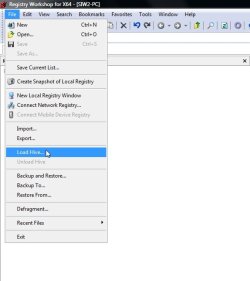
You can then load the hives and search for the filenames of your programs.

Most likely in ntuser.dat ( you can load that as a hive with regworkshop), or system32\config\SOFTWARE (no extension,it is just called SOFTWARE)

Suggest you do that with regworkshop ( 30 day trial ). Download Free Trial Software | www.torchsoft.com

RW1.jpg
 

My Computers My Computers

  • At a glance

    7 X64i5 84002x8gb 3200mhz
    Computer type
    PC/Desktop
    OS
    7 X64
    CPU
    i5 8400
    Motherboard
    gigabyte b365m ds3h
    Memory
    2x8gb 3200mhz
    Hard Drives
    various
    PSU
    pure power 11 400w cm
    Case
    Coolermaster
    Cooling
    cryorig m9i
  • At a glance

    7x64g54008gb ddr4 2400
    Computer type
    PC/Desktop
    OS
    7x64
    CPU
    g5400
    Motherboard
    ga b365m ds3h
    Memory
    8gb ddr4 2400
    PSU
    xfx pro 450w
It is NOT dead. The data is there. all the files are accessible. The only problem is the MBR corruption at the hardware level. It wont boot. If I could copy over everything or just close the drive, that would do it, but cloning also assumes the MBR record is correct doesn't it? I have already recovered my basic data, and am quite frankly just trying to avoid reinstalling and repatching over 100 applications.

Currently the second drive is external in a USB enclosure. I can also install it as a second ATA drive, if that would help. I could boot to a USB OS either Linux or Windows if that would help. Am just looking for some app or trick to get the registry copied over. The movement of the physical files to the locations the registry expect them is not a problem
 

My Computer My Computer

At a glance

Windows 7 Pro 64 BitI712 GBGeforce 460
Computer type
PC/Desktop
Computer Manufacturer/Model Number
Custom build
OS
Windows 7 Pro 64 Bit
CPU
I7
Motherboard
Gigabyte
Memory
12 GB
Graphics Card(s)
Geforce 460
Hard Drives
1 3TB Seagate (2TB Windows, 1 TB Linux) New
1 2TB WD (Bad boot sector, data otherwise available) USB Connected
1 6 TB External RAID 10 array USB Connected
Antivirus
MSE
Browser
Chrome
Lemmie make sure I understand, the replacement HD has the OS, which "knows" all about the 100+ programs previously installed on the old HD. Earlier, this old HD had [or still has] the aforementioned OS. What you are wanting to do is "copy" 100+ programs, their respective appdata folders, their respective ProgramData folders, and so on. Did I understand that correctly?
In some ways, I have done that with programs that are not married into Windows\System32 and other such directories. Firefox & Thunderbird are two of my best [successful] examples. On some others, after installing on replacement HD, I was able to copy over respective appdata folders and respective ProgramData folders -- so far, so good. Had some tweaking to do though.
 

My Computer My Computer

At a glance

Windows 7 Professional 64-bitDesktop i5; Acers i5 & i7desktop 16GB; 1 Acer 8GB & 1 Acer 16GB
Computer type
PC/Desktop
Computer Manufacturer/Model Number
Antec desktop; Acer Aspire laptops
OS
Windows 7 Professional 64-bit
CPU
Desktop i5; Acers i5 & i7
Memory
desktop 16GB; 1 Acer 8GB & 1 Acer 16GB
Hard Drives
1TB split into 2 equal partitions [OS and data] usable by RJS
Internet Speed
AT&T DSL
Browser
FF, GChrome, msIE
Other Info
Windows 7 Firewall, Emsisoft AM/AV, MSE [scan-only], SpywareBlaster, Ruiware/BillP combine
I encountered problems on the installation of Windows P7 Pro in that the product key, which was the same that was on the computer before and later validated with NirSoft ProduKey application, was apparently for an upgrade instead of a clean install. Oh yeah.. back when I originally built this computer I used the 32 bit version initially, and when I saw that I could only address 2 GB RAM when I had 6 installed, I upgraded to 64 bit. The 32 bit version was from a complimentary Window 7 Ultimate OS DVD from a Microsoft technical conference to which I was invited. Not a trial version, but a 32 bit version. The problem now? I have already installed Windows 7 Pro 64 BIT which does not match the SKU for Windows 7 Ultimate 32 bit, so neither product key works. The thought of starting over is abhorrent, but still a viable option.
The same key is good for 32 Bit or 64 Bit.
It is only good for a specific version such as Win 7 Pro OR Win 7 Ultimate.
Are you sure you entered the key correctly ?

Can you post a maximized Disk Management screen print, with HD connected that has the Win 7 that won't boot now ?
http://www.sevenforums.com/tutorials/274797-disk-management-post-screen-capture-image.html

If it is as you say the old HD is good, but just won't boot because of a corrupted MBR,
it MIGHT be possible to create an image of that old OS partition and restore it to a new HD with a working MBR ???

See if this tutorial by Brink helps:
http://www.sevenforums.com/tutorials/31402-clean-install-upgrade-windows-7-version.html
 

My Computer My Computer

At a glance

Multi-Boot W7_Pro_x64 W8.1_Pro_x64 W10_Pro_x6...AMD Athlon II x4 6206GB GSkill DDR2 800AMD 4670 GPU + AMD 4200 IGP
Computer type
PC/Desktop
Computer Manufacturer/Model Number
home built
OS
Multi-Boot W7_Pro_x64 W8.1_Pro_x64 W10_Pro_x64 +Linux_VMs +Chromium_VM
CPU
AMD Athlon II x4 620
Motherboard
Gigabyte GA-MA785G-UD3H
Memory
6GB GSkill DDR2 800
Graphics Card(s)
AMD 4670 GPU + AMD 4200 IGP
Sound Card
on board Realtek ALC889A
Monitor(s) Displays
RCA 40" LCD TV, Insignia 32" LCD TV, HP 15" LCD monitor
Screen Resolution
1680 x 1050
Hard Drives
OCZ Vertex 3 120GB,
Samsung F3 1TB (3),
Several others - WD, Seagate, Hitachi, ...
PSU
Corsair 500 W
Case
Rosewill mid tower
Cooling
CM 90mm rifle
Keyboard
Gyration wireless, Logitech wireless, Dell USB wired
Mouse
Gyration wireless, Logitech wireless, V7 USB wired
Internet Speed
Spectrum - 100Mbps D / 10Mbps U
Antivirus
Avast, MBAM3, EMET, WinPatrol
Browser
Pale Moon, Firefox, IE
Other Info
2 multi-boot PC's
Mainly HTPC/Office/Gen purpose (no gaming).
Trendnet USB KVM.
LG DVD burner/Blue Ray Player.
Tray system for removable SATA backup drives.

Not currently OCd, under-volted.
I use Hybrid sleep, rarely re-boot or shutdown.

Hauppauge HD-PVR, Avermedia PCIe TV Tuner, Hauppauge PCI TV Tuner.
Roland. That is essentially correct. With the notable exception of being unable to boot, the drive which is now in an external enclosure is basically sound. I have already copied several hundred gigabytes to the new drive. Program files, Program Files (x86) my entire user directory etc. I have not yet copied over the entire windows directory, but if need be can do that too with a third drive as the OS .. which may allow a clone..

It is not only the inconvenience of installing all the the programs. I fear I would need to do two installations of windows, the 32 bit version and then the upgrade to the 64 bit version since they key I have for the 64 bit version is an upgrade key and the 32 bit version is for ultimate, and therefore a different SKU which the activator does not accept. So since the drive is sound, my hope is to basically get it all over to the new drive with registry entries in tact which will have the product key accepted by Microsoft in place for each of their products I own in addition to windows,which is most of them.

I don't know if the SAM will prevent this, and at this point I am still looking to do anything but reinstall everything because with post installation patches to apply that have come out after the installation media I have, it will be a multi-day process.
 

My Computer My Computer

At a glance

Windows 7 Pro 64 BitI712 GBGeforce 460
Computer type
PC/Desktop
Computer Manufacturer/Model Number
Custom build
OS
Windows 7 Pro 64 Bit
CPU
I7
Motherboard
Gigabyte
Memory
12 GB
Graphics Card(s)
Geforce 460
Hard Drives
1 3TB Seagate (2TB Windows, 1 TB Linux) New
1 2TB WD (Bad boot sector, data otherwise available) USB Connected
1 6 TB External RAID 10 array USB Connected
Antivirus
MSE
Browser
Chrome
Aye, sir, even I have never attempted the brave things you have done and are doing now.
I don't know if all of that will be succesful. Tread carefully and wisely. Keep us posted.
 

My Computer My Computer

At a glance

Windows 7 Professional 64-bitDesktop i5; Acers i5 & i7desktop 16GB; 1 Acer 8GB & 1 Acer 16GB
Computer type
PC/Desktop
Computer Manufacturer/Model Number
Antec desktop; Acer Aspire laptops
OS
Windows 7 Professional 64-bit
CPU
Desktop i5; Acers i5 & i7
Memory
desktop 16GB; 1 Acer 8GB & 1 Acer 16GB
Hard Drives
1TB split into 2 equal partitions [OS and data] usable by RJS
Internet Speed
AT&T DSL
Browser
FF, GChrome, msIE
Other Info
Windows 7 Firewall, Emsisoft AM/AV, MSE [scan-only], SpywareBlaster, Ruiware/BillP combine

My Computer My Computer

At a glance

Multi-Boot W7_Pro_x64 W8.1_Pro_x64 W10_Pro_x6...AMD Athlon II x4 6206GB GSkill DDR2 800AMD 4670 GPU + AMD 4200 IGP
Computer type
PC/Desktop
Computer Manufacturer/Model Number
home built
OS
Multi-Boot W7_Pro_x64 W8.1_Pro_x64 W10_Pro_x64 +Linux_VMs +Chromium_VM
CPU
AMD Athlon II x4 620
Motherboard
Gigabyte GA-MA785G-UD3H
Memory
6GB GSkill DDR2 800
Graphics Card(s)
AMD 4670 GPU + AMD 4200 IGP
Sound Card
on board Realtek ALC889A
Monitor(s) Displays
RCA 40" LCD TV, Insignia 32" LCD TV, HP 15" LCD monitor
Screen Resolution
1680 x 1050
Hard Drives
OCZ Vertex 3 120GB,
Samsung F3 1TB (3),
Several others - WD, Seagate, Hitachi, ...
PSU
Corsair 500 W
Case
Rosewill mid tower
Cooling
CM 90mm rifle
Keyboard
Gyration wireless, Logitech wireless, Dell USB wired
Mouse
Gyration wireless, Logitech wireless, V7 USB wired
Internet Speed
Spectrum - 100Mbps D / 10Mbps U
Antivirus
Avast, MBAM3, EMET, WinPatrol
Browser
Pale Moon, Firefox, IE
Other Info
2 multi-boot PC's
Mainly HTPC/Office/Gen purpose (no gaming).
Trendnet USB KVM.
LG DVD burner/Blue Ray Player.
Tray system for removable SATA backup drives.

Not currently OCd, under-volted.
I use Hybrid sleep, rarely re-boot or shutdown.

Hauppauge HD-PVR, Avermedia PCIe TV Tuner, Hauppauge PCI TV Tuner.
David, Thanks for that note. It fixed my product key problem. I am now going to try creating another admin user to copy over all the files where they need to be now that I have a valid installation. I used option 3 on the link you posted.
 

My Computer My Computer

At a glance

Windows 7 Pro 64 BitI712 GBGeforce 460
Computer type
PC/Desktop
Computer Manufacturer/Model Number
Custom build
OS
Windows 7 Pro 64 Bit
CPU
I7
Motherboard
Gigabyte
Memory
12 GB
Graphics Card(s)
Geforce 460
Hard Drives
1 3TB Seagate (2TB Windows, 1 TB Linux) New
1 2TB WD (Bad boot sector, data otherwise available) USB Connected
1 6 TB External RAID 10 array USB Connected
Antivirus
MSE
Browser
Chrome
You're welcome and glad to hear you are making progress.

But, if your last post means you are going to try and "copy" programs from the old HD to the new HD, that won't work.
You can't just "copy" an OS or installed programs from one HD to another ...
The registry settings and more just won't work ...
Restoring a backup image is needed for that.

If you are only copying "data" files, that should be doable ...
 

My Computer My Computer

At a glance

Multi-Boot W7_Pro_x64 W8.1_Pro_x64 W10_Pro_x6...AMD Athlon II x4 6206GB GSkill DDR2 800AMD 4670 GPU + AMD 4200 IGP
Computer type
PC/Desktop
Computer Manufacturer/Model Number
home built
OS
Multi-Boot W7_Pro_x64 W8.1_Pro_x64 W10_Pro_x64 +Linux_VMs +Chromium_VM
CPU
AMD Athlon II x4 620
Motherboard
Gigabyte GA-MA785G-UD3H
Memory
6GB GSkill DDR2 800
Graphics Card(s)
AMD 4670 GPU + AMD 4200 IGP
Sound Card
on board Realtek ALC889A
Monitor(s) Displays
RCA 40" LCD TV, Insignia 32" LCD TV, HP 15" LCD monitor
Screen Resolution
1680 x 1050
Hard Drives
OCZ Vertex 3 120GB,
Samsung F3 1TB (3),
Several others - WD, Seagate, Hitachi, ...
PSU
Corsair 500 W
Case
Rosewill mid tower
Cooling
CM 90mm rifle
Keyboard
Gyration wireless, Logitech wireless, Dell USB wired
Mouse
Gyration wireless, Logitech wireless, V7 USB wired
Internet Speed
Spectrum - 100Mbps D / 10Mbps U
Antivirus
Avast, MBAM3, EMET, WinPatrol
Browser
Pale Moon, Firefox, IE
Other Info
2 multi-boot PC's
Mainly HTPC/Office/Gen purpose (no gaming).
Trendnet USB KVM.
LG DVD burner/Blue Ray Player.
Tray system for removable SATA backup drives.

Not currently OCd, under-volted.
I use Hybrid sleep, rarely re-boot or shutdown.

Hauppauge HD-PVR, Avermedia PCIe TV Tuner, Hauppauge PCI TV Tuner.
The only programs that can be copied are "stand-alone" utilities. FF & Thunderbird can be copied successfully if all respective folders [and files] are done at the same time. Beyond that, time to reinstall and reconfigure all 100+ programs. I doubt even registry bloc copy will work, if that can even be done at all. Back in the early Windows 3.1 days, such was a possibility.
 

My Computer My Computer

At a glance

Windows 7 Professional 64-bitDesktop i5; Acers i5 & i7desktop 16GB; 1 Acer 8GB & 1 Acer 16GB
Computer type
PC/Desktop
Computer Manufacturer/Model Number
Antec desktop; Acer Aspire laptops
OS
Windows 7 Professional 64-bit
CPU
Desktop i5; Acers i5 & i7
Memory
desktop 16GB; 1 Acer 8GB & 1 Acer 16GB
Hard Drives
1TB split into 2 equal partitions [OS and data] usable by RJS
Internet Speed
AT&T DSL
Browser
FF, GChrome, msIE
Other Info
Windows 7 Firewall, Emsisoft AM/AV, MSE [scan-only], SpywareBlaster, Ruiware/BillP combine
Back
Top