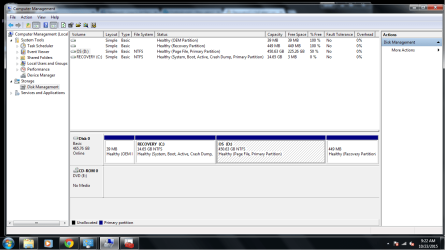
Recovery(C:) full and I can not save programs to OS (D:) drive

Fitzy

New member
Local time
11:37 PM
Messages
4
My computer keeps trying to save programs that I download to my recovery drive which is full instead of my OS drive. How can I fix this?
 

My Computer My Computer

At a glance

windows 7 ultimate x64
Computer type
PC/Desktop
Computer Manufacturer/Model Number
Dell
OS
windows 7 ultimate x64
Antivirus
Trend micro security
Browser
Chrome
Hi Fitzy,

Can you send a screenshot of your disk management screen please?

1. Search "Disk Management" in the search box and press enter.

2. Confirm and type in an admin password if UAC pops up.

3. Take a screenshot and upload it here!

Kind Regards,

Mark
 

My Computer My Computer

At a glance

Windows 7 Home Premium x64AMD FX - 6200 3.8GHzPatriot Viper 3 Series DDR3 1600MHzSapphire AMD Radeon HD 7850
Computer type
PC/Desktop
Computer Manufacturer/Model Number
Custom Build
OS
Windows 7 Home Premium x64
CPU
AMD FX - 6200 3.8GHz
Motherboard
ASUS M5A99X EVO R2.0
Memory
Patriot Viper 3 Series DDR3 1600MHz
Graphics Card(s)
Sapphire AMD Radeon HD 7850
Hard Drives
2 x Seagate Barracuda 3.5" 2TB 6GB/s
Antivirus
Kaspersky Total Security 2016
Thanks for your reply mark, Hopefully this works.
 

Attachments

  • Untitled.png
    Untitled.png
    47.4 KB · Views: 5

My Computer My Computer

At a glance

windows 7 ultimate x64
Computer type
PC/Desktop
Computer Manufacturer/Model Number
Dell
OS
windows 7 ultimate x64
Antivirus
Trend micro security
Browser
Chrome
Hi Fitzy,

It appears that your Recovery partition has been allocated the C letter and it shouldn't have any letter. To remove it, right-click the recovery partition, and then click Change Drive Letter and Paths, then click Remove and then confirm.

You then want to change the OS partition to C as it's the main partition where you store all your personal data, program files and the operating system. Do the same above, but click change instead of remove and change it to C.

You can then restart and you'll need to make a registry edit (more on that later).

Kind Regards,

Mark
 

My Computer My Computer

At a glance

Windows 7 Home Premium x64AMD FX - 6200 3.8GHzPatriot Viper 3 Series DDR3 1600MHzSapphire AMD Radeon HD 7850
Computer type
PC/Desktop
Computer Manufacturer/Model Number
Custom Build
OS
Windows 7 Home Premium x64
CPU
AMD FX - 6200 3.8GHz
Motherboard
ASUS M5A99X EVO R2.0
Memory
Patriot Viper 3 Series DDR3 1600MHz
Graphics Card(s)
Sapphire AMD Radeon HD 7850
Hard Drives
2 x Seagate Barracuda 3.5" 2TB 6GB/s
Antivirus
Kaspersky Total Security 2016
Paint is not allowing me to save ATM, so can't upload pic.

It has come up with an alert window stating "Assigning or removing drive letters on the current boot or page file volume is not allowed"
 

My Computer My Computer

At a glance

windows 7 ultimate x64
Computer type
PC/Desktop
Computer Manufacturer/Model Number
Dell
OS
windows 7 ultimate x64
Antivirus
Trend micro security
Browser
Chrome

My Computer My Computer

At a glance

Windows 7 Home Premium x64AMD FX - 6200 3.8GHzPatriot Viper 3 Series DDR3 1600MHzSapphire AMD Radeon HD 7850
Computer type
PC/Desktop
Computer Manufacturer/Model Number
Custom Build
OS
Windows 7 Home Premium x64
CPU
AMD FX - 6200 3.8GHz
Motherboard
ASUS M5A99X EVO R2.0
Memory
Patriot Viper 3 Series DDR3 1600MHz
Graphics Card(s)
Sapphire AMD Radeon HD 7850
Hard Drives
2 x Seagate Barracuda 3.5" 2TB 6GB/s
Antivirus
Kaspersky Total Security 2016
Ok no worries thats what I thought. Thanks for your help any way.
 

My Computer My Computer

At a glance

windows 7 ultimate x64
Computer type
PC/Desktop
Computer Manufacturer/Model Number
Dell
OS
windows 7 ultimate x64
Antivirus
Trend micro security
Browser
Chrome
No problem
 

My Computer My Computer

At a glance

Windows 7 Home Premium x64AMD FX - 6200 3.8GHzPatriot Viper 3 Series DDR3 1600MHzSapphire AMD Radeon HD 7850
Computer type
PC/Desktop
Computer Manufacturer/Model Number
Custom Build
OS
Windows 7 Home Premium x64
CPU
AMD FX - 6200 3.8GHz
Motherboard
ASUS M5A99X EVO R2.0
Memory
Patriot Viper 3 Series DDR3 1600MHz
Graphics Card(s)
Sapphire AMD Radeon HD 7850
Hard Drives
2 x Seagate Barracuda 3.5" 2TB 6GB/s
Antivirus
Kaspersky Total Security 2016
That`s because your recovery partition (it`s not a drive) got labeled C, how did that ever happen ? Remove the letter, and the OS should be labeled C, not D, but changing it now will ruin it.

Backup your data, format the entire drive and reinstall windows, any questions, just ask.

http://www.sevenforums.com/tutorials/1649-clean-install-windows-7-a.html

Who installed windows on that drive, it`s totally wrong :eek:
 

My Computer My Computer

At a glance

Windows 10 Pro x64Intel Core i7 6700KGSkill TridentZ RGB 16GB 3600 16-16-16-36EVGA GTX 980 Ti SC x2
Computer type
PC/Desktop
Computer Manufacturer/Model Number
Skylake Special #666
OS
Windows 10 Pro x64
CPU
Intel Core i7 6700K
Motherboard
Asus Sabertooth Z170 Mark 1
Memory
GSkill TridentZ RGB 16GB 3600 16-16-16-36
Graphics Card(s)
EVGA GTX 980 Ti SC x2
Sound Card
Realtek High Definition
Monitor(s) Displays
AOC G2460PG
Screen Resolution
1920 x 1080 144Hz
Hard Drives
Samsung 860 Pro 256GB, Seagate Barracuda 4TB x2
PSU
EVGA 1000 P2, EVGA White Custom Braided Cables
Case
Corsair Vengeance C70 Gunmetal Black
Cooling
Corsair H100i v2, Corsair ML120 x2, Thermal Grizzly Kryonaut
Keyboard
Logitech G910 Orion Spectrum
Mouse
Logitech G700s
Internet Speed
Verizon Fios Quantum Gateway 75/75
Antivirus
Windows Defender, Malwarebytes Free 3.8.3
Browser
Chrome
Other Info
Corsair SP120 x4, LG Blu-ray Drive, Durabrand HT-395 100 Watt Dolby Digital Amp, Corsair H2100 Wireless 7.1 Headset
Back
Top