Recovery d drive storing program files (86) and is almost full.

sharonyoung

New member
Local time
3:33 PM
Messages
12
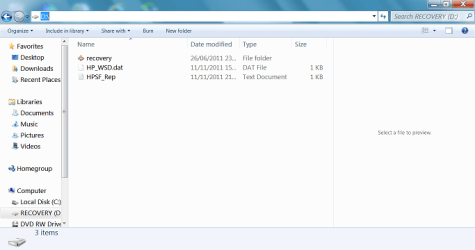
I have an HP laptop and windows 7. The recovery d drive is almost full. It is storing program files (86) which consists of an 'Adobe' folder and when I click on that it lists my Adobe CS3 and Adobe bridge etc. a 'recovery' folder and' HP_WSD. dat' and 'HPSF_ Rep' are also listed on the drive.

I have an external drive where I hope I have backed up my files following the back-up procedure. When I look at the is lists 'SHAZ HP', Windowsimagebackup and mediaID.bin

MY 2 QUESTIONS ARE: Can I delete what is on the recovery d drive and do I appear to have backed up properly on the external drive.

any help much appreciated:cry:
 

My Computer My Computer

At a glance

Windows 7
OS
Windows 7
Why are you installing programs to D: drive?
& not C: drive.
 

My Computer My Computer

At a glance

ME/XP/Vista/Win7
OS
ME/XP/Vista/Win7
You apparently did not change the drive letter when you backed up those files. D is often assumed as default. I would move those files to where you think they should be.
 

My Computer My Computer

At a glance

Vista, Windows7, Mint Mate, Zorin, Windows 8from 1.6GHz Duo to i7
Computer Manufacturer/Model Number
HP, Dell, Gateway, Toshiba - 4 laptops and 2 desktops
OS
Vista, Windows7, Mint Mate, Zorin, Windows 8
CPU
from 1.6GHz Duo to i7
Monitor(s) Displays
2x HP w2207
Hard Drives
5x HDD, 7x SSD, 12x Externals
Keyboard
with trackball - no mices
Mouse
Trackball mice
Internet Speed
DSL 6000
MY 2 QUESTIONS ARE: Can I delete what is on the recovery d drive and do I appear to have backed up properly on the external drive.

You have apparently gone down the wrong path by installing programs onto D rather than C. You can often install to a partition other than C, but you shouldn't have chosen D because it is limited in size.

So--NO, you should definitely not delete what is on D. The D drive should contain files that will restore you to factory condition--which you may need to do given the wrong path you have gone down.

As far as your backup goes, I don't know. You are using Windows built in backup and I have no expertise with it. But I certainly would not assume you have anything backed up correctly---all the more reason not to delete the recovery capabilities on D, which you may well need.

How much space do you have on C? You may need to reinstall your programs there--that's the normal purpose of the C drive.
 

My Computer My Computer

At a glance

Windows 7 Home Premium SP1, 64-bitIntel Skylake i5-6600K, not overclocked8 GB HyperX DDR4-2666 (2 x 4 GB)none; graphics are integrated on CPU
Computer type
PC/Desktop
Computer Manufacturer/Model Number
Ignatz Special; 4 speed manual gearbox; factory air conditioning; one of one
OS
Windows 7 Home Premium SP1, 64-bit
CPU
Intel Skylake i5-6600K, not overclocked
Motherboard
AsRock Z170M Extreme 4, micro ATX
Memory
8 GB HyperX DDR4-2666 (2 x 4 GB)
Graphics Card(s)
none; graphics are integrated on CPU
Sound Card
onboard: Realtek ALC1150; external: USB Behringer UF0-202
Monitor(s) Displays
Dell S2340M 23 inch IPS
Screen Resolution
1600 x 900
Hard Drives
System: Crucial MX100 series SSD, 128 GB;
Data: Samsung Spinpoint 103SJ, 1 TB;
Backup: WD Caviar Green WD30EZRX-00D8PB0, 3 TB
PSU
Rosewill SilentNight 500 watt fanless, semi-modular
Case
Antec Solo II
Cooling
Noctua NH-U12S; Noctua F12 intake, Noctua S12A exhaust
Keyboard
Microsoft 200 6JH-00001 USB
Mouse
Dell or Microsoft optical wired; USB
Antivirus
Microsoft Security Essentials and Malwarebytes Premium
Browser
Pale Moon
Other Info
All fans PWM; speeds at idle: CPU circa 500 rpm; intake circa 600 rpm; exhaust circa 600 rpm; CPU temps 27 idle and 47 C load in a warm room (27 C/81 F) when running Intel Extreme Tuning Utility stress test.
Hi thanks for that. I wasn't aware that I had installed the programmes to the D drive. The c drive has a lot of space and it also has the same 'programe files (86) folder on it. When I click into that it has an adobe folder but my full photoshop cs3 programme doesn't seem to be there. Would it be ok for me to move the program files from the d to c drive or do I need to re install my photoshop?

You commented that I was using the windows back up. Can you tell me how else I could have done it? cheers again.
 

My Computer My Computer

At a glance

Windows 7
OS
Windows 7
You can't simply move installed programs from one drive to another without asking for problems.

I'd uninstall whatever is on the D drive and reinstall those same applications to the C drive.

Re backup:

What are you trying to back up? Your personal data? Or Windows and your installed programs? It's a critical distinction and the proper program depends on the answer.
 

My Computer My Computer

At a glance

Windows 7 Home Premium SP1, 64-bitIntel Skylake i5-6600K, not overclocked8 GB HyperX DDR4-2666 (2 x 4 GB)none; graphics are integrated on CPU
Computer type
PC/Desktop
Computer Manufacturer/Model Number
Ignatz Special; 4 speed manual gearbox; factory air conditioning; one of one
OS
Windows 7 Home Premium SP1, 64-bit
CPU
Intel Skylake i5-6600K, not overclocked
Motherboard
AsRock Z170M Extreme 4, micro ATX
Memory
8 GB HyperX DDR4-2666 (2 x 4 GB)
Graphics Card(s)
none; graphics are integrated on CPU
Sound Card
onboard: Realtek ALC1150; external: USB Behringer UF0-202
Monitor(s) Displays
Dell S2340M 23 inch IPS
Screen Resolution
1600 x 900
Hard Drives
System: Crucial MX100 series SSD, 128 GB;
Data: Samsung Spinpoint 103SJ, 1 TB;
Backup: WD Caviar Green WD30EZRX-00D8PB0, 3 TB
PSU
Rosewill SilentNight 500 watt fanless, semi-modular
Case
Antec Solo II
Cooling
Noctua NH-U12S; Noctua F12 intake, Noctua S12A exhaust
Keyboard
Microsoft 200 6JH-00001 USB
Mouse
Dell or Microsoft optical wired; USB
Antivirus
Microsoft Security Essentials and Malwarebytes Premium
Browser
Pale Moon
Other Info
All fans PWM; speeds at idle: CPU circa 500 rpm; intake circa 600 rpm; exhaust circa 600 rpm; CPU temps 27 idle and 47 C load in a warm room (27 C/81 F) when running Intel Extreme Tuning Utility stress test.
You can use Windows Backup (although that would not be my first choice). But you have to make sure that the backup partition is set by you and is not using the default.

My way is that I defined a Data Partition and move all my user data there. Then I image that partition as needed. I use free Macrium for that. Then I can either restore the whole partition or mount the image VHD (just double click on the image file) and pick whichever file I need to restore individually.
 

My Computer My Computer

At a glance

Vista, Windows7, Mint Mate, Zorin, Windows 8from 1.6GHz Duo to i7
Computer Manufacturer/Model Number
HP, Dell, Gateway, Toshiba - 4 laptops and 2 desktops
OS
Vista, Windows7, Mint Mate, Zorin, Windows 8
CPU
from 1.6GHz Duo to i7
Monitor(s) Displays
2x HP w2207
Hard Drives
5x HDD, 7x SSD, 12x Externals
Keyboard
with trackball - no mices
Mouse
Trackball mice
Internet Speed
DSL 6000
I coped the ADOBE from the D to C and that seemend to work, although I left it on the D just incase. I will uninstall ADOBE from c and then reinstall on D, if that is the safer option. I would like to back up what is needed, should the lap top suddenlt fail to work. So not sure how to do that. I have an external drive and so chose the windows backup and the detination as the external drive. I'm a novice at this, so unfortunately, I'm afraid I have no idea what the advice above is referring to.
 

My Computer My Computer

At a glance

Windows 7
OS
Windows 7
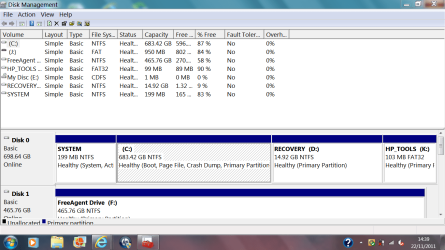
Sharon, can you please post a screenshot of your fully expanded dusk management layout (including your external backup drive) so we can see exactly what is going on?

http://www.sevenforums.com/tutorials/9733-screenshots-files-upload-post-seven-forums.html

As others have said, your recovery partition should not be used to install programs. You can't just copy Adobe CS3 and Adobe Bridge to another partition, they'll need to be uninstalled, and then re-installed on your C Drive.
 

My Computer My Computer

At a glance

Windows 7 Ultimate SP1 64-BitIntel Core i7 870 @ 2.93GHz8Gb Dual-Channel DDR3 @ 664MHznVidia GeForce GTX 460 1024MB dedicated RAM
Computer Manufacturer/Model Number
HP Pavilion Elite 495UK
OS
Windows 7 Ultimate SP1 64-Bit
CPU
Intel Core i7 870 @ 2.93GHz
Motherboard
MSI 2A9C (CPU1)
Memory
8Gb Dual-Channel DDR3 @ 664MHz
Graphics Card(s)
nVidia GeForce GTX 460 1024MB dedicated RAM
Sound Card
Realtek HD Audio
Monitor(s) Displays
HP2310i
Screen Resolution
1920 x 1080
Hard Drives
1x1954GB Hitachi HDS22020ALA 330 (RAID), 1x1954GB Hitachi External for backup and storage
PSU
460W
Case
HP Elite
Cooling
Air cooled
Keyboard
Logitech K750 solar-powered keyboard
Mouse
Logitech Wireless M180 mouse
Internet Speed
2Mb
Other Info
Pure Avanti Flow Internet Radio with iPod Dock, 64Gb iPod, HP USB Speakers, Sony MDR-V500 Headphones, Sony Vaio F-Series Laptop
I coped the ADOBE from the D to C and that seemend to work, although I left it on the D just incase. I will uninstall ADOBE from c and then reinstall on D, if that is the safer option. I would like to back up what is needed, should the lap top suddenlt fail to work. So not sure how to do that.


Concentrate on one thing at a time.

A picture of your Disk Management would be very helpful.

I'd first uninstall applications from D. Then reinstall them to C.

Make sure those reinstalled programs work properly.

Then re-inspect D drive and let us know what is left in there.

After you do that much, we can set you straight on "backing up".
 

My Computer My Computer

At a glance

Windows 7 Home Premium SP1, 64-bitIntel Skylake i5-6600K, not overclocked8 GB HyperX DDR4-2666 (2 x 4 GB)none; graphics are integrated on CPU
Computer type
PC/Desktop
Computer Manufacturer/Model Number
Ignatz Special; 4 speed manual gearbox; factory air conditioning; one of one
OS
Windows 7 Home Premium SP1, 64-bit
CPU
Intel Skylake i5-6600K, not overclocked
Motherboard
AsRock Z170M Extreme 4, micro ATX
Memory
8 GB HyperX DDR4-2666 (2 x 4 GB)
Graphics Card(s)
none; graphics are integrated on CPU
Sound Card
onboard: Realtek ALC1150; external: USB Behringer UF0-202
Monitor(s) Displays
Dell S2340M 23 inch IPS
Screen Resolution
1600 x 900
Hard Drives
System: Crucial MX100 series SSD, 128 GB;
Data: Samsung Spinpoint 103SJ, 1 TB;
Backup: WD Caviar Green WD30EZRX-00D8PB0, 3 TB
PSU
Rosewill SilentNight 500 watt fanless, semi-modular
Case
Antec Solo II
Cooling
Noctua NH-U12S; Noctua F12 intake, Noctua S12A exhaust
Keyboard
Microsoft 200 6JH-00001 USB
Mouse
Dell or Microsoft optical wired; USB
Antivirus
Microsoft Security Essentials and Malwarebytes Premium
Browser
Pale Moon
Other Info
All fans PWM; speeds at idle: CPU circa 500 rpm; intake circa 600 rpm; exhaust circa 600 rpm; CPU temps 27 idle and 47 C load in a warm room (27 C/81 F) when running Intel Extreme Tuning Utility stress test.
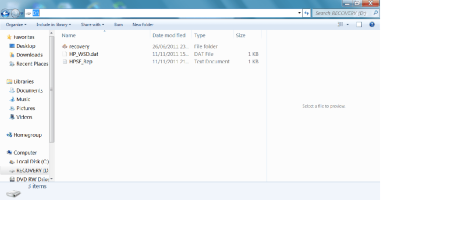
ok. I uninstalled Adobe. Here is a screen shot of the D. drive. Not sure if I have done this correctly. When I tried to take a screen shot of the external drive, when I tried to copy into the paint, It would only copy the D drive again instead of the F drive.....
 

Attachments

  • Untitled.png
    Untitled.png
    18.5 KB · Views: 15

My Computer My Computer

At a glance

Windows 7
OS
Windows 7
OOPS , a bit small to see it, will do it again.
 

Attachments

  • Untitled 2.png
    Untitled 2.png
    29.7 KB · Views: 8

My Computer My Computer

At a glance

Windows 7
OS
Windows 7
The D drive also has only 1.32GB free of 14.9GB . I am wondering if it is because of my Adobe photographic programme and all the work that I do on the pictures:)
 

My Computer My Computer

At a glance

Windows 7
OS
Windows 7
Sharon, what you have uploaded is a screenshot of your recovery partition when we need one of your disk management layout, just click on the attachment below to see what I mean.

DM.JPG

Click Start and type Disk Management in the Search field then click Create and format hard disk partitions to open Disk Management, expand it to its full size then upload it.

I cannot repeat strongly enough that you should not be installing programs to your D drive. It is your computer's recovery partition, which is why it is so small, and if corrupted will prevent you recovering Windows if you haven't created any recovery discs.

So, PLEASE upload a screen shot of your fully expanded disk management layout so that we can see how best to help you. :)

http://www.sevenforums.com/tutorials/9733-screenshots-files-upload-post-seven-forums.html
 
Last edited:

My Computer My Computer

At a glance

Windows 7 Ultimate SP1 64-BitIntel Core i7 870 @ 2.93GHz8Gb Dual-Channel DDR3 @ 664MHznVidia GeForce GTX 460 1024MB dedicated RAM
Computer Manufacturer/Model Number
HP Pavilion Elite 495UK
OS
Windows 7 Ultimate SP1 64-Bit
CPU
Intel Core i7 870 @ 2.93GHz
Motherboard
MSI 2A9C (CPU1)
Memory
8Gb Dual-Channel DDR3 @ 664MHz
Graphics Card(s)
nVidia GeForce GTX 460 1024MB dedicated RAM
Sound Card
Realtek HD Audio
Monitor(s) Displays
HP2310i
Screen Resolution
1920 x 1080
Hard Drives
1x1954GB Hitachi HDS22020ALA 330 (RAID), 1x1954GB Hitachi External for backup and storage
PSU
460W
Case
HP Elite
Cooling
Air cooled
Keyboard
Logitech K750 solar-powered keyboard
Mouse
Logitech Wireless M180 mouse
Internet Speed
2Mb
Other Info
Pure Avanti Flow Internet Radio with iPod Dock, 64Gb iPod, HP USB Speakers, Sony MDR-V500 Headphones, Sony Vaio F-Series Laptop

Theog gave you all the information possible to get you out of trouble, have you looked at any of it?

I must repeat, you should be using your C drive for installing your applications and storing your personal data, and not your D drive, which is there to allow you to recover your system to its factory state.

You obviously haven't created any recovery discs and if you're not careful you're going to corrupt your recovery partition.

Please take your time to read through the information we've given you then post back with any questions so that we can give you good help.
 

My Computer My Computer

At a glance

Windows 7 Ultimate SP1 64-BitIntel Core i7 870 @ 2.93GHz8Gb Dual-Channel DDR3 @ 664MHznVidia GeForce GTX 460 1024MB dedicated RAM
Computer Manufacturer/Model Number
HP Pavilion Elite 495UK
OS
Windows 7 Ultimate SP1 64-Bit
CPU
Intel Core i7 870 @ 2.93GHz
Motherboard
MSI 2A9C (CPU1)
Memory
8Gb Dual-Channel DDR3 @ 664MHz
Graphics Card(s)
nVidia GeForce GTX 460 1024MB dedicated RAM
Sound Card
Realtek HD Audio
Monitor(s) Displays
HP2310i
Screen Resolution
1920 x 1080
Hard Drives
1x1954GB Hitachi HDS22020ALA 330 (RAID), 1x1954GB Hitachi External for backup and storage
PSU
460W
Case
HP Elite
Cooling
Air cooled
Keyboard
Logitech K750 solar-powered keyboard
Mouse
Logitech Wireless M180 mouse
Internet Speed
2Mb
Other Info
Pure Avanti Flow Internet Radio with iPod Dock, 64Gb iPod, HP USB Speakers, Sony MDR-V500 Headphones, Sony Vaio F-Series Laptop
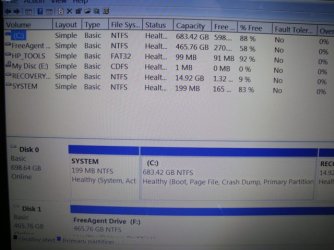
I am trying to make a screen shot of the disk management layout but when I try to paste into the paint window, it is pasting the one I sent previously. So, I,ve taken a photo of it. Here goes.
 

Attachments

  • DSC01802.JPG
    DSC01802.JPG
    50.3 KB · Views: 10

My Computer My Computer

At a glance

Windows 7
OS
Windows 7
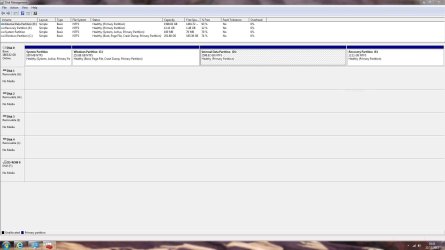
Here goes with the snipping tool instead, really sorry about this and thatnks for bearing with me.
 

Attachments

  • Capture.PNG
    Capture.PNG
    58.1 KB · Views: 15

My Computer My Computer

At a glance

Windows 7
OS
Windows 7
Back
Top