Recovery disk

Chiumiento

Chiumiento
Power User
Local time
7:54 PM
Messages
237
Location
United States, Bangor, Maine, 04401
I Have just noticed this thing called recovery disk creation. Is that the same thing as either my repair disk or my back up disk. I tried to do it. But it said that there was no partition on my system. Is there anyway that I can do this I want to make sure my computer is completely safe if i can.
 

My Computer

Computer Manufacturer/Model Number
HP Pavilion p6000 series/Model p6654y
OS
Windows 7 Ultimate x64
CPU
AMD Athlon(tm) II X4 630
Motherboard
Socket AM3 (938)
Memory
DDR3 2048 MB's/ PC3-10600 (1,333 MHz) (2 Cards)
Graphics Card(s)
ATI Radeon HD 4200
Sound Card
Realtek High definition Audio
Monitor(s) Displays
PnP-Monitor (Standard) (I am using my Emerson TV)
Screen Resolution
1024 x 768 pixels at 75 Hz in true colors (32-bit)
Hard Drives
750.05 Gigabytes Usable Hard Drive Capacity
692.61 Gigabytes Hard Drive Free Space

hp DVD-RAM GH60L SATA CdRom Device [Optical drive]
YMAX magicJack USB Device [Optical drive]

Generic- Compact Flash USB Device [Hard drive] -- drive 2
Generic
PSU
250 Watts
Case
HP
Cooling
Fan
Keyboard
Logitech wireless wave combo MK550 (Came with mouse)
Mouse
Logitech wireless wave combo MK550 (Came with keyboard)
Internet Speed
DSL Download speed 15.06-mb/s Upload .49-mb/s ping 45ms
Other Info
HP Wireless 802.11 b/g/n PCIe Card

My Computer

Computer Manufacturer/Model Number
HP, Dell, Gateway, Toshiba - 4 laptops and 2 desktops
OS
Vista, Windows7, Mint Mate, Zorin, Windows 8
CPU
from 1.6GHz Duo to i7
Monitor(s) Displays
2x HP w2207
Hard Drives
5x HDD, 7x SSD, 12x Externals
Keyboard
with trackball - no mices
Mouse
Trackball mice
Internet Speed
DSL 6000
I have a brand new computer. How would I lose my partition. My computer is maybe 2 weeks old.
To do imaging. Can I do it onto a CD?
 

My Computer

Computer Manufacturer/Model Number
HP Pavilion p6000 series/Model p6654y
OS
Windows 7 Ultimate x64
CPU
AMD Athlon(tm) II X4 630
Motherboard
Socket AM3 (938)
Memory
DDR3 2048 MB's/ PC3-10600 (1,333 MHz) (2 Cards)
Graphics Card(s)
ATI Radeon HD 4200
Sound Card
Realtek High definition Audio
Monitor(s) Displays
PnP-Monitor (Standard) (I am using my Emerson TV)
Screen Resolution
1024 x 768 pixels at 75 Hz in true colors (32-bit)
Hard Drives
750.05 Gigabytes Usable Hard Drive Capacity
692.61 Gigabytes Hard Drive Free Space

hp DVD-RAM GH60L SATA CdRom Device [Optical drive]
YMAX magicJack USB Device [Optical drive]

Generic- Compact Flash USB Device [Hard drive] -- drive 2
Generic
PSU
250 Watts
Case
HP
Cooling
Fan
Keyboard
Logitech wireless wave combo MK550 (Came with mouse)
Mouse
Logitech wireless wave combo MK550 (Came with keyboard)
Internet Speed
DSL Download speed 15.06-mb/s Upload .49-mb/s ping 45ms
Other Info
HP Wireless 802.11 b/g/n PCIe Card
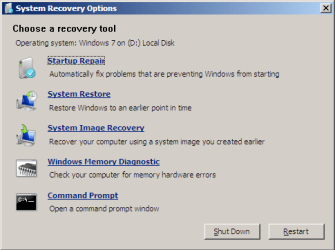
This is what the recovery disk can do for you:
 

Attachments

  • windows-7-recovery-disc-1.png
    windows-7-recovery-disc-1.png
    10 KB · Views: 7

My Computer

Computer Manufacturer/Model Number
Dell and Custom
OS
Systems 1 and 2: Windows 7 Enterprise x64, Win 8 Developer
CPU
System 1: i7 [email protected], System 2: AMD FX-4100 Zambezi 3.6G
Motherboard
System 1:Dell 06NWYK System 2: ASUS M5A97 AM3+
Memory
System 1: 8GB System 2: 8GB
Graphics Card(s)
System 1: ATI FirePro V4800 System 2: Radeon HD 6850
Sound Card
System 1: onboard System 2: onboard
Monitor(s) Displays
System1: Viewsonic HDMI 24"
Screen Resolution
System 1: 1920x1080 System 2: 1920x1080
Hard Drives
System 1: Mirrored .5B drives System 2: Seagate Barracuda ST1000DM003 1TB 7200 RPM 64MB Cache SATA 6.0Gb/s
Case
System 1: Dell System 2: Cooler Master
Internet Speed
10 MBPS
Well, I only concluded that from what you said.

But it said that there was no partition on my system

But check in Computer whether there is a recovery partition (usually D).

For imaging you should have an external disk. But it is possible to make images on DVDs (not CDs). Depending on the size of the data on your C, it will take 2 or 3 DVDs. Figure about 8GBs of the data (not the size of the partition) on C will fit on one DVD.
But you may want to image more frequently as you go. That's why we always recommend to do it to external disks. If you want to study a full blown imaging strategy, read this tut I have made on the matter: http://www.sevenforums.com/tutorials/128494-imaging-strategies.html
 

My Computer

Computer Manufacturer/Model Number
HP, Dell, Gateway, Toshiba - 4 laptops and 2 desktops
OS
Vista, Windows7, Mint Mate, Zorin, Windows 8
CPU
from 1.6GHz Duo to i7
Monitor(s) Displays
2x HP w2207
Hard Drives
5x HDD, 7x SSD, 12x Externals
Keyboard
with trackball - no mices
Mouse
Trackball mice
Internet Speed
DSL 6000
Well, I only concluded that from what you said.

But it said that there was no partition on my system

But check in Computer whether there is a recovery partition (usually D).

For imaging you should have an external disk. But it is possible to make images on DVDs (not CDs). Depending on the size of the data on your C, it will take 2 or 3 DVDs. Figure about 8GBs of the data (not the size of the partition) on C will fit on one DVD.
But you may want to image more frequently as you go. That's why we always recommend to do it to external disks. If you want to study a full blown imaging strategy, read this tut I have made on the matter: http://www.sevenforums.com/tutorials/128494-imaging-strategies.html
I see I have it locked. i will unlock it. then try it.
 

My Computer

Computer Manufacturer/Model Number
HP Pavilion p6000 series/Model p6654y
OS
Windows 7 Ultimate x64
CPU
AMD Athlon(tm) II X4 630
Motherboard
Socket AM3 (938)
Memory
DDR3 2048 MB's/ PC3-10600 (1,333 MHz) (2 Cards)
Graphics Card(s)
ATI Radeon HD 4200
Sound Card
Realtek High definition Audio
Monitor(s) Displays
PnP-Monitor (Standard) (I am using my Emerson TV)
Screen Resolution
1024 x 768 pixels at 75 Hz in true colors (32-bit)
Hard Drives
750.05 Gigabytes Usable Hard Drive Capacity
692.61 Gigabytes Hard Drive Free Space

hp DVD-RAM GH60L SATA CdRom Device [Optical drive]
YMAX magicJack USB Device [Optical drive]

Generic- Compact Flash USB Device [Hard drive] -- drive 2
Generic
PSU
250 Watts
Case
HP
Cooling
Fan
Keyboard
Logitech wireless wave combo MK550 (Came with mouse)
Mouse
Logitech wireless wave combo MK550 (Came with keyboard)
Internet Speed
DSL Download speed 15.06-mb/s Upload .49-mb/s ping 45ms
Other Info
HP Wireless 802.11 b/g/n PCIe Card
I got it to work. But now I need non rewritable disks
 

My Computer

Computer Manufacturer/Model Number
HP Pavilion p6000 series/Model p6654y
OS
Windows 7 Ultimate x64
CPU
AMD Athlon(tm) II X4 630
Motherboard
Socket AM3 (938)
Memory
DDR3 2048 MB's/ PC3-10600 (1,333 MHz) (2 Cards)
Graphics Card(s)
ATI Radeon HD 4200
Sound Card
Realtek High definition Audio
Monitor(s) Displays
PnP-Monitor (Standard) (I am using my Emerson TV)
Screen Resolution
1024 x 768 pixels at 75 Hz in true colors (32-bit)
Hard Drives
750.05 Gigabytes Usable Hard Drive Capacity
692.61 Gigabytes Hard Drive Free Space

hp DVD-RAM GH60L SATA CdRom Device [Optical drive]
YMAX magicJack USB Device [Optical drive]

Generic- Compact Flash USB Device [Hard drive] -- drive 2
Generic
PSU
250 Watts
Case
HP
Cooling
Fan
Keyboard
Logitech wireless wave combo MK550 (Came with mouse)
Mouse
Logitech wireless wave combo MK550 (Came with keyboard)
Internet Speed
DSL Download speed 15.06-mb/s Upload .49-mb/s ping 45ms
Other Info
HP Wireless 802.11 b/g/n PCIe Card
I got it to work. But now I need non rewritable disks
R/W DVDs tend to be less stable over time than non R/W.
When you say you "unlocked" something I'm not sure what that meant. Just make sure you are making the factory recovery disks and use a quality brand you've found good in the past.
* Factory recovery disks - used to restore the PC to the state you bought it in.
(store them away for safe keeping)
* Normal image recovery - Made from images you make from time to time using the inbuilt windows imaging and maybe another for safety in case one fails (Macrium - WHS refers to is good). This returns your computer to the state it was when you made the image (snap shot). It includes all your programs ....everything. You don't want to go all the way back to the factory condition unless you need to. Use an external HDD (not your main HDD) for to store these images. DVDs are not a good idea for this.
 

My Computer

Computer type
PC/Desktop
Computer Manufacturer/Model Number
Own build
OS
Windows 7x64 Home Premium SP1
CPU
Intel i7 2600k
Motherboard
ASUS P8Z68 Deluxe
Memory
G.Skill Ripjaws (DDR3-1600) 2x4GB
Graphics Card(s)
Nvidia GeForce GTS 450; Intel HD Graphics 3000(GT2+)
Monitor(s) Displays
Dell Ultrasharp IPS panel U2311H, Samsung SyncMaster P2350
Screen Resolution
1920x1080
Hard Drives
Samsung 850 Pro SSD 256GB, Samsung SSD 840 120GB, Seagates 1TB Barracuda ST31000528AS x2
PSU
Seasonic M12II 520W
Case
Lian Li Lancool PC-K60
Cooling
Case: 1x120mm, 3x140mm CPU: Hyper 212+
Keyboard
Logitech MK520 (wireless)
Mouse
Logitech MK520
Internet Speed
6-7 Mbps
Antivirus
Norton Security Premium, Malwarebytes on 2 (MSE on 3rd PC)
Browser
FireFox
Other Info
Audio: Logitech Z523 2.1
When you do make your recovery disks keep in mind that you can only make one set and keep them in a safe place as they will return your computer to factory condition and are a fail safe should imaging fail . Also do not interrupt the recovery disc process for any reason by cancelling the process or shutting down the computer.

There is also complete information on making recovery disks on the support & drivers page for your model and the link should be in one of the HP folders or through the help button which should contain an HP page with helpful links and the 3rd option would be to also look in any HP folders for any user manuals.
 

My Computer

Computer type
PC/Desktop
Computer Manufacturer/Model Number
My own abomination, I call it the Money Pit
OS
Windows 10 Pro x 2/Windows 11 Home
CPU
Intel i7 2600K @ 3.40 GHz
Motherboard
ASUS Sabertooth P67
Memory
Corsair Vengeance 16GB DDR3 1600MHz CL8 Dual Channel Kit
Graphics Card(s)
EVGA GeForce RTX 3080 XC3 ULTRA GAMING 10GB GDDR6X
Sound Card
Onboard Realtek or Nvidia High Definition Audio (HDMI)
Monitor(s) Displays
Samsung JS7000 50" SUHD TV or Samsung 27" FHD 60Hz 8ms GTG V
Screen Resolution
1920 x 1080
Hard Drives
1 x Samsung 870 EVO 250 GB SSD (Windows 10 Pro), 1 x Samsung 850 EVO 250 GB SSD (Windows 10 Pro)
PSU
Corsair AX860 - 860W Modular Power Supply
Case
Phanteks Enthoo Luxe Full Tower Case - Black
Cooling
CORSAIR Hydro Series H150i PRO RGB 360mm Liquid CPU Cooler
Keyboard
Logitech K830 Illuminated Living-Room Keyboard
Mouse
Logitech MX Anywhere 2S Wireless Mouse
Internet Speed
100 Mbps
Antivirus
ESET Internet Security
Browser
Latest Version Of Firefox & Microsoft Edge Chromium Stable
Other Info
LG Super Multi Blue Internal Blu-ray Disk Rewriter - BH10LS30
6x2 HDMI Switcher (6 inputs, 2 outputs) so I can send the output of my Cable Box, Roku, or any my 4 computers to either my TV or Monitor separately or simultaneously.
I got it to work. But now I need non rewritable disks
When you say you "unlocked" something I'm not sure what that meant.
what I meant was I unlocked my recovery drive. I used bitlocker. It locks my recovery drive so no one can get into it unless they have the password. I think that is what is it for.
 

My Computer

Computer Manufacturer/Model Number
HP Pavilion p6000 series/Model p6654y
OS
Windows 7 Ultimate x64
CPU
AMD Athlon(tm) II X4 630
Motherboard
Socket AM3 (938)
Memory
DDR3 2048 MB's/ PC3-10600 (1,333 MHz) (2 Cards)
Graphics Card(s)
ATI Radeon HD 4200
Sound Card
Realtek High definition Audio
Monitor(s) Displays
PnP-Monitor (Standard) (I am using my Emerson TV)
Screen Resolution
1024 x 768 pixels at 75 Hz in true colors (32-bit)
Hard Drives
750.05 Gigabytes Usable Hard Drive Capacity
692.61 Gigabytes Hard Drive Free Space

hp DVD-RAM GH60L SATA CdRom Device [Optical drive]
YMAX magicJack USB Device [Optical drive]

Generic- Compact Flash USB Device [Hard drive] -- drive 2
Generic
PSU
250 Watts
Case
HP
Cooling
Fan
Keyboard
Logitech wireless wave combo MK550 (Came with mouse)
Mouse
Logitech wireless wave combo MK550 (Came with keyboard)
Internet Speed
DSL Download speed 15.06-mb/s Upload .49-mb/s ping 45ms
Other Info
HP Wireless 802.11 b/g/n PCIe Card
I got it to work. But now I need non rewritable disks
When you say you "unlocked" something I'm not sure what that meant.
what I meant was I unlocked my recovery drive. I used bitlocker. It locks my recovery drive so no one can get into it unless they have the password. I think that is what is it for.

If im understanding you correctly, you have locked your Recovery partition (which will reinstall Windows should you ever need it to) with Bitlocker?

This is a Bad Idea (with capital letters!)

Should you ever need to actually boot into that partition because your Windows becomes unusable, your PC will be unable to read it due to it being encrypted. (which is the point of bitlocker) The only way that partition can be accessed is through Windows. (or the fake windows that the install disk creates)

Do yourself a favour and unlock it, it will only cause you trouble. There really is no reason to protect it with Bitlocker anyway, it's not like it has anything on it that anyone with access to a Windows 7 disk doesn't already have.
 

My Computer

Computer type
PC/Desktop
Computer Manufacturer/Model Number
Medion Erazer (note to self: insert model number) - with custom additions
OS
Windows 10 Pro x64
CPU
Intel Core i5 7400 @ 3.00GHz
Motherboard
OEM supllied with PC
Memory
8GB 2133Mhz DDR4 (OEM supplied)
Graphics Card(s)
Gygabyte Windforce GTX 1050Ti (Factory Overclocked)
Sound Card
Realtek
Monitor(s) Displays
Acer Al1980 + HKC
Screen Resolution
1360*768(HKC) / 1280*1024(Acer)
Hard Drives
1TB Toshiba
1TB WD Caviar Green
120GB Samsung Evo 840
PSU
OEM supplied (no power rating on case)
Case
OEM Supplied
Cooling
Stock
Keyboard
Logitech Wireless
Mouse
Logitect Wireless
Internet Speed
40Mb/s Down 10Mb/s Up
Antivirus
Defender
Browser
Firefox
  • Like
Reactions: whs
When you say you "unlocked" something I'm not sure what that meant.
what I meant was I unlocked my recovery drive. I used bitlocker. It locks my recovery drive so no one can get into it unless they have the password. I think that is what is it for.

If im understanding you correctly, you have locked your Recovery partition (which will reinstall Windows should you ever need it to) with Bitlocker?

This is a Bad Idea (with capital letters!)

Should you ever need to actually boot into that partition because your Windows becomes unusable, your PC will be unable to read it due to it being encrypted. (which is the point of bitlocker) The only way that partition can be accessed is through Windows. (or the fake windows that the install disk creates)

Do yourself a favour and unlock it, it will only cause you trouble. There really is no reason to protect it with Bitlocker anyway, it's not like it has anything on it that anyone with access to a Windows 7 disk doesn't already have.
+1, absolutely right
 

My Computer

Computer Manufacturer/Model Number
HP, Dell, Gateway, Toshiba - 4 laptops and 2 desktops
OS
Vista, Windows7, Mint Mate, Zorin, Windows 8
CPU
from 1.6GHz Duo to i7
Monitor(s) Displays
2x HP w2207
Hard Drives
5x HDD, 7x SSD, 12x Externals
Keyboard
with trackball - no mices
Mouse
Trackball mice
Internet Speed
DSL 6000
Factory Win7 Diskography

if Win7 becomes unbootable, boot the Repair CD (made in Win7 Backup Center) to try to Repair it using Startup Repair, System Restore, Recover using an Image Backup, etc.

If Win7 is irreparable, copy out your files and Run the Recovery Partition which is more stable than the Recovery disks. Only if it fails should you run the Disks you make.

If HD fails, run the Recovery Disks on the replacement HD.

Backup a Win7 System Image after you have everything set up as you like. You can use this in place of Recovery partition since it will return everything to your favored configuration in about twenty minutes.

And on top of all of this, many tech enthusiasts find a clean copy DVD of their version of Win7 to clean reinstall using the Product Key on COA sticker. This is because most factory installs are loaded with so much sponsored bloatware and useless factory utilities (with much better versions built into Win7) that a clean reinstall using the Win7 DVD gives you a computer that is better than new. Here are some tips based on doing hundreds of these: http://www.sevenforums.com/installation-setup/125874-re-install-windows-7-a.html#post1086729
 
How do I get a clean Windows 7 disk?
 

My Computer

Computer Manufacturer/Model Number
HP Pavilion p6000 series/Model p6654y
OS
Windows 7 Ultimate x64
CPU
AMD Athlon(tm) II X4 630
Motherboard
Socket AM3 (938)
Memory
DDR3 2048 MB's/ PC3-10600 (1,333 MHz) (2 Cards)
Graphics Card(s)
ATI Radeon HD 4200
Sound Card
Realtek High definition Audio
Monitor(s) Displays
PnP-Monitor (Standard) (I am using my Emerson TV)
Screen Resolution
1024 x 768 pixels at 75 Hz in true colors (32-bit)
Hard Drives
750.05 Gigabytes Usable Hard Drive Capacity
692.61 Gigabytes Hard Drive Free Space

hp DVD-RAM GH60L SATA CdRom Device [Optical drive]
YMAX magicJack USB Device [Optical drive]

Generic- Compact Flash USB Device [Hard drive] -- drive 2
Generic
PSU
250 Watts
Case
HP
Cooling
Fan
Keyboard
Logitech wireless wave combo MK550 (Came with mouse)
Mouse
Logitech wireless wave combo MK550 (Came with keyboard)
Internet Speed
DSL Download speed 15.06-mb/s Upload .49-mb/s ping 45ms
Other Info
HP Wireless 802.11 b/g/n PCIe Card
What is hash? And how exactly do I check it and why. Is there a guide that has been writing out for this. I would like to read it. If not can I have one sent to me or wrote on here for everyone. That would be great.
 

My Computer

Computer Manufacturer/Model Number
HP Pavilion p6000 series/Model p6654y
OS
Windows 7 Ultimate x64
CPU
AMD Athlon(tm) II X4 630
Motherboard
Socket AM3 (938)
Memory
DDR3 2048 MB's/ PC3-10600 (1,333 MHz) (2 Cards)
Graphics Card(s)
ATI Radeon HD 4200
Sound Card
Realtek High definition Audio
Monitor(s) Displays
PnP-Monitor (Standard) (I am using my Emerson TV)
Screen Resolution
1024 x 768 pixels at 75 Hz in true colors (32-bit)
Hard Drives
750.05 Gigabytes Usable Hard Drive Capacity
692.61 Gigabytes Hard Drive Free Space

hp DVD-RAM GH60L SATA CdRom Device [Optical drive]
YMAX magicJack USB Device [Optical drive]

Generic- Compact Flash USB Device [Hard drive] -- drive 2
Generic
PSU
250 Watts
Case
HP
Cooling
Fan
Keyboard
Logitech wireless wave combo MK550 (Came with mouse)
Mouse
Logitech wireless wave combo MK550 (Came with keyboard)
Internet Speed
DSL Download speed 15.06-mb/s Upload .49-mb/s ping 45ms
Other Info
HP Wireless 802.11 b/g/n PCIe Card
Here is a simple article; What is the MD5 hash?
and a more indepth one: What is MD5 Hash and How to Use it?

Basically, its like a fingerprint. Every file has a different hash. When downloading something, if you can check the hash is the same as the known hash of the file your downloading, you know its the right file. Otherwise you might end up with a virused up system.
 

My Computer

Computer type
PC/Desktop
Computer Manufacturer/Model Number
Medion Erazer (note to self: insert model number) - with custom additions
OS
Windows 10 Pro x64
CPU
Intel Core i5 7400 @ 3.00GHz
Motherboard
OEM supllied with PC
Memory
8GB 2133Mhz DDR4 (OEM supplied)
Graphics Card(s)
Gygabyte Windforce GTX 1050Ti (Factory Overclocked)
Sound Card
Realtek
Monitor(s) Displays
Acer Al1980 + HKC
Screen Resolution
1360*768(HKC) / 1280*1024(Acer)
Hard Drives
1TB Toshiba
1TB WD Caviar Green
120GB Samsung Evo 840
PSU
OEM supplied (no power rating on case)
Case
OEM Supplied
Cooling
Stock
Keyboard
Logitech Wireless
Mouse
Logitect Wireless
Internet Speed
40Mb/s Down 10Mb/s Up
Antivirus
Defender
Browser
Firefox
Click the blue links in my post to get the tool to check HASH and a list of the official Win7 HASHes.
 
Back
Top