Recovery iso for 7th gen intel and newer

abro163

New member
Local time
1:07 AM
Messages
5
Does anyone have one, I cant get into windows, I can't access my harddrive with the stock repair. Needs usb3.1? /ssd drivers .

I have dual boot win10/7 and i get the boot menu, then when I choose windows 7 it shows the logo then reboots a few seconds later.
Would it work using usb to run the recovery then adding the drivers to a cd, instead of dism.
 

My Computers My Computers

  • At a glance

    Windows 7 ultimate x64
    OS
    Windows 7 ultimate x64
  • Computer type
    PC/Desktop

My Computers My Computers

  • At a glance

    7 X64i5 84002x8gb 3200mhz
    Computer type
    PC/Desktop
    OS
    7 X64
    CPU
    i5 8400
    Motherboard
    gigabyte b365m ds3h
    Memory
    2x8gb 3200mhz
    Hard Drives
    various
    PSU
    pure power 11 400w cm
    Case
    Coolermaster
    Cooling
    cryorig m9i
  • At a glance

    7x64g54008gb ddr4 2400
    Computer type
    PC/Desktop
    OS
    7x64
    CPU
    g5400
    Motherboard
    ga b365m ds3h
    Memory
    8gb ddr4 2400
    PSU
    xfx pro 450w
Thanks for your software, not sure if it is meant to automatically detect my drive, I had to add the driver IastoreAC.inf or the other intel .inf in that folder (sort by date modified) when inside the "repair your computer" menu then load driver. However i'm still stuck with a non booting windows 7 , i tried sfc /scannow, thats about all you can do? i tried 3 bootrec commands. Except bootrec /rebuildbcd. Anyway to salvage it or have to reinstall.

- - - Updated - - -

Anyway to get boot log, I tried f8-> enable logging but no boot log appeared, I tried running safe mode also, last file to load before reboot is classpnp.sys . I think thats normal though?

The error i get is "a required device isn't connected. 0x000000f"

This happened because of a shortcircuit/poweroff , a cmos battery shorted and killed a ram stick or vice versa, I read perhaps my drivers are corrupt , probably storage one ? can delete them and windows will reinstall, but which one is windows using.
 

My Computers My Computers

  • At a glance

    Windows 7 ultimate x64
    OS
    Windows 7 ultimate x64
  • Computer type
    PC/Desktop
I had to add the driver IastoreAC.inf or the other intel .inf in that folder (sort by date modified) when inside the "repair your computer" menu then load driver. However i'm still stuck with a non booting windows 7


If you have the relevant drivers you can install them into the image you have already applied to disk.

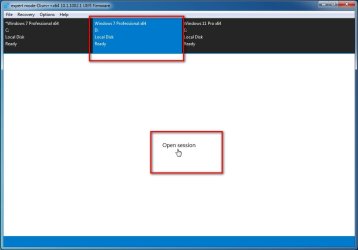
A simple way is to run dism++:ar: download dism++

from another os or winpe and select the applied image


1. Click the target os in the top pane to highlight it in blue

2. Click "open session"

dism++-open-session2.jpg


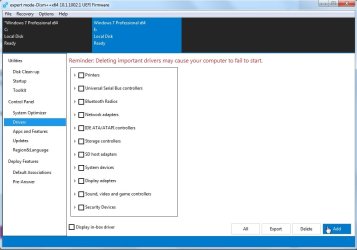
3. Click Drivers in the left pane then click ADD

4. Browse to the FOLDER containing the drivers

dism++drivers5.jpg


note: you could also integrate the same drivers into boot.wim image 2 using dism++
 

My Computers My Computers

  • At a glance

    7 X64i5 84002x8gb 3200mhz
    Computer type
    PC/Desktop
    OS
    7 X64
    CPU
    i5 8400
    Motherboard
    gigabyte b365m ds3h
    Memory
    2x8gb 3200mhz
    Hard Drives
    various
    PSU
    pure power 11 400w cm
    Case
    Coolermaster
    Cooling
    cryorig m9i
  • At a glance

    7x64g54008gb ddr4 2400
    Computer type
    PC/Desktop
    OS
    7x64
    CPU
    g5400
    Motherboard
    ga b365m ds3h
    Memory
    8gb ddr4 2400
    PSU
    xfx pro 450w
The driver was included in your package, but didn't detect, I pointed windows to x:/windows/system32/driverstore/filerepository/ then sort by date, add the Intel inf as mentioned above. Maybe will help others. I know I can add drivers with your tool, but trouble is finding them for "unsupported hardware"
i'm still not repaired though, do you have any hot tips 😉, I'm sick of 10 already,slow response compared to 7 with older gdi apps
 

My Computers My Computers

  • At a glance

    Windows 7 ultimate x64
    OS
    Windows 7 ultimate x64
  • Computer type
    PC/Desktop
What is the make and model of the machine?
 

My Computers My Computers

  • At a glance

    7 X64i5 84002x8gb 3200mhz
    Computer type
    PC/Desktop
    OS
    7 X64
    CPU
    i5 8400
    Motherboard
    gigabyte b365m ds3h
    Memory
    2x8gb 3200mhz
    Hard Drives
    various
    PSU
    pure power 11 400w cm
    Case
    Coolermaster
    Cooling
    cryorig m9i
  • At a glance

    7x64g54008gb ddr4 2400
    Computer type
    PC/Desktop
    OS
    7x64
    CPU
    g5400
    Motherboard
    ga b365m ds3h
    Memory
    8gb ddr4 2400
    PSU
    xfx pro 450w
dell optiplex 7050 i7 7700 ,ssd drive

- - - Updated - - -

So I disabled Intel rapid storage in bios and will it boot now, mouse not working. I guess I need to readd those drivers?
 

My Computers My Computers

  • At a glance

    Windows 7 ultimate x64
    OS
    Windows 7 ultimate x64
  • Computer type
    PC/Desktop
dell media for that model

GDXKK_X8V66A00_W7SP1PRO64_ROW.iso
 

My Computers My Computers

  • At a glance

    7 X64i5 84002x8gb 3200mhz
    Computer type
    PC/Desktop
    OS
    7 X64
    CPU
    i5 8400
    Motherboard
    gigabyte b365m ds3h
    Memory
    2x8gb 3200mhz
    Hard Drives
    various
    PSU
    pure power 11 400w cm
    Case
    Coolermaster
    Cooling
    cryorig m9i
  • At a glance

    7x64g54008gb ddr4 2400
    Computer type
    PC/Desktop
    OS
    7x64
    CPU
    g5400
    Motherboard
    ga b365m ds3h
    Memory
    8gb ddr4 2400
    PSU
    xfx pro 450w
Thank you for your help. Im in a bit of a bind, if boot with RST enabled in bios it wont' boot, and then I can't remove the RST driver and re-add it.

- - - Updated - - -

I removed the usb3 drivers in device manager and rebooted , now the mouse works. I need to do the same for intel rapid storage, but it doesnt show up since its on ahci mode. "Intel 200 series chipset SATA AHCI controller " is the current controller in device manager.
But at least I have a working system now. Thanks
 

My Computers My Computers

  • At a glance

    Windows 7 ultimate x64
    OS
    Windows 7 ultimate x64
  • Computer type
    PC/Desktop
Back
Top