
recovery manager does not work

surans

New member
Local time
1:16 AM
Messages
1
Location
sri lanka
:(:(:( i have hp pavilion dv6 core i7 laptop. genuinely it has amount of 20GB recovery partition. very first the recovery manager remind me to write backup disks. I did not know what was that!!! now the recovery manager not working. how can i re activate the recovery manager...OR is there any other way to active the recovery partition(F 11 NOT WORKING).
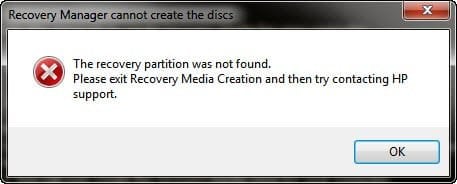
When i trying to create recovery dvds appears this error message what do
i do now?? SNAG-0096.jpg
 
Last edited:

My Computer

OS
windows 7 home premium 64 bit
CPU
COR i7
Memory
4GB
Graphics Card(s)
ATI mobility radeonHD 5650
Sound Card
ati high definition audiodevice
Monitor(s) Displays
genaric pnp monitor
Hard Drives
hitachi 500GB
Hello surans, welcome to Seven Forums!


Have a look through the information in this tutorial at the link below for some additional ideas and be sure to post back with any further questions you may have and to keep us informed.


My Computer

Computer Manufacturer/Model Number
* BFK Customs *
OS
W 7 64-bit Ultimate
CPU
Intel Q9550 Yorkfield
Motherboard
ASUS P5Q Pro
Memory
8GB Dominator 8500C5D
Graphics Card(s)
ATI : XFX 5870
Sound Card
Realtek HD Audio 7-1
Monitor(s) Displays
1x 47" LCD HDMI & 3x 26" LCD HDMI
Screen Resolution
1920x1080P & 1920x1200
Hard Drives
1x 80GB Intel X25-M G2 SSD : 1x 500GB & 1x 640GB WD Caviar Black(s)
PSU
Corsair 620HX
Case
Cooler Master RC-690
Cooling
Tuniq Tower 120, 2x 140mm and 3x 120mm case fans
Keyboard
Microsoft 500
Mouse
Razer Diamondback 3G
Internet Speed
14 Mb/s
Other Info
1x Koutech 3Gb/s SATA HDD Hot Swap Rack
Have you done anything like repartitioning that might have disabled the Recovery Partition?

Were you infected or have you checked for infection? Check now with a Malwarebytes Full Scan.

Post back a screenshot of your maxmimized Disk Mgmt drive map and listings using SNipping Tool in Start Menu.

If you cannot start Recovery Partition, try triggering it using this method to make a second set of Recovery Disks: HP Recov DIsks - make another set

Otherwise you'll need to order Recovery Disks to reimage your entire HD including the Recov Partition.


http://www.sevenforums.com/installation-setup/146367-recovery-dvd-issue.html#post1255310
 
Back
Top