recovery partition as boot or system?

surati

New member
Local time
9:56 AM
Messages
9
Hi
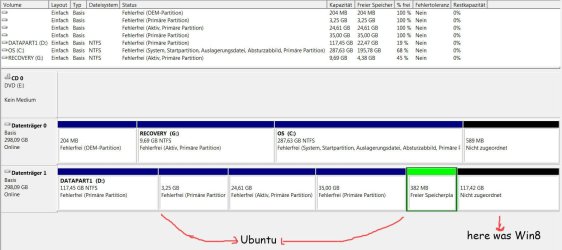
During installation of win8 in a multiboot system (win7+win8+ubuntu) I got a little chaos booting my Dell Computer. So now Im not sure which partition has to be the boot one. At the moment is the recovry partition not hidden and named "boot". I guess it hat to be hidden, but which should be the boot partition?
:rolleyes:
 

Attachments

  • Bildschirmfoto vom 2013-02-02 21:02:52.png
    Bildschirmfoto vom 2013-02-02 21:02:52.png
    11.3 KB · Views: 14

My Computer My Computer

OS
windows 7 32 professional
Post a snapshot of a fullscreen Disk Management window:

To open Disk Management, press Windows key+r, type diskmgmt.msc and press Enter or click GO. Make it full screen.

How to Use the Snipping Tool in Vista - Vista Forums (says it's for Vista but also works with Win 7).

Use the Browse and Attach This File buttons below the text input area while using the Full editor to upload and insert here.
 

My Computer My Computer

Computer type
PC/Desktop
Computer Manufacturer/Model Number
Lenovo IdeaCenter 450
OS
Windows 10 Pro X64
CPU
Intel Quad Core i7-4770 @ 3.4Ghz
Memory
16.0GB PC3-12800 DDR3 SDRAM 1600 MHz
Graphics Card(s)
Intel Integrated HD Graphics
Sound Card
Realtek HD Audio
Monitor(s) Displays
HP 22" LCD
Screen Resolution
1680 x 1050
Hard Drives
250GB Samsung EVO SATA-3 SSD
2TB Seagate ST2000DM001 SATA-2
1.5TB Seagate ST3150041AS SATA
Keyboard
Dell USB
Mouse
Lenovo USB
Internet Speed
Cable via Road Runner 3MB Upload, 30MB Download
Antivirus
Windows Defender, MBAM Pro, MBAE
Browser
Seamonkey
Other Info
UEFI/GPT
PLDS DVD-RW DH16AERSH
The snipping tool is found in Start>All Programs>Accessories and can be pinned to the main taskbar when used a lot. ;) That can come in handy!

Often the hidden recovery partition since 7 will be the boot partition rather then seeing a separate 100mb System Reserved partition created when custom installing 7 on a new drive by itself allowing the 7 drive tools to create and format the new boot as well as C primary.

When going to install 8 after the 7/ubuntu dual boot was already set up the 8 installer likely trashed the Grub mbr entries replacing those with 8's. 8 will have or should automatically added 7 in as a second OS while ignoring ubuntu. That's if Grub not the Wubi boot loader was in use. The Win+r key combination brings up the prompt for the Start>Run command line where you can also type the diskmgmt.msc command.
 

My Computers My Computers

System One System Two

  • Computer type
    PC/Desktop
    Computer Manufacturer/Model Number
    Custom builds = 2
    OS
    W7 Ultimate x64/W10 Pro x64/W11 Pro Triple Boot - Main PC W7 Remote PC Micro ATX W7 Pro x64/W11 Pro
    CPU
    AMD Phenom II X4 975 Deneb 3.6ghz - 965 2nd remote pc
    Motherboard
    Gigabyte GA-790XTA-UD4-Gigabyte GA-880GM-D2H remote pc
    Memory
    Kingston Hyper X DDR3 1600 1.5v 16gb - Hyper X Fury 8gb 2nd
    Graphics Card(s)
    MSI HD Radeon 5750 1gb - MSI HD Radeon 6450 on mini tower
    Sound Card
    Creative Labs X-Fi Xtreme Audio P - Realtek onooard 2nd case
    Monitor(s) Displays
    ASUS VW199T-P 19" HP 2082a Main-HP 2082a 20" remote pc
    Screen Resolution
    Asus 1440x900 - HP 1600x900
    Hard Drives
    WD Black 1TB HD per OS W7, W10, and pending W11 presently on 500gb OS Drive - Pending Triple 1TB HDs for Spanned Storage/backup volume
    Single 2TB external USB enclosure, single 1TB System 7 Host/Boot drive, Pending 8TB external HD for system image b
    PSU
    Corsair 750TX - primary / Corsair CX600 - second
    Case
    Antec 900-2 - SSD compatible / NZXT Vulcan mini tower
    Cooling
    Zalman CNPS9900A
    Keyboard
    AZIO L70 Backlit Letters Gaming - ONN Cordless/USB
    Mouse
    MSI DS200 Programmable, Logitech Cordless
    Internet Speed
    30mbps upgrade - primary hard wired - mini tower usb WiFi
    Antivirus
    GFI VIPRE Internet Security 2014 on W7 2016 beta on W10,
    Browser
    Cyberfox, WaterFox 64bit FF variants, FireFox x64, Pale Moon
    Other Info
    Accomdata fan cooled usb 2.0 PIDE/Sata II, III external enclosure.
    Sambient usb/eSata PATA/Sata II, III external enclosure.
  • Computer type
    PC/Desktop
    System Manufacturer/Model Number
    CUSTOM ASSEMBLY
    OS
    W7 Pro x64/W11 Pro
    CPU
    AMD Deneb 3.6ghz - 965
    Motherboard
    Gigabyte GA-880GM-D2H remote pc
    Memory
    Kingston Hyper X Fury 8gb
    Graphics Card(s)
    MSI HD Radeon 6450 DVI Output
    Sound Card
    Realtek onooard Creative or Other separate PENDING
    Monitor(s) Displays
    VIZIO 32" LCD TV Separate LCD Pending
    Screen Resolution
    1600x1080
    Hard Drives
    WD 500GB OS Host/Boot WD Green 1TB Storage/Backup
    PSU
    Corsair 600W - THERMALTAKE 600W spare case
    Case
    NZXT Vulcan mini tower
    Cooling
    Twin 120mm Top Fans - 240mm Side Cover
    Keyboard
    ONN Cordless/USB Logitech Cordless
    Mouse
    ONN USB/Cordless - Logitech Cordless
    Internet Speed
    DSL 5G
    Browser
    MS Edge, FireFox, WaterFox x64, FireFox Nightly
    Other Info
    OS Testing-Remote Access to Main TeamViewer
Thanks for the clear information! :)
I uninstalled win8 (deleted it´s partition)but still, grub shows win8 in the start-menue. How can I solve this problem? Somehow I have to "clean" mbr from win8, no?
 

Attachments

  • partitionen.jpg
    partitionen.jpg
    114.5 KB · Views: 9

My Computer My Computer

OS
windows 7 32 professional
You have the System boot files on C as signfiied by the System flag shown there. I don't know why the Active flag is now on Recovery. I would move the Active flag to C since it belongs there now on the System partition.

What remains to be seen is if the Dell bootable Diagnostics will now run from the OEM partition, and Recovery will run from its partition. You can try running Diagnostics and queuing up Recovery to see.
Dell Diagnostics Utility - How to Run the
Dell Windows 7 PC Restore

If not then you can delete both of those partitions to resize C into the space using Partition Wizard Resize Partition -- Video Help. . You would want to get the vastly superior Clean Reinstall - Factory OEM Windows 7 anyway instead of Recovery.

Since you have two HD's you should contain all Linux on the secondary HD booted via the BIOS one-time Boot Menu key, not impose GRUB on Win7 at all.
 
Thanks for the clear information! :)
I uninstalled win8 (deleted it´s partition)but still, grub shows win8 in the start-menue. How can I solve this problem? Somehow I have to "clean" mbr from win8, no?

When you installed Win8, most likely, it wrote its boot loader files into the Win7 partition.

Had you "uninstalled" Win8, those files might have been removed, restoring the Win7 boot -- but just erasing the partition left those files in place.

You would need to restore those files as Win8 uses a different boot loader from Win7.
 

My Computer My Computer

Computer type
PC/Desktop
Computer Manufacturer/Model Number
Custom
OS
Win7 Pro 32-bit, Win8 Pro 32-bit
CPU
AMD Phenom II X6 1090T
Motherboard
Gigabyte
Memory
4GB ddr3 1300
Graphics Card(s)
AMD HD 4290 onboard
Sound Card
Builtin Realtek HD Audio
Monitor(s) Displays
Samsung 24" widescreen, LG 23" widescreen
Screen Resolution
1920x1200/1920x1080
Hard Drives
Kingston 256GB SSD
Keyboard
Logitech Illuminated Keyboard
Mouse
Logitech M705 wireless mouse
Antivirus
Norton Av 2013
Browser
IE v10
When you installed Win8, most likely, it wrote its boot loader files into the Win7 partition.

Had you "uninstalled" Win8, those files might have been removed, restoring the Win7 boot -- but just erasing the partition left those files in place.

You would need to restore those files as Win8 uses a different boot loader from Win7.
So how is it possible to restor the Win7 boot? (so that win8 wo´nt apear in grub´s menue).

What remains to be seen is if the Dell bootable Diagnostics will now run from the OEM partition, and Recovery will run from its partition. You can try running Diagnostics and queuing up Recovery to see.
Dell Diagnostics Utility - How to Run the
Dell Windows 7 PC Restore
Thanks! Dell utillity´s partition functions without any problem, I guess the recovery too (i have seen that the files are still inside and were not overwriten). Can I conclude that Win8 boot manager "implantated" itself in partition OS C?

Since you have two HD's you should contain all Linux on the secondary HD booted via the BIOS one-time Boot Menu key, not impose GRUB on Win7 at all.
That´s a great idea! why I didn´t think about it before.......
 

My Computer My Computer

OS
windows 7 32 professional
It doesn't matter if Win8 updated the boot files on C, deleting the 8 partition is sufficient.

However C should be marked Active since it's now the System partition. The System partition should always be Active and remain that way unless you deliberately intend to move the System Boot files to another partition.

I would uninstall GRUB from the Win7 HD if it's on it at all. You shouldn't need it to boot Linux on secondary via the BIOS
 
Last edited:
That depends on whether or not the originaly 7 BCD store and boot files were on the 204mb OEM partition which is separate from the Recovery partition. Grub likely ended up on the OEM part at the front of the first drive 7 came preinstalled on. The 8 installer upgraded the mbr and BCD store to 8's while adding 7 in as the second Windows.

For restoring the 7 BCD and mbr entries a 7 repair cd or booting live from a 7 recovery disk live if you have one will allow you to run the Startup repair tool a few times to replace the 8 boot entries. 8 still uses the same type of bootloader as both Vista and 7 but is the newer version. Likewise when removing 7 from a dual boot with Vista you would need to run the Vista Startup repair to replace the 7 mbr and version of BCD store.

With a live ubuntu disk you can browse the partitions on Disk 0 to see just where the Boot folder is located which contains the boot files and BCD store(Boot Configuration Data store). That will need to be marked as the active system since the boot files and boot information are located there. The 7 primary will simply remain as a healthy primary partition.

On other premade systems there is no separate 204mb boot parition where the BCD is located on the hidden recovery partition when found at the front of the drive. Once you boot live from a ubuntu or other distro's cd or dvd like Linux Mint or Puppy Linux this is how the boot partition on a 7 machine will look as far as the folders you will find.

11vo85z.jpg


Note this is how that will be named when 7 is custom installed while the 204mb partition has an OEM name to it there.
 

My Computers My Computers

System One System Two

  • Computer type
    PC/Desktop
    Computer Manufacturer/Model Number
    Custom builds = 2
    OS
    W7 Ultimate x64/W10 Pro x64/W11 Pro Triple Boot - Main PC W7 Remote PC Micro ATX W7 Pro x64/W11 Pro
    CPU
    AMD Phenom II X4 975 Deneb 3.6ghz - 965 2nd remote pc
    Motherboard
    Gigabyte GA-790XTA-UD4-Gigabyte GA-880GM-D2H remote pc
    Memory
    Kingston Hyper X DDR3 1600 1.5v 16gb - Hyper X Fury 8gb 2nd
    Graphics Card(s)
    MSI HD Radeon 5750 1gb - MSI HD Radeon 6450 on mini tower
    Sound Card
    Creative Labs X-Fi Xtreme Audio P - Realtek onooard 2nd case
    Monitor(s) Displays
    ASUS VW199T-P 19" HP 2082a Main-HP 2082a 20" remote pc
    Screen Resolution
    Asus 1440x900 - HP 1600x900
    Hard Drives
    WD Black 1TB HD per OS W7, W10, and pending W11 presently on 500gb OS Drive - Pending Triple 1TB HDs for Spanned Storage/backup volume
    Single 2TB external USB enclosure, single 1TB System 7 Host/Boot drive, Pending 8TB external HD for system image b
    PSU
    Corsair 750TX - primary / Corsair CX600 - second
    Case
    Antec 900-2 - SSD compatible / NZXT Vulcan mini tower
    Cooling
    Zalman CNPS9900A
    Keyboard
    AZIO L70 Backlit Letters Gaming - ONN Cordless/USB
    Mouse
    MSI DS200 Programmable, Logitech Cordless
    Internet Speed
    30mbps upgrade - primary hard wired - mini tower usb WiFi
    Antivirus
    GFI VIPRE Internet Security 2014 on W7 2016 beta on W10,
    Browser
    Cyberfox, WaterFox 64bit FF variants, FireFox x64, Pale Moon
    Other Info
    Accomdata fan cooled usb 2.0 PIDE/Sata II, III external enclosure.
    Sambient usb/eSata PATA/Sata II, III external enclosure.
  • Computer type
    PC/Desktop
    System Manufacturer/Model Number
    CUSTOM ASSEMBLY
    OS
    W7 Pro x64/W11 Pro
    CPU
    AMD Deneb 3.6ghz - 965
    Motherboard
    Gigabyte GA-880GM-D2H remote pc
    Memory
    Kingston Hyper X Fury 8gb
    Graphics Card(s)
    MSI HD Radeon 6450 DVI Output
    Sound Card
    Realtek onooard Creative or Other separate PENDING
    Monitor(s) Displays
    VIZIO 32" LCD TV Separate LCD Pending
    Screen Resolution
    1600x1080
    Hard Drives
    WD 500GB OS Host/Boot WD Green 1TB Storage/Backup
    PSU
    Corsair 600W - THERMALTAKE 600W spare case
    Case
    NZXT Vulcan mini tower
    Cooling
    Twin 120mm Top Fans - 240mm Side Cover
    Keyboard
    ONN Cordless/USB Logitech Cordless
    Mouse
    ONN USB/Cordless - Logitech Cordless
    Internet Speed
    DSL 5G
    Browser
    MS Edge, FireFox, WaterFox x64, FireFox Nightly
    Other Info
    OS Testing-Remote Access to Main TeamViewer
Back
Top