Solved Recovery partition created - suitable restore points now unavailable

viggen

New member
Local time
3:33 PM
Messages
5
My new notebook, running Windows 7, crashed 90 minutes after first boot and created a recovery partition. (Affects C:\ drive only. No programs or drivers were being installed. Starts up OK & is functional).

Restore points are now unavailable from the time before partition was created. When a system restore cannot be performed, will system remain unaffected if I do nothing to the recovery partition?
 

My Computer My Computer

At a glance

Windows 7 64 bitAMD dual core4Gb DIMMAMD vision E2
Computer Manufacturer/Model Number
HP Pavilion g6 Notebook PC
OS
Windows 7 64 bit
CPU
AMD dual core
Motherboard
n/a
Memory
4Gb DIMM
Graphics Card(s)
AMD vision E2
Sound Card
n/a
Monitor(s) Displays
AOC 19"
Hard Drives
n/a
PSU
n/a
Case
n/a
Cooling
n/a
A recovery partition is normally created by the computer manufacturer during the manufacturing process. It's about 10 - 15GB in size and on a hidden partition of the C: drive. Its purpose is to allow the user to return the computer to factory specifications, just like the day you bought it. I've not heard of a recovery partition being created as the result of a crash. It would help if you could post a screenshot of your maximized Disk Management window.

How To Access Disk Management in Windows 7

http://www.sevenforums.com/tutorials/9733-screenshots-files-upload-post-seven-forums.html

If your computer was on for just "90 minutes after first boot" before crashing, was this the computer's very first startup after bring it home from the store? When you would normally be configuring a new machine with your user preferences, setting the language, etc? Or do you mean it was the first startup of the day? A crash could cause many different problems and that could be the reason you have no restore points. It's also possible something may have turned system protection off before the crash occured which could have left the computer without any restore points.

http://www.sevenforums.com/tutorials/330-system-protection-turn-off.html
 

My Computer My Computer

At a glance

Win 7 Pro 64-bitIntel i5 2.4 Ghz8GB DDR3Intel HD 3000
Computer type
Laptop
Computer Manufacturer/Model Number
Sony Vaio VPCEB47GM Laptop
OS
Win 7 Pro 64-bit
CPU
Intel i5 2.4 Ghz
Memory
8GB DDR3
Graphics Card(s)
Intel HD 3000
Sound Card
IDT High Definition
Monitor(s) Displays
15.6 WGXA Anti-Glare LED
Screen Resolution
1280x800
Hard Drives
640Gb 7200rpm
Antivirus
MSE
Browser
Opera (primary) with IE9 backup
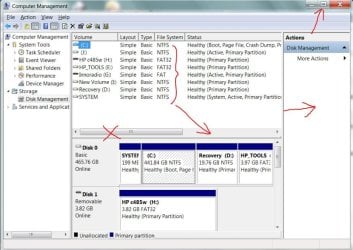
  • I have attached a copy of the disk management screen.
 

Attachments

  • disk management.png
    disk management.png
    40.8 KB · Views: 17

My Computer My Computer

At a glance

Windows 7 64 bitAMD dual core4Gb DIMMAMD vision E2
Computer Manufacturer/Model Number
HP Pavilion g6 Notebook PC
OS
Windows 7 64 bit
CPU
AMD dual core
Motherboard
n/a
Memory
4Gb DIMM
Graphics Card(s)
AMD vision E2
Sound Card
n/a
Monitor(s) Displays
AOC 19"
Hard Drives
n/a
PSU
n/a
Case
n/a
Cooling
n/a
Could you maximize the Disk Management please. It would help to be able to see all of the various partitions you have because the horizonal scroll bar doesn't work in a screenshot. :)

diskmgt.JPG
 

My Computer My Computer

At a glance

Win 7 Pro 64-bitIntel i5 2.4 Ghz8GB DDR3Intel HD 3000
Computer type
Laptop
Computer Manufacturer/Model Number
Sony Vaio VPCEB47GM Laptop
OS
Win 7 Pro 64-bit
CPU
Intel i5 2.4 Ghz
Memory
8GB DDR3
Graphics Card(s)
Intel HD 3000
Sound Card
IDT High Definition
Monitor(s) Displays
15.6 WGXA Anti-Glare LED
Screen Resolution
1280x800
Hard Drives
640Gb 7200rpm
Antivirus
MSE
Browser
Opera (primary) with IE9 backup
The 'crash' I mention happened 90 minutes after I first started up the machine straight out of the box. I noticed a window with a time ribbon quickly deleting some files from some partition - can't remember which. I didn't know what to do - so closed the lid to shut the computer down.

The restore function is currently enabled and I never disabled it. There is now a restore point for 21/12 and there was previously one for 14/12.
 

My Computer My Computer

At a glance

Windows 7 64 bitAMD dual core4Gb DIMMAMD vision E2
Computer Manufacturer/Model Number
HP Pavilion g6 Notebook PC
OS
Windows 7 64 bit
CPU
AMD dual core
Motherboard
n/a
Memory
4Gb DIMM
Graphics Card(s)
AMD vision E2
Sound Card
n/a
Monitor(s) Displays
AOC 19"
Hard Drives
n/a
PSU
n/a
Case
n/a
Cooling
n/a
That looks like a standard HP partition layout to me. Is the machine functioning properly now? If not and it really did just crash at only 90 minutes old I would take it back to the shop.
 

My Computer My Computer

At a glance

Microsoft Windows 7 Home Premium 64-bit Servi...Intel(R) Core(TM) i3 CPU M 330 @ 2.13GHz8 GB DDR3Intel(R) HD Graphics
Computer type
Laptop
Computer Manufacturer/Model Number
Hewlett-Packard/G62-107SA Notebook
OS
Microsoft Windows 7 Home Premium 64-bit Service Pack 1
CPU
Intel(R) Core(TM) i3 CPU M 330 @ 2.13GHz
Motherboard
Hewlett-Packard 1425
Memory
8 GB DDR3
Graphics Card(s)
Intel(R) HD Graphics
Sound Card
Realtek High Definition Audio
Monitor(s) Displays
Builtin
Screen Resolution
1366 x 768 x 32 bits (4294967296 colors) @ 60 Hz
Hard Drives
250 GB SATA Hard Disk Drive 7200 rpm
2TB Seagate GoFlex USB 2 Drive
1TB Iomega Prestige USB 2 Drive
1.5TB Iomega Prestige USB 2 Drive (Samsung)
2TB WD MyBook Live NAS.
Mouse
Logitech Anywhere MX
Internet Speed
152 Mbs download 10 Mbs upload
Antivirus
Norton 360
Browser
Chrome
  • I have attached a copy of the disk management screen.
RECOVERY and HP_TOOLS were always on disk. Manufacturer made them.
 

My Computer My Computer

At a glance

Microsoft Windows 7 Home Premium 64-bits 7601...Intel(R) Core(TM) i3 CPU M 370 @ 2.40GHz4,00 GBATI Mobility Radeon HD 5400 Series
Computer type
Laptop
Computer Manufacturer/Model Number
ACER ASPIRE 5742G
OS
Microsoft Windows 7 Home Premium 64-bits 7601 Multiprocessor Free Service Pack 1
CPU
Intel(R) Core(TM) i3 CPU M 370 @ 2.40GHz
Motherboard
Acer Aspire 5742G
Memory
4,00 GB
Graphics Card(s)
ATI Mobility Radeon HD 5400 Series
Sound Card
(1) AMD High Definition Audio Device (2) Realtek High Defi
Screen Resolution
1366 x 768 x 32 bits (4294967296 colors) @ 60 Hz
Hard Drives
WDC WD5000BEVT-22ZAT0
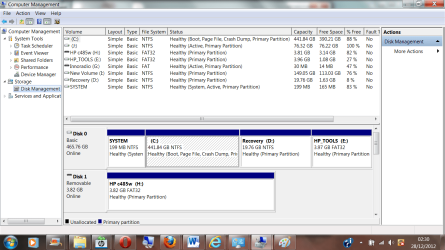
Maximised disk management screen - if marsmimar still requires it. Thanks for all other replies.
 

Attachments

  • disk management max.png
    disk management max.png
    71.6 KB · Views: 12

My Computer My Computer

At a glance

Windows 7 64 bitAMD dual core4Gb DIMMAMD vision E2
Computer Manufacturer/Model Number
HP Pavilion g6 Notebook PC
OS
Windows 7 64 bit
CPU
AMD dual core
Motherboard
n/a
Memory
4Gb DIMM
Graphics Card(s)
AMD vision E2
Sound Card
n/a
Monitor(s) Displays
AOC 19"
Hard Drives
n/a
PSU
n/a
Case
n/a
Cooling
n/a
Everything in your Disk Management looks good. I don't think anything was "created" with your crash. All partitions look normal. Does the PC run OK now or are you still having problems?
 

My Computer My Computer

At a glance

Windows 7 Home Premium 32-Bit - Build 7600 SP1Intel Core i3-2120 3.30GhzKingston 4 GB DDR3 1333 mhzAMD Radeon HD6670
Computer type
PC/Desktop
Computer Manufacturer/Model Number
Custom Build
OS
Windows 7 Home Premium 32-Bit - Build 7600 SP1
CPU
Intel Core i3-2120 3.30Ghz
Motherboard
Asus P8Z68-V LX Intel Z68 Socket H2 ATX
Memory
Kingston 4 GB DDR3 1333 mhz
Graphics Card(s)
AMD Radeon HD6670
Sound Card
Sound Blaster Audigy SE 24-Bit
Monitor(s) Displays
Asus VE228
Screen Resolution
1440 X 900
Hard Drives
OCZ Vertex 3 120 GB Sata 3 SSD ==
Kingston SH103/S3 120 G Hyper X 120 GB SSD ==
Western Digital 500 GB Caviar Green 7200 RPM ==
PSU
Corsair CX600M == 600 Watt
Case
NZXT Apollo - Silver with Clear Side Panel
Cooling
Three 120 mm Fans
Keyboard
Microsoft Natural 4000
Mouse
Microsoft Custom Optical 3000
Internet Speed
AT&T Fiber Optic Wireless Network
Antivirus
Microsoft Security Essentials
Browser
Chrome
Other Info
120 mm Blue LED Fan -- Three Blue LED Lazer Light Sticks
I agree with the others. Disk Management looks good. The only thing I might suggest is checking that you don't have any damaged or corrupt system files as a result of the crash. You could run a system file checker scan from an elevated command prompt (option two.) If problems are found, run the scan 3 times and reboot the computer after each scan.

http://www.sevenforums.com/tutorials/1538-sfc-scannow-command-system-file-checker.html
 

My Computer My Computer

At a glance

Win 7 Pro 64-bitIntel i5 2.4 Ghz8GB DDR3Intel HD 3000
Computer type
Laptop
Computer Manufacturer/Model Number
Sony Vaio VPCEB47GM Laptop
OS
Win 7 Pro 64-bit
CPU
Intel i5 2.4 Ghz
Memory
8GB DDR3
Graphics Card(s)
Intel HD 3000
Sound Card
IDT High Definition
Monitor(s) Displays
15.6 WGXA Anti-Glare LED
Screen Resolution
1280x800
Hard Drives
640Gb 7200rpm
Antivirus
MSE
Browser
Opera (primary) with IE9 backup
Computer is running well - good to know that recovery partition is part of system. Will use system file checker as a precaution.
 

My Computer My Computer

At a glance

Windows 7 64 bitAMD dual core4Gb DIMMAMD vision E2
Computer Manufacturer/Model Number
HP Pavilion g6 Notebook PC
OS
Windows 7 64 bit
CPU
AMD dual core
Motherboard
n/a
Memory
4Gb DIMM
Graphics Card(s)
AMD vision E2
Sound Card
n/a
Monitor(s) Displays
AOC 19"
Hard Drives
n/a
PSU
n/a
Case
n/a
Cooling
n/a
Back
Top