I'm going to be replacing a 500 GB hard drive with a 1 TB hard drive in a ThinkPad laptop. I created an image of the 500 GB drive using Macrium. It contains C:/, D:/ and a recovery partition. I will be extending the size of the C:/ and D:/ partitions and have read that the size of the recovery partition should not be changed or it will become inoperable. Just checking here to make sure that information is correct. Thanks.
Scuttlebutt has told me that one can restore a partition onto an equal-size or greater-size partition; one can restore an entire hard-drive X-size onto a target hard-drive x-size or larger. Quick example: I have restored an OS image from a 465GB partition onto or into a 467GB partition. I found it best to "parallel" the target HD to match the source HD -- quick example: OS/465GB-C, Data/467GB-D source was successfully restored onto OS/467.8GB-C and data/467.7GB-D. Just before restoring, I split the whole 931GB/1 giant C into 467 C and 467 D. What brought all of that on -- I was in a hurry, and totally toasted my hard-drive logically [not hardware-wise]; I fixed it all with the abovementioned steps.
My Computer
At a glance
Windows 7 Professional 64-bitDesktop i5; Acers i5 & i7desktop 16GB; 1 Acer 8GB & 1 Acer 16GB
Computer type
PC/Desktop
Computer Manufacturer/Model Number
Antec desktop; Acer Aspire laptops
OS
Windows 7 Professional 64-bit
CPU
Desktop i5; Acers i5 & i7
Memory
desktop 16GB; 1 Acer 8GB & 1 Acer 16GB
Hard Drives
1TB split into 2 equal partitions [OS and data] usable by RJS
Internet Speed
AT&T DSL
Browser
FF, GChrome, msIE
Other Info
Windows 7 Firewall, Emsisoft AM/AV, MSE [scan-only], SpywareBlaster, Ruiware/BillP combine
Thanks for your reply, RolandJS, but you're confusing me. I'm asking about the recovery partition. I can't see how to apply your example to my situation. Perhaps I'm missing something? My hard drive is failing so I want to install a new one and then copy the image of my old drive onto the new drive. Then I will assign unallocated space to both the C and D partitions and leave the recovery partition alone. I would like to confirm that this is what I should be doing as I have never done it before.
I forgot the part about the Recovery Partition, sorry! I was focused on your C and D partitions. You're aok with cloning the source HD onto a target HD, as long as the target HD is as large or larger than the source HD. You're good to go.
My Computer
At a glance
Windows 7 Professional 64-bitDesktop i5; Acers i5 & i7desktop 16GB; 1 Acer 8GB & 1 Acer 16GB
Computer type
PC/Desktop
Computer Manufacturer/Model Number
Antec desktop; Acer Aspire laptops
OS
Windows 7 Professional 64-bit
CPU
Desktop i5; Acers i5 & i7
Memory
desktop 16GB; 1 Acer 8GB & 1 Acer 16GB
Hard Drives
1TB split into 2 equal partitions [OS and data] usable by RJS
Internet Speed
AT&T DSL
Browser
FF, GChrome, msIE
Other Info
Windows 7 Firewall, Emsisoft AM/AV, MSE [scan-only], SpywareBlaster, Ruiware/BillP combine
No problem, Roland. But, I can't clone the hard drive as it is failing. I have an image that I want to use. I've read that method works and I'm pretty confident it will. At any rate, I have no choice but to use the image. What I am not clear on are the requirements/limitations related to the recovery program. I plan to leave it alone after the image is copied to the new drive but I am curious about it.
Question for pbcopter: Does the target HD have to have the partitions already created via a disk management utility? I had to do that when I was "transferring" SysRes, C, D from source HD onto target HD.
My Computer
At a glance
Windows 7 Professional 64-bitDesktop i5; Acers i5 & i7desktop 16GB; 1 Acer 8GB & 1 Acer 16GB
Computer type
PC/Desktop
Computer Manufacturer/Model Number
Antec desktop; Acer Aspire laptops
OS
Windows 7 Professional 64-bit
CPU
Desktop i5; Acers i5 & i7
Memory
desktop 16GB; 1 Acer 8GB & 1 Acer 16GB
Hard Drives
1TB split into 2 equal partitions [OS and data] usable by RJS
Internet Speed
AT&T DSL
Browser
FF, GChrome, msIE
Other Info
Windows 7 Firewall, Emsisoft AM/AV, MSE [scan-only], SpywareBlaster, Ruiware/BillP combine
After you successfully do your reimage, post a shot of Disk Management from the new drive, you more then likely have to move the recovery partition if it`s to the right of C.
My Computer
At a glance
Windows 10 Pro x64Intel Core i7 6700KGSkill TridentZ RGB 16GB 3600 16-16-16-36EVGA GTX 980 Ti SC x2
"Roland – according to macrium's knowledgebase, macrium reflect creates partitions when restoring an image to a new drive: v5: How to restore a backup image (Restore, v5)" -- EllenTK
After you successfully do your reimage, post a shot of Disk Management from the new drive, you more then likely have to move the recovery partition if it`s to the right of C.
AddRAM - Macrium shows this order of partitions on my image, from left to right: System, C:Windows, Data, Q: Lenovo Recovery. (The System partition is tiny, 1.46 GB.) Based on your comment, is this the physical order or just the order based on assigned drive letter? I believe I accessed the recovery partition in order to run some windows diagnostics when my hard drive began to fail. And the image was taken before that. So is it safe to assume the image will restore partitions to where they were? And since they worked where they were the restore will also work?
Macrium lets you resize partitions during a restore, which is what I thought I would do - expand both my C and D partitions as I will have twice as much space. Or is it safer to expand them using partition management software after I restore the image?
Thanks very much for your help. I haven't done this before (obviously) and I don't want to make any mistakes.
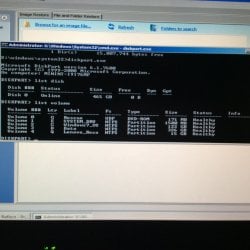
Here's a photo I took with my iPad of the diskpart/list volume command. I can boot into windows PE from Macrium's rescue disk but booting into windows even in safe mode is unreliable at this point. The image is clear when enlarged, but if it can't be made clear on your system, it lists:
Volume. ltr. label. Type
0 G. Rescue. DVD
1. E. System. Partition
2. C. Win7. Partition
3. D. Data. Partition
4. Q. Lenovo
recovery. Partition
I'm haven't bought the new HD yet. And was waiting for the rails to arrive by mail.
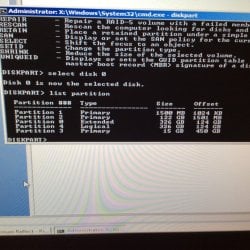
Here's what list partition reports. It looks different then list volume. Is it okay?
#. Type Size. Offset
1. primary. 1500mb. 1024kb
2. primary. 122gb. 1501mb
0. extended. 326gb. 124gb
4. logical. 326gb. 124gb
3. primary. 15gb. 450gb
After you successfully do your reimage, post a shot of Disk Management from the new drive, you more then likely have to move the recovery partition if it`s to the right of C.
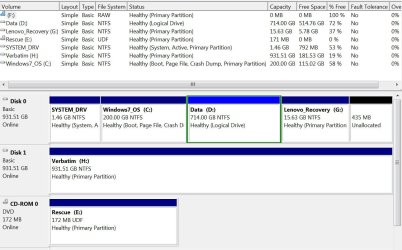
I finally installed the new hard drive. It seems to be working well and passed Lenovo's diagnostics, so I hope it lasts longer than the old one. I've uploaded a disk management screen shot. The only thing different, aside from the bigger size, is a bit of unallocated space (for some reason I thought it might be safer to leave some room) and the recovery partition is now G instead of Q. I assume I can change it back to Q with no ill effects?And should I allocate the extra space?



 ata, Q: Lenovo Recovery. (The System partition is tiny, 1.46 GB.) Based on your comment, is this the physical order or just the order based on assigned drive letter? I believe I accessed the recovery partition in order to run some windows diagnostics when my hard drive began to fail. And the image was taken before that. So is it safe to assume the image will restore partitions to where they were? And since they worked where they were the restore will also work?