Recovery problem! wimapply and bootmgr errors

please help

New member
Local time
11:53 AM
Messages
11
Hello guys,

I am in a trouble with my laptop Emachines G730Z.

Recently i deleted all of the partitions and performed a full format(long story).

Anyways, I deleted and formatted "everything". Then i tried to install a W7 32 bit cd, it didn't work. I came to know that my comp is for 64 bit windows.

So I obtained the recovery discs for this model.

Now I have the recovery discs (4 discs) and try to install it several times. The problem is after i put the 4th disc it stops during a progress and gives this error:

"WIMAPPLYimage fail"

And it is stuck like this. Then i make a forced shutdown and restart and this time comes the following message after start up:

"Bootmgr is missing ctrl+alt+del to restart"

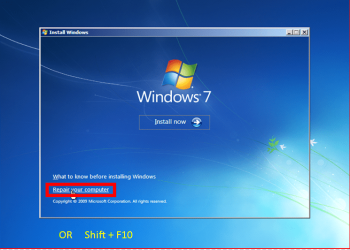
I cannot use repair windows tools since nothing is installed. Recovery discs doesn't have any option to format. So i can only format using 32 bit Windows 7 and then try again with recovery discs. But then the same things happen.

Please help! I am desperate, even I have recovery discs i cannot solve:(
 

My Computer

Computer Manufacturer/Model Number
G730Z
OS
Windows 7 - 64 bit
CPU
Intel Pentium P6200
Memory
4 GB DDR3
Graphics Card(s)
Intel HD Graphics
Monitor(s) Displays
17.3'' 16:9 HD+LCD
Hard Drives
500 GB HDD
32bit Windows should have no problems installing on a 64bit processor. What was the problem there?

I take it there's a sticker somewhere underneath with your Product Key on it, what version is listed there?
 

My Computer

Computer Manufacturer/Model Number
Self built
OS
Windows 7 Ultimate x64
CPU
Intel Pentium Dual Core E5200 2.5GHz (3.77GHz OC)
Motherboard
Asus P5Q-E
Memory
Corsair 4GB DDR2 (4x1GB CM2X1024-6400C4)
Graphics Card(s)
Palit GeForce GTS 250 (1024MB)
Sound Card
On Board (ADI AD2000B 8ch HD)
Monitor(s) Displays
Samsung 32in LCD TV
Screen Resolution
1360x768
Hard Drives
2 x 1TB Samsung 103SJ (Raid0)
2 x External 500GB Samsung 502IJ (NexStar 3 HD Enclosures)
PSU
550W Antec Neo HE 550
Case
Antec P180
Cooling
Xigmatex Red Scorpion CPU Cooler. 3x120mm Fans
Keyboard
Logitech MX5000 Laser (Combo)
Mouse
Logitech MX5000 Laser (Combo)
Internet Speed
ADSL2+ (avg 10 Mbps Down, 0.80 Mbps up)
Other Info
Gigabyte GN-WP01GS 54g Wireless Lan Card
with 32 bit cd it stops installation and stucks(because it doesnt belong to this computer). itdoesnt work at all i tried hundreds of times.

so please what can i do? i ahve the recovery cds and the problems i mentioned.

the recovery cds are for this model. they are original. i took from the company to install
 

My Computer

Computer Manufacturer/Model Number
G730Z
OS
Windows 7 - 64 bit
CPU
Intel Pentium P6200
Memory
4 GB DDR3
Graphics Card(s)
Intel HD Graphics
Monitor(s) Displays
17.3'' 16:9 HD+LCD
Hard Drives
500 GB HDD
Did you define a partition large enough (25GB or more) to where to install.
 

My Computer

Computer Manufacturer/Model Number
HP, Dell, Gateway, Toshiba - 4 laptops and 2 desktops
OS
Vista, Windows7, Mint Mate, Zorin, Windows 8
CPU
from 1.6GHz Duo to i7
Monitor(s) Displays
2x HP w2207
Hard Drives
5x HDD, 7x SSD, 12x Externals
Keyboard
with trackball - no mices
Mouse
Trackball mice
Internet Speed
DSL 6000
Ray, I would partition. With a predefined active partition you avoid the 100MB system partition.
 

My Computer

Computer Manufacturer/Model Number
HP, Dell, Gateway, Toshiba - 4 laptops and 2 desktops
OS
Vista, Windows7, Mint Mate, Zorin, Windows 8
CPU
from 1.6GHz Duo to i7
Monitor(s) Displays
2x HP w2207
Hard Drives
5x HDD, 7x SSD, 12x Externals
Keyboard
with trackball - no mices
Mouse
Trackball mice
Internet Speed
DSL 6000
You can set the partitions with Acer OEM manufacturer's Recovery Disks.
 

My Computer

OS
ME/XP/Vista/Win7
You can set the partitions with Acer OEM manufacturer's Recovery Disks.
And that gets you out of the 100MB system partition ?? I have no experience with Acers.
 

My Computer

Computer Manufacturer/Model Number
HP, Dell, Gateway, Toshiba - 4 laptops and 2 desktops
OS
Vista, Windows7, Mint Mate, Zorin, Windows 8
CPU
from 1.6GHz Duo to i7
Monitor(s) Displays
2x HP w2207
Hard Drives
5x HDD, 7x SSD, 12x Externals
Keyboard
with trackball - no mices
Mouse
Trackball mice
Internet Speed
DSL 6000
The Acer OEM manufacturer's Recovery Disks will Reinstall the F key Recovery Partition.
 

My Computer

OS
ME/XP/Vista/Win7
The Acer OEM manufacturer's Recovery Disks will Reinstall the F key Recovery Partition.
Yeah, that was the same with the HP recovery DVD that I once used for Vista about 4 years ago.
 

My Computer

Computer Manufacturer/Model Number
HP, Dell, Gateway, Toshiba - 4 laptops and 2 desktops
OS
Vista, Windows7, Mint Mate, Zorin, Windows 8
CPU
from 1.6GHz Duo to i7
Monitor(s) Displays
2x HP w2207
Hard Drives
5x HDD, 7x SSD, 12x Externals
Keyboard
with trackball - no mices
Mouse
Trackball mice
Internet Speed
DSL 6000
theog you are telling me to use "CLEAN ALL command".

but i have no OS installed and i cannot install any? Both 32 bit Windows and 64 bit recovery is problematic as i wrote.

now i deleted every partition from the 32 bit windows setup screen. and without formatting i shut down the computer. now i started trying with the recovery cds again.

i tried this option before but i am trying again. i don't think it will work.

let me put it again: i have no access to any OS. i have only access to startup menu and 32 bit Windows partitioning screen, nothing more.

and for the recovery discs, it is stuck when it tries to copy the discs to f: or d: and gives "WIMAPPLYimage fail" error.

please i dont know what to do
 

My Computer

Computer Manufacturer/Model Number
G730Z
OS
Windows 7 - 64 bit
CPU
Intel Pentium P6200
Memory
4 GB DDR3
Graphics Card(s)
Intel HD Graphics
Monitor(s) Displays
17.3'' 16:9 HD+LCD
Hard Drives
500 GB HDD
ok now i got it theog. i will give try that method today.

now i have to go to work. i hope i can find you all guys later

best
 

My Computer

Computer Manufacturer/Model Number
G730Z
OS
Windows 7 - 64 bit
CPU
Intel Pentium P6200
Memory
4 GB DDR3
Graphics Card(s)
Intel HD Graphics
Monitor(s) Displays
17.3'' 16:9 HD+LCD
Hard Drives
500 GB HDD
just do the CLEAN command (clean all isn't necessary). This will remove all partitions on disk. Now reboot again from DVD.
Now install 32bits or 64bits win7 from installation DVD. Of course the right language and version (home premium, professional, ultimate).
 
Last edited:

My Computer

Computer type
Laptop
Computer Manufacturer/Model Number
ACER ASPIRE 5742G
OS
Microsoft Windows 7 Home Premium 64-bits 7601 Multiprocessor Free Service Pack 1
CPU
Intel(R) Core(TM) i3 CPU M 370 @ 2.40GHz
Motherboard
Acer Aspire 5742G
Memory
4,00 GB
Graphics Card(s)
ATI Mobility Radeon HD 5400 Series
Sound Card
(1) AMD High Definition Audio Device (2) Realtek High Defi
Screen Resolution
1366 x 768 x 32 bits (4294967296 colors) @ 60 Hz
Hard Drives
WDC WD5000BEVT-22ZAT0
On my Acer 7551 there is the PQService (hidden Partition) even though you did a full format the partition could be enabled in your bios. It could be causing the problem. Also if you've reset the bios to default. your ACHI setting may have rolled back to IDE mode. Not sure if that would make a difference though.

Reading your post the "WIMAPPLYimage fail" sounds like a read/write error? Scratched CD/DVDs or optical cd drive is having trouble reading the recovery discs. Hmmm. Be sure only the power and keyboard are the only things plugged in to.

The partition wizard iso. is bootable and can give you detailed info about your HDD. I don't think I'm allowed to post a link though. it has an option to rebuild mbr and edit the current bootmgr.
 
Last edited:

My Computer

Computer Manufacturer/Model Number
Acer 7551
OS
Windows 7 Professional 64bit
CPU
AMD Phenom X4 N970 2.2 GHz
Motherboard
AMD
Memory
4 GB DDR3 Upgrade Available
Graphics Card(s)
AMD ATI Mobility Radeon HD 4250 1919 MB Hyper Memory
Sound Card
Realtek High Definition Audio Bus
Monitor(s) Displays
17.3 HD+ LED, LCD
Screen Resolution
1600x900
Hard Drives
Model WDC WD50 00BEVT-22A0RT0 SATA Disk Device
Keyboard
Standard PS/2 Keyboard
Mouse
PS/2 Compatible Mouse
just do the CLEAN command (clean all isn't necessary). This will remove all partitions on disk. No reboot again from DVD.
Now install 32bits or 64bits win7 from installation DVD. Of course the right language and version (home premium, professional, ultimate).
Yeah, with 'All', it will write all zeros. That may take a while.
 

My Computer

Computer Manufacturer/Model Number
HP, Dell, Gateway, Toshiba - 4 laptops and 2 desktops
OS
Vista, Windows7, Mint Mate, Zorin, Windows 8
CPU
from 1.6GHz Duo to i7
Monitor(s) Displays
2x HP w2207
Hard Drives
5x HDD, 7x SSD, 12x Externals
Keyboard
with trackball - no mices
Mouse
Trackball mice
Internet Speed
DSL 6000
The Acer partitioning tool does not like partitioning a dirty HD Drive, therefore CLEAN ALL is need.
 

My Computer

OS
ME/XP/Vista/Win7
The Acer partitioning tool does not like partitioning a dirty HD Drive, therefore CLEAN ALL is need.
Very strange if that's true
 

My Computer

Computer type
Laptop
Computer Manufacturer/Model Number
ACER ASPIRE 5742G
OS
Microsoft Windows 7 Home Premium 64-bits 7601 Multiprocessor Free Service Pack 1
CPU
Intel(R) Core(TM) i3 CPU M 370 @ 2.40GHz
Motherboard
Acer Aspire 5742G
Memory
4,00 GB
Graphics Card(s)
ATI Mobility Radeon HD 5400 Series
Sound Card
(1) AMD High Definition Audio Device (2) Realtek High Defi
Screen Resolution
1366 x 768 x 32 bits (4294967296 colors) @ 60 Hz
Hard Drives
WDC WD5000BEVT-22ZAT0
During an installation failure the only benefit provided from Diskpart is wiping the boot sector which can be done with Clean Command. Clean All is to overwrite data so it can't be retrieved later and imparts no extra benefit for installation.

In your case we could have helped you troubleshoot either the 32 or 64-bit Win7 Clean reinstall as either will work and it is incorrect to say otherwise here.

Sometimes manufacturers will say that you are restricted to 64 bit because that's the only drivers they provide, but today's processors will support either and the Win7 EULA specifically says you can use either bit version with each license no matter what the manufacturer says. Almost all drivers are in the Win7 installer and others can be found via Google if not on the manufacturer's Support Downloads webpage.

Once you change to activating with the COA sticker Product Key you are protected in MS Activation servers and have no ties to the manufacturer any longer.

If your disks are faulty you can ask manufacturer to replace them, or try booting the Win7 installation DVD again to clean reinstall your version in your preference of 32- or 64-bit. As the installer itself could be the problem, let us know the licensed version on your COA sticker so we can provide the latest.
 
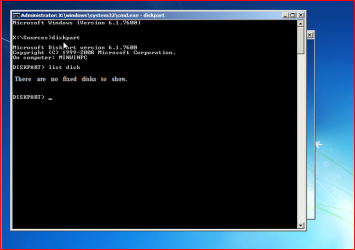
hey guys, clean works but "clean all" command gives the following error:

"DiskPart has encountered an error: The request could not be performed because of an I/O Device error. See the system event log for more information"

nothing is plugged extra.
 

My Computer

Computer Manufacturer/Model Number
G730Z
OS
Windows 7 - 64 bit
CPU
Intel Pentium P6200
Memory
4 GB DDR3
Graphics Card(s)
Intel HD Graphics
Monitor(s) Displays
17.3'' 16:9 HD+LCD
Hard Drives
500 GB HDD
Back
Top