Recurring CorelDraw App Crash

kilobravo

New member
Local time
10:42 AM
Messages
9
Well, I HOPE this is the correct board for this post, the "Crashes" board seems to be for BSOD crashes only.

Anyway, I have a serious recurring program crash "uh..stopped working" that despite countless hours of Web surfing and reading, I can't solve. The app is CorelDraw X5 and while I can make the crash recur, I can't pin down exactly what action caused it. I have the same problem on two different machines, desktop and notebook, so I don't think it's hardware-related.

I ran the SF Diag tool and have attached the associated ZIP file, hopefully someone here can at least get me going in the right direction.

TIA
KB
 

Attachments

My Computer

Computer Manufacturer/Model Number
home built
OS
Win7 Pro 64
CPU
Core 2 Quad
Motherboard
Asus P5WE
Memory
8gb
Graphics Card(s)
Dual nVidia 8600 GT
Sound Card
mobo
Monitor(s) Displays
3 Samsung LCD's
Hard Drives
Samsung 240gb SSD boot
4 SATA spindle data drives
PSU
thermaltake 1kw
Welcome aboard.

You need to update your BIOS, as I think.
Event[3618]:
Log Name: System
Source: Microsoft-Windows-HAL
Date: 2012-04-10T19:18:28.264
Event ID: 12
Task: N/A
Level: Error
Opcode: Info
Keyword: N/A
User: N/A
User Name: N/A
Computer: ASUSP5WE
Description:
The platform firmware has corrupted memory across the previous system power transition. Please check for updated firmware for your system.
Code:
BIOS Version/Date    American Megatrends Inc. 1203,[COLOR=Red][B] 5/7/2009[/B][/COLOR]
It is somehow old, and it requires an update.

You need to update nvidia display driver.
Event[2270]:
Log Name: System
Source: Microsoft-Windows-WindowsUpdateClient
Date: 2012-04-10T13:53:19.683
Event ID: 20
Task: Windows Update Agent
Level: Error
Opcode: Installation
Keyword: Installation,Failure
User: S-1-5-18
User Name: NT AUTHORITY\SYSTEM
Computer: ASUSP5WE
Description:
Installation Failure: Windows failed to install the following update with error 0x80070103: nVidia - Display, Other hardware - NVIDIA GeForce 8600 GT
.
.Net framework security update failed to be installed.

Event[2845]:
Log Name: System
Source: Microsoft-Windows-WindowsUpdateClient
Date: 2012-04-10T15:28:22.172
Event ID: 20
Task: Windows Update Agent
Level: Error
Opcode: Installation
Keyword: Installation,Failure
User: S-1-5-18
User Name: NT AUTHORITY\SYSTEM
Computer: ASUSP5WE
Description:
Installation Failure: Windows failed to install the following update with error 0x80242016: Security Update for Microsoft .NET Framework 3.5.1 on Windows 7 and Windows Server 2008 R2 for x64-based Systems (KB2656372)
.
Try this tutorial: http://www.sevenforums.com/tutorials/91738-windows-update-reset.html


If you have an USB disk attached, remove it.


The file unlocker you are using is saying to be no matching to your system (bitlocker may be, or any third party program?) Disable it.


► Finally, Enable Driver Verifier, run it for 24 hours or the occurrence of the next crash.


Report us.
 

My Computer

Computer type
PC/Desktop
Computer Manufacturer/Model Number
Self Assembled
OS
Microsoft Windows 10 Pro Insider Preview 64-bit
CPU
Intel(R) Core(TM) i3-4130 CPU @ 3.40GHz
Motherboard
Gigabyte Technology Co., Ltd. B85M-D3H
Memory
Corsair Vengence 4GB x2 (8.00GB Dual-Channel DDR3 @ 798MHz)
Graphics Card(s)
2047MB GeForce GTS 450 (ZOTAC International)
Sound Card
Onboard (Realtek High Definition Audio)
Monitor(s) Displays
LG Flatron E2040T
Screen Resolution
1600x900
Hard Drives
Western Digital 1 TB
Seagate 500 GB
PSU
Corsair VS550
Case
Cooler Master K380
Cooling
Cooler Master Seidon 120V Plus
Keyboard
Logitech MK260r
Mouse
Logitech MK260r
Internet Speed
PMPL Broadband
Antivirus
Windows Defender + MBAM
Browser
Firefox
Other Info
Dell Studio 15" Laptop
Arc: Thanks for the welcome aboard and for the quick response.

I do not know why those dump files told you the BIOS and display adapter needed updating, they do not. I have the last BIOS version for this Asus board, 1203 and the nVidia driver is the latest dated 8/30/12. As for .Net framework, it may have been one of the things that didn't get re-updated after I rolled back to a SRP dated about a week ago that I know was good. I just ran Windoze Update and did 40-some updates.

Next, I attempted to replicate the app crash and it took less than a minute so, I have re-run SF Diags and, I created a dump file from Task Manager on the coreldrw.exe process but unfortunately, it's 600mb so I didn't include it in the SF ZIP. Please let me know if the newest data is still showing BIOS and Display Driver out of date along with the Net Framework baloney. If so, I think I will be forced to do a clean install of Win7.

Thanks again,

KB
 

Attachments

My Computer

Computer Manufacturer/Model Number
home built
OS
Win7 Pro 64
CPU
Core 2 Quad
Motherboard
Asus P5WE
Memory
8gb
Graphics Card(s)
Dual nVidia 8600 GT
Sound Card
mobo
Monitor(s) Displays
3 Samsung LCD's
Hard Drives
Samsung 240gb SSD boot
4 SATA spindle data drives
PSU
thermaltake 1kw
Kilo, your dump is not showing anything that informative, that is why I suggested you to enable driver verifier.
Code:
..................................................
*******************************************************************************
*                                                                             *
*                        Bugcheck Analysis                                    *
*                                                                             *
*******************************************************************************

Use !analyze -v to get detailed debugging information.

BugCheck A, {10, 2, 1, fffff80002aa7340}

Probably caused by : memory_corruption ( nt!MiReplenishPageSlist+c0 )

Followup: MachineOwner
---------
It is the initial report that your dump gives.

I got your bios info from the MSINFO.sys you have uploaded.

I got the nvidia and .net info from the eventsys.txt file you have uploaded.

all, all those are same in the latest zip you supplied, too. :(
 

My Computer

Computer type
PC/Desktop
Computer Manufacturer/Model Number
Self Assembled
OS
Microsoft Windows 10 Pro Insider Preview 64-bit
CPU
Intel(R) Core(TM) i3-4130 CPU @ 3.40GHz
Motherboard
Gigabyte Technology Co., Ltd. B85M-D3H
Memory
Corsair Vengence 4GB x2 (8.00GB Dual-Channel DDR3 @ 798MHz)
Graphics Card(s)
2047MB GeForce GTS 450 (ZOTAC International)
Sound Card
Onboard (Realtek High Definition Audio)
Monitor(s) Displays
LG Flatron E2040T
Screen Resolution
1600x900
Hard Drives
Western Digital 1 TB
Seagate 500 GB
PSU
Corsair VS550
Case
Cooler Master K380
Cooling
Cooler Master Seidon 120V Plus
Keyboard
Logitech MK260r
Mouse
Logitech MK260r
Internet Speed
PMPL Broadband
Antivirus
Windows Defender + MBAM
Browser
Firefox
Other Info
Dell Studio 15" Laptop
OK, ARC, I guess I'm resigned to yet another clean install of Windoze..<sigh>

Thanks
 

My Computer

Computer Manufacturer/Model Number
home built
OS
Win7 Pro 64
CPU
Core 2 Quad
Motherboard
Asus P5WE
Memory
8gb
Graphics Card(s)
Dual nVidia 8600 GT
Sound Card
mobo
Monitor(s) Displays
3 Samsung LCD's
Hard Drives
Samsung 240gb SSD boot
4 SATA spindle data drives
PSU
thermaltake 1kw
Sorry to say, but this thing may be there, too
Event[3618]:
Log Name: System
Source: Microsoft-Windows-HAL
Date: 2012-04-10T19:18:28.264
Event ID: 12
Task: N/A
Level: Error
Opcode: Info
Keyword: N/A
User: N/A
User Name: N/A
Computer: ASUSP5WE
Description:
The platform firmware has corrupted memory across the previous system power transition. Please check for updated firmware for your system.
As the clean install will do nothing to this.

It is the same for the display driver, too.
You are to do all those manually. :(
 

My Computer

Computer type
PC/Desktop
Computer Manufacturer/Model Number
Self Assembled
OS
Microsoft Windows 10 Pro Insider Preview 64-bit
CPU
Intel(R) Core(TM) i3-4130 CPU @ 3.40GHz
Motherboard
Gigabyte Technology Co., Ltd. B85M-D3H
Memory
Corsair Vengence 4GB x2 (8.00GB Dual-Channel DDR3 @ 798MHz)
Graphics Card(s)
2047MB GeForce GTS 450 (ZOTAC International)
Sound Card
Onboard (Realtek High Definition Audio)
Monitor(s) Displays
LG Flatron E2040T
Screen Resolution
1600x900
Hard Drives
Western Digital 1 TB
Seagate 500 GB
PSU
Corsair VS550
Case
Cooler Master K380
Cooling
Cooler Master Seidon 120V Plus
Keyboard
Logitech MK260r
Mouse
Logitech MK260r
Internet Speed
PMPL Broadband
Antivirus
Windows Defender + MBAM
Browser
Firefox
Other Info
Dell Studio 15" Laptop
Not sure what you mean by,

"as the clean install will do nothing to this".

Are you saying that even a reformat of the drive and a fresh install of Windows won't cure the HAL 3618 error about the firmware corrupting memory? If so, does that mean a new motherboard?

Also, for what it's worth, I tried the Driver Verification and it BSOD on the next boot. I had to drop back to "the last known good Windows condition".
 

My Computer

Computer Manufacturer/Model Number
home built
OS
Win7 Pro 64
CPU
Core 2 Quad
Motherboard
Asus P5WE
Memory
8gb
Graphics Card(s)
Dual nVidia 8600 GT
Sound Card
mobo
Monitor(s) Displays
3 Samsung LCD's
Hard Drives
Samsung 240gb SSD boot
4 SATA spindle data drives
PSU
thermaltake 1kw
Not sure what you mean by,

"as the clean install will do nothing to this".

Are you saying that even a reformat of the drive and a fresh install of Windows won't cure the HAL 3618 error about the firmware corrupting memory?
Most probably, as it will see the same BIOS.
If so, does that mean a new motherboard?
Not exactly, but maybe a new BIOS version. IF needed, we may ask some help from our hardware experts who will guide you in it in a better manner.

Also, for what it's worth, I tried the Driver Verification and it BSOD on the next boot. I had to drop back to "the last known good Windows condition".
Can you tell me what's the Bugcheck code? The information is needed, and the dump too, if possible.

And, if yours is a OEM license, motherboard changing may cause the license to turn void.
 

My Computer

Computer type
PC/Desktop
Computer Manufacturer/Model Number
Self Assembled
OS
Microsoft Windows 10 Pro Insider Preview 64-bit
CPU
Intel(R) Core(TM) i3-4130 CPU @ 3.40GHz
Motherboard
Gigabyte Technology Co., Ltd. B85M-D3H
Memory
Corsair Vengence 4GB x2 (8.00GB Dual-Channel DDR3 @ 798MHz)
Graphics Card(s)
2047MB GeForce GTS 450 (ZOTAC International)
Sound Card
Onboard (Realtek High Definition Audio)
Monitor(s) Displays
LG Flatron E2040T
Screen Resolution
1600x900
Hard Drives
Western Digital 1 TB
Seagate 500 GB
PSU
Corsair VS550
Case
Cooler Master K380
Cooling
Cooler Master Seidon 120V Plus
Keyboard
Logitech MK260r
Mouse
Logitech MK260r
Internet Speed
PMPL Broadband
Antivirus
Windows Defender + MBAM
Browser
Firefox
Other Info
Dell Studio 15" Laptop
No idea what you mean by "Bugcheck code" Also, no idea what "dump" you are requesting.

My install is a retail-purchased OEM copy of Win7 Pro so shouldn't be any licensing issues, I reformatted and re-installed a few months back when I put a solid state boot drive in.
 

My Computer

Computer Manufacturer/Model Number
home built
OS
Win7 Pro 64
CPU
Core 2 Quad
Motherboard
Asus P5WE
Memory
8gb
Graphics Card(s)
Dual nVidia 8600 GT
Sound Card
mobo
Monitor(s) Displays
3 Samsung LCD's
Hard Drives
Samsung 240gb SSD boot
4 SATA spindle data drives
PSU
thermaltake 1kw
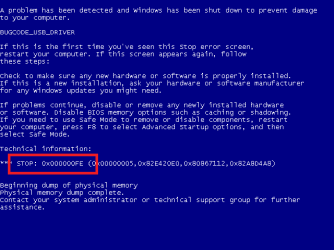
bugcode_usb_driver.PNG
This is a bugcheck code... the "stop ............" thing. And the dump is what you uploaded twice earlier.

Usually OEM licenses are tagged with hardware (specially motherboard) and cannot be activated on any other motherboard.
Users who run a Microsoft Original Equipment Manufacturer (OEM) operating system may upgrade or replace most of the hardware components on the computer and still maintain the license for the original Microsoft OEM operating system software provided by the OEM, with the exception of an upgrade or a replacement of the motherboard.
Source

That is why, I suggest you to update the BIOS, if you dont think that is is really that old that I am getting from the MSINFO32.
 

My Computer

Computer type
PC/Desktop
Computer Manufacturer/Model Number
Self Assembled
OS
Microsoft Windows 10 Pro Insider Preview 64-bit
CPU
Intel(R) Core(TM) i3-4130 CPU @ 3.40GHz
Motherboard
Gigabyte Technology Co., Ltd. B85M-D3H
Memory
Corsair Vengence 4GB x2 (8.00GB Dual-Channel DDR3 @ 798MHz)
Graphics Card(s)
2047MB GeForce GTS 450 (ZOTAC International)
Sound Card
Onboard (Realtek High Definition Audio)
Monitor(s) Displays
LG Flatron E2040T
Screen Resolution
1600x900
Hard Drives
Western Digital 1 TB
Seagate 500 GB
PSU
Corsair VS550
Case
Cooler Master K380
Cooling
Cooler Master Seidon 120V Plus
Keyboard
Logitech MK260r
Mouse
Logitech MK260r
Internet Speed
PMPL Broadband
Antivirus
Windows Defender + MBAM
Browser
Firefox
Other Info
Dell Studio 15" Laptop
Are you using two valid Corel licenses? you said this is happening on two machines. My license is only for one machine at any time.
 

My Computer

Computer type
PC/Desktop
Computer Manufacturer/Model Number
Home Built Desktop By DataTech
OS
Windows 7 Ultimate X64 SP1
CPU
Intel i5-2550K, Differing ~4.4-4.8GHz No built in GPU
Motherboard
ASUS P8Z68-V PRO/GEN3
Memory
16GB G.Skill Sniper 1866MHz @ 2133MHz 2x8GB
Graphics Card(s)
ASUS GTX650TIB-DC2OC-2GD5, (650TI Boost)
Sound Card
Onboard Realtek 5-1
Monitor(s) Displays
Samsung P2570HD
Screen Resolution
1920x1080
Hard Drives
Samsung 840 Pro 256GB SSD for OS, 500GB Seagate Constellation (Enterprise drive) for Data
PSU
Corsair HX650W
Case
Inwin Dragon Rider
Cooling
Hyper 212 EVO w/two Noctua fans, push-pull, @1300 RPM
Keyboard
E-Z Eyes, bright yellow keys with large characters
Mouse
steelseries SENSEI Laser Pro Gaming
Internet Speed
48-51Mbs Mbs down, 11 Mbs up Xfinity Cable
Antivirus
Norton Internet Security 2013
Browser
IE 10, Opera, Pale Moon if needed
Other Info
4 case fans, LG BluRay-RE, ASUS DVD-RW, Mr. Fusion power supply, 1.21 gigawatts.
I know the BIOS is the newest AND the last firmware revision for this 3-4 year old mobo. It shows the correct number on POST...rev 1203 and there are none newer. As for Microsoft, I've never had a problem with hardware upgrades in the past but if I do buy a new mobo and this OEM WIN7 will NOT install, they'll be getting a call from me.

I HAVE to believe the firmware flash I did a few months ago when I found the final BIOS revision went in correctly as the machine posts fine and Windoze runs fine except for this one app.

Anyway, thanks for trying, I really had hope that someone a whole lot Windoze smarter than me would be able to solve the problem but apparently, that isn't going to happen.

Really appreciate you trying to help, Arc..

KB

I don't really want to go back to the BSOD routine caused by Driver Verify as I don't think it's going to help. I have no other software issues with many, many major applications installed, only CorelDraw dies on me and as before, I still don't have a clue why. But, it does that on my notebook as well, totally separate hardware so I don't think it's a hardware issue. But, I'm fed up with the program and if it doesn't run correctly after the fresh install and HOURS AND HOURS or application re-installs, I'll probably just give up.
 

My Computer

Computer Manufacturer/Model Number
home built
OS
Win7 Pro 64
CPU
Core 2 Quad
Motherboard
Asus P5WE
Memory
8gb
Graphics Card(s)
Dual nVidia 8600 GT
Sound Card
mobo
Monitor(s) Displays
3 Samsung LCD's
Hard Drives
Samsung 240gb SSD boot
4 SATA spindle data drives
PSU
thermaltake 1kw
We wish you luck. OEM w7 licenses are tied to the first motherboard they are installed on. You can, however, change drive, RAM, GPU etc and still be OK. They will "see" a new board as a different PC.

there have been case though that people were able to activate the OS with a robo call to MS.

You can try reinstalling Corel too.
 

My Computer

Computer type
PC/Desktop
Computer Manufacturer/Model Number
Home Built Desktop By DataTech
OS
Windows 7 Ultimate X64 SP1
CPU
Intel i5-2550K, Differing ~4.4-4.8GHz No built in GPU
Motherboard
ASUS P8Z68-V PRO/GEN3
Memory
16GB G.Skill Sniper 1866MHz @ 2133MHz 2x8GB
Graphics Card(s)
ASUS GTX650TIB-DC2OC-2GD5, (650TI Boost)
Sound Card
Onboard Realtek 5-1
Monitor(s) Displays
Samsung P2570HD
Screen Resolution
1920x1080
Hard Drives
Samsung 840 Pro 256GB SSD for OS, 500GB Seagate Constellation (Enterprise drive) for Data
PSU
Corsair HX650W
Case
Inwin Dragon Rider
Cooling
Hyper 212 EVO w/two Noctua fans, push-pull, @1300 RPM
Keyboard
E-Z Eyes, bright yellow keys with large characters
Mouse
steelseries SENSEI Laser Pro Gaming
Internet Speed
48-51Mbs Mbs down, 11 Mbs up Xfinity Cable
Antivirus
Norton Internet Security 2013
Browser
IE 10, Opera, Pale Moon if needed
Other Info
4 case fans, LG BluRay-RE, ASUS DVD-RW, Mr. Fusion power supply, 1.21 gigawatts.
Are you using two valid Corel licenses? you said this is happening on two machines. My license is only for one machine at any time.

Same license and as far as I know, Corel allows the install on multiple machines as long as only one machine is used at a time.
 

My Computer

Computer Manufacturer/Model Number
home built
OS
Win7 Pro 64
CPU
Core 2 Quad
Motherboard
Asus P5WE
Memory
8gb
Graphics Card(s)
Dual nVidia 8600 GT
Sound Card
mobo
Monitor(s) Displays
3 Samsung LCD's
Hard Drives
Samsung 240gb SSD boot
4 SATA spindle data drives
PSU
thermaltake 1kw
We wish you luck. OEM w7 licenses are tied to the first motherboard they are installed on. You can, however, change drive, RAM, GPU etc and still be OK. They will "see" a new board as a different PC.

there have been case though that people were able to activate the OS with a robo call to MS.

You can try reinstalling Corel too.

As I said before, my Win7 is a RETAIL copy purchased separately and I have already checked and a retail copy can be used on upgraded hardware. Only OEM copies have the mobo restriction.
 

My Computer

Computer Manufacturer/Model Number
home built
OS
Win7 Pro 64
CPU
Core 2 Quad
Motherboard
Asus P5WE
Memory
8gb
Graphics Card(s)
Dual nVidia 8600 GT
Sound Card
mobo
Monitor(s) Displays
3 Samsung LCD's
Hard Drives
Samsung 240gb SSD boot
4 SATA spindle data drives
PSU
thermaltake 1kw
Quick followup..did a clean install of Win7 and the first app I installed was the problem app, CorelDraw X5 followed by its SP3 file which includes SP1/2. Within 60 seconds of starting to work on an illustration, the program crashed.

So, looks like I have given myself at least 3 days of hell for nothing...geeeze, what a drag.
 

My Computer

Computer Manufacturer/Model Number
home built
OS
Win7 Pro 64
CPU
Core 2 Quad
Motherboard
Asus P5WE
Memory
8gb
Graphics Card(s)
Dual nVidia 8600 GT
Sound Card
mobo
Monitor(s) Displays
3 Samsung LCD's
Hard Drives
Samsung 240gb SSD boot
4 SATA spindle data drives
PSU
thermaltake 1kw
No idea what you mean by "Bugcheck code" Also, no idea what "dump" you are requesting.

My install is a retail-purchased OEM copy of Win7 Pro so shouldn't be any licensing issues, I reformatted and re-installed a few months back when I put a solid state boot drive in.
Here is a quote of your statement. One can buy an OEM version from a retailer, but that does not make it a retail copy. OEM version do not have any MS support.

kilobravo said:
Same license and as far as I know, Corel allows the install on multiple machines as long as only one machine is used at a time.
"Used" or "In use" means the same as "Installed on" by all EULAs I have read.
 

My Computer

Computer type
PC/Desktop
Computer Manufacturer/Model Number
Home Built Desktop By DataTech
OS
Windows 7 Ultimate X64 SP1
CPU
Intel i5-2550K, Differing ~4.4-4.8GHz No built in GPU
Motherboard
ASUS P8Z68-V PRO/GEN3
Memory
16GB G.Skill Sniper 1866MHz @ 2133MHz 2x8GB
Graphics Card(s)
ASUS GTX650TIB-DC2OC-2GD5, (650TI Boost)
Sound Card
Onboard Realtek 5-1
Monitor(s) Displays
Samsung P2570HD
Screen Resolution
1920x1080
Hard Drives
Samsung 840 Pro 256GB SSD for OS, 500GB Seagate Constellation (Enterprise drive) for Data
PSU
Corsair HX650W
Case
Inwin Dragon Rider
Cooling
Hyper 212 EVO w/two Noctua fans, push-pull, @1300 RPM
Keyboard
E-Z Eyes, bright yellow keys with large characters
Mouse
steelseries SENSEI Laser Pro Gaming
Internet Speed
48-51Mbs Mbs down, 11 Mbs up Xfinity Cable
Antivirus
Norton Internet Security 2013
Browser
IE 10, Opera, Pale Moon if needed
Other Info
4 case fans, LG BluRay-RE, ASUS DVD-RW, Mr. Fusion power supply, 1.21 gigawatts.
I have had a number of Corel applications over the years and the earlier ones were fairly smooth. Things got cranky with Win7 x64 and I fell into the update abyss. The problem with the later programs is Protexis licensing service. From what little I can glean,
it phones home every time you start a Corel app. Usually if it can't get through the app simply won't open but I have seen freezes and one BSOD due to this. AV and firewall restrictions can be a problem for Protexis. Versions prior to th X4's will run OK with the Protexis disabled. After X4 you are pretty much stuck with Protexis and whatever problems it may cause. The ed edition of Painter 12 will run without it but not PSP photo X4. Just my guess but I suspect Corel Draw X5 will be problematic unless it has a clear path for Protexis. My solution? Don't buy any of the later Corel products. But that's just me and may have nothing to do with your puzzle.
 

My Computer

Computer Manufacturer/Model Number
HB
OS
W7x64 Ult.
CPU
i7 975
Motherboard
P6T7 SC
Memory
12GB Corsair Dom
Graphics Card(s)
Evga GTX285
Sound Card
OB
Monitor(s) Displays
HP LP2475
Screen Resolution
1920x1200
Hard Drives
Velociraptors Raid0 BU
Crucial M4 OS
WD RE4 Data
PSU
PC Power & Cooling 950
Case
Chieftec Bravo
Cooling
Air 6 GentleTyphoon
Keyboard
Logitech Illuminated
Mouse
Logitech MX518
Back
Top