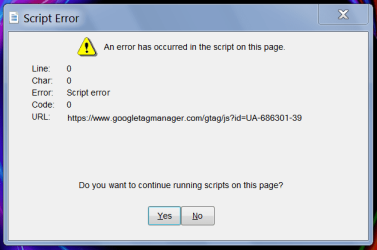
So either this is a browser issue or a program issue.
That link is for Google analytics or AdSense. Going
here you can see what websites foolishly use the same ID for all of their web properties. If you recognize one of those websites then perhaps it's your backup program on your computer or something in the browser fetching one of those links.
Do you have any add-ons in Pale Moon? Are you using Sandboxie? If you use an add-on that jacks around with java script like NoScript or uMatrix, then that
could be why the script isn't parsing correctly.
The other suitable contender here for this mess is your anti-virus software is intercepting HTTPS connections and using its own Cert. and f^%^&ing things up. This is just one out of many reasons why I don't use an anti-virus anymore. I primary use a highly configured program called Sandboxie for my browsers and scan all downloads at Virus Total. A lot of downloads I don't even have to upload to Virus Total. I have a program called
Hash Tools installed and I just right click the file, select SHA256, and then use the option in Hash Tools to check the hash at Virus Total. If Virus Total doesn't have the hash then you have to upload the download to Virus Total. Depending on what the download is, the general consensus is four hits and you toss.
A hash is just a mathematical number unique to only one file and that file. That's why it's used for data verification so you know what you download hasn't been manipulated by comparing the hash to the hash provided at the website you got the download. While something that seems innocent like Firefox portable or some other popular download may not be packed with a virus, the website that hosts the download on their server/s could get hacked and the downloaded altered. Now you just got owned and tea bagged. Such was the case several years ago with the popular Ccleaner. A seemly innocent download was tainted by a hacker on the server.
What makes Virus Total so great is that not only do they use an abundant of anti-virus engines, but get malware samples from the U.S. Cyber Command. Of course those would probably be unclassified malware samples. But I know a lot of them are from other nation states and crap. Your over bloated anti-virus software simply does not do this. Now mind you if you upload something to Virus Total it's allowed to be analyzed by God knows who. I wanted to know my self so I uploaded a few files containing what are called canary tokens. Once some virus research firm or nation state, etc opened it I'd get a hit with the IP address that was used to open it. 90% of all IP hits came from China, the remaining came from Russia. This doesn't invalidate Virus Total at all, this is just computer virus researchers opening the files that were uploaded to Virus Total. Virus Total is actually owned by Google.
The use of Sandboxie and a good Ad blocker is wise to not only stop a possible Ad that's been laced with malware, but to
hopefully keep any malicious code in a virtual environment known as the sandbox and not be committed to your hard drive. This method will be one of the greatest in an effort to help thwart polymorphic malware like ransomware. Traditional anti-virus software may fail due to their inherit nature of using definitions to catch a known nasty in the wild. It's really nothing but a massive cat and mouse game.
At any rate, and in case you don't know.
Kaspersky Lab - Wikipedia
You may also be interested in my post
here. You probably can't use a VPN to go to that link, and Tor won't work either.
Again. Just more reasons why I just don't use anti-virus software. Just uBlock, Sandboxie, periodic full 1:1 disk clones and other things. Believe me when I tell you I run a pretty damn tight ship. Even on my website. Of course nothing is unhackable, but to borrow from Willy Wonka, 'we are the music makers, and we are the dreamers of dreams... (Note: the 50th anniversary is this June or July I do believe.
 Now it's time for a smoke, Slug Heads!