Recurring Windows Malicious Software Removal Tool installation problem

Yes that's what I meant. You'll get used to remembering that it's the second Tuesday of every month.
 

My Computer

Computer type
PC/Desktop
Computer Manufacturer/Model Number
Alienware® ALX X58
OS
Win 7 Ult SP1/Win 10 Pro (all x64)
CPU
Intel® Core™ i7-975 Extreme O/C to 4.02 GHz, 8MB Cache
Motherboard
Asus® P6T Deluxe V2 X58 LGA1366
Memory
24GB Corsair Vengeance DDR3 SDRAM at 1600MHz - 6 x 4096MB
Graphics Card(s)
1792 MB NVIDIA® GeForce® GTX 295 Dual Core
Sound Card
Onboard Soundmax® High-Definition 7.1 Performance Audio
Monitor(s) Displays
Samsung XL2370 LED backlit 23" W/S 2ms response time
Screen Resolution
1920 X 1080
Hard Drives
2 x 500gb SATA II
1 x 1TB SATA II
1 external eSATA LaCie 3TB
(Non-RAID)
PSU
Alienware® 1200 Watt Multi-GPU
Case
Alienware® P2 ALX Chassis with AlienIce™ 3.0 Video Cooling
Cooling
Alienware® High-Perf. Liquid Cooling + Acoustic Dampening
Keyboard
Microsoft® Wireless Entertainment 8000 + Logitech® G15 Wired
Mouse
Microsoft® Wireless Laser 8000 + Logitech® G9 Wired
Internet Speed
1Gb/s
Antivirus
McAfee LiveSafe
Browser
Firefox - latest
Other Info
Using non-RAID on purpose as I find RAID to be too temperamental.
Now set to AHCI
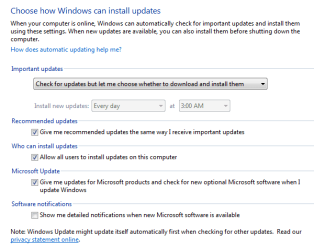
Here's how I have WU set up, this way it will download what I want, when I want. If I wait too long though, I'll get the Shut Down to Install Updates note on the start button.

Updates.PNG
 

My Computer

Computer type
PC/Desktop
Computer Manufacturer/Model Number
Home Built Desktop By DataTech
OS
Windows 7 Ultimate X64 SP1
CPU
Intel i5-2550K, Differing ~4.4-4.8GHz No built in GPU
Motherboard
ASUS P8Z68-V PRO/GEN3
Memory
16GB G.Skill Sniper 1866MHz @ 2133MHz 2x8GB
Graphics Card(s)
ASUS GTX650TIB-DC2OC-2GD5, (650TI Boost)
Sound Card
Onboard Realtek 5-1
Monitor(s) Displays
Samsung P2570HD
Screen Resolution
1920x1080
Hard Drives
Samsung 840 Pro 256GB SSD for OS, 500GB Seagate Constellation (Enterprise drive) for Data
PSU
Corsair HX650W
Case
Inwin Dragon Rider
Cooling
Hyper 212 EVO w/two Noctua fans, push-pull, @1300 RPM
Keyboard
E-Z Eyes, bright yellow keys with large characters
Mouse
steelseries SENSEI Laser Pro Gaming
Internet Speed
48-51Mbs Mbs down, 11 Mbs up Xfinity Cable
Antivirus
Norton Internet Security 2013
Browser
IE 10, Opera, Pale Moon if needed
Other Info
4 case fans, LG BluRay-RE, ASUS DVD-RW, Mr. Fusion power supply, 1.21 gigawatts.
Mine's almost the same, but I have it set to install the updates automatically. Does that setting tell you when updates are available, or do you need to open WU to check?
 

My Computer

Computer type
PC/Desktop
Computer Manufacturer/Model Number
Packard Bell ipower G5800
OS
Windows 7 Home Premium 64bit (Service Pack 1)
CPU
Intel Core i7
Memory
6.00 GB
Graphics Card(s)
NVIDIA GeForce GTX 550 Ti
Antivirus
Avira Free Antivirus
Browser
Firefox
Yes the notification is there when updates are ready. I then look through them and pick the ones I want, Important, Recommended, and hide the rest which are usually Silverlight or Bing crap.
 

My Computer

Computer type
PC/Desktop
Computer Manufacturer/Model Number
Home Built Desktop By DataTech
OS
Windows 7 Ultimate X64 SP1
CPU
Intel i5-2550K, Differing ~4.4-4.8GHz No built in GPU
Motherboard
ASUS P8Z68-V PRO/GEN3
Memory
16GB G.Skill Sniper 1866MHz @ 2133MHz 2x8GB
Graphics Card(s)
ASUS GTX650TIB-DC2OC-2GD5, (650TI Boost)
Sound Card
Onboard Realtek 5-1
Monitor(s) Displays
Samsung P2570HD
Screen Resolution
1920x1080
Hard Drives
Samsung 840 Pro 256GB SSD for OS, 500GB Seagate Constellation (Enterprise drive) for Data
PSU
Corsair HX650W
Case
Inwin Dragon Rider
Cooling
Hyper 212 EVO w/two Noctua fans, push-pull, @1300 RPM
Keyboard
E-Z Eyes, bright yellow keys with large characters
Mouse
steelseries SENSEI Laser Pro Gaming
Internet Speed
48-51Mbs Mbs down, 11 Mbs up Xfinity Cable
Antivirus
Norton Internet Security 2013
Browser
IE 10, Opera, Pale Moon if needed
Other Info
4 case fans, LG BluRay-RE, ASUS DVD-RW, Mr. Fusion power supply, 1.21 gigawatts.
Still on the fact that you're getting re-directed .....


Disable the proxy settings in Internet Explorer:
1) Under “Tools” in the browser tool bar select “Internet Options”.
2) In the “Internet Options” window that pops up, click the “Connections” tab at the top.
3) Click “LAN Settings” near the bottom of the “Connections” section.
4) If the “Proxy server” checkbox is marked with a check, click it to deselect/uncheck it.
5) Click “Ok” to close the “Local Area Network (LAN) Settings” window.
6) Click “Ok” to close the “Internet Options” window.
Reboot
Make sure "Proxy server" is still disabled under your LAN Settings.
 

My Computer

Computer type
PC/Desktop
Computer Manufacturer/Model Number
Bruce ... somewhere in his 40's
OS
Windows 7 Ultimate 32bit SP1
CPU
Intel(R) Core(TM)2 Quad CPU @ 2.40GHz, 2400 MHz
Motherboard
INTEL/D975XBX2
Memory
4 GB
Graphics Card(s)
ATI Radeon HD 2600 Pro
Monitor(s) Displays
Samsung SyncMaster 914v
Screen Resolution
1280 x 1024
Hard Drives
2/500GB each ... ST3500630AS ATA Device.
One is not connected
PSU
Rocketfish 700 W
Case
G.Skill Gigabyte Chassis
Keyboard
Standard PS/2 Keyboard
Mouse
Microsoft PS/2 Mouse
Internet Speed
DSL
Antivirus
Avira Internet Security
Browser
IE 11
Other Info
ATI HDMI Audio
I just had a look and "proxy server" is already unchecked. Also, I don't know if it makes a difference, but I use Firefox as my main browser rather than Internet Explorer.
 

My Computer

Computer type
PC/Desktop
Computer Manufacturer/Model Number
Packard Bell ipower G5800
OS
Windows 7 Home Premium 64bit (Service Pack 1)
CPU
Intel Core i7
Memory
6.00 GB
Graphics Card(s)
NVIDIA GeForce GTX 550 Ti
Antivirus
Avira Free Antivirus
Browser
Firefox
Let's see what DDS can uncover for us.


Download DDS from one of these links:
DDS.com
DDS.pif
  • Disable any script blocking protection
  • Double click the dds icon to run the tool.
  • When done, DDS will open two (2) logs:
    1. DDS.txt
    2. Attach.txt <--- will be minimized in the task tray
  • Save both reports to your desktop.
Include the contents of both logs in your next post.
The scan will instruct you to post Attach.txt as an attachment.
 

My Computer

Computer type
PC/Desktop
Computer Manufacturer/Model Number
Bruce ... somewhere in his 40's
OS
Windows 7 Ultimate 32bit SP1
CPU
Intel(R) Core(TM)2 Quad CPU @ 2.40GHz, 2400 MHz
Motherboard
INTEL/D975XBX2
Memory
4 GB
Graphics Card(s)
ATI Radeon HD 2600 Pro
Monitor(s) Displays
Samsung SyncMaster 914v
Screen Resolution
1280 x 1024
Hard Drives
2/500GB each ... ST3500630AS ATA Device.
One is not connected
PSU
Rocketfish 700 W
Case
G.Skill Gigabyte Chassis
Keyboard
Standard PS/2 Keyboard
Mouse
Microsoft PS/2 Mouse
Internet Speed
DSL
Antivirus
Avira Internet Security
Browser
IE 11
Other Info
ATI HDMI Audio
Should I attach the files (and zip attach.txt like the program said) or copy and paste the contents?
 

My Computer

Computer type
PC/Desktop
Computer Manufacturer/Model Number
Packard Bell ipower G5800
OS
Windows 7 Home Premium 64bit (Service Pack 1)
CPU
Intel Core i7
Memory
6.00 GB
Graphics Card(s)
NVIDIA GeForce GTX 550 Ti
Antivirus
Avira Free Antivirus
Browser
Firefox
Attach both DDS.txt and Attach.txt as an attachment, not a .zip file.
 

My Computer

Computer type
PC/Desktop
Computer Manufacturer/Model Number
Bruce ... somewhere in his 40's
OS
Windows 7 Ultimate 32bit SP1
CPU
Intel(R) Core(TM)2 Quad CPU @ 2.40GHz, 2400 MHz
Motherboard
INTEL/D975XBX2
Memory
4 GB
Graphics Card(s)
ATI Radeon HD 2600 Pro
Monitor(s) Displays
Samsung SyncMaster 914v
Screen Resolution
1280 x 1024
Hard Drives
2/500GB each ... ST3500630AS ATA Device.
One is not connected
PSU
Rocketfish 700 W
Case
G.Skill Gigabyte Chassis
Keyboard
Standard PS/2 Keyboard
Mouse
Microsoft PS/2 Mouse
Internet Speed
DSL
Antivirus
Avira Internet Security
Browser
IE 11
Other Info
ATI HDMI Audio
Here you go. Is it okay to delete DDS now?
 

Attachments

Last edited:

My Computer

Computer type
PC/Desktop
Computer Manufacturer/Model Number
Packard Bell ipower G5800
OS
Windows 7 Home Premium 64bit (Service Pack 1)
CPU
Intel Core i7
Memory
6.00 GB
Graphics Card(s)
NVIDIA GeForce GTX 550 Ti
Antivirus
Avira Free Antivirus
Browser
Firefox
Are you connected to a private network/domain?
 

My Computer

Computer type
PC/Desktop
Computer Manufacturer/Model Number
Bruce ... somewhere in his 40's
OS
Windows 7 Ultimate 32bit SP1
CPU
Intel(R) Core(TM)2 Quad CPU @ 2.40GHz, 2400 MHz
Motherboard
INTEL/D975XBX2
Memory
4 GB
Graphics Card(s)
ATI Radeon HD 2600 Pro
Monitor(s) Displays
Samsung SyncMaster 914v
Screen Resolution
1280 x 1024
Hard Drives
2/500GB each ... ST3500630AS ATA Device.
One is not connected
PSU
Rocketfish 700 W
Case
G.Skill Gigabyte Chassis
Keyboard
Standard PS/2 Keyboard
Mouse
Microsoft PS/2 Mouse
Internet Speed
DSL
Antivirus
Avira Internet Security
Browser
IE 11
Other Info
ATI HDMI Audio
Yes.
 

My Computer

Computer type
PC/Desktop
Computer Manufacturer/Model Number
Packard Bell ipower G5800
OS
Windows 7 Home Premium 64bit (Service Pack 1)
CPU
Intel Core i7
Memory
6.00 GB
Graphics Card(s)
NVIDIA GeForce GTX 550 Ti
Antivirus
Avira Free Antivirus
Browser
Firefox

My Computer

Computer type
PC/Desktop
Computer Manufacturer/Model Number
Bruce ... somewhere in his 40's
OS
Windows 7 Ultimate 32bit SP1
CPU
Intel(R) Core(TM)2 Quad CPU @ 2.40GHz, 2400 MHz
Motherboard
INTEL/D975XBX2
Memory
4 GB
Graphics Card(s)
ATI Radeon HD 2600 Pro
Monitor(s) Displays
Samsung SyncMaster 914v
Screen Resolution
1280 x 1024
Hard Drives
2/500GB each ... ST3500630AS ATA Device.
One is not connected
PSU
Rocketfish 700 W
Case
G.Skill Gigabyte Chassis
Keyboard
Standard PS/2 Keyboard
Mouse
Microsoft PS/2 Mouse
Internet Speed
DSL
Antivirus
Avira Internet Security
Browser
IE 11
Other Info
ATI HDMI Audio
You might also, want to reset your IP to make sure you're not getting re-directed anymore.


Copy and paste this into an elevated (run as Administrator) Command prompt:


netsh winsock reset catalog

Press Enter.....
Then copy and paste this in:


netsh int ip reset reset.log

Press Enter.
When finished restart your computer.
 

My Computer

Computer type
PC/Desktop
Computer Manufacturer/Model Number
Bruce ... somewhere in his 40's
OS
Windows 7 Ultimate 32bit SP1
CPU
Intel(R) Core(TM)2 Quad CPU @ 2.40GHz, 2400 MHz
Motherboard
INTEL/D975XBX2
Memory
4 GB
Graphics Card(s)
ATI Radeon HD 2600 Pro
Monitor(s) Displays
Samsung SyncMaster 914v
Screen Resolution
1280 x 1024
Hard Drives
2/500GB each ... ST3500630AS ATA Device.
One is not connected
PSU
Rocketfish 700 W
Case
G.Skill Gigabyte Chassis
Keyboard
Standard PS/2 Keyboard
Mouse
Microsoft PS/2 Mouse
Internet Speed
DSL
Antivirus
Avira Internet Security
Browser
IE 11
Other Info
ATI HDMI Audio
Download Security Check by screen317 from here http://screen317.spywareinfoforum.org/SecurityCheck.exe or here http://screen317.spywareinfoforum.org/
Save it to your Desktop.
Double click SecurityCheck.exe and follow the onscreen instructions inside of the black box.
A Notepad document should open automatically called checkup.txt.
Please post the contents of that document.

Neither of those links seem to be working for me right now. Is this the same program?

SecurityCheck Download
 

My Computer

Computer type
PC/Desktop
Computer Manufacturer/Model Number
Packard Bell ipower G5800
OS
Windows 7 Home Premium 64bit (Service Pack 1)
CPU
Intel Core i7
Memory
6.00 GB
Graphics Card(s)
NVIDIA GeForce GTX 550 Ti
Antivirus
Avira Free Antivirus
Browser
Firefox
Yes, the one from Bleeping will work.
 

My Computer

Computer type
PC/Desktop
Computer Manufacturer/Model Number
Bruce ... somewhere in his 40's
OS
Windows 7 Ultimate 32bit SP1
CPU
Intel(R) Core(TM)2 Quad CPU @ 2.40GHz, 2400 MHz
Motherboard
INTEL/D975XBX2
Memory
4 GB
Graphics Card(s)
ATI Radeon HD 2600 Pro
Monitor(s) Displays
Samsung SyncMaster 914v
Screen Resolution
1280 x 1024
Hard Drives
2/500GB each ... ST3500630AS ATA Device.
One is not connected
PSU
Rocketfish 700 W
Case
G.Skill Gigabyte Chassis
Keyboard
Standard PS/2 Keyboard
Mouse
Microsoft PS/2 Mouse
Internet Speed
DSL
Antivirus
Avira Internet Security
Browser
IE 11
Other Info
ATI HDMI Audio
Here are the contents of the log.

Results of screen317's Security Check version 0.99.81
Windows 7 Service Pack 1 x64 (UAC is enabled)
Internet Explorer 11
``````````````Antivirus/Firewall Check:``````````````
Windows Firewall Enabled!
Avira Desktop
Antivirus up to date!
`````````Anti-malware/Other Utilities Check:`````````
Malwarebytes Anti-Malware version 1.75.0.1300
Adobe Flash Player 12.0.0.77
Mozilla Firefox (27.0)
````````Process Check: objlist.exe by Laurent````````
Avira Antivir avgnt.exe
Avira Antivir avguard.exe
`````````````````System Health check`````````````````
Total Fragmentation on Drive C:
````````````````````End of Log``````````````````````

Is this log saved onto my PC or is it deleted once I close it?
 

My Computer

Computer type
PC/Desktop
Computer Manufacturer/Model Number
Packard Bell ipower G5800
OS
Windows 7 Home Premium 64bit (Service Pack 1)
CPU
Intel Core i7
Memory
6.00 GB
Graphics Card(s)
NVIDIA GeForce GTX 550 Ti
Antivirus
Avira Free Antivirus
Browser
Firefox
You can delete it and screen's Security Check. Your programs appear to be up to date and no issues there.
 

My Computer

Computer type
PC/Desktop
Computer Manufacturer/Model Number
Bruce ... somewhere in his 40's
OS
Windows 7 Ultimate 32bit SP1
CPU
Intel(R) Core(TM)2 Quad CPU @ 2.40GHz, 2400 MHz
Motherboard
INTEL/D975XBX2
Memory
4 GB
Graphics Card(s)
ATI Radeon HD 2600 Pro
Monitor(s) Displays
Samsung SyncMaster 914v
Screen Resolution
1280 x 1024
Hard Drives
2/500GB each ... ST3500630AS ATA Device.
One is not connected
PSU
Rocketfish 700 W
Case
G.Skill Gigabyte Chassis
Keyboard
Standard PS/2 Keyboard
Mouse
Microsoft PS/2 Mouse
Internet Speed
DSL
Antivirus
Avira Internet Security
Browser
IE 11
Other Info
ATI HDMI Audio
I did a bit of Googling on my iPhone and it looks like this problem has occurred on several forums using Invision Pro. Someone asked for help it on the Malwarebytes forums last month but never found a solution, and it was suggested that the problem might not be on their end. There was one site that fixed the problem only for it to come back later.

Going back to my original problem in this thread (the malware removal tool not downloading automatically), should I delete the file and see if it automatically downloads itself when the next set of updates are released, or should I just manually set them to download and forget about it?
 

My Computer

Computer type
PC/Desktop
Computer Manufacturer/Model Number
Packard Bell ipower G5800
OS
Windows 7 Home Premium 64bit (Service Pack 1)
CPU
Intel Core i7
Memory
6.00 GB
Graphics Card(s)
NVIDIA GeForce GTX 550 Ti
Antivirus
Avira Free Antivirus
Browser
Firefox
Back
Top