Solved Recycle Bin missing its properties and its icon is generic

ineuw

New member
Member
VIP
Local time
8:35 PM
Messages
152
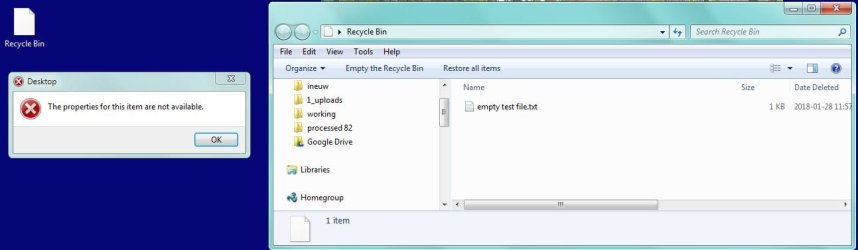
The Recycle Bin is not corrupt! I can open it and see if anything is in it and delete the contents individually, but "empty recycle bin" does not work and the properties are not available. Please see image.

I followed here several posts' instructions and nothing worked.
1. "sfc /scannow" reports that there are no problems.
2. Deleted all $Recycle Bin files, and rebooted.
3. Cleared the icon cache and rebuilt it.

What have I missed?
 

Attachments

  • recycle-bin-icon.jpg
    recycle-bin-icon.jpg
    7.8 KB · Views: 69

My Computer My Computer

At a glance

Microsoft Windows 10 Pro 64-bit8th generation Intel(R) Pentium G5600 3.9GHz16 GB DDR4 Kingston HyperXOn board Intel UHD Graphics 1GB shared
Computer type
PC/Desktop
Computer Manufacturer/Model Number
Custom built
OS
Microsoft Windows 10 Pro 64-bit
CPU
8th generation Intel(R) Pentium G5600 3.9GHz
Motherboard
ASRock B360 Pro 4 8th Generation
Memory
16 GB DDR4 Kingston HyperX
Graphics Card(s)
On board Intel UHD Graphics 1GB shared
Sound Card
On board Realtek HD ALC892
Monitor(s) Displays
LG 22 in LCD
Screen Resolution
1536 x 864 x 32 bits (4294967296 colors) @ 59 Hz
Hard Drives
(1) SanDisk SDSSDHII120G ATA Device
(2) ST1000DM003-1SB10C ATA Device
(3) ST500DM002-1BD142 ATA Device
PSU
Antec 650 Watt PSU
Case
Antec mid size tower
Cooling
120mm fan
Keyboard
Generic 105 keys
Mouse
Generic JeTech
Internet Speed
50 megabits
Antivirus
Avast and daily Malwarebytes scan
Browser
Cyberfox 52.9.1
Hi ineuw, You could try to right click on the desktop, personalize, change desktop icons, and check the
box for recycle bin, if you have not already tried this, and the below tutorial by Brink will help you with
the properties of the recycle bin.:D


Recycle Bin Properties - Add or Remove - Windows 7 Help Forums
 

My Computer My Computer

At a glance

Windows 10 Pro 64 bitAMD A4-5300 APU with Radeon(tm) HD Graphics8.00 GBAMD Radeon HD 7480D
Computer type
PC/Desktop
Computer Manufacturer/Model Number
ASUS A85XM-A custom build
OS
Windows 10 Pro 64 bit
CPU
AMD A4-5300 APU with Radeon(tm) HD Graphics
Motherboard
ASUSTeK COMPUTER INC. A85XM-A
Memory
8.00 GB
Graphics Card(s)
AMD Radeon HD 7480D
Sound Card
(1) High Definition Audio Device (2) Realtek High Definiti
Monitor(s) Displays
HP W2072a 20 inch Led Backlit Monitor
Screen Resolution
1600 x 900 x 32 bits (4294967296 colors) @ 60 Hz
Hard Drives
TOSHIBA DT01ACA100 SATA Disk Device
Keyboard
Acer
Mouse
Acer
Internet Speed
varies
Antivirus
Windows Defender Antivirus
Browser
Waterfox, Edge

My Computer My Computer

At a glance

Windows 10 Pro 64 bitAMD A4-5300 APU with Radeon(tm) HD Graphics8.00 GBAMD Radeon HD 7480D
Computer type
PC/Desktop
Computer Manufacturer/Model Number
ASUS A85XM-A custom build
OS
Windows 10 Pro 64 bit
CPU
AMD A4-5300 APU with Radeon(tm) HD Graphics
Motherboard
ASUSTeK COMPUTER INC. A85XM-A
Memory
8.00 GB
Graphics Card(s)
AMD Radeon HD 7480D
Sound Card
(1) High Definition Audio Device (2) Realtek High Definiti
Monitor(s) Displays
HP W2072a 20 inch Led Backlit Monitor
Screen Resolution
1600 x 900 x 32 bits (4294967296 colors) @ 60 Hz
Hard Drives
TOSHIBA DT01ACA100 SATA Disk Device
Keyboard
Acer
Mouse
Acer
Internet Speed
varies
Antivirus
Windows Defender Antivirus
Browser
Waterfox, Edge
Ethel, thanks for the info, unfortunately it's not working for me. The Desktop Personalize icons for the Recycle Bin are correct . . . When I click to restore the defaults, the empty and full icons are displayed respectively. But the icons do not show up on the desktop and instead it displays an empty space. The issue is that the mechanism of the Recycle Bin is not functioning. The "Properties" label exists when the context menu is activated, but the Bin has no properties (please see the enclosed image) and the folder's "Empty the Recycling Bin" control is not functioning. Items that I delete appear in the folder, and to delete them I select all and click delete, as I would in any normal folder. On the other hand, the Restore function works (surprisingly).
 

Attachments

  • recycle-bin.jpg
    recycle-bin.jpg
    38.4 KB · Views: 2

My Computer My Computer

At a glance

Microsoft Windows 10 Pro 64-bit8th generation Intel(R) Pentium G5600 3.9GHz16 GB DDR4 Kingston HyperXOn board Intel UHD Graphics 1GB shared
Computer type
PC/Desktop
Computer Manufacturer/Model Number
Custom built
OS
Microsoft Windows 10 Pro 64-bit
CPU
8th generation Intel(R) Pentium G5600 3.9GHz
Motherboard
ASRock B360 Pro 4 8th Generation
Memory
16 GB DDR4 Kingston HyperX
Graphics Card(s)
On board Intel UHD Graphics 1GB shared
Sound Card
On board Realtek HD ALC892
Monitor(s) Displays
LG 22 in LCD
Screen Resolution
1536 x 864 x 32 bits (4294967296 colors) @ 59 Hz
Hard Drives
(1) SanDisk SDSSDHII120G ATA Device
(2) ST1000DM003-1SB10C ATA Device
(3) ST500DM002-1BD142 ATA Device
PSU
Antec 650 Watt PSU
Case
Antec mid size tower
Cooling
120mm fan
Keyboard
Generic 105 keys
Mouse
Generic JeTech
Internet Speed
50 megabits
Antivirus
Avast and daily Malwarebytes scan
Browser
Cyberfox 52.9.1

My Computer My Computer

At a glance

Windows 10 Pro 64 bitAMD A4-5300 APU with Radeon(tm) HD Graphics8.00 GBAMD Radeon HD 7480D
Computer type
PC/Desktop
Computer Manufacturer/Model Number
ASUS A85XM-A custom build
OS
Windows 10 Pro 64 bit
CPU
AMD A4-5300 APU with Radeon(tm) HD Graphics
Motherboard
ASUSTeK COMPUTER INC. A85XM-A
Memory
8.00 GB
Graphics Card(s)
AMD Radeon HD 7480D
Sound Card
(1) High Definition Audio Device (2) Realtek High Definiti
Monitor(s) Displays
HP W2072a 20 inch Led Backlit Monitor
Screen Resolution
1600 x 900 x 32 bits (4294967296 colors) @ 60 Hz
Hard Drives
TOSHIBA DT01ACA100 SATA Disk Device
Keyboard
Acer
Mouse
Acer
Internet Speed
varies
Antivirus
Windows Defender Antivirus
Browser
Waterfox, Edge
Hi again, I forgot to mention before that it would not hurt to try sfc /scannow a second time to see if this
helps.
 

My Computer My Computer

At a glance

Windows 10 Pro 64 bitAMD A4-5300 APU with Radeon(tm) HD Graphics8.00 GBAMD Radeon HD 7480D
Computer type
PC/Desktop
Computer Manufacturer/Model Number
ASUS A85XM-A custom build
OS
Windows 10 Pro 64 bit
CPU
AMD A4-5300 APU with Radeon(tm) HD Graphics
Motherboard
ASUSTeK COMPUTER INC. A85XM-A
Memory
8.00 GB
Graphics Card(s)
AMD Radeon HD 7480D
Sound Card
(1) High Definition Audio Device (2) Realtek High Definiti
Monitor(s) Displays
HP W2072a 20 inch Led Backlit Monitor
Screen Resolution
1600 x 900 x 32 bits (4294967296 colors) @ 60 Hz
Hard Drives
TOSHIBA DT01ACA100 SATA Disk Device
Keyboard
Acer
Mouse
Acer
Internet Speed
varies
Antivirus
Windows Defender Antivirus
Browser
Waterfox, Edge
ethel, thanks again for our your efforts but please don't waste more of your time on this issue. I have done sfc /scannow for the third time and everything is OK. So is Chkdsk c: /f on boot. The Recycle Bin works with the context menu "Empty Recycle Bin", so the only thing is missing is the icon and the control button on the Explorer toolbar. I am sure that a solution will be found.

After the first posting, I restored the last Macrium mirror backup, (4 days old and there is no data on the C: drive.) The Recycle Bin icon and the Explorer control button worked as they should, but after a couple of days the same problem returned. I made no Windows update in that time.
 

My Computer My Computer

At a glance

Microsoft Windows 10 Pro 64-bit8th generation Intel(R) Pentium G5600 3.9GHz16 GB DDR4 Kingston HyperXOn board Intel UHD Graphics 1GB shared
Computer type
PC/Desktop
Computer Manufacturer/Model Number
Custom built
OS
Microsoft Windows 10 Pro 64-bit
CPU
8th generation Intel(R) Pentium G5600 3.9GHz
Motherboard
ASRock B360 Pro 4 8th Generation
Memory
16 GB DDR4 Kingston HyperX
Graphics Card(s)
On board Intel UHD Graphics 1GB shared
Sound Card
On board Realtek HD ALC892
Monitor(s) Displays
LG 22 in LCD
Screen Resolution
1536 x 864 x 32 bits (4294967296 colors) @ 59 Hz
Hard Drives
(1) SanDisk SDSSDHII120G ATA Device
(2) ST1000DM003-1SB10C ATA Device
(3) ST500DM002-1BD142 ATA Device
PSU
Antec 650 Watt PSU
Case
Antec mid size tower
Cooling
120mm fan
Keyboard
Generic 105 keys
Mouse
Generic JeTech
Internet Speed
50 megabits
Antivirus
Avast and daily Malwarebytes scan
Browser
Cyberfox 52.9.1
Hi ineuw, Sorry that the icon issue is still there, and you are not wasting my time, I just wanted to try to
help, but I do not know what to do about the icon. Maybe someone else may have an answer to it.:D
 

My Computer My Computer

At a glance

Windows 10 Pro 64 bitAMD A4-5300 APU with Radeon(tm) HD Graphics8.00 GBAMD Radeon HD 7480D
Computer type
PC/Desktop
Computer Manufacturer/Model Number
ASUS A85XM-A custom build
OS
Windows 10 Pro 64 bit
CPU
AMD A4-5300 APU with Radeon(tm) HD Graphics
Motherboard
ASUSTeK COMPUTER INC. A85XM-A
Memory
8.00 GB
Graphics Card(s)
AMD Radeon HD 7480D
Sound Card
(1) High Definition Audio Device (2) Realtek High Definiti
Monitor(s) Displays
HP W2072a 20 inch Led Backlit Monitor
Screen Resolution
1600 x 900 x 32 bits (4294967296 colors) @ 60 Hz
Hard Drives
TOSHIBA DT01ACA100 SATA Disk Device
Keyboard
Acer
Mouse
Acer
Internet Speed
varies
Antivirus
Windows Defender Antivirus
Browser
Waterfox, Edge

My Computer My Computer

At a glance

Windows 7 x64, Vista x64, 8.1 smartphoneIntel E8400 65W 64-bitDDR2 2 x 2GB, 1GB x 2XFX Radeon HD5750
Computer type
PC/Desktop
OS
Windows 7 x64, Vista x64, 8.1 smartphone
CPU
Intel E8400 65W 64-bit
Motherboard
Gigabyte EP45-UD3LR
Memory
DDR2 2 x 2GB, 1GB x 2
Graphics Card(s)
XFX Radeon HD5750
Sound Card
AMD High Definition Audio; Realtek High Definition Audio
Monitor(s) Displays
iiyama prolite X2377HDS
Screen Resolution
1920 x 1080
Hard Drives
500GB 7200 rpm Seagate ST3500413AS 16MB, 500GB 5400 rpm Toshiba MQ02ABF050H 32MB, 200GB 7200 rpm Seagate ST3200820AS 8MB, 2TB 7200 rpm Western Digital WD20EZRX 64MB
PSU
Enermax Liberty Modular
Case
Antec P193 Midi Tower
Keyboard
Mionix ZIBAL 60
Mouse
Razer USB 2.0 Diamondback Mouse or Huion Graphics Tablet
Browser
Internet Explorer, Lunascape, Firefox, Opera, Avast Safezone

My Computer My Computer

At a glance

64-bit Windows 11 Pro for WorkstationsIntel i7-8700K OC'd to 5 GHz64 GB (4x16GB) G.SKILL TridentZ RGB DDR4 3600...ASUS ROG-STRIX-GTX1080TI-O11G-GAMING
Computer type
PC/Desktop
Computer Manufacturer/Model Number
Self built custom
OS
64-bit Windows 11 Pro for Workstations
CPU
Intel i7-8700K OC'd to 5 GHz
Motherboard
ASUS ROG Maximus XI Formula Z390
Memory
64 GB (4x16GB) G.SKILL TridentZ RGB DDR4 3600 MHz
Graphics Card(s)
ASUS ROG-STRIX-GTX1080TI-O11G-GAMING
Sound Card
Integrated
Monitor(s) Displays
2 x Samsung Odyssey G7 27"
Screen Resolution
2560x1440
Hard Drives
1TB Samsung 990 PRO M.2,
4TB Samsung 990 PRO PRO M.2,
TerraMaster F8 SSD Plus NAS
PSU
Seasonic Prime Titanium 850W
Case
Thermaltake Core P3
Cooling
Corsair Hydro H115i
Keyboard
Logitech wireless K800
Mouse
Logitech MX Master 4
Internet Speed
2 Gb/s Download and 100 Mb/s Upload
Antivirus
Malwarebyte Anti-Malware Premium
Browser
Google Chrome
Other Info
Logitech Z625 speaker system,
Logitech BRIO 4K Pro webcam,
HP Color LaserJet Pro MFP M477fdn,
APC SMART-UPS RT 1000 XL - SURT1000XLI,
Galaxy S23 Plus phone
Thanks Brink for the links, but nothing I tried resolved the issue. The problem was corruption in the registry because of the Firefox 52.5.3 ESR crash. Restoring the last mirror helped temporarily, but with the reinstall of Firefox, the registry corrupted again and affected the Recycle bin. So, I ran JetClean repeatedly until suddenly everything was back to normal.

Caveat: Use a registry cleaner only if you have good mirror backups and keep no data on the boot drive. Macrium has saved my skin on numerous occasions.
 

My Computer My Computer

At a glance

Microsoft Windows 10 Pro 64-bit8th generation Intel(R) Pentium G5600 3.9GHz16 GB DDR4 Kingston HyperXOn board Intel UHD Graphics 1GB shared
Computer type
PC/Desktop
Computer Manufacturer/Model Number
Custom built
OS
Microsoft Windows 10 Pro 64-bit
CPU
8th generation Intel(R) Pentium G5600 3.9GHz
Motherboard
ASRock B360 Pro 4 8th Generation
Memory
16 GB DDR4 Kingston HyperX
Graphics Card(s)
On board Intel UHD Graphics 1GB shared
Sound Card
On board Realtek HD ALC892
Monitor(s) Displays
LG 22 in LCD
Screen Resolution
1536 x 864 x 32 bits (4294967296 colors) @ 59 Hz
Hard Drives
(1) SanDisk SDSSDHII120G ATA Device
(2) ST1000DM003-1SB10C ATA Device
(3) ST500DM002-1BD142 ATA Device
PSU
Antec 650 Watt PSU
Case
Antec mid size tower
Cooling
120mm fan
Keyboard
Generic 105 keys
Mouse
Generic JeTech
Internet Speed
50 megabits
Antivirus
Avast and daily Malwarebytes scan
Browser
Cyberfox 52.9.1
Ah, yeah registry cleaners can do some serious damage.
 

My Computer My Computer

At a glance

64-bit Windows 11 Pro for WorkstationsIntel i7-8700K OC'd to 5 GHz64 GB (4x16GB) G.SKILL TridentZ RGB DDR4 3600...ASUS ROG-STRIX-GTX1080TI-O11G-GAMING
Computer type
PC/Desktop
Computer Manufacturer/Model Number
Self built custom
OS
64-bit Windows 11 Pro for Workstations
CPU
Intel i7-8700K OC'd to 5 GHz
Motherboard
ASUS ROG Maximus XI Formula Z390
Memory
64 GB (4x16GB) G.SKILL TridentZ RGB DDR4 3600 MHz
Graphics Card(s)
ASUS ROG-STRIX-GTX1080TI-O11G-GAMING
Sound Card
Integrated
Monitor(s) Displays
2 x Samsung Odyssey G7 27"
Screen Resolution
2560x1440
Hard Drives
1TB Samsung 990 PRO M.2,
4TB Samsung 990 PRO PRO M.2,
TerraMaster F8 SSD Plus NAS
PSU
Seasonic Prime Titanium 850W
Case
Thermaltake Core P3
Cooling
Corsair Hydro H115i
Keyboard
Logitech wireless K800
Mouse
Logitech MX Master 4
Internet Speed
2 Gb/s Download and 100 Mb/s Upload
Antivirus
Malwarebyte Anti-Malware Premium
Browser
Google Chrome
Other Info
Logitech Z625 speaker system,
Logitech BRIO 4K Pro webcam,
HP Color LaserJet Pro MFP M477fdn,
APC SMART-UPS RT 1000 XL - SURT1000XLI,
Galaxy S23 Plus phone
I have the same issue

I don't mean to start this up again, but I am having the exact same issue and it happened after I uninstalled JetClean. I know that you fixed it, I am still just confused on how? If jetclean caused my issue. Thanks, Guys!
 

My Computer My Computer

At a glance

windows 10 64 bit
Computer type
PC/Desktop
OS
windows 10 64 bit
Hello Magpeye, and welcome to Seven Forums. :)

You could try the same tutorials linked in the previous posts to see if they may be able to help you was well.
 

My Computer My Computer

At a glance

64-bit Windows 11 Pro for WorkstationsIntel i7-8700K OC'd to 5 GHz64 GB (4x16GB) G.SKILL TridentZ RGB DDR4 3600...ASUS ROG-STRIX-GTX1080TI-O11G-GAMING
Computer type
PC/Desktop
Computer Manufacturer/Model Number
Self built custom
OS
64-bit Windows 11 Pro for Workstations
CPU
Intel i7-8700K OC'd to 5 GHz
Motherboard
ASUS ROG Maximus XI Formula Z390
Memory
64 GB (4x16GB) G.SKILL TridentZ RGB DDR4 3600 MHz
Graphics Card(s)
ASUS ROG-STRIX-GTX1080TI-O11G-GAMING
Sound Card
Integrated
Monitor(s) Displays
2 x Samsung Odyssey G7 27"
Screen Resolution
2560x1440
Hard Drives
1TB Samsung 990 PRO M.2,
4TB Samsung 990 PRO PRO M.2,
TerraMaster F8 SSD Plus NAS
PSU
Seasonic Prime Titanium 850W
Case
Thermaltake Core P3
Cooling
Corsair Hydro H115i
Keyboard
Logitech wireless K800
Mouse
Logitech MX Master 4
Internet Speed
2 Gb/s Download and 100 Mb/s Upload
Antivirus
Malwarebyte Anti-Malware Premium
Browser
Google Chrome
Other Info
Logitech Z625 speaker system,
Logitech BRIO 4K Pro webcam,
HP Color LaserJet Pro MFP M477fdn,
APC SMART-UPS RT 1000 XL - SURT1000XLI,
Galaxy S23 Plus phone
Thank You!

I had thought I had done all of them, but I hadn't done the "How to Fix the Recycle Bin Icon Not Refreshing When Emptied." Because I thought that was not my issue exactly, but I did that and it fixed my problem:D I feel like a noob, thank you so much for the help. :):)
 

My Computer My Computer

At a glance

windows 10 64 bit
Computer type
PC/Desktop
OS
windows 10 64 bit
You're most welcome. I'm glad you got it fixed. :party:
 

My Computer My Computer

At a glance

64-bit Windows 11 Pro for WorkstationsIntel i7-8700K OC'd to 5 GHz64 GB (4x16GB) G.SKILL TridentZ RGB DDR4 3600...ASUS ROG-STRIX-GTX1080TI-O11G-GAMING
Computer type
PC/Desktop
Computer Manufacturer/Model Number
Self built custom
OS
64-bit Windows 11 Pro for Workstations
CPU
Intel i7-8700K OC'd to 5 GHz
Motherboard
ASUS ROG Maximus XI Formula Z390
Memory
64 GB (4x16GB) G.SKILL TridentZ RGB DDR4 3600 MHz
Graphics Card(s)
ASUS ROG-STRIX-GTX1080TI-O11G-GAMING
Sound Card
Integrated
Monitor(s) Displays
2 x Samsung Odyssey G7 27"
Screen Resolution
2560x1440
Hard Drives
1TB Samsung 990 PRO M.2,
4TB Samsung 990 PRO PRO M.2,
TerraMaster F8 SSD Plus NAS
PSU
Seasonic Prime Titanium 850W
Case
Thermaltake Core P3
Cooling
Corsair Hydro H115i
Keyboard
Logitech wireless K800
Mouse
Logitech MX Master 4
Internet Speed
2 Gb/s Download and 100 Mb/s Upload
Antivirus
Malwarebyte Anti-Malware Premium
Browser
Google Chrome
Other Info
Logitech Z625 speaker system,
Logitech BRIO 4K Pro webcam,
HP Color LaserJet Pro MFP M477fdn,
APC SMART-UPS RT 1000 XL - SURT1000XLI,
Galaxy S23 Plus phone
I had the exact same problem as the OP (blank icon, no 'empty recycle bin' command & broken properties), and after spending more than an hour seeking a solution, I finally found it here (look for Elvandil's post) - Solved: Need to restore recycle bin on desktop | Tech Support Guy .

What initially led to this problem is that I let MalwareBytes remove everything related to JetClean (it recognized JetClean as a potential problem, and I just went ahead with the removal because I hand't used JetClean in ages anyway). As it turned out, this had the unfortunate effect of completely removing [HKEY_CLASSES_ROOT\CLSID\{645FF040-5081-101B-9F08-00AA002F954E}\ from the registry.

The fix I linked to above will help you create a .reg file that will restore the Recycle Bin stuff to its default values.
 

My Computer My Computer

At a glance

Windows 7 Ultimate x64
Computer type
PC/Desktop
OS
Windows 7 Ultimate x64
Insolentius, Thanks for the solution. I fixed it on Windows 7 but don't remember how. I moved on to Windows 10 and the same thing happened there last week, but an update by Microsoft corrected it. Malwarebytes wants to quarantine every registry cleaner software, with the exception of Ccleaner and Bleachbit. I never had any difficulty with any one of them but in MB I created JetClean exceptions.
 

My Computer My Computer

At a glance

Microsoft Windows 10 Pro 64-bit8th generation Intel(R) Pentium G5600 3.9GHz16 GB DDR4 Kingston HyperXOn board Intel UHD Graphics 1GB shared
Computer type
PC/Desktop
Computer Manufacturer/Model Number
Custom built
OS
Microsoft Windows 10 Pro 64-bit
CPU
8th generation Intel(R) Pentium G5600 3.9GHz
Motherboard
ASRock B360 Pro 4 8th Generation
Memory
16 GB DDR4 Kingston HyperX
Graphics Card(s)
On board Intel UHD Graphics 1GB shared
Sound Card
On board Realtek HD ALC892
Monitor(s) Displays
LG 22 in LCD
Screen Resolution
1536 x 864 x 32 bits (4294967296 colors) @ 59 Hz
Hard Drives
(1) SanDisk SDSSDHII120G ATA Device
(2) ST1000DM003-1SB10C ATA Device
(3) ST500DM002-1BD142 ATA Device
PSU
Antec 650 Watt PSU
Case
Antec mid size tower
Cooling
120mm fan
Keyboard
Generic 105 keys
Mouse
Generic JeTech
Internet Speed
50 megabits
Antivirus
Avast and daily Malwarebytes scan
Browser
Cyberfox 52.9.1
SOLVED: Window 7 "blank RECYCLE BIN ICON, no 'empty recycle bin' command & broken properties"


I had the exact same problem with my recycle bin as mentioned above (blank icon, no 'empty recycle bin' command & broken properties), and after spending more than an hour seeking a solution, I also used (look for Elvandil's post) - Solved: Need to restore recycle bin on desktop | Tech Support Guy .

What also initially led to this problem on my computer is that I let MalwareBytes remove everything related to JetClean (it recognized JetClean and its old folders in the APP DATA folders as a potential problems, and I just went ahead with the removal because I hadn't used JetClean in ages anyway). As mentioned above, it turned out, this had the unfortunate effect of completely removing [HKEY_CLASSES_ROOT\CLSID\{645FF040-5081-101B-9F08-00AA002F954E}\ from the registry.


So, I followed the instructions from the link, pasted the rb.reg file into my registry, then rebooted my computer and it fixed the recycle bin problem. All other remedies failed to solve the problem!
 

My Computer My Computer

At a glance

windows 7 ultimate
OS
windows 7 ultimate
Back
Top