Recycle Bin

huffman

New member
Pro User
Local time
5:27 AM
Messages
715
I am running Windows 7, 64 bit. I ran what was supposed to be a free version of CleanMyPC. It was NOT free and so never activated it, therefore it was limited as to what it would do.

At any rate, after the scan, it said that my Recycle Bin had 8.47gb of files. I double checked and when I tried to empty the Recycle bin, it indicated it was empty.

Is this even possible. Reason I am asking because my C-drive says it is full.

Any info would be helpful. Thank you.
 

My Computer

OS
Windows 7 Pro
CPU
Intel(R) Pentium(R) Duel CPU E2200 2.20 Ghz
Motherboard
GA-G41M-ES2L
Memory
4 gb 2.96 Usable
Graphics Card(s)
Onboard
Sound Card
Onboard
Hard Drives
2 - 1TB WD Sata Drives
There can be a lot of trash on the temp folders, updates already installed etc.
Use free CCleaner to clean your computer. CCleaner - Standard

Once installed, go to Options - Settings and un mark everything.
Then run the Cleaner - Windows tab
 

My Computers

System One System Two

  • Computer type
    PC/Desktop
    Computer Manufacturer/Model Number
    custom build
    OS
    Windows 7 HP 64
    CPU
    i5 6600K - 800MHz to 4200MHz
    Motherboard
    GA-Z170-HD3P
    Memory
    4+4G GSkill DDR4 3000
    Graphics Card(s)
    IG - Intel 530
    Monitor(s) Displays
    Samsung 226BW
    Screen Resolution
    1680x1050
    Hard Drives
    (1) -1 SM951 – 128GB M.2 AHCI PCIe SSD drive for Windows 7 and Lubuntu
    (2) -1 WD SATA 3 - 1T for Data
    (3) -1 WD SATA 3 - 1T for backup
    PSU
    Thermaltake 450W TR2 gold
    Keyboard
    Old and good Chicony mechanical keyboard
    Mouse
    Logitech mX performance - 9 buttons (had to disable some)
    Internet Speed
    500Mb/s
    Browser
    Firefox 64
    Other Info
    TinyWall firewall
  • Computer type
    Laptop
    System Manufacturer/Model Number
    Asus Q550LF
    OS
    Windows 7 Pro
    CPU
    i7-4500U 800MHz to 3.0GHz
    Motherboard
    Asus Q550LF
    Memory
    (4+4)G DDR3 1600
    Graphics Card(s)
    IG intel 4400 + NVIDIA GeForce GT 745M
    Sound Card
    Realtek
    Monitor(s) Displays
    LG Display LP156WF4-SPH1
    Screen Resolution
    1920 x 1080
    Hard Drives
    BX500 120G SSD for Windows and programs +
    1T HDD for data
    Internet Speed
    500 Mb/s
    Browser
    Firefox
    Other Info
    TinyWall firewall
An interesting moment:

My Recycle Bin is also empty, but it seems that it still takes up ~180 MB via Disk Cleanup's report. (disk clean up scans first, then awaits for any command to clean or not, one must be careful if using Disk Cleanup to free up space, best to read more before completing a clean up with this method)

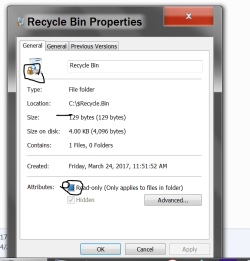
Also, when I attempted to enter path: C:\$Recycle.Bin
Via properties it did show me that there are around 77 files and 3 folders, but there was no file, not even the hidden ones.
I made a test such as putting in recycle bin another file, the amount of files raised to 78 in C:\$Recycle.Bin .
Emptied my R.Bin and the count decreased by 1, back to 77.

Puzzles me if it left out some files in some place now.
Guess it is not critical for me to let it be this way for now, but just in case if someone needs, I did look up an extra thread that might be of help (by Brink):

Recycle Bin Corrupted - Cannot Delete File or Folder
 

My Computer

Computer type
PC/Desktop
OS
Windows 8.1 x64
Hi Huffman,

Id be more concerned as your C drive is showing as full.
Programs create temporary files when performing actions, if theres NO space available then it will not work correctly or even fail.

Rule of Thumb keep 15% free

Anyway 2 things you can do
remove any progams/files or folder piecemeal, then a few at a time
According to your specs your using a 1TB drive you could increase the size of C, if possible cant say for sure as would need to see systems disk management layout

Roy
 

My Computer

Computer type
PC/Desktop
Computer Manufacturer/Model Number
medionl/Aspire 6930G/acer x55a
OS
W7 home premium 32bit/W7HP 64bit/w10 tp insider ring
CPU
E5300 dual core
Motherboard
medion MS7366
Memory
3gb
Graphics Card(s)
Nvidia Geforce 7100 Nforce 630i
Monitor(s) Displays
avixc
Internet Speed
n (isp resticted to 72)
Antivirus
mse/pands
Browser
palemoon
Other Info
Belkin Fd7050 n USB using Railink RT2870 drivers, more upto date
Is there more than one active user account? The desktop Recycle bin will only show files belonging to the logged in user. The Recycle bin may contain files from other accounts but they will not be shown. Utilities such as CleanMyPC may also show them.
 

My Computer

Computer type
PC/Desktop
Computer Manufacturer/Model Number
HP
OS
Windows 7 Pro 64 bit
CPU
Xeon W3520
Memory
8 GB
Graphics Card(s)
Nvidia Geforce 210
I just ran CleanMyPC the latest version. It said there was 8.47GG of files in my Recycle Bin. I had it clean my Recycle Bin and said it did.

That did NOT increase the space on C-drive. :rolleyes::p

I just seems crazy to me.
 

My Computer

OS
Windows 7 Pro
CPU
Intel(R) Pentium(R) Duel CPU E2200 2.20 Ghz
Motherboard
GA-G41M-ES2L
Memory
4 gb 2.96 Usable
Graphics Card(s)
Onboard
Sound Card
Onboard
Hard Drives
2 - 1TB WD Sata Drives
Run check disk. It may have cross links.
 

My Computers

System One System Two

  • Computer type
    PC/Desktop
    Computer Manufacturer/Model Number
    custom build
    OS
    Windows 7 HP 64
    CPU
    i5 6600K - 800MHz to 4200MHz
    Motherboard
    GA-Z170-HD3P
    Memory
    4+4G GSkill DDR4 3000
    Graphics Card(s)
    IG - Intel 530
    Monitor(s) Displays
    Samsung 226BW
    Screen Resolution
    1680x1050
    Hard Drives
    (1) -1 SM951 – 128GB M.2 AHCI PCIe SSD drive for Windows 7 and Lubuntu
    (2) -1 WD SATA 3 - 1T for Data
    (3) -1 WD SATA 3 - 1T for backup
    PSU
    Thermaltake 450W TR2 gold
    Keyboard
    Old and good Chicony mechanical keyboard
    Mouse
    Logitech mX performance - 9 buttons (had to disable some)
    Internet Speed
    500Mb/s
    Browser
    Firefox 64
    Other Info
    TinyWall firewall
  • Computer type
    Laptop
    System Manufacturer/Model Number
    Asus Q550LF
    OS
    Windows 7 Pro
    CPU
    i7-4500U 800MHz to 3.0GHz
    Motherboard
    Asus Q550LF
    Memory
    (4+4)G DDR3 1600
    Graphics Card(s)
    IG intel 4400 + NVIDIA GeForce GT 745M
    Sound Card
    Realtek
    Monitor(s) Displays
    LG Display LP156WF4-SPH1
    Screen Resolution
    1920 x 1080
    Hard Drives
    BX500 120G SSD for Windows and programs +
    1T HDD for data
    Internet Speed
    500 Mb/s
    Browser
    Firefox
    Other Info
    TinyWall firewall
Recycle Bin and $recycle bin are two different location to the best of my memory.

LMiller please correct me if I'm wrong.

My understanding is:

When you delete something in most cases it goes to the 'Recycle Bin' and when you delete the Recycle Bin things go to a hidden file '$Recycle Bin'.

My Recycle Bin when opened from the desktop is empty.
Yet my $Recycle Bin has this.

$Recycle Bin.PNG

Let me know if I'm crazy; please.

Jack
 

My Computer

Computer type
PC/Desktop
Computer Manufacturer/Model Number
Home made Desktop
OS
Windows 10 Pro. 64/ version 1709 Windows 7 Pro/64
CPU
Intel i7-6800K @ 4.3
Motherboard
ASUS X-99 Deluxe II
Memory
Corsair Platinum 16 gig @2400
Graphics Card(s)
EVGA GTX 1070 OC
Monitor(s) Displays
Asus 27" LED LCD/VE278Q
Screen Resolution
1920-1080 or 1280-720 HDMI
Hard Drives
INTEL SSD 730-240 Gb Sata 3.0/
PSU
EVGA Platium 1200W
Case
Phanteks Luxe Tempered Glass 8 fans/ one radiator
Cooling
XSPC/ Water Cooled CPU
Keyboard
Das 4 Professional
Mouse
Logitech M705/MX Anywhere 2-S
Internet Speed
100 mbits
Antivirus
Microsoft Security Essentials/ Malwarebytes Premium 3.0/ SAS
Browser
I.E. 11 default/Firefox/ ISP Time Warner Cable/Spectrum
Other Info
LG BluRay Burner/
Sound system-KLipsch-THX/
Icy Dock ssd Hot Swap bays.
The $RECYCLE.BIN folder acts as the physical storage for the desktop recycle bin for files deleted from that drive. There is a separate sub folder for each user for their own deleted files. This is a move operation within the volume so does not require any copying of data and is very fast. The files are renamed for security purposes. A user with sufficient privileges would be able to see the files but not see their correct names or be able to open them.

Normal users shouldn't really be using the $RECYCLE.BIN folders. It is hidden for a reason. Improper modification could corrupt the contents and prevent recovery. The details of how all this works are officially undocumented and have changed somewhat with different versions of Windows.

Edit: The one file shown in the properties dialog is the folders desktop.ini file which remains when the recycle bin is emptied. It contains some information regarding how the recycle bin will appear on the desktop.
 

My Computer

Computer type
PC/Desktop
Computer Manufacturer/Model Number
HP
OS
Windows 7 Pro 64 bit
CPU
Xeon W3520
Memory
8 GB
Graphics Card(s)
Nvidia Geforce 210
I just ran CleanMyPC the latest version. It said there was 8.47GG of files in my Recycle Bin. I had it clean my Recycle Bin and said it did.

That did NOT increase the space on C-drive. :rolleyes::p

I just seems crazy to me.

I think things can go very wrong if you don't free up space on your storage and torchwood, does talk about the right thing. In general, they do say to keep 10% of free space of your storage for the best performance.

The last time I remember running out of space on storage, did cause me to experience very odd stuff going on, but it was 15 years ago or so xD.


Anyways, here are few more links to look at if you are curious about RB's content:
1) command line - Listing files in recycle bin - Stack Overflow
2) Dir command line options

I tried: dir C:\$Recycle.Bin /s /b
and it listed in cmd those directories it had in there.
Looking at the list, it seemed to match "77" entries I spoke about earlier.

Below is a possible example of what you may see there:
C:\$Recycle.Bin\S-1-9-46-464646464-46464564646-46456464646-4646456\$SAMPLE4.txt
 

My Computer

Computer type
PC/Desktop
OS
Windows 8.1 x64
I have no idea what is crazy anymore. A couple of years ago I had this same problem and because of the way my HDD is partitioned, I used EaseUS Partition Master to fix the issue. I have to free space to do it again, but I am not sure I want to. The reason is just a month or so ago my C drive (150gb) was only 60% filled. Now it is full and nothing has installed other than windows updates.

LMiller7 How to I delete what is in the $RECYCLE.BIN folder? How od I even find it?

Megahertz07 I ran Check Disk this morning and it did not find anything wrong.

BTW I am the only user on this pc.
 

My Computer

OS
Windows 7 Pro
CPU
Intel(R) Pentium(R) Duel CPU E2200 2.20 Ghz
Motherboard
GA-G41M-ES2L
Memory
4 gb 2.96 Usable
Graphics Card(s)
Onboard
Sound Card
Onboard
Hard Drives
2 - 1TB WD Sata Drives
On my systems I leave $RECYCLE.BIN folders alone.

If I need more free space, I look for other ways to get the free space.

Jack
 

My Computer

Computer type
PC/Desktop
Computer Manufacturer/Model Number
Home made Desktop
OS
Windows 10 Pro. 64/ version 1709 Windows 7 Pro/64
CPU
Intel i7-6800K @ 4.3
Motherboard
ASUS X-99 Deluxe II
Memory
Corsair Platinum 16 gig @2400
Graphics Card(s)
EVGA GTX 1070 OC
Monitor(s) Displays
Asus 27" LED LCD/VE278Q
Screen Resolution
1920-1080 or 1280-720 HDMI
Hard Drives
INTEL SSD 730-240 Gb Sata 3.0/
PSU
EVGA Platium 1200W
Case
Phanteks Luxe Tempered Glass 8 fans/ one radiator
Cooling
XSPC/ Water Cooled CPU
Keyboard
Das 4 Professional
Mouse
Logitech M705/MX Anywhere 2-S
Internet Speed
100 mbits
Antivirus
Microsoft Security Essentials/ Malwarebytes Premium 3.0/ SAS
Browser
I.E. 11 default/Firefox/ ISP Time Warner Cable/Spectrum
Other Info
LG BluRay Burner/
Sound system-KLipsch-THX/
Icy Dock ssd Hot Swap bays.
You could try changing Recycle Bin's size for trashed files.
Anything exceeding the value you set, will be removed or removed until RB has this much of trash in it.

I've made a test for this in the following way:

RB = Recycle Bin

1) My RB's size (= how much of trash my RB can hold up to) on C drive = 30 GB, but the bin is empty
2) Made 1 GB of trash files consisting of 2 files and trashed them to RB (they reside in the bin now)
3) Changed RB's size for trash from 30 GB down to 100 MB.
4) RB became empty (because it doesn't allow more than 100 MB of trash, and I had 2 files, each 500 MB in it, so they both had fallen into criteria of getting deleted due to this restriction)
5) Since it was a test, I restored my RB's size back to 30GB, for no good reason... I've always been fine with RB being 2 GB large before.. ;D

---

As the last resort, you could try the link I shared in my earlier post. (guide by Brink)
Though I do agree with people stating that no user should be playing with $RECYCLE.BIN or its insides.
It seems to me that it is hard coded there, it's not even on basic level of being hidden there if you think about it ;D
 

My Computer

Computer type
PC/Desktop
OS
Windows 8.1 x64
Back
Top