
RED ALERT 2 on windows 7

siddharthshinde

New member
Local time
6:06 AM
Messages
10
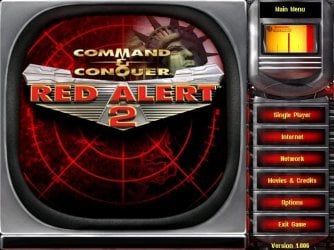
I really hope I am not reposting this question, I am using an acer 4738z with win7 32bit, i installed red alert2 today and the menus and other options cannot be seen, but in truth they are there, if i just click without seeing it does respond normally, also i get a black screen when the videos play, while i can hear the audio,i tried compatibility mode to win2000, winxp, tried running as admin still didn't work

like on this screen

redalert2.JPG


none of the options on the right can be seen, or the center image, but if i take a screenshot and paste it everything is perfect in the screenshot :what::what:
 

My Computer

OS
Windows 7 Professional x64
CPU
core i5 2400
Motherboard
Intel DH67BL
Memory
4GB DDR3 1333Hz
Graphics Card(s)
Sapphire Radeon 6850 1GB
you might need to switch off Aero..
 

My Computer

Computer type
PC/Desktop
Computer Manufacturer/Model Number
benchtec, built to personal specs
OS
Windows10 Pro - 64Bit vs.10547
CPU
i7-965 Extreme Edition (8 Cores) at 3.3GHz (no OC)
Motherboard
BloodRageX58 (Socket1366)
Memory
12G Corsair Dominator DDR3 - tripled
Graphics Card(s)
2xAMD SapphireNITRO R9 380(4G) crossfire
Sound Card
Sonar(SB)X-Fi onboard
Monitor(s) Displays
SyncMaster P2050 20"
Screen Resolution
1600x900 (widescreen)
Hard Drives
480G\OCZSolid3SSD, 64G\OCZVertex3SSD,60G\OCZVertex2SSD, 1TB\spinpointF1SATAHDD
PSU
1200w Power Station Gold
Case
ANTEC 900/2 all blue lights, etc..
Cooling
Noctua SE1366 NH-U12P - a tight fit, but a monster cooler!!
Keyboard
Logitech G19 (wired)
Mouse
Logitech G9 Laser (wired)
Internet Speed
150mb unlimited
Browser
IE11(RP)
Other Info
Xbox One, Nokia735 Windows10 mobile, LG HD/DVD/Blu-Ray r/w, CyberlinkPowerDVD15, LogitechZ5500-SS(5.1), LogitechG35Phones-SS(7.1),MSOffice 2007,CorelDrawX7,Painter2016, Wacom Intuos Pro-SE
you might need to switch off Aero..

thanks for the reply, i did try turning off Aero now, but it's still the same thing, and every time i minimize the game and then open it again, i can see the screen that was (supposed to be) there at the time of minimizing the game
 

My Computer

OS
Windows 7 Professional x64
CPU
core i5 2400
Motherboard
Intel DH67BL
Memory
4GB DDR3 1333Hz
Graphics Card(s)
Sapphire Radeon 6850 1GB
Back
Top