Red X On Network Icon On Task Bar, However Connected To Internet

Xylisithe

New member
Local time
5:45 AM
Messages
13
My girlfriend is having an issue with her laptop, where the Network icon on the task bar has a red X over, however she is still connected to the internet. It prevents her from seeing her laptops battery, so there is always the chance it'll randomly shut down.

If anyone could help, it'd be great. We can provide more information as it is necessary, along with screenshots/specs as well if needed.
 

My Computer My Computer

At a glance

Microsoft Windows 7 Ultimate 64-bitIntel(R) Core(TM)2 Duo CPU E4400 @ 2.00GHz2.00 GBIntel(R) G33/G31 Express Chipset Family
Computer type
PC/Desktop
OS
Microsoft Windows 7 Ultimate 64-bit
CPU
Intel(R) Core(TM)2 Duo CPU E4400 @ 2.00GHz
Motherboard
Dell Inc. 0CU409
Memory
2.00 GB
Graphics Card(s)
Intel(R) G33/G31 Express Chipset Family
Sound Card
Intel(R) G33/G31 Express Chipset Family
Antivirus
AVG
Browser
Chrome
Hello Xylisithe and welcome to Seven Forums.

It sounds like some of the Notification icons might be frozen for some reason.

Try this:
1. Click on the small white arrow pointing upwards to bring up the extra icons on the task bar
2. Click on customize...
3. If you have specific 'Behaviors' for icons that you want to keep then take note of them
4. Click on Restore default icon behaviors

If this doesn't help then click 'turn system icons on or off'
1. Turn all of the System icons off, then click OK
2. Then turn all of them back on and click OK

Basically what we want to accomplish here is to try and refresh the network icon and hopefully make the power icon appear as well.
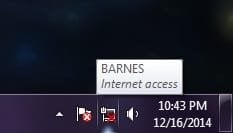
Would you be able to upload a screen shot of this big red X that seems to be covering up both the Network and Power icon?

Hope this helps :)
 

My Computer My Computer

At a glance

Windows 7 64-bit SP1 (VM)Intel(R) Core(TM) i7-2670QM CPU @ 2.20GHz (8 ...4 GB (Expandable to 8 GB)NVIDIA GeForce GT 525M
Computer type
Laptop
Computer Manufacturer/Model Number
Toshiba, Satellite L750/0T1
OS
Windows 7 64-bit SP1 (VM)
CPU
Intel(R) Core(TM) i7-2670QM CPU @ 2.20GHz (8 CPUs), ~2.2GHz
Motherboard
Intel Corp, PSK2YA-0T102S, Sandy Bridge - 09
Memory
4 GB (Expandable to 8 GB)
Graphics Card(s)
NVIDIA GeForce GT 525M
Sound Card
Conexant SmartAudio HD & NVIDIA High Definition Audio
Monitor(s) Displays
2 (Mobile PC Display, Dell E2009W)
Screen Resolution
1366 x 768 & 1680 x 1050
Hard Drives
TOSHIBA MK7575GSX - 698GB (Main Hard Drive)
WD Elements - 1TB (External Hard Drive)
Keyboard
Standard PS/2 Keyboard & Dell SK-8165
Mouse
Synaptics PS/2 Port TouchPad, Logitech Wireless Mouse M185
Internet Speed
Download: 49 Mb/s, Upload: 2 Mb/s 'via Ethernet' (OOKLA)
Antivirus
AVG AntiVirus Free Edition (Outside VM)
Browser
Internet Explorer, Google Chrome
Other Info
Main OS:Windows 10 64-bit
Also, you could try restarting Windows Explorer. Just to be safe, save all of your work before doing this. What you want to do is open the Task Manager by typing CTRL SHIFT ESC. Click Processes, click explorer.exe and click End Process. Now, don't let this scare you. Now click File > New Task(Run) > then type explorer.exe and hit enter. If the task bar and icons do not re-appear, turn off your computer manually (power button).
 

My Computer My Computer

At a glance

Windows 7 Home Premium 64 BitIntel i516 GBRadeon R7 260x
Computer type
PC/Desktop
Computer Manufacturer/Model Number
Modified Dell
OS
Windows 7 Home Premium 64 Bit
CPU
Intel i5
Memory
16 GB
Graphics Card(s)
Radeon R7 260x
Monitor(s) Displays
2 ASUS 19", 1 Vizio 27~"
Screen Resolution
1440 x 900 (2), 1920 x 1080
Hard Drives
1 TB Hard Drive
Keyboard
Razer DeathStalker Expert
Mouse
Razer Naga 2014
Internet Speed
Decent
Antivirus
McAfee
Browser
Chrome
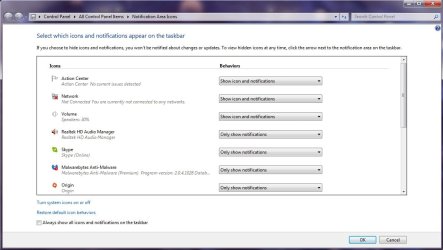
Okay, here are two screenshots from her laptop now. Unfortunately, neither suggestion helped.
 

Attachments

  • 1.jpg
    1.jpg
    66.9 KB · Views: 5
  • 2.jpg
    2.jpg
    3.9 KB · Views: 23

My Computer My Computer

At a glance

Microsoft Windows 7 Ultimate 64-bitIntel(R) Core(TM)2 Duo CPU E4400 @ 2.00GHz2.00 GBIntel(R) G33/G31 Express Chipset Family
Computer type
PC/Desktop
OS
Microsoft Windows 7 Ultimate 64-bit
CPU
Intel(R) Core(TM)2 Duo CPU E4400 @ 2.00GHz
Motherboard
Dell Inc. 0CU409
Memory
2.00 GB
Graphics Card(s)
Intel(R) G33/G31 Express Chipset Family
Sound Card
Intel(R) G33/G31 Express Chipset Family
Antivirus
AVG
Browser
Chrome
Hello,

If I may jump in....

This is a Network Connection Status Icon (NCSI) issue, see if editing the registry helps. Backup your computer's registry before editing. This procedure should work for Windows 7.

Also, for others it works assigning Static IPs.
 

My Computer My Computer

At a glance

Win7 & Win8 64bitIntel i5
Computer Manufacturer/Model Number
Lenovo Desktop/Samsung Laptop
OS
Win7 & Win8 64bit
CPU
Intel i5
Internet Speed
Charter-20 Mbps
Antivirus
Avast
Browser
FF, IE9 and Chrome
Thanks for the screen shots Xylisithe :)

If the refreshing method didn't work then it is definitely worth taking a look in the registry like 2xg said.

If that doesn't work the only other suggestion that I have would be to disable and re-enable your network adapter, otherwise re-installing the driver for your network adapter via your computer's manufacture's website.
 

My Computer My Computer

At a glance

Windows 7 64-bit SP1 (VM)Intel(R) Core(TM) i7-2670QM CPU @ 2.20GHz (8 ...4 GB (Expandable to 8 GB)NVIDIA GeForce GT 525M
Computer type
Laptop
Computer Manufacturer/Model Number
Toshiba, Satellite L750/0T1
OS
Windows 7 64-bit SP1 (VM)
CPU
Intel(R) Core(TM) i7-2670QM CPU @ 2.20GHz (8 CPUs), ~2.2GHz
Motherboard
Intel Corp, PSK2YA-0T102S, Sandy Bridge - 09
Memory
4 GB (Expandable to 8 GB)
Graphics Card(s)
NVIDIA GeForce GT 525M
Sound Card
Conexant SmartAudio HD & NVIDIA High Definition Audio
Monitor(s) Displays
2 (Mobile PC Display, Dell E2009W)
Screen Resolution
1366 x 768 & 1680 x 1050
Hard Drives
TOSHIBA MK7575GSX - 698GB (Main Hard Drive)
WD Elements - 1TB (External Hard Drive)
Keyboard
Standard PS/2 Keyboard & Dell SK-8165
Mouse
Synaptics PS/2 Port TouchPad, Logitech Wireless Mouse M185
Internet Speed
Download: 49 Mb/s, Upload: 2 Mb/s 'via Ethernet' (OOKLA)
Antivirus
AVG AntiVirus Free Edition (Outside VM)
Browser
Internet Explorer, Google Chrome
Other Info
Main OS:Windows 10 64-bit
Back
Top