Redirect Virus for Opera and Firefox

thehay

New member
Local time
6:37 PM
Messages
33
I'm getting redirected for hits from google/bing/yahoo about half the time to spam sites when i use opera and firefox. Opera is my main browser and i first noticed it happening when i had a win 7 antispyware 2011 virus which i think i have removed using malwarebytes.

I have Mcafee Security Center but i find it pretty useless.
my HitMan Pro 3.5 tells me i have a "possible variant of the TDL3 (alias Alureon) rootkit detected" and also a "Master Boot Record (sector 0) Rootkit" but i cant remove it because my hitman pro has passed its trial period and refuses to.

i'll post my latest malwarebytes log, for the sake of it.
i also have an opened thread in crashes and debugging forum because before i had this issue i had a lot of bsod crashes. http://www.sevenforums.com/crashes-debugging/148453-random-bsod-crashes.html

ive been following the http://www.sevenforums.com/system-security/147539-redirect-virus.html thread and the first few instructions on that. so ive flushed my DNS Cache, and ran a GooredFix scan.

help would be great! i really need to use my computer for uni work soon.
 

Attachments

My Computer My Computer

OS
Windows 7 Professional 32bit
The first thing to do is to install Microsoft Security Essentials:
http://www.microsoft.com/security_essentials/
Run a full system scan and if it still does not pick anything up try Spybot Search and Destroy:
The home of Spybot-S&D!
I would suggest downloading both, also S&D can imunize you browsers from these redirects be modifiying the hosts file in Windows 7.

If you need any help just let me know.

mbam-log-2011-03-05 (21-12-15).txt
Code:
Malwarebytes' Anti-Malware 1.50.1.1100
[URL="http://www.malwarebytes.org"]www.malwarebytes.org[/URL]
Database version: 5962
Windows 6.1.7600
Internet Explorer 8.0.7600.16385
5/03/2011 9:12:15 PM
mbam-log-2011-03-05 (21-12-15).txt
Scan type: Full scan (C:\|D:\|)
Objects scanned: 414213
Time elapsed: 1 hour(s), 56 minute(s), 56 second(s)
Memory Processes Infected: 0
Memory Modules Infected: 0
Registry Keys Infected: 0
Registry Values Infected: 1
Registry Data Items Infected: 0
Folders Infected: 0
Files Infected: 2
Memory Processes Infected:
(No malicious items detected)
Memory Modules Infected:
(No malicious items detected)
Registry Keys Infected:
(No malicious items detected)
Registry Values Infected:
HKEY_CLASSES_ROOT\.exe\shell\open\command\(default) (Hijack.ExeFile) -> Value: (default) -> Quarantined and deleted successfully.
Registry Data Items Infected:
(No malicious items detected)
Folders Infected:
(No malicious items detected)
Files Infected:
c:\Windows\temp\0.5094980352235309.exe (Trojan.Dropper) -> Quarantined and deleted successfully.
c:\Windows\temp\0.259625413950334.exe (Trojan.Dropper) -> Quarantined and deleted successfully.

GooredFix.txt
Code:
GooredFix by jpshortstuff (03.07.10.1)
Log created at 13:58 on 06/03/2011 (Chungy)
Firefox version 3.5.11 (en-US)
========== GooredScan ==========

========== GooredLog ==========
C:\Program Files\Mozilla Firefox\extensions\
{01398B87-61AF-4FFB-9AB5-1A1C5FB39A9C} [12:34 26/08/2009]
{972ce4c6-7e08-4474-a285-3208198ce6fd} [06:02 26/08/2009]
{CAFEEFAC-0016-0000-0013-ABCDEFFEDCBA} [11:15 26/08/2009]
{CAFEEFAC-0016-0000-0024-ABCDEFFEDCBA} [02:32 06/03/2011]
C:\Users\Chungy\Application Data\Mozilla\Firefox\Profiles\o5amkx0o.default\extensions\
[EMAIL="[email protected]"][email protected][/EMAIL] [08:04 19/06/2010]
{ea0969b3-6e12-4ac0-b6c9-148e81247954} [08:28 12/05/2010]
[HKEY_LOCAL_MACHINE\Software\Mozilla\Firefox\Extensions]
"{ABDE892B-13A8-4d1b-88E6-365A6E755758}"="C:\Program Files\Real\RealPlayer\browserrecord\firefox\ext" [12:27 26/08/2009]
"{B7082FAA-CB62-4872-9106-E42DD88EDE45}"="C:\Program Files\McAfee\SiteAdvisor" [08:00 15/09/2010]
---------- Old Logs ----------
GooredFix[02.04.16_06-03-2011].txt
GooredFix[02.04.37_06-03-2011].txt
-=E.O.F=-
 

My Computer My Computer

Computer type
PC/Desktop
Computer Manufacturer/Model Number
HP Pavilion g7-1350dx
OS
Windows 7 Ultimate SP1 x64
CPU
AMD A6-3420M APU
Memory
4.0 Gb DDR3 838 MHz
Graphics Card(s)
AMD Radeon HD 6520G
Sound Card
IDT HD Audio
Screen Resolution
1600x 900
Hard Drives
500GB Hitachi HTS547550A9E384
i ran MSE last night. it picked up a few files but the redirecting still occurs. i can't seem to find the log file for it else i would have posted it.
i'll try the S&D now
 

My Computer My Computer

OS
Windows 7 Professional 32bit
okay, let me know if you need help with S&D, it can be a little confusing at first.
 

My Computer My Computer

Computer type
PC/Desktop
Computer Manufacturer/Model Number
HP Pavilion g7-1350dx
OS
Windows 7 Ultimate SP1 x64
CPU
AMD A6-3420M APU
Memory
4.0 Gb DDR3 838 MHz
Graphics Card(s)
AMD Radeon HD 6520G
Sound Card
IDT HD Audio
Screen Resolution
1600x 900
Hard Drives
500GB Hitachi HTS547550A9E384
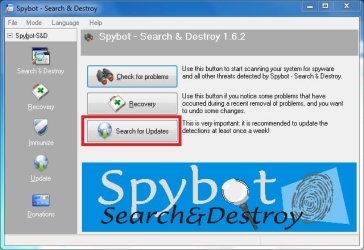
First you will have to update:
1.1.jpg
2.PNG
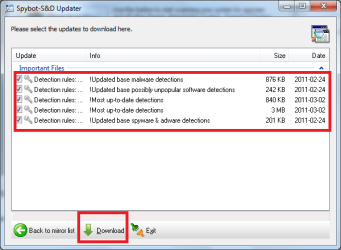
Download the latest updates:
3.PNG
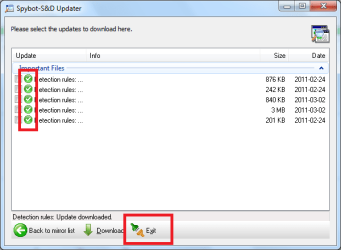
Once done you can exit:
4.PNG

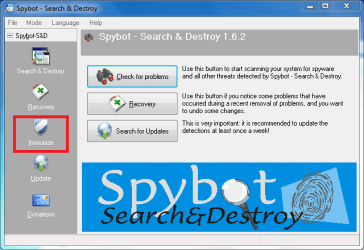
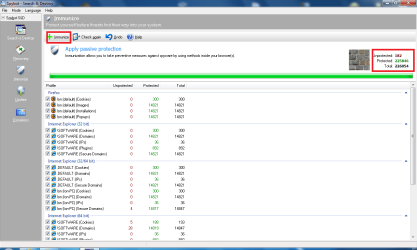
Then click on Immunize:
1.2.png
Close all browsers and again click on Immunize:
5.PNG

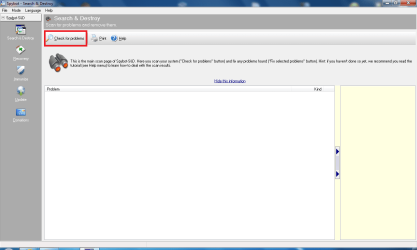
Afterwards click on "search and Destroy":
1.3.png
And click "Check for Problems"
6.PNG

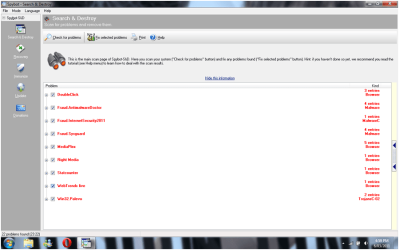
Afterward you will have a list of things that have been found, could you please post a snippet once done scanning.
 

My Computer My Computer

Computer type
PC/Desktop
Computer Manufacturer/Model Number
HP Pavilion g7-1350dx
OS
Windows 7 Ultimate SP1 x64
CPU
AMD A6-3420M APU
Memory
4.0 Gb DDR3 838 MHz
Graphics Card(s)
AMD Radeon HD 6520G
Sound Card
IDT HD Audio
Screen Resolution
1600x 900
Hard Drives
500GB Hitachi HTS547550A9E384
thanks for the instructions. working on that now.
 

My Computer My Computer

OS
Windows 7 Professional 32bit
Is the immunize part meant to take very long? It's been stuck at about 97% for a while now. Though it says there are 0 unprotected files left. Should I just leave it and start the scan?
 

My Computer My Computer

OS
Windows 7 Professional 32bit
Is the immunize part meant to take very long? It's been stuck at about 97% for a while now. Though it says there are 0 unprotected files left. Should I just leave it and start the scan?
First of all did you have all your browsers closed when Immunizing?
If no then you need to close all your browsers, and re-immunize, if it hangs at 97% again go ahead and start the scan.
 

My Computer My Computer

Computer type
PC/Desktop
Computer Manufacturer/Model Number
HP Pavilion g7-1350dx
OS
Windows 7 Ultimate SP1 x64
CPU
AMD A6-3420M APU
Memory
4.0 Gb DDR3 838 MHz
Graphics Card(s)
AMD Radeon HD 6520G
Sound Card
IDT HD Audio
Screen Resolution
1600x 900
Hard Drives
500GB Hitachi HTS547550A9E384
so i ran the scan and didnt realize i wasnt meant to click on "fix problems" which i did.
i did a screen shot of it beforehand though.
and damn. the redirecting is still occurring. thought it seems to be occurring less.
 

Attachments

  • spybot.png
    spybot.png
    40 KB · Views: 62

My Computer My Computer

OS
Windows 7 Professional 32bit
were you able to fully immunize? or did it still hang at 97%
Try starting Windows 7 in safe mode, then apply immunization again, and rescan and fix.
 

My Computer My Computer

Computer type
PC/Desktop
Computer Manufacturer/Model Number
HP Pavilion g7-1350dx
OS
Windows 7 Ultimate SP1 x64
CPU
AMD A6-3420M APU
Memory
4.0 Gb DDR3 838 MHz
Graphics Card(s)
AMD Radeon HD 6520G
Sound Card
IDT HD Audio
Screen Resolution
1600x 900
Hard Drives
500GB Hitachi HTS547550A9E384
I'm in safe mode and its still hanging at 97%
Unprotected 0
Protected 151193
Total 151386
I'll leave it at that whilst I go out for dinner and see if its still at 97%
 

My Computer My Computer

OS
Windows 7 Professional 32bit
Disable Spybot and TeaTimer (it will try to interfere with the cleaning) ....

Download TDSSKiller and save it to your Desktop.
  • Extract the file and run it.
  • Once completed it will create a log in the root directory (usually C:\).
  • Please post the contents of that log in your next reply.
 

My Computer My Computer

Computer type
PC/Desktop
Computer Manufacturer/Model Number
Bruce ... somewhere in his 40's
OS
Windows 7 Ultimate 32bit SP1
CPU
Intel(R) Core(TM)2 Quad CPU @ 2.40GHz, 2400 MHz
Motherboard
INTEL/D975XBX2
Memory
4 GB
Graphics Card(s)
ATI Radeon HD 2600 Pro
Monitor(s) Displays
Samsung SyncMaster 914v
Screen Resolution
1280 x 1024
Hard Drives
2/500GB each ... ST3500630AS ATA Device.
One is not connected
PSU
Rocketfish 700 W
Case
G.Skill Gigabyte Chassis
Keyboard
Standard PS/2 Keyboard
Mouse
Microsoft PS/2 Mouse
Internet Speed
DSL
Antivirus
Avira Internet Security
Browser
IE 11
Other Info
ATI HDMI Audio
i ran the scan and that may have been the trick. havent had a redirect yet so thats very good news. thanks! =)
and just as a general question. i have mcafee security center but due to my recent problems i downloaded microsoft security essentials. should i get rid of one since ive been told that having two anti virus programs may be conflicting.
 

Attachments

My Computer My Computer

OS
Windows 7 Professional 32bit
i ran the scan and that may have been the trick. havent had a redirect yet so thats very good news. thanks! =)
and just as a general question. i have mcafee security center but due to my recent problems i downloaded microsoft security essentials. should i get rid of one since ive been told that having two anti virus programs may be conflicting.
That is good, I would leave MSE installed and uninstall mcafee to prevent conflics. Also Search and Destroy plays nice with MSE, and it provides the browser imunization so that should be all good now.
 

My Computer My Computer

Computer type
PC/Desktop
Computer Manufacturer/Model Number
HP Pavilion g7-1350dx
OS
Windows 7 Ultimate SP1 x64
CPU
AMD A6-3420M APU
Memory
4.0 Gb DDR3 838 MHz
Graphics Card(s)
AMD Radeon HD 6520G
Sound Card
IDT HD Audio
Screen Resolution
1600x 900
Hard Drives
500GB Hitachi HTS547550A9E384
hmm.. hopefully my dad doesnt mind. he just renewed the membership with mcafee
thanks for the advice and helping me get rid of the virus ionbasa and jacee! =)
 

My Computer My Computer

OS
Windows 7 Professional 32bit
Looks like TDSSKiller took care of it.

Please download TFC by Old Timer TFC - Temp File Cleaner by OldTimer - Geeks to Go Forums and save it to your desktop.
Save any unsaved work. TFC will close ALL open programs including your browser!
Double-click on TFC.exe to run it. If you are using Vista/Windows 7 right-click on the file and choose Run As Administrator.
Click the Start button to begin the cleaning process and let it run uninterrupted to completion.
Important! If TFC prompts you to reboot, please do so immediately. If not prompted, manually reboot the machine anyway to ensure a complete clean.

Next, rescan with Malwarebytes'
 

My Computer My Computer

Computer type
PC/Desktop
Computer Manufacturer/Model Number
Bruce ... somewhere in his 40's
OS
Windows 7 Ultimate 32bit SP1
CPU
Intel(R) Core(TM)2 Quad CPU @ 2.40GHz, 2400 MHz
Motherboard
INTEL/D975XBX2
Memory
4 GB
Graphics Card(s)
ATI Radeon HD 2600 Pro
Monitor(s) Displays
Samsung SyncMaster 914v
Screen Resolution
1280 x 1024
Hard Drives
2/500GB each ... ST3500630AS ATA Device.
One is not connected
PSU
Rocketfish 700 W
Case
G.Skill Gigabyte Chassis
Keyboard
Standard PS/2 Keyboard
Mouse
Microsoft PS/2 Mouse
Internet Speed
DSL
Antivirus
Avira Internet Security
Browser
IE 11
Other Info
ATI HDMI Audio
i ran TFC and then malwarebytes. it didnt pick up anything so thats good news.
 

Attachments

My Computer My Computer

OS
Windows 7 Professional 32bit
Do yourself a favor and add Sandboxie free;)
 

My Computer My Computer

OS
Win 7 64 premium
Other Info
7 fw, LUA, UAC on high, IE-9 w/ smartscreen on, SANDBOXIE
Let's run one more scan...... I'd like you to scan your machine with ESET OnlineScan
  1. Hold down Control and click on the following link to open ESET OnlineScan in a new window.
    ESET OnlineScan
  2. Click the
    esetOnline.png
    button.
  3. For alternate browsers only: (Microsoft Internet Explorer users can skip these steps)
    1. Click on
      esetSmartInstall.png
      to download the ESET Smart Installer. Save it to your desktop.
    2. Double click on the
      esetSmartInstallDesktopIcon.png
      icon on your desktop.
  4. Check
    esetAcceptTerms.png
  5. Click the
    esetStart.png
    button.
  6. Accept any security warnings from your browser.
  7. Check
    esetScanArchives.png
  8. Push the Start button.
  9. ESET will then download updates for itself, install itself, and begin scanning your computer. Please be patient as this can take some time.
  10. When the scan completes, push
    esetListThreats.png
  11. Push
    esetExport.png
    , and save the file to your desktop using a unique name, such as ESETScan. Include the contents of this report in your next reply.
  12. Push the
    esetBack.png
    button.
  13. Push
    esetFinish.png
 

My Computer My Computer

Computer type
PC/Desktop
Computer Manufacturer/Model Number
Bruce ... somewhere in his 40's
OS
Windows 7 Ultimate 32bit SP1
CPU
Intel(R) Core(TM)2 Quad CPU @ 2.40GHz, 2400 MHz
Motherboard
INTEL/D975XBX2
Memory
4 GB
Graphics Card(s)
ATI Radeon HD 2600 Pro
Monitor(s) Displays
Samsung SyncMaster 914v
Screen Resolution
1280 x 1024
Hard Drives
2/500GB each ... ST3500630AS ATA Device.
One is not connected
PSU
Rocketfish 700 W
Case
G.Skill Gigabyte Chassis
Keyboard
Standard PS/2 Keyboard
Mouse
Microsoft PS/2 Mouse
Internet Speed
DSL
Antivirus
Avira Internet Security
Browser
IE 11
Other Info
ATI HDMI Audio
Back
Top