Solved Reduce OEM system reserve partition on SSD Drive

surferman

New member
Local time
5:36 PM
Messages
16
Hi Folks,

I have looked around on the site for some answers, but cant find an answer (only if I want to reinstall Win7)

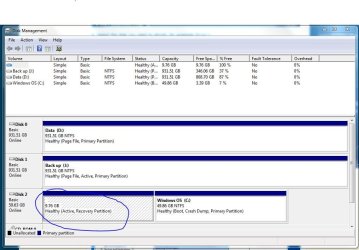
I have a 64GB SSD split into two partitions: Win 7 is on the C:/(49.86GB) and the OEM system reserved is on the other hidden partition (9.76GB). The OEM partition holds OEM receovery software for PowerDVD and other older softare I no longer need.

The system reserved space is over 9GB and I could do with this for running Win7, and want to reduce the OEM partition down to 200MB to hold the Boot mgr and windows recovery files.

Can anybody help me to reduce the system reserve partition and increase the windows partition?

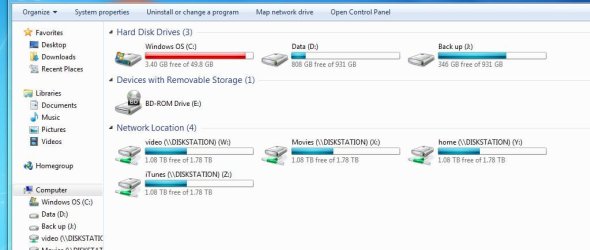
I have attached pics of the drive information and status as per diskmgmt.msc

Much appreciated!

Leo
 

Attachments
  • Capture1.JPG
    Capture1.JPG
    53.6 KB · Views: 49
  • Capture2.JPG
    Capture2.JPG
    89 KB · Views: 113

My Computer My Computer

At a glance

Windows 7 Home premium 64bitPentium i7 CPU 860 @2.80 Ghz8GB Crucial RAM (4 x 2GB DDR3 1333MHz)1 GB, HIS ATI Radeon 5770
Computer Manufacturer/Model Number
Mesh Computers, MESH ICe 5 Pro - A LIST
OS
Windows 7 Home premium 64bit
CPU
Pentium i7 CPU 860 @2.80 Ghz
Motherboard
Asus P7P55D LE
Memory
8GB Crucial RAM (4 x 2GB DDR3 1333MHz)
Graphics Card(s)
1 GB, HIS ATI Radeon 5770
Sound Card
VIA VT1828S (on board MOBO)
Monitor(s) Displays
Prolite E2407HDSD (IIyama 24")
Screen Resolution
1920 x 1080
Hard Drives
Samsung 64GB MLC SSD SATA Solid state drive (SAMSUNG HD103SJ ATA Device)
Samsung 1TB serial ATA 2 (SAMSUNG MMCRE64G5MXP-0VB ATA Device)
PSU
X-Power ATX-700TW (700W HEC)
Case
Hush, NXT
Cooling
2 x case Fans (front & rear), intel CPU heatsink & fan
Internet Speed
4Mb download
Pretty sure it cannot be done with Windows own tools.

Look into Paragon Partition Manager boot disc.

You might also want to put your boot files on C.
 

My Computer My Computer

At a glance

Windows 7 Home Premium SP1, 64-bitIntel Skylake i5-6600K, not overclocked8 GB HyperX DDR4-2666 (2 x 4 GB)none; graphics are integrated on CPU
Computer type
PC/Desktop
Computer Manufacturer/Model Number
Ignatz Special; 4 speed manual gearbox; factory air conditioning; one of one
OS
Windows 7 Home Premium SP1, 64-bit
CPU
Intel Skylake i5-6600K, not overclocked
Motherboard
AsRock Z170M Extreme 4, micro ATX
Memory
8 GB HyperX DDR4-2666 (2 x 4 GB)
Graphics Card(s)
none; graphics are integrated on CPU
Sound Card
onboard: Realtek ALC1150; external: USB Behringer UF0-202
Monitor(s) Displays
Dell S2340M 23 inch IPS
Screen Resolution
1600 x 900
Hard Drives
System: Crucial MX100 series SSD, 128 GB;
Data: Samsung Spinpoint 103SJ, 1 TB;
Backup: WD Caviar Green WD30EZRX-00D8PB0, 3 TB
PSU
Rosewill SilentNight 500 watt fanless, semi-modular
Case
Antec Solo II
Cooling
Noctua NH-U12S; Noctua F12 intake, Noctua S12A exhaust
Keyboard
Microsoft 200 6JH-00001 USB
Mouse
Dell or Microsoft optical wired; USB
Antivirus
Microsoft Security Essentials and Malwarebytes Premium
Browser
Pale Moon
Other Info
All fans PWM; speeds at idle: CPU circa 500 rpm; intake circa 600 rpm; exhaust circa 600 rpm; CPU temps 27 idle and 47 C load in a warm room (27 C/81 F) when running Intel Extreme Tuning Utility stress test.
It is also best to have your OS Hd Drive as Disk 0.
 

My Computer My Computer

At a glance

ME/XP/Vista/Win7
OS
ME/XP/Vista/Win7
Thanks for the replies!

ignatzatsonic,

WIll Partition Magic allow me to view the OEM system reserved files and delete the crap? reduce the hidden partition and enlarge the C:/ drive

Theog,

I presume I just rearrange the SATA connectors from the motherboard to get the SSD as disk 0

...I have to admit I'm not an expert, but know enough to be dangerous...lol!
 

My Computer My Computer

At a glance

Windows 7 Home premium 64bitPentium i7 CPU 860 @2.80 Ghz8GB Crucial RAM (4 x 2GB DDR3 1333MHz)1 GB, HIS ATI Radeon 5770
Computer Manufacturer/Model Number
Mesh Computers, MESH ICe 5 Pro - A LIST
OS
Windows 7 Home premium 64bit
CPU
Pentium i7 CPU 860 @2.80 Ghz
Motherboard
Asus P7P55D LE
Memory
8GB Crucial RAM (4 x 2GB DDR3 1333MHz)
Graphics Card(s)
1 GB, HIS ATI Radeon 5770
Sound Card
VIA VT1828S (on board MOBO)
Monitor(s) Displays
Prolite E2407HDSD (IIyama 24")
Screen Resolution
1920 x 1080
Hard Drives
Samsung 64GB MLC SSD SATA Solid state drive (SAMSUNG HD103SJ ATA Device)
Samsung 1TB serial ATA 2 (SAMSUNG MMCRE64G5MXP-0VB ATA Device)
PSU
X-Power ATX-700TW (700W HEC)
Case
Hush, NXT
Cooling
2 x case Fans (front & rear), intel CPU heatsink & fan
Internet Speed
4Mb download
I have never used Paragon for your stated purpose. Paragon makes several different software packages that are generally the most comprehensive available.

Member SIW 2 is the authority on Paragon software.

He may comment in this thread.
 

My Computer My Computer

At a glance

Windows 7 Home Premium SP1, 64-bitIntel Skylake i5-6600K, not overclocked8 GB HyperX DDR4-2666 (2 x 4 GB)none; graphics are integrated on CPU
Computer type
PC/Desktop
Computer Manufacturer/Model Number
Ignatz Special; 4 speed manual gearbox; factory air conditioning; one of one
OS
Windows 7 Home Premium SP1, 64-bit
CPU
Intel Skylake i5-6600K, not overclocked
Motherboard
AsRock Z170M Extreme 4, micro ATX
Memory
8 GB HyperX DDR4-2666 (2 x 4 GB)
Graphics Card(s)
none; graphics are integrated on CPU
Sound Card
onboard: Realtek ALC1150; external: USB Behringer UF0-202
Monitor(s) Displays
Dell S2340M 23 inch IPS
Screen Resolution
1600 x 900
Hard Drives
System: Crucial MX100 series SSD, 128 GB;
Data: Samsung Spinpoint 103SJ, 1 TB;
Backup: WD Caviar Green WD30EZRX-00D8PB0, 3 TB
PSU
Rosewill SilentNight 500 watt fanless, semi-modular
Case
Antec Solo II
Cooling
Noctua NH-U12S; Noctua F12 intake, Noctua S12A exhaust
Keyboard
Microsoft 200 6JH-00001 USB
Mouse
Dell or Microsoft optical wired; USB
Antivirus
Microsoft Security Essentials and Malwarebytes Premium
Browser
Pale Moon
Other Info
All fans PWM; speeds at idle: CPU circa 500 rpm; intake circa 600 rpm; exhaust circa 600 rpm; CPU temps 27 idle and 47 C load in a warm room (27 C/81 F) when running Intel Extreme Tuning Utility stress test.

My Computer My Computer

At a glance

ME/XP/Vista/Win7
OS
ME/XP/Vista/Win7
That partition is a recovery partition and probably contains a factory image that takes up that space, doubt you can reduce it that much. That said, you can look at it by assigning a drive letter to that partition and turn on show hidden folders and system files. I would make an image of it and put away some where if needed later and get rid of partition and make the SSD one partition.

TJG :)

Edit: Unless you are using bit-locker.
 

My Computer My Computer

At a glance

Windows 7 Home Premium 32bitsIntel Pentium 4 521DDR2 4096MBytesATI Radeon HD 2400 Series
Computer Manufacturer/Model Number
Dell Dimension E510
OS
Windows 7 Home Premium 32bits
CPU
Intel Pentium 4 521
Motherboard
Dell Inc. ORD203
Memory
DDR2 4096MBytes
Graphics Card(s)
ATI Radeon HD 2400 Series
Sound Card
On-Board Sigma Tel High Definition Audio
Monitor(s) Displays
Dell ST2210 1920x1080x60 hertz
Hard Drives
320 SATA
500 SATA
PSU
Antec 430 Watts
Case
Dell
Cooling
Standard Fans
What I would do is move the System Active boot files into C by marking it Active and running Startup Repair 3 Separate Times from Win7 DVD or Repair CD. Once Win7 starts on its own, delete Recov partition and resize C into its space.

You can use free Partition Wizard bootable CD to rightclick C to Modify>Set to Active, then rightclick J to Modify>Set to Inactive so it doesn't interfere, then click on HD to highlight it, from DIsk tab select Rebuild MBR which may preclude the need to run the Repairs if it starts at reboot.

If not run the Repairs then when Win7 starts on its own boot back into PW CD to confirm C is now System Active. If so rightclick on Recovery to Delete, OK. Then rightclick on C to Resize, slide left grey border all the way to right, OK, Apply both steps. Win7 should start after resizing without the need for another Repair.
 
Thanks for all the feedback...used partition Magic from Paragon and it was a breeze.

br

Leo
 

My Computer My Computer

At a glance

Windows 7 Home premium 64bitPentium i7 CPU 860 @2.80 Ghz8GB Crucial RAM (4 x 2GB DDR3 1333MHz)1 GB, HIS ATI Radeon 5770
Computer Manufacturer/Model Number
Mesh Computers, MESH ICe 5 Pro - A LIST
OS
Windows 7 Home premium 64bit
CPU
Pentium i7 CPU 860 @2.80 Ghz
Motherboard
Asus P7P55D LE
Memory
8GB Crucial RAM (4 x 2GB DDR3 1333MHz)
Graphics Card(s)
1 GB, HIS ATI Radeon 5770
Sound Card
VIA VT1828S (on board MOBO)
Monitor(s) Displays
Prolite E2407HDSD (IIyama 24")
Screen Resolution
1920 x 1080
Hard Drives
Samsung 64GB MLC SSD SATA Solid state drive (SAMSUNG HD103SJ ATA Device)
Samsung 1TB serial ATA 2 (SAMSUNG MMCRE64G5MXP-0VB ATA Device)
PSU
X-Power ATX-700TW (700W HEC)
Case
Hush, NXT
Cooling
2 x case Fans (front & rear), intel CPU heatsink & fan
Internet Speed
4Mb download
Back
Top