Reduce Windows 7 memory footprint

Derek10

New member
Member
Local time
1:37 AM
Messages
87
I have a netbook with 1 GB of RAM and Windows 7 Starter and it still eats lots of memory without any background program despite reading all tutorials on the internet (kill any non crucial background program and services, using classic theme, disabled visual effects, cleaning registry and junk files, etc)
This makes the hard drive light stay on almost constantly while the RAM is 99% used.

If anyone knows another way to improve RAM memory please reply :)
 

My Computer My Computer

Computer Manufacturer/Model Number
Custom
OS
Windows 7 Ultimate 64-bit SP1
CPU
Intel Celeron G530
Motherboard
Gigabyte GA-H61M-S2-B3
Memory
2 GB DDR3 Kingston 1333 (1066)
Graphics Card(s)
POV Nvidia Geforce GT530
Sound Card
Onboard
Monitor(s) Displays
Samsung SyncMaster S19B150
Screen Resolution
1366x768
Hard Drives
Laptop HDD TOSHIBA MK3265GSX
PSU
Generic 500W
Cooling
Stock
Keyboard
Logitech S 510 Wireless
Mouse
IBM MO28UO
Internet Speed
30 mbps
Increase the amount of RAM. With 1 GB i think it's going to swap no matter what you do. You don't have enough ram to turn swap and prefetch off.
 

My Computer My Computer

Computer Manufacturer/Model Number
HP Media Center
OS
Windows 7 32 bit
CPU
AMD 5200+ dual core
Memory
2 GB
Graphics Card(s)
NVidia GeForce 6150SE 128 MB
Monitor(s) Displays
CRT
Screen Resolution
1280x1024
Hard Drives
500 GB Sata internal :

SIIG USB 3.0 docking stations w/WD Caviar Black 6 Gb/s drives
Keyboard
PS/2
Mouse
PS/2 Wheel Mouse
Other Info
SIIG USB 3.0 PCIexpress card.
Post a screenshot of Task Manager - Performance tab. This will give a better picture of what is happening.
On a system with memory problems disabling the pagefile is the worst thing you can do. This would make things worse, if it would run at all.

Windows 7 is not going to run well with 1 GB RAM.
 

My Computer My Computer

Computer type
PC/Desktop
Computer Manufacturer/Model Number
HP
OS
Windows 7 Pro 64 bit
CPU
Xeon W3520
Memory
8 GB
Graphics Card(s)
Nvidia Geforce 210
I have a netbook with 1 GB of RAM
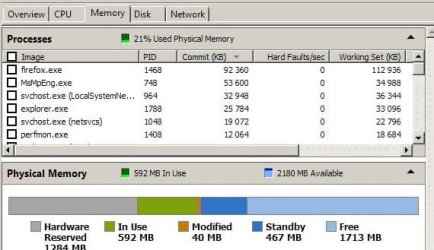
It's very possible to get w7 to use less mem, shaving off startup programs and non-crucial services (see attachment, HP 6735b w7 32bit ultimate, less than 600MB with ff + more stuff running). But you may have some of the 1GB gone to start with > hardware reserved... so getting yourself a GB more of ram is recommended in all circumstances.
Post a resource monitor shot of your memory usage.
 

Attachments

  • w7mem.JPG
    w7mem.JPG
    39.2 KB · Views: 11

My Computer My Computer

Computer type
Laptop
Computer Manufacturer/Model Number
Dell \ Lenovo\ HP \ Toshiba
OS
W7, W8.1
Antivirus
MSE, Malwarebytes
Browser
FF
What programs do you generally run? You will need more RAM too.
 

My Computer My Computer

Computer type
Laptop
Their is no tap dancing around this problem or magic wan. You need more ram.
 

My Computer My Computer

Computer type
PC/Desktop
Computer Manufacturer/Model Number
Home made Desktop
OS
Windows 10 Pro. 64/ version 1709 Windows 7 Pro/64
CPU
Intel i7-6800K @ 4.3
Motherboard
ASUS X-99 Deluxe II
Memory
Corsair Platinum 16 gig @2400
Graphics Card(s)
EVGA GTX 1070 OC
Monitor(s) Displays
Asus 27" LED LCD/VE278Q
Screen Resolution
1920-1080 or 1280-720 HDMI
Hard Drives
INTEL SSD 730-240 Gb Sata 3.0/
PSU
EVGA Platium 1200W
Case
Phanteks Luxe Tempered Glass 8 fans/ one radiator
Cooling
XSPC/ Water Cooled CPU
Keyboard
Das 4 Professional
Mouse
Logitech M705/MX Anywhere 2-S
Internet Speed
100 mbits
Antivirus
Microsoft Security Essentials/ Malwarebytes Premium 3.0/ SAS
Browser
I.E. 11 default/Firefox/ ISP Time Warner Cable/Spectrum
Other Info
LG BluRay Burner/
Sound system-KLipsch-THX/
Icy Dock ssd Hot Swap bays.
Running Windows 7 with 1 GB RAM is a problem but it does meet the minimum requirements. With a workload within it's means it should run reasonably well. Ultimately it is the system memory manager that controls memory usage and it will try very hard to maintain a reasonable amount of available memory. Having 99% memory usage is a good indicator that something is wrong. Solving problems starts with information and at present there is very little. A screenshot of Task Manager - Performance tab, will provide much of that.
 

My Computer My Computer

Computer type
PC/Desktop
Computer Manufacturer/Model Number
HP
OS
Windows 7 Pro 64 bit
CPU
Xeon W3520
Memory
8 GB
Graphics Card(s)
Nvidia Geforce 210
Correct 1 gb of ram is all that is required to install Windows 7.
Post #1 the ram is being eaten up. Their is no ram to be eaten. One gig of ram just barely runs Window 7.
 
Last edited:

My Computer My Computer

Computer type
PC/Desktop
Computer Manufacturer/Model Number
Home made Desktop
OS
Windows 10 Pro. 64/ version 1709 Windows 7 Pro/64
CPU
Intel i7-6800K @ 4.3
Motherboard
ASUS X-99 Deluxe II
Memory
Corsair Platinum 16 gig @2400
Graphics Card(s)
EVGA GTX 1070 OC
Monitor(s) Displays
Asus 27" LED LCD/VE278Q
Screen Resolution
1920-1080 or 1280-720 HDMI
Hard Drives
INTEL SSD 730-240 Gb Sata 3.0/
PSU
EVGA Platium 1200W
Case
Phanteks Luxe Tempered Glass 8 fans/ one radiator
Cooling
XSPC/ Water Cooled CPU
Keyboard
Das 4 Professional
Mouse
Logitech M705/MX Anywhere 2-S
Internet Speed
100 mbits
Antivirus
Microsoft Security Essentials/ Malwarebytes Premium 3.0/ SAS
Browser
I.E. 11 default/Firefox/ ISP Time Warner Cable/Spectrum
Other Info
LG BluRay Burner/
Sound system-KLipsch-THX/
Icy Dock ssd Hot Swap bays.
Running Windows 7 with 1 GB RAM is a problem but it does meet the minimum requirements.

I've found minimum requirements to mean the system will boot after you install. You can look at the desktop wallpaper all you want. But if you want to use anything, search the web and find out what hardware people using it really have for adequate performance, before you get the OS in question.
 

My Computer My Computer

Computer Manufacturer/Model Number
HP Media Center
OS
Windows 7 32 bit
CPU
AMD 5200+ dual core
Memory
2 GB
Graphics Card(s)
NVidia GeForce 6150SE 128 MB
Monitor(s) Displays
CRT
Screen Resolution
1280x1024
Hard Drives
500 GB Sata internal :

SIIG USB 3.0 docking stations w/WD Caviar Black 6 Gb/s drives
Keyboard
PS/2
Mouse
PS/2 Wheel Mouse
Other Info
SIIG USB 3.0 PCIexpress card.
Back
Top