Reformat laptopWindows ask to activate No product key Error 0xC004F063

beabs88

New member
Local time
7:56 PM
Messages
3
After reformatting my laptop (Toshiba), it is saying my Windows is not genuine and it is counterfeit software. I cannot use any product key on the bottom of the laptop as there is no sticker with that information on my laptop. I contacted Microsoft they said they can't do anything and I should contact my manufacturer or store that I bought it from to see if they have an OEM copy of my product key. Is there any other way I can get my windows product key? I tried those programs that you can download to get your key but the key was unsuccessful in activating windows. Error message: 0xC004F063.

Sick of this problem. I know hundreds are having the same problem as I've seen in MANY posts online. Where do I start and can I fix the problem? The version of windows came with the computer. I did not purchase it separately. BUT I did use a different Windows Installation Disc that was my friend's to reformat the computer however I did not get a product key. What do I do????? Help! Pls!

:cry:
 

My Computer My Computer

At a glance

Windows 7 Professional 64 bitIntel Core i710GB
Computer type
Laptop
Computer Manufacturer/Model Number
Toshiba
OS
Windows 7 Professional 64 bit
CPU
Intel Core i7
Memory
10GB
Antivirus
MSE
Browser
Mozilla
The key you found was the key the factory uses to activate windows and is useless to you.

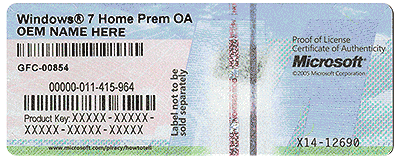
All computers sold with Windows 7 have a COA sticker, look in the battery compartment.

If you don`t have a COA, then your only option is to contact Toshiba for recovery discs or buy Windows 7 OEM.

This is an example of a site here in the US, you will have to find something in Australia.

Microsoft Windows 7 Home Premium SP1 64-Bit - Operating Systems - Newegg.com

COA
 

Attachments

  • HardwareCOA.gif
    HardwareCOA.gif
    707.8 KB · Views: 17

My Computer My Computer

At a glance

Windows 10 Pro x64Intel Core i7 6700KGSkill TridentZ RGB 16GB 3600 16-16-16-36EVGA GTX 980 Ti SC x2
Computer type
PC/Desktop
Computer Manufacturer/Model Number
Skylake Special #666
OS
Windows 10 Pro x64
CPU
Intel Core i7 6700K
Motherboard
Asus Sabertooth Z170 Mark 1
Memory
GSkill TridentZ RGB 16GB 3600 16-16-16-36
Graphics Card(s)
EVGA GTX 980 Ti SC x2
Sound Card
Realtek High Definition
Monitor(s) Displays
AOC G2460PG
Screen Resolution
1920 x 1080 144Hz
Hard Drives
Samsung 860 Pro 256GB, Seagate Barracuda 4TB x2
PSU
EVGA 1000 P2, EVGA White Custom Braided Cables
Case
Corsair Vengeance C70 Gunmetal Black
Cooling
Corsair H100i v2, Corsair ML120 x2, Thermal Grizzly Kryonaut
Keyboard
Logitech G910 Orion Spectrum
Mouse
Logitech G700s
Internet Speed
Verizon Fios Quantum Gateway 75/75
Antivirus
Windows Defender, Malwarebytes Free 3.8.3
Browser
Chrome
Other Info
Corsair SP120 x4, LG Blu-ray Drive, Durabrand HT-395 100 Watt Dolby Digital Amp, Corsair H2100 Wireless 7.1 Headset
You need to reinstall using the proper manufacturer's Recovery media - which contain the proper licenses and Key for your OS.
Having said that, if there's no COA sticker on the case, then the machine may well have shipped without an OS, or with Linux installed.


Please follow this tutorial and post an MGADiag report - then we can see if the machine will accept the Windows Recovery media

http://www.sevenforums.com/windows-updates-activation/234159-windows-genuine-activation-issue-posting-instructions.html

Ignore errors produced when clicking on the Copy button - they simply mean that the tool could not create the backup files for some reason. The data is still copied to the clipboard for pasting to your response.

Please also state the Version and Edition of Windows quoted on your COA sticker (if you have one) on the case of your machine (or inside the battery compartment), but do NOT quote the Key on the sticker!
http://www.microsoft.com/en-us/howtotell/Hardware.aspx
 

My Computer My Computer

At a glance

Win 7 x64 Home Premium (and x86 VirtualBox VM...i3 370M/i7 6500U8GB - finally :)/8GBit's an i3, dude!/dual Intel&nVidia
Computer type
Laptop
Computer Manufacturer/Model Number
Asus K52F or Lenovo B51-80
OS
Win 7 x64 Home Premium (and x86 VirtualBox VM)/Win10
CPU
i3 370M/i7 6500U
Motherboard
Asus/Lenovo
Memory
8GB - finally :)/8GB
Graphics Card(s)
it's an i3, dude!/dual Intel&nVidia
Sound Card
onboard
Monitor(s) Displays
15.6" built-in
Screen Resolution
1366x768/1920x1080
Hard Drives
750GB Seagate internal
Sundry external drives attached to other computers on the local network
1TB SSD on the Lenovo
PSU
n/a
Internet Speed
as much as I can get - usually on a dongle/phone, so <1MB/s
Antivirus
MSE/Defender
Browser
IE11/12/Edge/Chrome/FF(if I must)
It is Windows 7 Professional 64bit. Here is my MGADiag report:

Code:
Diagnostic Report (1.9.0027.0):
-----------------------------------------
Windows Validation Data-->

Validation Code: 50
Cached Online Validation Code: 0x0
Windows Product Key: *****-*****-DD6WM-GHDG2-Y8M37
Windows Product Key Hash: NgyVvjf4w7YgSVHrjuWBUTC51KE=
Windows Product ID: 00371-OEM-8992671-00205
Windows Product ID Type: 2
Windows License Type: OEM SLP
Windows OS version: 6.1.7601.2.00010100.1.0.048
ID: {ED23E207-B37F-4BA8-8077-2022E41CBDE6}(3)
Is Admin: Yes
TestCab: 0x0
LegitcheckControl ActiveX: N/A, hr = 0x80070002
Signed By: N/A, hr = 0x80070002
Product Name: Windows 7 Professional
Architecture: 0x00000009
Build lab: 7601.win7sp1_gdr.150316-1654
TTS Error: 
Validation Diagnostic: 
Resolution Status: N/A

Vista WgaER Data-->
ThreatID(s): N/A, hr = 0x80070002
Version: N/A, hr = 0x80070002

Windows XP Notifications Data-->
Cached Result: N/A, hr = 0x80070002
File Exists: No
Version: N/A, hr = 0x80070002
WgaTray.exe Signed By: N/A, hr = 0x80070002
WgaLogon.dll Signed By: N/A, hr = 0x80070002

OGA Notifications Data-->
Cached Result: N/A, hr = 0x80070002
Version: N/A, hr = 0x80070002
OGAExec.exe Signed By: N/A, hr = 0x80070002
OGAAddin.dll Signed By: N/A, hr = 0x80070002

OGA Data-->
Office Status: 109 N/A
OGA Version: N/A, 0x80070002
Signed By: N/A, hr = 0x80070002
Office Diagnostics: 025D1FF3-364-80041010_025D1FF3-229-80041010_025D1FF3-230-1_025D1FF3-517-80040154_025D1FF3-237-80040154_025D1FF3-238-2_025D1FF3-244-80070002_025D1FF3-258-3

Browser Data-->
Proxy settings: N/A
User Agent: Mozilla/4.0 (compatible; MSIE 8.0; Win32)
Default Browser: C:\Program Files (x86)\Mozilla Firefox\firefox.exe
Download signed ActiveX controls: Prompt
Download unsigned ActiveX controls: Disabled
Run ActiveX controls and plug-ins: Allowed
Initialize and script ActiveX controls not marked as safe: Disabled
Allow scripting of Internet Explorer Webbrowser control: Disabled
Active scripting: Allowed
Script ActiveX controls marked as safe for scripting: Allowed

File Scan Data-->

Other data-->
Office Details: <GenuineResults><MachineData><UGUID>{ED23E207-B37F-4BA8-8077-2022E41CBDE6}</UGUID><Version>1.9.0027.0</Version><OS>6.1.7601.2.00010100.1.0.048</OS><Architecture>x64</Architecture><PKey>*****-*****-*****-*****-Y8M37</PKey><PID>00371-OEM-8992671-00205</PID><PIDType>2</PIDType><SID>S-1-5-21-66072723-251912005-4051661179</SID><SYSTEM><Manufacturer>TOSHIBA</Manufacturer><Model>PORTEGE Z930</Model></SYSTEM><BIOS><Manufacturer>TOSHIBA</Manufacturer><Version>Version 6.50  </Version><SMBIOSVersion major="2" minor="5"/><Date>20121126000000.000000+000</Date></BIOS><HWID>EE3C0A00018400FE</HWID><UserLCID>0C09</UserLCID><SystemLCID>0409</SystemLCID><TimeZone>AUS Central Standard Time(GMT+09:30)</TimeZone><iJoin>0</iJoin><SBID><stat>3</stat><msppid></msppid><name></name><model></model></SBID><OEM><OEMID>TOSHIB</OEMID><OEMTableID>A0082   </OEMTableID></OEM><GANotification/></MachineData><Software><Office><Result>109</Result><Products/><Applications/></Office></Software></GenuineResults>  

Spsys.log Content: 0x80070002

Licensing Data-->
Software licensing service version: 6.1.7601.17514

Name: Windows(R) 7, Professional edition
Description: Windows Operating System - Windows(R) 7, OEM_SLP channel
Activation ID: 50e329f7-a5fa-46b2-85fd-f224e5da7764
Application ID: 55c92734-d682-4d71-983e-d6ec3f16059f
Extended PID: 00371-00178-926-700205-02-1033-7601.0000-1302015
Installation ID: 005512587700271095029674644876964416145124562833701045
Processor Certificate URL: http://go.microsoft.com/fwlink/?LinkID=88338
Machine Certificate URL: http://go.microsoft.com/fwlink/?LinkID=88339
Use License URL: http://go.microsoft.com/fwlink/?LinkID=88341
Product Key Certificate URL: http://go.microsoft.com/fwlink/?LinkID=88340
Partial Product Key: Y8M37
License Status: Notification
Notification Reason: 0xC004F063.
Remaining Windows rearm count: 3
Trusted time: 22/06/2015 10:37:28 PM

Windows Activation Technologies-->
HrOffline: 0x00000000
HrOnline: 0xC004C533
HealthStatus: 0x0000000000000000
Event Time Stamp: 5:21:2015 18:47
ActiveX: Registered, Version: 7.1.7600.16395
Admin Service: Registered, Version: 7.1.7600.16395
HealthStatus Bitmask Output:


HWID Data-->
HWID Hash Current: MgAAAAAAAwABAAEAAAABAAAABAABAAEA4nOQ/Ia9HC+ESuzRPBxSE/x+nO10nbSrlmM=

OEM Activation 1.0 Data-->
N/A

OEM Activation 2.0 Data-->
BIOS valid for OA 2.0: yes
Windows marker version: 0x20001
OEMID and OEMTableID Consistent: yes
BIOS Information: 
  ACPI Table Name    OEMID Value    OEMTableID Value
  APIC            TOSHIB        A0082   
  FACP            TOSHIB        A0082   
  HPET            TOSHIB        A0082   
  BOOT            TOSHIB        A0082   
  MCFG            TOSHIB        A0082   
  ASF!            TOSHIB        A0082   
  TCPA            TOSHIB        A0082   
  MSDM            TOSHIB        A0082   
  SLIC            TOSHIB        A0082   
  SSDT            TOSHIB        SataAhci
  SSDT            TOSHIB        SataAhci
  SSDT            TOSHIB        SataAhci
  SSDT            TOSHIB        SataAhci
  FPDT            TOSHIB        A0082

 

My Computer My Computer

At a glance

Windows 7 Professional 64 bitIntel Core i710GB
Computer type
Laptop
Computer Manufacturer/Model Number
Toshiba
OS
Windows 7 Professional 64 bit
CPU
Intel Core i7
Memory
10GB
Antivirus
MSE
Browser
Mozilla
The installation is classed as counterfeit.
The installed Product Key is one from a Fujitsu-Siemens machine, while yours is a Toshiba - with a Toshiba SLIC table

Does the COA sticker state Windows 7 Professional OA??
If so, then you can swap the Key from that sticker into the current install, and it should activate OK. If it says anything else, you may have to reformat and reinstall.

You need to change the Product Key to the oneon the COA sticker on the machine's case (or inside the batterycompartment), using the Change ProductKey link at the bottom of the System properties page.

You may need toactivate by phone.
 

My Computer My Computer

At a glance

Win 7 x64 Home Premium (and x86 VirtualBox VM...i3 370M/i7 6500U8GB - finally :)/8GBit's an i3, dude!/dual Intel&nVidia
Computer type
Laptop
Computer Manufacturer/Model Number
Asus K52F or Lenovo B51-80
OS
Win 7 x64 Home Premium (and x86 VirtualBox VM)/Win10
CPU
i3 370M/i7 6500U
Motherboard
Asus/Lenovo
Memory
8GB - finally :)/8GB
Graphics Card(s)
it's an i3, dude!/dual Intel&nVidia
Sound Card
onboard
Monitor(s) Displays
15.6" built-in
Screen Resolution
1366x768/1920x1080
Hard Drives
750GB Seagate internal
Sundry external drives attached to other computers on the local network
1TB SSD on the Lenovo
PSU
n/a
Internet Speed
as much as I can get - usually on a dongle/phone, so <1MB/s
Antivirus
MSE/Defender
Browser
IE11/12/Edge/Chrome/FF(if I must)
That's the point that there is no COA sticker on the bottom of the laptop. Apparently new laptops don't have it there anymore. I opened the bottom of the laptop (ultrabook) and the whole base unscrewed however there was something holding it and I didn't want to pull it apart in case I broke something. Is there a way of removing it to get the COA sticker without damaging any seals or links or anything? Thanks.

Ps. sorry about the late response!
 

My Computer My Computer

At a glance

Windows 7 Professional 64 bitIntel Core i710GB
Computer type
Laptop
Computer Manufacturer/Model Number
Toshiba
OS
Windows 7 Professional 64 bit
CPU
Intel Core i7
Memory
10GB
Antivirus
MSE
Browser
Mozilla
There is, as you say, NO COA sticker on machines which shipped with Windows 8 - whether or not they shipped with a downgrade option.
This machine is a Toshiba - and the downgrade MUST use the Toshiba Recovery media (with their Product Key embedded).
You have two options:
1) reformat/reinstall using the proper Toshiba Recovery media - either Windows 7 Pro or Windows 8 Pro
2) Purchase a Full license for Windows 7 Pro and use that to make the system genuine.
 

My Computer My Computer

At a glance

Win 7 x64 Home Premium (and x86 VirtualBox VM...i3 370M/i7 6500U8GB - finally :)/8GBit's an i3, dude!/dual Intel&nVidia
Computer type
Laptop
Computer Manufacturer/Model Number
Asus K52F or Lenovo B51-80
OS
Win 7 x64 Home Premium (and x86 VirtualBox VM)/Win10
CPU
i3 370M/i7 6500U
Motherboard
Asus/Lenovo
Memory
8GB - finally :)/8GB
Graphics Card(s)
it's an i3, dude!/dual Intel&nVidia
Sound Card
onboard
Monitor(s) Displays
15.6" built-in
Screen Resolution
1366x768/1920x1080
Hard Drives
750GB Seagate internal
Sundry external drives attached to other computers on the local network
1TB SSD on the Lenovo
PSU
n/a
Internet Speed
as much as I can get - usually on a dongle/phone, so <1MB/s
Antivirus
MSE/Defender
Browser
IE11/12/Edge/Chrome/FF(if I must)
Back
Top