reformat question

kevin39

New member
Local time
6:40 PM
Messages
6
Hi
i need to reformat my windows 7 32bit home premium.i get to where which type of installation do you want. i do the custom {advanced} install a clean copy of windows select where you want to install it.or make changes to disks and partitions.this option does not keep your files settings and programs. {i am ok on this one} where i run in to trouble is where do you want to install windows i have name {disk 0 unallocated space total size 100.0mb free space 100.0mb type none} i have never seen this before can anyone tell me what disk 0 unallocated space total size 100.0mb free space 100.0mb type none is? then i have name {disk 0 partition 1 total size 456.4gb free space 419.5gb type system none} and what do for this one is i delete then i format it. is this right? when i have a name {disk 0 partition 2:factoty_image total size 9.2.gb free space 1.3gb type primary. i hope this makes sense

thank you for anyone help on this
 

My Computer

OS
windows 7 home premium
Looks like Windows should be installed on Disc 0, on the partition with the 456.4 gb of free space.

But to be sure, go to disk management and post a screen capture of what you see in the disk management screen. Without that, we can't be sure what is going on.
 

My Computer

Computer type
PC/Desktop
Computer Manufacturer/Model Number
Ignatz Special; 4 speed manual gearbox; factory air conditioning; one of one
OS
Windows 7 Home Premium SP1, 64-bit
CPU
Intel Skylake i5-6600K, not overclocked
Motherboard
AsRock Z170M Extreme 4, micro ATX
Memory
8 GB HyperX DDR4-2666 (2 x 4 GB)
Graphics Card(s)
none; graphics are integrated on CPU
Sound Card
onboard: Realtek ALC1150; external: USB Behringer UF0-202
Monitor(s) Displays
Dell S2340M 23 inch IPS
Screen Resolution
1600 x 900
Hard Drives
System: Crucial MX100 series SSD, 128 GB;
Data: Samsung Spinpoint 103SJ, 1 TB;
Backup: WD Caviar Green WD30EZRX-00D8PB0, 3 TB
PSU
Rosewill SilentNight 500 watt fanless, semi-modular
Case
Antec Solo II
Cooling
Noctua NH-U12S; Noctua F12 intake, Noctua S12A exhaust
Keyboard
Microsoft 200 6JH-00001 USB
Mouse
Dell or Microsoft optical wired; USB
Antivirus
Microsoft Security Essentials and Malwarebytes Premium
Browser
Pale Moon
Other Info
All fans PWM; speeds at idle: CPU circa 500 rpm; intake circa 600 rpm; exhaust circa 600 rpm; CPU temps 27 idle and 47 C load in a warm room (27 C/81 F) when running Intel Extreme Tuning Utility stress test.
That's the 100 mb System Reserved boot partition created when you partition with the installer. It places the Repair console normally only available on the DVD or Repair CD conveniently on the F8 Advanced Boot Tools menu. So I would leave it alone and install to the second partition.
 
Hi ignatzatsonic
this is why i think i have to reformat my windows 7 32bit home premium. when ever i play a game or play a videos my computer will freezes up.it does not give me any error message i just have shut it down and restart my computer. all my computer drivers are up to date on the name {disk 0 partition 1 total size 456.4gb free space 419.5gb type system} can you tell me if this is right or not? first i need to delete partition then i need to format it?
thank you
 

Attachments

  • Clipboard014.jpg
    Clipboard014.jpg
    12.4 KB · Views: 20

My Computer

OS
windows 7 home premium
I meant a picture of Disk Management, not Device Manager. Type disk management into the start button search box and post a picture of where it leads you.

I have no idea if a reformat and reinstall will solve your problems, but it looks like you have only 1 place you can install Windows and that is on the 456 gig partition.

You can go ahead with that or you can post a picture of disk management so we can be sure.

You would delete the partition and then reformat it and then install Windows on the newly formatted partition. If I remember correctly, Windows does the formatting without actually being told to do so--after you delete that partition.
 

My Computer

Computer type
PC/Desktop
Computer Manufacturer/Model Number
Ignatz Special; 4 speed manual gearbox; factory air conditioning; one of one
OS
Windows 7 Home Premium SP1, 64-bit
CPU
Intel Skylake i5-6600K, not overclocked
Motherboard
AsRock Z170M Extreme 4, micro ATX
Memory
8 GB HyperX DDR4-2666 (2 x 4 GB)
Graphics Card(s)
none; graphics are integrated on CPU
Sound Card
onboard: Realtek ALC1150; external: USB Behringer UF0-202
Monitor(s) Displays
Dell S2340M 23 inch IPS
Screen Resolution
1600 x 900
Hard Drives
System: Crucial MX100 series SSD, 128 GB;
Data: Samsung Spinpoint 103SJ, 1 TB;
Backup: WD Caviar Green WD30EZRX-00D8PB0, 3 TB
PSU
Rosewill SilentNight 500 watt fanless, semi-modular
Case
Antec Solo II
Cooling
Noctua NH-U12S; Noctua F12 intake, Noctua S12A exhaust
Keyboard
Microsoft 200 6JH-00001 USB
Mouse
Dell or Microsoft optical wired; USB
Antivirus
Microsoft Security Essentials and Malwarebytes Premium
Browser
Pale Moon
Other Info
All fans PWM; speeds at idle: CPU circa 500 rpm; intake circa 600 rpm; exhaust circa 600 rpm; CPU temps 27 idle and 47 C load in a warm room (27 C/81 F) when running Intel Extreme Tuning Utility stress test.
Kevin,

You may want to give us more info on your computer hardware & memory, etc.
Your problem could be from several things, even like old drivers.
Reformatting may or may not solve it, without looking all all options.
 

My Computer

Computer type
PC/Desktop
Computer Manufacturer/Model Number
Built them myself, Science Experiments !
OS
Win7 Enterprise, Win7 x86 (Ult 7600), Win7 x64 Ult 7600, TechNet RTM on AMD x64 (2.8Ghz)
CPU
AMD fx8350 4ghz, AMD-32 2400mhz, AMD-64 3200mhz, AMDx64 2.8G
Motherboard
SIS 755, ECS-K8M890M-M (Ult 7600), GigaByte & others
Memory
2gb, 4gb on the Ult 7600, 4gb on Technet RTM, 32gb on FX8350
Graphics Card(s)
Draw my own Graphics, several nVidia cards
Sound Card
on motherboard
Monitor(s) Displays
19" flat scr, 28" I-Inc widescr,22" Emprex Widescr, 23" Acer
Screen Resolution
1280 x 1024, 1440 x 900, 1920 x 1080
Hard Drives
6 pata Ide HD's & 2 Sata HD's
added 80gb external on Ult 7600 computer,
numerous extra 1tb, 2TB, 3Tb SATA HD's
A collection of ext HD Docks w/ HDs
PSU
430w, 550w, 600w, 700, 800, etc
Case
All Generic Full Towers
Cooling
Open Air & a few fans, some w/ colored LEDs
Keyboard
Compaq & Dell recycled from GoodWill
Mouse
Made in China Optical Wired Mouse
Internet Speed
Fast Cable InterNet
Antivirus
AVG Free on 24 different Desktops, NO Problems!
Browser
IE 8 is preferred, but use FireFox sometimes
Other Info
Linksys Routers, switches, & Hubs
Too Many USB Flash Drives to count, Biggest is 64GB !
Eight computers in my home network.
Sixteen computers at my business network.
Linked via TeamViewer !
Lots of old used spare computer parts everywhere!
Hello kevin39, welcome to Seven Forums!

Here's some additional useful information below to look over while you get a snip of disk management for us to see and be sure to post back with any further questions you may have and to keep us informed.
   Note

In the Windows start menu right click computer and click manage, in the left pane of the "Computer Management" window that opens click disk management and post a snip of that.

How to Upload and Post a Screenshot and File in Seven Forums

After you have copied out or made back-ups of the data you need to save to external media, use Step One of this tutorial at the first link below to do a wipe (secure erase) to the entire Hard Disk Drive / Solid State Drive.
  • Then if you do not want to create the new Windows 7 "System Reserved" partition use the outline in Step Two #2 to create, format and mark Active a single 100GB partition to do the installation to.
  • If you do want to create the "System Reserved" partition use the outline in Step Two #3 to create, format and mark Active the System Reserved partition and then create and format the 100GB partition to do the installation to.
Either way, running the "clean all" then creating and formatting the partition(s) using diskpart will get you the best possible space to do a clean install of Windows 7 to; you can always extend the Windows partition to include the remaining unallocated space on the HDD / SSD or create additional Primary partitions or an Extended partition after the installation completes if you choose.

SSD / HDD : Optimize for Windows Reinstallation

DISKPART : At PC Startup

Do a Clean Install with a Upgrade Windows 7 Version
 

My Computer

Computer Manufacturer/Model Number
* BFK Customs *
OS
W 7 64-bit Ultimate
CPU
Intel Q9550 Yorkfield
Motherboard
ASUS P5Q Pro
Memory
8GB Dominator 8500C5D
Graphics Card(s)
ATI : XFX 5870
Sound Card
Realtek HD Audio 7-1
Monitor(s) Displays
1x 47" LCD HDMI & 3x 26" LCD HDMI
Screen Resolution
1920x1080P & 1920x1200
Hard Drives
1x 80GB Intel X25-M G2 SSD : 1x 500GB & 1x 640GB WD Caviar Black(s)
PSU
Corsair 620HX
Case
Cooler Master RC-690
Cooling
Tuniq Tower 120, 2x 140mm and 3x 120mm case fans
Keyboard
Microsoft 500
Mouse
Razer Diamondback 3G
Internet Speed
14 Mb/s
Other Info
1x Koutech 3Gb/s SATA HDD Hot Swap Rack
Hi DocBrown
i hope this is what you mean
i have a hp pavilion a6400f pc processon intel {R}pentium {R}cpu e2200@ 2.20ghz 2.20ghz installed memory ram 3.00gb system type 32bit operating systerm windows 7 home premium dvd/cd-rom drives hl-dt-st-dvd-ram gh10l display adapters intel {r}g33/g31 express chipset family sound video and game controllers realtek high definiton audio computer acpi x86-based pc when i use the update drivers it get the best driver software for your device is already installed
 

My Computer

OS
windows 7 home premium
hi
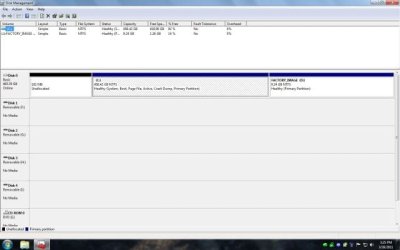
hope the screen capture is the right on of the disk management. i was having trouble posting on here. hope its ok now
 

Attachments

  • Clipboard112.jpg
    Clipboard112.jpg
    21 KB · Views: 13

My Computer

OS
windows 7 home premium
Looks like you had a System Reserved partition which was deleted creating Unallocated space. But the System boot files are contained within the Win7 partition so there is no reason to reinstall unless you otherwise believe the install was faulty.

You have a Factory Recovery partiiton on the computer. Do you happen to know if it will run, or did you make the Recovery Disks off of it before deleting whatever OS came with the machine? You could actually run it from boot to see if it gives you better performance to restore to factory condition, as a comparison with the clean reinstall you did.

If you don't want the factory recovery partition, then you could wipe the HD to clean reinstall to make sure there is no disk corruption which is affecting the install: Reinstalling Windows 7 - Windows 7 Forums
 
Hi Gregrocker
when i first got my computer it came with windows vista home premium 32bit. i made 3 recovery disc of vista and i have 11 back up files disc of vists why do you think when ever i play games or play videos my computer will freezes up on me.
 

My Computer

OS
windows 7 home premium
I think your problem may be just having 3gb of memory & onboard Intel Video :(

Looks like you can put 8gb of DDR2 (PC2-6400) memory in this MB :D
4 Memory slots - DIMM 240-pin

HP Pavilion a6400f Specs (P E2200 2.2 GHz) - Desktops - CNET Reviews

Looks like you could add a nice video card to one of these expansion slots :D

Expansion Slots Total (Free) 1 ( 0 ) x PCI,
1 ( 1 ) x PCI Express x16,
2 ( 2 ) x PCI Express x1,
 

My Computer

Computer type
PC/Desktop
Computer Manufacturer/Model Number
Built them myself, Science Experiments !
OS
Win7 Enterprise, Win7 x86 (Ult 7600), Win7 x64 Ult 7600, TechNet RTM on AMD x64 (2.8Ghz)
CPU
AMD fx8350 4ghz, AMD-32 2400mhz, AMD-64 3200mhz, AMDx64 2.8G
Motherboard
SIS 755, ECS-K8M890M-M (Ult 7600), GigaByte & others
Memory
2gb, 4gb on the Ult 7600, 4gb on Technet RTM, 32gb on FX8350
Graphics Card(s)
Draw my own Graphics, several nVidia cards
Sound Card
on motherboard
Monitor(s) Displays
19" flat scr, 28" I-Inc widescr,22" Emprex Widescr, 23" Acer
Screen Resolution
1280 x 1024, 1440 x 900, 1920 x 1080
Hard Drives
6 pata Ide HD's & 2 Sata HD's
added 80gb external on Ult 7600 computer,
numerous extra 1tb, 2TB, 3Tb SATA HD's
A collection of ext HD Docks w/ HDs
PSU
430w, 550w, 600w, 700, 800, etc
Case
All Generic Full Towers
Cooling
Open Air & a few fans, some w/ colored LEDs
Keyboard
Compaq & Dell recycled from GoodWill
Mouse
Made in China Optical Wired Mouse
Internet Speed
Fast Cable InterNet
Antivirus
AVG Free on 24 different Desktops, NO Problems!
Browser
IE 8 is preferred, but use FireFox sometimes
Other Info
Linksys Routers, switches, & Hubs
Too Many USB Flash Drives to count, Biggest is 64GB !
Eight computers in my home network.
Sixteen computers at my business network.
Linked via TeamViewer !
Lots of old used spare computer parts everywhere!
Hi
i need to reformat my windows 7 32bit home premium.i get to where which type of installation do you want. i do the custom {advanced} install a clean copy of windows select where you want to install it.or make changes to disks and partitions.this option does not keep your files settings and programs. {i am ok on this one} where i run in to trouble is where do you want to install windows i have name {disk 0 unallocated space total size 100.0mb free space 100.0mb type none} i have never seen this before can anyone tell me what disk 0 unallocated space total size 100.0mb free space 100.0mb type none is? then i have name {disk 0 partition 1 total size 456.4gb free space 419.5gb type system none} and what do for this one is i delete then i format it. is this right? when i have a name {disk 0 partition 2:factoty_image total size 9.2.gb free space 1.3gb type primary. i hope this makes sense

thank you for anyone help on this


http://www.sevenforums.com/tutorials/91339-ssd-hdd-optimize-windows-reinstallation.html
 

My Computer

OS
ME/XP/Vista/Win7
Back
Top