.reg file that does not need confirmation to run

JoshuaLawrenc

New member
Local time
8:00 PM
Messages
5
Location
Upstate NY
My work computer turns on every morning at 3:00 to get updates. IF there are updates then the registry is rewritten and my auto login is gone. It takes a good 10-15 minutes to login so I have this .reg script to make my computer auto login

Windows Registry Editor Version 5.00
[HKEY_LOCAL_MACHINE\SOFTWARE\Microsoft\Windows NT\CurrentVersion\Winlogon]
"AutoAdminLogon"="1"
"DefaultUserName"="myname"
"DefaultPassword"="mypass"
"DefaultDomainName"="Domain"

When it runs I get two popups:
Adding info can unintentionally change or delete values....do you trust this file. [yes] [no]
after I click yes I get
The keys and values have been successfully added.

is there a way to run a .reg file with no popups. I want to go to gpedit.msc"\windows settings\scripts\startup" and shutdown and add my script, but the popups make the shutdown process freeze. And when I tried startup, nothing happened. It didn't freeze or do anything. How can I cleanly run this file?
 

My Computer My Computer

Computer type
PC/Desktop
Computer Manufacturer/Model Number
Dell
OS
New York
Browser
Chrome
regedit

Hi Joshua,
Regarding the yes/no prompt, it can be done in 2 different ways
Lower UAC setting to Never, or creating a Task with the following, see screenshot, roy = User (Joshua?)

removing the Message promp requires the /s, (silent) added to the task

Roy
 

Attachments

  • skipuac.PNG
    skipuac.PNG
    14.9 KB · Views: 4

My Computer My Computer

Computer type
PC/Desktop
Computer Manufacturer/Model Number
medionl/Aspire 6930G/acer x55a
OS
W7 home premium 32bit/W7HP 64bit/w10 tp insider ring
CPU
E5300 dual core
Motherboard
medion MS7366
Memory
3gb
Graphics Card(s)
Nvidia Geforce 7100 Nforce 630i
Monitor(s) Displays
avixc
Internet Speed
n (isp resticted to 72)
Antivirus
mse/pands
Browser
palemoon
Other Info
Belkin Fd7050 n USB using Railink RT2870 drivers, more upto date
Thanks, but over my head.

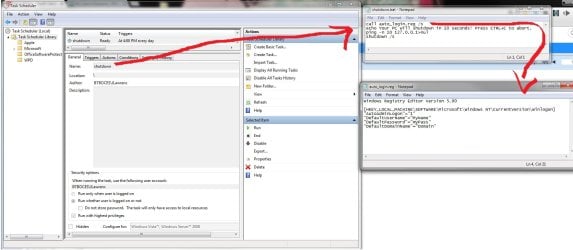
I went to lower the UAC and it was already on "never", then I went to add /s and wherever I added it, no change. Attached you'll see a picture of my scripts. I'm sure you'll see the error right away, I'm trying to learn my batch and VBS scripting. I want to load "auto_login" then shutdown, while giving myself a way out if I need to work longer.

Thanks a million.
 

Attachments

  • regedit.jpg
    regedit.jpg
    119.2 KB · Views: 5

My Computer My Computer

Computer type
PC/Desktop
Computer Manufacturer/Model Number
Dell
OS
New York
Browser
Chrome

My Computer My Computer

Computer type
PC/Desktop
Computer Manufacturer/Model Number
medionl/Aspire 6930G/acer x55a
OS
W7 home premium 32bit/W7HP 64bit/w10 tp insider ring
CPU
E5300 dual core
Motherboard
medion MS7366
Memory
3gb
Graphics Card(s)
Nvidia Geforce 7100 Nforce 630i
Monitor(s) Displays
avixc
Internet Speed
n (isp resticted to 72)
Antivirus
mse/pands
Browser
palemoon
Other Info
Belkin Fd7050 n USB using Railink RT2870 drivers, more upto date
Almost

Thank you, I thought I had it, but when I would go to cmd and type
powershell =file "C\path\to\script.reg" -noexit
I got an error
Processing -File...failed because the file does not have a '.psi' extension.

Is there a way to do that with a .reg or .bat extension?
 

My Computer My Computer

Computer type
PC/Desktop
Computer Manufacturer/Model Number
Dell
OS
New York
Browser
Chrome
My work computer turns on every morning at 3:00 to get updates. IF there are updates then the registry is rewritten and my auto login is gone. It takes a good 10-15 minutes to login....
Since this is your work computer, we need to be careful not to help you make changes that go against what your IT department wants.

The removal of the auto logon settings in the registry is not done by Windows updates - so it must be done by group policy updates and/or scripts setup by your IT department. It seems obvious that the IT staff does not want this computer to automatically log a user on.

Have you asked IT support why the computer takes 10-15 minutes after logon before it is of use to you?


I went to lower the UAC and it was already on "never",
That is really scary. That breaks so many things in the Windows security model.
 

My Computer My Computer

Computer type
Laptop
Computer Manufacturer/Model Number
Employer provided Dell Latitude
OS
W7 Pro SP1 64bit
CPU
i7
Memory
8GB
Graphics Card(s)
Intel HD Graphics
Hard Drives
crappy SSD
Antivirus
Employer mandated Symantec Endpoint Protection
Browser
Pale Moon 64bit, IE11 64bit & Chrome 64bit
I am on the IT staff

Yes I have made the registry adjustments myself. The auto login is OK because we also have a scheduled task to lock the computer directly after login. Then everything will be loaded but secure behind my password.
 

My Computer My Computer

Computer type
PC/Desktop
Computer Manufacturer/Model Number
Dell
OS
New York
Browser
Chrome
...IF there are updates then the registry is rewritten and my auto login is gone...
What software/script is removing the auto logon settings?
 

My Computer My Computer

Computer type
Laptop
Computer Manufacturer/Model Number
Employer provided Dell Latitude
OS
W7 Pro SP1 64bit
CPU
i7
Memory
8GB
Graphics Card(s)
Intel HD Graphics
Hard Drives
crappy SSD
Antivirus
Employer mandated Symantec Endpoint Protection
Browser
Pale Moon 64bit, IE11 64bit & Chrome 64bit
Regedit

I opened regedit, went to
HKEY_LOCAL_MACHINE\SOFTWARE\Microsoft\Windows NT\CurrentVersion\Winlogon
then set the values of DefaultUserName DefaultPassword and set AutoAdminLogin to 1
 

My Computer My Computer

Computer type
PC/Desktop
Computer Manufacturer/Model Number
Dell
OS
New York
Browser
Chrome
In your original post, you state:
"IF there are updates then the registry is rewritten and my auto login is gone."

I mentioned:
"The removal of the auto logon settings in the registry is not done by Windows updates - so it must be done by group policy updates and/or scripts setup by your IT department."

After which you stated:
"I have made the registry adjustments myself."
I know that. I'm talking about how your settings are getting removed.

So I directly asked:
"What software/script is removing the auto logon settings?"

And again you mentioned your actions:
"I opened regedit, went to"
Again, you are telling me how you added the settings...
...I'm talking about how your settings are getting removed.


I guess I'm not being clear. I know what settings you are changing. I know how you are changing those settings. I know why you are changing them. I know that you want to automate the changes to those settings. Rather than spend your time making those changes after updates*, I was suggesting that you stop the updates* from undoing your auto logon settings.

*we are still not sure what updates you are talking about. I'm guessing group policy updates.


To state things another way:
1) the computer wakes at 3am
2) if updates are applied, the auto logon settings are removed
3) you desire to automatically re-enter the auto logon settings
(user prompts are a problem)

You made this thread because you ran into user prompt problems with step #3. I'm suggesting that you spend your time preventing step #2 from undoing your auto logon settings. Someone in your company should know what script is removing those auto logon settings on this computer.

Group policies can be used to tell a computer to run a particular set of scripts at logon or at other times. Which policies to apply and which scripts to run for a given computer are often controlled by Active Directory (AD) Organizational Units (OU). If you went through the proper channels at your company, then this computer might be moved to an OU that does not force the removal of the auto logon settings.

There is also an AD computer property setting called "Member of". A computer can be made a member of an exception group. The scripts that removes auto logon settings can be written in such a way as to check the "Member of" list and skip the removal of the auto logon settings... if the computer is authorized to auto logon.


There are ways to automatically add the auto logon settings without getting user prompts... but helping you to do that would be creating one script to fight another script. It is just not the best thing to do. Since you are in IT, your manager should know who to contact about preventing the auto logon settings from being removed.
 

My Computer My Computer

Computer type
Laptop
Computer Manufacturer/Model Number
Employer provided Dell Latitude
OS
W7 Pro SP1 64bit
CPU
i7
Memory
8GB
Graphics Card(s)
Intel HD Graphics
Hard Drives
crappy SSD
Antivirus
Employer mandated Symantec Endpoint Protection
Browser
Pale Moon 64bit, IE11 64bit & Chrome 64bit
Back
Top