Regain a lost drive using Test Disk - An Illustrated Guide

definitely on the right path: get the data off, wipe it securely, do a test using their test tool, record the result, apply for RMA online, send in for replace.

My external hdd is western digital my passport. Its model is wd 0740. Whenever I plugged it in the usb interface it gives a clicking sound and after a minute or two the sound went away and i can feel a weak spinning from inside. by the way my external hdd is 3-week old.
 

My Computer My Computer

Computer Manufacturer/Model Number
HP DC7600, HP DC7600[2], HP DC7100, Samsung NC10
OS
Windows XP Pro SP3, Windows 7 Pro 32-bit, Windows 7 Ultimate 64bit, Windows XP Home SP3
CPU
Pentium 4 3.2GHz, Pentium 4 3.4GHz 64bit, Atom,
Motherboard
Dunno
Memory
4GB matched, 1GB, 2.5GB, 4.0 GB
Graphics Card(s)
Geforce 8400 GS and others
Sound Card
RealteK ALC260 and others
Monitor(s) Displays
Asus HD
Screen Resolution
1920x1080
Hard Drives
WD Caviar 640gb SATA
Cooling
We Be Cool
we're assuming you know how to burn a bootable of disc of UBCD: download of ISO is here Ultimate Boot CD - Download the UBCD and also there is a link for making bootable stick if your system does not have a cd/dvd drive. let us know if you need help with these steps. the checksum is listed at the upper part of the page, the iso mirrors at bottom. you have enough of a 'discovery' there that I think you'll get your files off ok without having to apply format to the drive
 

My Computer My Computer

Computer Manufacturer/Model Number
HP DC7600, HP DC7600[2], HP DC7100, Samsung NC10
OS
Windows XP Pro SP3, Windows 7 Pro 32-bit, Windows 7 Ultimate 64bit, Windows XP Home SP3
CPU
Pentium 4 3.2GHz, Pentium 4 3.4GHz 64bit, Atom,
Motherboard
Dunno
Memory
4GB matched, 1GB, 2.5GB, 4.0 GB
Graphics Card(s)
Geforce 8400 GS and others
Sound Card
RealteK ALC260 and others
Monitor(s) Displays
Asus HD
Screen Resolution
1920x1080
Hard Drives
WD Caviar 640gb SATA
Cooling
We Be Cool
For the limited purpose of running TestDisk or PhotoRec, one need not necessarily create a UBCD or a Live CD. ( I do not know which version of TestDisk these will have.)

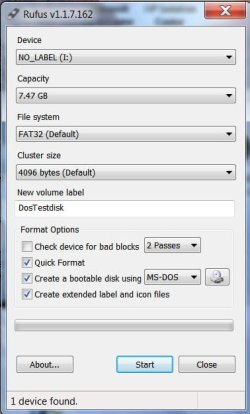
The OP can create a DOS bootable pendrive using Rufus v1.1.7 without FreeDOS Support - 154 KB (only MSDOS) Rufus - Create bootable USB drives

DOSTestdisk.jpg

Then download the current stable version of TestDisk 6.13 for DOS/Win9x, http://www.cgsecurity.org/wiki/TestDisk_Download extract the contents to the root directory of the pendrive, boot from the USB pendrive (using the one-time boot menu) and at the command prompt type testdisk.exe and press ENTER to run it.

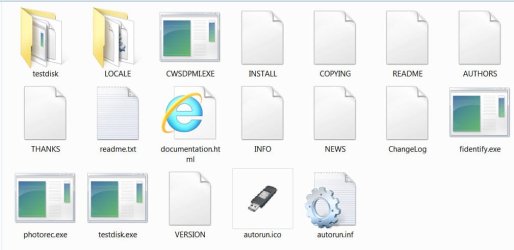
Note: If extracting the TestDisk.zip puts the contents to a folder like TestDisk6.13, all files there could be selected and moved to the root directory of the pendrive.. At the end of it the bootable DOS TestDisk pendrive should look like this:

contents.jpg

( I have created the bootable DOS TestDisk pendrive, run it and checked it on my system. The OP should select the correct drive shown by identifying it by its capacity.)
 

My Computer My Computer

OS
Windows 7 Home Premium 32 bit
@sibbil
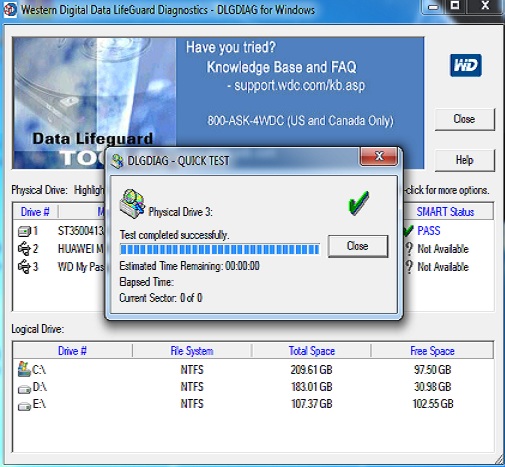
I ran the WD diagnostics, had my Passport scanned, and it has passed both Quick Scan and Extended Scan. But I think something is wrong, both Quick and Extended scan didn't even take 1 sec to finish, the scanning were so fast...

8hWRb.jpg


MhLiU.jpg
 
Last edited:

My Computer My Computer

OS
Windows 7 Ultimate x64
It doesn't seem like it's accessing the drive correctly. A quick test should take a number of minutes to run, the full test around an hour or so depending on the size.

When I've used it with external WD drives it also shows SMART data accurately, whereas in your case it shows a "?" in the SMART column.

I would suggest downloading UBCD (link posted a couple times already in this thread), burn to a CD, boot from it and see how it sees the drive. UBCD contains the DOS version of the WD diagnostics program. It also contains Seagate's Seatools diagnostics that you should try.

Testdisk and photorec are on UBCD too, so you can check how they see the drive in that environment. The version number is almost current; one minor version number behind.
 

My Computer My Computer

OS
Windows 7 Ultimate x64
how to use UBCD

can i have a tutorial on how to use UBCD? thank you in advance.

@torre- i have not use EASEUS. i'll try it later.
 

My Computer My Computer

OS
Windows 7 Ultimate x64
What, exactly, do you need help with?

Have you downloaded and burned the UBCD iso to a CD?

Have you booted with it?
 

My Computer My Computer

OS
Windows 7 Ultimate x64
i have downloaded and burned ubcd...
and i have also tried booting it..
can i have a tutorial on how to recover my data using ubcd?
 

My Computer My Computer

OS
Windows 7 Ultimate x64
"tried booting it"


Did it boot successfully ? Does it recognize your Passport ?

Sibbil will clarify better, but after booting select the WinG (not sure of name) and the PhotoRec option if WinG is not successful. It will give you options for recovery if possible.
 

My Computer My Computer

OS
Win 7, 32bit, Premium
language being what it is: you said "have also tried booting it..."
if you're having boot issues, post that.
if it is booted, the answer to your stated question is: elsewhere there are tutorials on each tool that ubcd, as you dub it, provides, which is a lot of reading for you. these are located under the HDD heading/group

assuming it did boot correctly, choose the HDD group of tools, and then find photorec [it ain't just for photos]. To me, the cryptic menus were fairly followable, but you can easily use google to find tutorials. there are other tools to get to the same endpoint

i have downloaded and burned ubcd...
and i have also tried booting it..
can i have a tutorial on how to recover my data using ubcd?
 

My Computer My Computer

Computer Manufacturer/Model Number
HP DC7600, HP DC7600[2], HP DC7100, Samsung NC10
OS
Windows XP Pro SP3, Windows 7 Pro 32-bit, Windows 7 Ultimate 64bit, Windows XP Home SP3
CPU
Pentium 4 3.2GHz, Pentium 4 3.4GHz 64bit, Atom,
Motherboard
Dunno
Memory
4GB matched, 1GB, 2.5GB, 4.0 GB
Graphics Card(s)
Geforce 8400 GS and others
Sound Card
RealteK ALC260 and others
Monitor(s) Displays
Asus HD
Screen Resolution
1920x1080
Hard Drives
WD Caviar 640gb SATA
Cooling
We Be Cool
i have downloaded and burned ubcd...
and i have also tried booting it..
can i have a tutorial on how to recover my data using ubcd?

After you boot the CD and have the UBCD main menu on your screen, use the arrow keys to highlight the following selections and press enter:

HDD

Diagnosis

There are two Western Digital HD diagnostics programs here, labeled as DLG Diagnostic, two different versions. V5.19 is the DOS alternative to the Windows version you've already tried. You ought to try it to see if you can get it to run some valid tests.

When done, left click "X" to close all windows, until you get to a command prompt. It would be a good idea to have a drive connected now (either internal or external) that has enough space for the files you may want to recover from the crippled drive. That way if Testdisk gives you the opportunity to copy files from it you'll have a place to put them. At the command prompt type reboot and boot again from the CD. This time select:

Parted Magic V6.6

Default settings (Runs from Ram) -- it may take quite some time to load.

Once loaded you'll find yourself in the PartedMagic GUI. Left click the PartedMagic icon (where you normally find the Windows' start icon in the lower left corner of the screen), select System Tools, and then TestDisk.

TestDisk will open in a DOS-like window, and you can then follow the steps outlined in the following links from the Testdisk website:

Step-by-step guide here: TestDisk Step By Step - CGSecurity

Also check this out (for more specific help): http://www.cgsecurity.org/wiki/Data_Recovery_Examples

Be careful with drive selection and your keystrokes. If you see the option to view the file/folder structure, you can select the option to copy out your files to another location (either the internal hard drive, or an external if you have it connected) before trying to recover partitions.
 

My Computer My Computer

OS
Windows 7 Ultimate x64
i have tried running dlg diagnostic and it says there is no drive being found.

i have also tried parted magic and it hangs for a very long time and didn't even proceed.
 

My Computer My Computer

OS
Windows 7 Ultimate x64
Does testdisk recognize your drive ?
 

My Computer My Computer

OS
Win 7, 32bit, Premium
i have also tried parted magic and it hangs for a very long time and didn't even proceed.

It does take a considerable amount of time to finally open. How long did you let it go?

You can also find testdisk under the HDD / Diagnosis menu items.
 

My Computer My Computer

OS
Windows 7 Ultimate x64
UBCD contains a pretty old version of PartedMagic. You may have more success with a recent version. start
 

My Computer My Computer

Computer type
Laptop
Computer Manufacturer/Model Number
Hewlett-Packard/G62-107SA Notebook
OS
Microsoft Windows 7 Home Premium 64-bit Service Pack 1
CPU
Intel(R) Core(TM) i3 CPU M 330 @ 2.13GHz
Motherboard
Hewlett-Packard 1425
Memory
8 GB DDR3
Graphics Card(s)
Intel(R) HD Graphics
Sound Card
Realtek High Definition Audio
Monitor(s) Displays
Builtin
Screen Resolution
1366 x 768 x 32 bits (4294967296 colors) @ 60 Hz
Hard Drives
250 GB SATA Hard Disk Drive 7200 rpm
2TB Seagate GoFlex USB 2 Drive
1TB Iomega Prestige USB 2 Drive
1.5TB Iomega Prestige USB 2 Drive (Samsung)
2TB WD MyBook Live NAS.
Mouse
Logitech Anywhere MX
Internet Speed
152 Mbs download 10 Mbs upload
Antivirus
Norton 360
Browser
Chrome
i just handed my wd external hdd to the store where i bought it and they said all data inside the drive will be deleted. so i guess i'll just have to download back for a long time all the data in my drive. :(

i just want to thanks all of you for sharing some knowledge about data recovery. i learned much even though i failed in recovering my data. what do you know i can use all i have learned here in the future. again, thanks guys. especially sibbil, zapp22 and torree. :)
 

My Computer My Computer

OS
Windows 7 Ultimate x64
Well, sorry to hear that. But I'm glad you gained some understanding from the experience!
 

My Computer My Computer

OS
Windows 7 Ultimate x64
Sorry you were not successful.

As earlier stated, I have the same dilemma but will keep my drive. When I have time, I often try new things to recover the data (with asssistance from sibbil). Like a kid who still plays with a broken toy. :)

I have formed the opinion that external drives are not stable. This, after much reading, and seeing others problems. Wish I had did my homework before purchasing. There are other options available that are more stable.
 

My Computer My Computer

OS
Win 7, 32bit, Premium
Thank you for your help. This software help me a lot. Great work
 

My Computer My Computer

OS
win7 32 bit
Back
Top