
Region and Language - Change

How to change your default Region and Language settings

   Information
This will show you how to set your Regional and Language Format, Location and System Locale settings.

   Note
Following the steps outlined below has been known to solve issues such as Sky Player not showing up in Media Center, which is due to discrepencies in the region/language settings


Here's How:
1. Open the Control Panel(Category View), then click on Regional and Language. (See screenshot below)
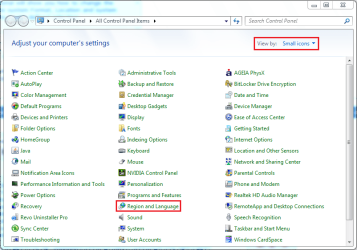
Control Panel - Category View.PNG
2. Click the 'Formats' tab (selected by default), then click the Format: dropdown and select the format you require (See screenshot below)
Region and Language (Formats).PNG
3. Next, click the 'Location' tab and select your location from the dropdown (See screenshot below)
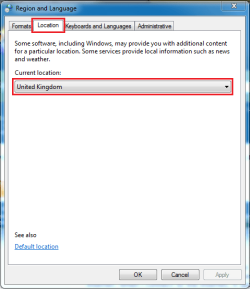
Region and Language (Location).PNG
4. Next, click the 'Administrative' tab. You will notice 2 options (See screenshot below)
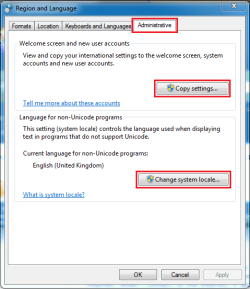
Region and Language (Administrative).PNG
5. Next, click the 'Change system locale' button and select your location from the dropdown then click OK (See screenshot below)
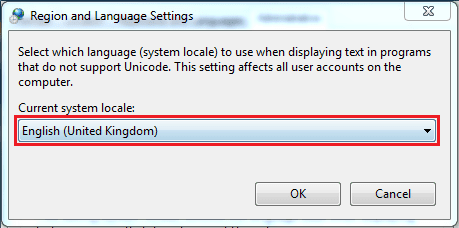
Region and Language (Administrative - Change Locale).PNG
6. Next, click the 'Copy Settings' button and put a check (tick) in the 2 boxes at the bottom then click OK (See screenshot below)
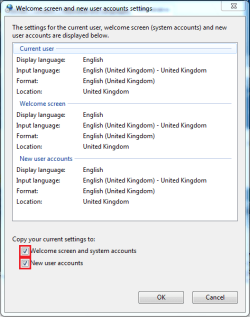
Region and Language (Administrative - Copy Settings).PNG

   Note
You may be prompted for a system restart after the final OK, just click the Restart Now button and allow the system to restart.
   Tip
For those using language packs and user accounts in more than one language, step 6 is essential to assure all new user accounts are not only set to to desired location and keyboard layout, but it also determines in which language new accounts are created


That's all there is to it,

Jeff


Last edited by a moderator:
Very clear, easy to read tutorial. Thanks, Jeff.

For those using language packs and user accounts in more than one language, step 6 is essential to assure all new user accounts are not only set to to desired location and keyboard layout, but it also determines in which language new accounts are created.

Kari

EDIT: Sorry, I have to spread the rep before being able to rep you again ;)
 

My Computer

Computer type
Laptop
Computer Manufacturer/Model Number
HP ENVY 17-1150eg
OS
Windows 10 Pro x64 EN-GB
CPU
1.6 GHz Intel Core i7-720QM Processor
Memory
6 GB
Graphics Card(s)
ATI Mobility Radeon HD 5850 Graphics
Sound Card
Beats sound system with integrated subwoofer
Monitor(s) Displays
17" laptop display, 22" LED and 32" Full HD TV through HDMI
Screen Resolution
1600*900 (1), 1920*1080 (2&3)
Hard Drives
Internal: 2 x 500 GB SATA Hard Disk Drive 7200 rpm
External: 2TB for backups, 3TB USB3 network drive for media
Cooling
As Envy runs a bit warm, I have it on a Cooler Master pad
Keyboard
Logitech diNovo Media Desktop Laser (bluetooth)
Mouse
Logitech Performance Mouse MX
Internet Speed
50/10 Mbps VDSL
Antivirus
Windows Defender 4.3.9431.0
Browser
Maxthon 3.5.2., IE11
Thanks Kari, added as a new tip ;)
 

My Computer

Computer Manufacturer/Model Number
Compaq Desktop
OS
Windows 7 Ultimate x64
CPU
AMD Sempron Dual Core
Memory
3GB
Graphics Card(s)
NVIDIA GeForce 6150SE nForce 430
Screen Resolution
1024x768
Hard Drives
150GB Sata
Hi,
I would like to know if there any way to set this changes by any kind of command line.
Bat file or something just to double click :)
 
Last edited:

My Computer

OS
Windows 7 Ultimate x64
Does this work on all versions of Windows 7? I see no mention of it being only for Pro, Ultimate and Enterprise.
 

My Computer

Computer type
PC/Desktop
Computer Manufacturer/Model Number
Home Built Desktop By DataTech
OS
Windows 7 Ultimate X64 SP1
CPU
Intel i5-2550K, Differing ~4.4-4.8GHz No built in GPU
Motherboard
ASUS P8Z68-V PRO/GEN3
Memory
16GB G.Skill Sniper 1866MHz @ 2133MHz 2x8GB
Graphics Card(s)
ASUS GTX650TIB-DC2OC-2GD5, (650TI Boost)
Sound Card
Onboard Realtek 5-1
Monitor(s) Displays
Samsung P2570HD
Screen Resolution
1920x1080
Hard Drives
Samsung 840 Pro 256GB SSD for OS, 500GB Seagate Constellation (Enterprise drive) for Data
PSU
Corsair HX650W
Case
Inwin Dragon Rider
Cooling
Hyper 212 EVO w/two Noctua fans, push-pull, @1300 RPM
Keyboard
E-Z Eyes, bright yellow keys with large characters
Mouse
steelseries SENSEI Laser Pro Gaming
Internet Speed
48-51Mbs Mbs down, 11 Mbs up Xfinity Cable
Antivirus
Norton Internet Security 2013
Browser
IE 10, Opera, Pale Moon if needed
Other Info
4 case fans, LG BluRay-RE, ASUS DVD-RW, Mr. Fusion power supply, 1.21 gigawatts.
For language packs you need Ultimate or Enterprise, other than that the regional and language settings as told in this tutorial can be found and changed on all editions.

Kari
 

My Computer

Computer type
Laptop
Computer Manufacturer/Model Number
HP ENVY 17-1150eg
OS
Windows 10 Pro x64 EN-GB
CPU
1.6 GHz Intel Core i7-720QM Processor
Memory
6 GB
Graphics Card(s)
ATI Mobility Radeon HD 5850 Graphics
Sound Card
Beats sound system with integrated subwoofer
Monitor(s) Displays
17" laptop display, 22" LED and 32" Full HD TV through HDMI
Screen Resolution
1600*900 (1), 1920*1080 (2&3)
Hard Drives
Internal: 2 x 500 GB SATA Hard Disk Drive 7200 rpm
External: 2TB for backups, 3TB USB3 network drive for media
Cooling
As Envy runs a bit warm, I have it on a Cooler Master pad
Keyboard
Logitech diNovo Media Desktop Laser (bluetooth)
Mouse
Logitech Performance Mouse MX
Internet Speed
50/10 Mbps VDSL
Antivirus
Windows Defender 4.3.9431.0
Browser
Maxthon 3.5.2., IE11
Thanks Kari.
 

My Computer

Computer type
PC/Desktop
Computer Manufacturer/Model Number
Home Built Desktop By DataTech
OS
Windows 7 Ultimate X64 SP1
CPU
Intel i5-2550K, Differing ~4.4-4.8GHz No built in GPU
Motherboard
ASUS P8Z68-V PRO/GEN3
Memory
16GB G.Skill Sniper 1866MHz @ 2133MHz 2x8GB
Graphics Card(s)
ASUS GTX650TIB-DC2OC-2GD5, (650TI Boost)
Sound Card
Onboard Realtek 5-1
Monitor(s) Displays
Samsung P2570HD
Screen Resolution
1920x1080
Hard Drives
Samsung 840 Pro 256GB SSD for OS, 500GB Seagate Constellation (Enterprise drive) for Data
PSU
Corsair HX650W
Case
Inwin Dragon Rider
Cooling
Hyper 212 EVO w/two Noctua fans, push-pull, @1300 RPM
Keyboard
E-Z Eyes, bright yellow keys with large characters
Mouse
steelseries SENSEI Laser Pro Gaming
Internet Speed
48-51Mbs Mbs down, 11 Mbs up Xfinity Cable
Antivirus
Norton Internet Security 2013
Browser
IE 10, Opera, Pale Moon if needed
Other Info
4 case fans, LG BluRay-RE, ASUS DVD-RW, Mr. Fusion power supply, 1.21 gigawatts.
I do this over and over again, like 30 times a day.
how can i write a code to select all settings to my installed Lp.cab?

ENG to TR, via one click?
 

My Computer

Computer type
PC/Desktop
OS
windows 7 ultimate x64
Back
Top