Registry Help

corpse827

New member
Local time
3:57 PM
Messages
3
For the record, I don't know if I post this thread in the right place, please move it if it isn't.

Somehow my IE8 homepage got locked to a trash web page, which I was informed to change it in the registry because changing the homepage address the standard way in IE didn't work. I tried to remove that address from the start page value in the registry, but the message "Cannot edit Start Page; Error writing the value's new contents." because I don't have the permission even running regedit with the administrator account. I tried to change the permission, again failed with administrator privilege, message "Unable to save permission changes on Main. Access denied."

Could somebody give me a hand? Thank you.
 

My Computer

OS
window 7 home premium
hello
try to create new account..and give privilege administrator in the group.
 

My Computer

Computer Manufacturer/Model Number
built up
OS
windows 7
CPU
Phenom II AMD Dragon 3.5Ghz
Memory
DDR3 4GB
Graphics Card(s)
ATI Radeon 512Mb
Monitor(s) Displays
HP L1506
Screen Resolution
1152 x 864
Hard Drives
WDC 1 TB SATA-II Green Power
Keyboard
HP wireless keyboard
Mouse
HP Optic
Internet Speed
1GB
For the record, I don't know if I post this thread in the right place, please move it if it isn't.

Somehow my IE8 homepage got locked to a trash web page, which I was informed to change it in the registry because changing the homepage address the standard way in IE didn't work. I tried to remove that address from the start page value in the registry, but the message "Cannot edit Start Page; Error writing the value's new contents." because I don't have the permission even running regedit with the administrator account. I tried to change the permission, again failed with administrator privilege, message "Unable to save permission changes on Main. Access denied."

Could somebody give me a hand? Thank you.

Open an elevated Command Prompt and enter:

Code:
reg add "hkcu\software\microsoft\internet explorer\main" /v "Start Page" /t REG_SZ /d "[URL="http://www.google.con"]http://www.google.co[/URL]m" /f
 

My Computer

Computer type
PC/Desktop
Computer Manufacturer/Model Number
Dell OP7010
OS
Windows 7 Enterprise (x64); Windows Server 2008 R2 (x64)
Memory
16GB
Monitor(s) Displays
4 Dell 24" LCD
Screen Resolution
1280x1024
Keyboard
Dell
Mouse
Dell Optical
Internet Speed
40meg
For the record, I don't know if I post this thread in the right place, please move it if it isn't.

Somehow my IE8 homepage got locked to a trash web page, which I was informed to change it in the registry because changing the homepage address the standard way in IE didn't work. I tried to remove that address from the start page value in the registry, but the message "Cannot edit Start Page; Error writing the value's new contents." because I don't have the permission even running regedit with the administrator account. I tried to change the permission, again failed with administrator privilege, message "Unable to save permission changes on Main. Access denied."

Could somebody give me a hand? Thank you.

Open an elevated Command Prompt and enter:

Code:
reg add "hkcu\software\microsoft\internet explorer\main" /v "Start Page" /t REG_SZ /d "[URL="http://www.google.con"]http://www.google.co[/URL]m" /f

ERROR: Invalid syntax.
 

My Computer

OS
window 7 home premium
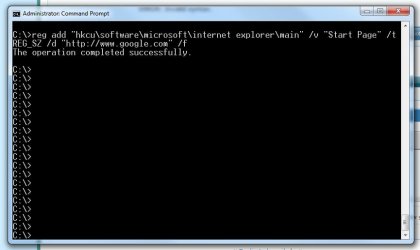
Runs fine here:
 

Attachments

  • CMD1.jpg
    CMD1.jpg
    31.2 KB · Views: 150

My Computer

Computer type
PC/Desktop
Computer Manufacturer/Model Number
Dell OP7010
OS
Windows 7 Enterprise (x64); Windows Server 2008 R2 (x64)
Memory
16GB
Monitor(s) Displays
4 Dell 24" LCD
Screen Resolution
1280x1024
Keyboard
Dell
Mouse
Dell Optical
Internet Speed
40meg
Did you run it as admin?

Type CMD in search, right click CMD.exe, Run As Administrator...

A Guy
 

My Computer

Computer type
PC/Desktop
OS
Windows 10 Home x64
CPU
INTEL Core i5-750 Quad-Core 3.37GHz
Motherboard
ASUS P7P55D
Memory
HyperX Fury Black Series 8GB (2 x 4GB) 1866Mhz
Graphics Card(s)
EVGA GeForce GTX 750 Superclocked 1GB 128-Bit GDDR5
Monitor(s) Displays
LG 32MA68HY 32" IPS
Screen Resolution
1920 x 1080
Hard Drives
Samsung 840 Evo 120GB, SEAGATE 500GB Barracuda® 7200.12, SATA 3 Gb/s, 7200 RPM, 16MB cache
PSU
ANTEC TruePower New TP-550, 80 PLUS, 550W
Case
ANTEC Three Hundred Illusion
Cooling
COOLER MASTER Hyper 212 Plus, 4 x 120mm 1 x 140mm Noctua's
Internet Speed
85 + Mbps
Antivirus
Avast
Browser
Vivaldi
A Guy is right: Open an elevated Command Prompt = Run as Administrator. Maybe I did not clarify that. :)
 

My Computer

Computer type
PC/Desktop
Computer Manufacturer/Model Number
Dell OP7010
OS
Windows 7 Enterprise (x64); Windows Server 2008 R2 (x64)
Memory
16GB
Monitor(s) Displays
4 Dell 24" LCD
Screen Resolution
1280x1024
Keyboard
Dell
Mouse
Dell Optical
Internet Speed
40meg
Did anyone resolve this? I am having the same issue. I have checked the permissions to the registry key.. I am logged in as domain admin. With the command prompt (administrator:cmd), i get Access is denied.

Changing it with regedt32 i get "Cannot edit Value Name: Error writing the value's new contents. UAC is on the lowest setting (not recommended) and no errors in the logs.

Also permissions on the key show Full for administrators (and i made myself the owner).
 
Last edited:

My Computer

OS
Windows 7
Since it appears that this is caused by a browser hijack, have you eliminated malware from the computer? I suggest a full system scan with both your updated antivirus and anti-malware software programs. For a "second opinion", you can try one or both of the following:

A-M:

Download Malwarebytes' Anti-Malware to your desktop.


  • Double-click mbam-setup.exe and follow the prompts to install the program.
  • At the end, be sure a checkmark is placed next to Update Malwarebytes' Anti-Malware and Launch Malwarebytes' Anti-Malware, then click Finish.
  • If an update is found, it will download and install the latest version.
  • Once the program has loaded, be sure Quick scan is selected, then click Scan.
  • When the scan is complete, click OK, then Show Results to view the results.
  • Be sure that everything is checked, EXCEPT items in System Restore as shown in this sample:
    MBAM_SR.png
  • Click Remove Selected.


A/V:

Go here and run an on-line scan with the F-Secure scanner.

  • Use IE (Internet Explorer), accept the license terms, and allow the Active-X controls to load.
  • Click Full System Scan and allow the components to download and the scan to complete.
  • If malware is found during the scan, check Submit samples to F-Secure and Automatic cleaning.
  • When the scan has finished, click the Show Report button and copy and paste the entire report in your next reply.
 

My Computer

OS
Windows 7 & Windows Vista Ultimate
Did anyone resolve this? I am having the same issue. I have checked the permissions to the registry key.. I am logged in as domain admin. With the command prompt (administrator:cmd), i get Access is denied.

Changing it with regedt32 i get "Cannot edit Value Name: Error writing the value's new contents. UAC is on the lowest setting (not recommended) and no errors in the logs.

Also permissions on the key show Full for administrators (and i made myself the owner).

It does not matter if you are a Domain Admin or not, if Domain Policy is set to restrict access to this registry key you will be restricted. Are you the Real Domain Admin or do you just have access as the Domain Admin? If the domain you are part of has a Real Domain Admin that is setting Domain Policy that is why you are unable to change this key even though you have a Domain Admin account or even if you are using the same Domain Admin account as the Real Admin that is setting Domain Policy. Setting Domain Policy can be tricky because it can have effects like this when you did not mean it too. If you are the only Domain Admin have you set Domain Policies that could have caused this issue??
 
Last edited:

My Computer

Computer type
PC/Desktop
Computer Manufacturer/Model Number
Dell OP7010
OS
Windows 7 Enterprise (x64); Windows Server 2008 R2 (x64)
Memory
16GB
Monitor(s) Displays
4 Dell 24" LCD
Screen Resolution
1280x1024
Keyboard
Dell
Mouse
Dell Optical
Internet Speed
40meg
Back
Top