

It is important that you are aware of which programs that run on startup, and which are initiated by the Run keys in the registry. These may be found in the following locations (note that I have removed the identification from the 2nd image):
HKEY_CURRENT_USER\Software\Microsoft\Windows\CurrentVersion\Run

HKEY_USERS\S-1-5-21-xxxxxxxxxx-xxxxxxxxxx-xxxxxxxxx-xxxx\Software\Microsoft\Windows\CurrentVersion\Run

Keep an eye on these locations regularly, and if additions are made there without your knowledge then alarm bells should start ringing. WinPatrol is a very useful program to have (written by one of our members, BillPStudios), as it helps greatly in monitoring this sort of activity.
The removal of entries can be straightforward, or can be tricky. First of all, make a note of the file location shown under the Data headings as you will need this information in order to remove the file(s) from your system. Now, right-click on the appropriate name under the Name column and select Delete to remove the entry. Refresh the screen. If the entry does not reappear, then you can delete the file from its location. If, however, it does reappear (and this is where WinPatrol comes in useful), then you will need to use a different tactic in order to remove it, namely by booting up into http://www.sevenforums.com/tutorials/69585-safe-mode.html. In this mode, the Run keys in the registry are not processed, and you should be able to proceed as described above in order to remove the unwanted entries and files.
Another location where this sort of entry may be found is the following:
HKEY_LOCAL_MACHINE\SOFTWARE\Microsoft\Windows\CurrentVersion\Run
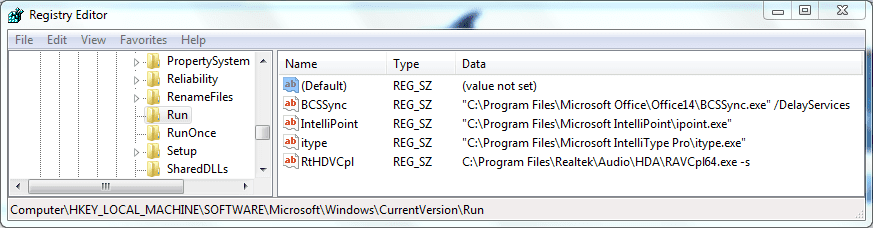
To remove entries here you can follow the above instructions, but you will need to do so from an account with administrative privileges.
HKEY_CURRENT_USER\Software\Microsoft\Windows\CurrentVersion\Run
HKEY_USERS\S-1-5-21-xxxxxxxxxx-xxxxxxxxxx-xxxxxxxxx-xxxx\Software\Microsoft\Windows\CurrentVersion\Run
Keep an eye on these locations regularly, and if additions are made there without your knowledge then alarm bells should start ringing. WinPatrol is a very useful program to have (written by one of our members, BillPStudios), as it helps greatly in monitoring this sort of activity.
The removal of entries can be straightforward, or can be tricky. First of all, make a note of the file location shown under the Data headings as you will need this information in order to remove the file(s) from your system. Now, right-click on the appropriate name under the Name column and select Delete to remove the entry. Refresh the screen. If the entry does not reappear, then you can delete the file from its location. If, however, it does reappear (and this is where WinPatrol comes in useful), then you will need to use a different tactic in order to remove it, namely by booting up into http://www.sevenforums.com/tutorials/69585-safe-mode.html. In this mode, the Run keys in the registry are not processed, and you should be able to proceed as described above in order to remove the unwanted entries and files.
Another location where this sort of entry may be found is the following:
HKEY_LOCAL_MACHINE\SOFTWARE\Microsoft\Windows\CurrentVersion\Run
To remove entries here you can follow the above instructions, but you will need to do so from an account with administrative privileges.
Last edited:
My Computer
- Computer type
- PC/Desktop
- Computer Manufacturer/Model Number
- Dwarf Dwf/11/2012 r09/2013
- OS
- Windows 8.1 Pro RTM x64
- CPU
- Intel Core-i5-3570K 4-core @ 3.4GHz (Ivy Bridge) (OC 4.4GHz)
- Motherboard
- ASRock Z77 Extreme4-M
- Memory
- 4 x 4GB DDR3-1600 Corsair Vengeance CMZ8GX3M2A1600C9B (16GB)
- Graphics Card(s)
- MSI GeForce GTX770 Gaming OC 2GB
- Sound Card
- Realtek High Definition on board solution (ALC 898)
- Monitor(s) Displays
- ViewSonic VA1912w Widescreen (VGA)
- Screen Resolution
- 1440x900
- Hard Drives
- OCZ Agility 3 SSD 120GB SATA III x2 (RAID 0)
Samsung HD501LJ 500GB SATA II x2
Hitachi HDS721010CLA332 1TB SATA II
Iomega 1.5TB Ext USB 2.0
WD 2.0TB Ext USB 3.0
- PSU
- XFX Pro Series 850W Semi-Modular
- Case
- Gigabyte IF233
- Cooling
- 1 x 120mm Front Inlet 1 x 120mm Rear Exhaust
- Keyboard
- Microsoft Comfort Curve Keyboard 3000 (USB)
- Mouse
- Microsoft Comfort Mouse 3000 for Business (USB)
- Internet Speed
- NetGear DG834Gv3 ADSL Modem/Router (Ethernet) ~4.0 Mb/s (O2)
- Antivirus
- Avast! 8.0.1497
- Browser
- IE 11
- Other Info
- Optical Drive: HL-DT-ST BD-RE BH10LS30 SATA Bluray
Lexmark S305 Printer/Scanner/Copier (USB)
WEI Score: 8.1/8.1/8.5/8.5/8.25
Asus Eee PC 1011PX Netbook (Windows 7 x86 Starter)

