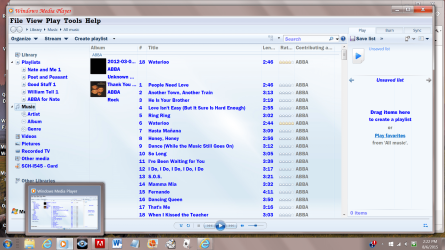
See the attachment please. As you can see it is a screenshot of my situation. I click on wmp, choose listen to favorites, wmp randomly chooses from my library and plays them in order. Nice - I like that.
As per the screenshot - if I want to make any changes while the music is playing all I need to do is point to the taskbar icon of wmp and a small window of wmp player comes up - see the screenshot.
Using that small icon I can change what is playing, pause and restart, skip ahead etc.
Recently I had to use a malware program as i got infected with some shopping junk and Malware bytes did the job and cleaned them out. However now the controls for the wmp small icon have disappeared.
Can I repair this - if so - how. Thank you to anyone who can help out
The if that doesn't fix the problem try a system restore back to when you know it was working the way you want it to - if not sure how to do that post back.
My Computer
Computer type
PC/Desktop
Computer Manufacturer/Model Number
Own build (new) Desk1 / Asus ROG Win 7 / Desk2 1st build
OS
Desk1 7 Home Prem / Desk2 10 Pro / Main lap Asus ROG 10 Pro 2 laptop Toshiba 7 Pro Asus P2520 7 & 10
One other Desktop (tester) and spare Toshba laptop both with SSD's
Running Kaspersky 2016 ISS on all machines config'd identically
Logitec audio stereo systems on each machine (x3)
Canon MG5250MFC
Router/modem TP-Link running WPA2SK
Yep well I guess if you can get back that far the WMP will still be there and you could even try Recuva for the at matter https://www.piriform.com/recuva there are others but try that one first.
My Computer
Computer type
PC/Desktop
Computer Manufacturer/Model Number
Own build (new) Desk1 / Asus ROG Win 7 / Desk2 1st build
OS
Desk1 7 Home Prem / Desk2 10 Pro / Main lap Asus ROG 10 Pro 2 laptop Toshiba 7 Pro Asus P2520 7 & 10
One other Desktop (tester) and spare Toshba laptop both with SSD's
Running Kaspersky 2016 ISS on all machines config'd identically
Logitec audio stereo systems on each machine (x3)
Canon MG5250MFC
Router/modem TP-Link running WPA2SK