Regular but seemingly random BSODs, please help?

Amd CPU driver amdk8.sys was blamed in the crash dump, I would recommend you to re-install the driver anyway.
Run system file check and let us know the result
http://www.sevenforums.com/tutorials/1538-sfc-scannow-command-system-file-checker.html

BUGCHECK SUMMARY:

Code:
BugCheck D1, {20ffd080, ff, 8, 20ffd080}

Probably caused by : ntkrpamp.exe ( nt!KiTrap0E+2cf )

Followup: MachineOwner
---------
BugCheck D1, {ffffff93, ff, 1, 86c59058}

Probably caused by : amdk8.sys ( amdk8!C1Halt+4 )

Followup: MachineOwner
---------
BugCheck 7F, {d, 0, 0, 0}

Probably caused by : amdk8.sys ( amdk8!C1Halt+4 )

Followup: MachineOwner
---------

STOP 0x0000007F: UNEXPECTED_KERNEL_MODE_TRAP http://www.carrona.org/bsodindx.html#top

Usual causes: Memory corruption, Hardware (memory in particular), Installing a faulty or mismatched hardware (especially memory) or a failure after installing it, 3rd party firewall, Device drivers, SCSI/network/BIOS updates needed, Improperly seated cards, Incompatible storage devices, Overclocking, Virus scanner, Backup tool, Bad motherboard, Missing Service Pack

Have you run the memtestx86 as Carl suggested earlier? There is still signal of memory corruption as u can see the information I just quoted above.

Regard,

Tuan
 

My Computer My Computer

Computer Manufacturer/Model Number
Lenovo T400 2767 2JU
OS
Microsoft Window 7 Professional 32 bit
CPU
Intel Centrino2 vPro
Memory
2GB DDR3
Graphics Card(s)
ATI Radeon 3400
Sound Card
Conexant 20561 SmartAudio HD
Monitor(s) Displays
Thinkpad Display
Screen Resolution
1280x800x49 hertz
Case
Magnisium, Fe, etc..
Keyboard
embeded
Mouse
Logitech
Internet Speed
54Kb/s
I just ran sfc /scannow through, but when the process reach 100% the cmd/prompt box closed instantly so it was pretty hard to read the report. I'm pretty sure it said "Windows Resource Protection did not find any integrity violations" as in the link you posted.

I haven't run the memtestx86 yet, will report back further when I have.
 

My Computer My Computer

Computer type
PC/Desktop
Computer Manufacturer/Model Number
HP xw4600 Workstation
OS
Windows 7 64bit
CPU
Intel Core 2 Duo E6850 @3GHz 3 Ghz
Memory
6.00 GB
Graphics Card(s)
NVIDIA Quadro FX 3700
Sound Card
SB Audigy Creative Technology Ltd.
Monitor(s) Displays
Samsung SyncMaster 2232BW & LG L226W
Screen Resolution
1680x1050
Hard Drives
120Gb Samsung SSD 840 Series & 1Tb WD Caviar Black (internal)

+ some 1Tb WD My Books (external)
Keyboard
basic HP (Model SK.2880)
Mouse
basic HP laser mouse
Internet Speed
up to 4MBPS, usually around 2MBPS
Antivirus
MS Essentials
Browser
Chrome
Other Info
Zune, Microsoft Security Essentials, Libre Office, Chrome, Adobe CS6, CCleaner, Radio Downloader, vlc
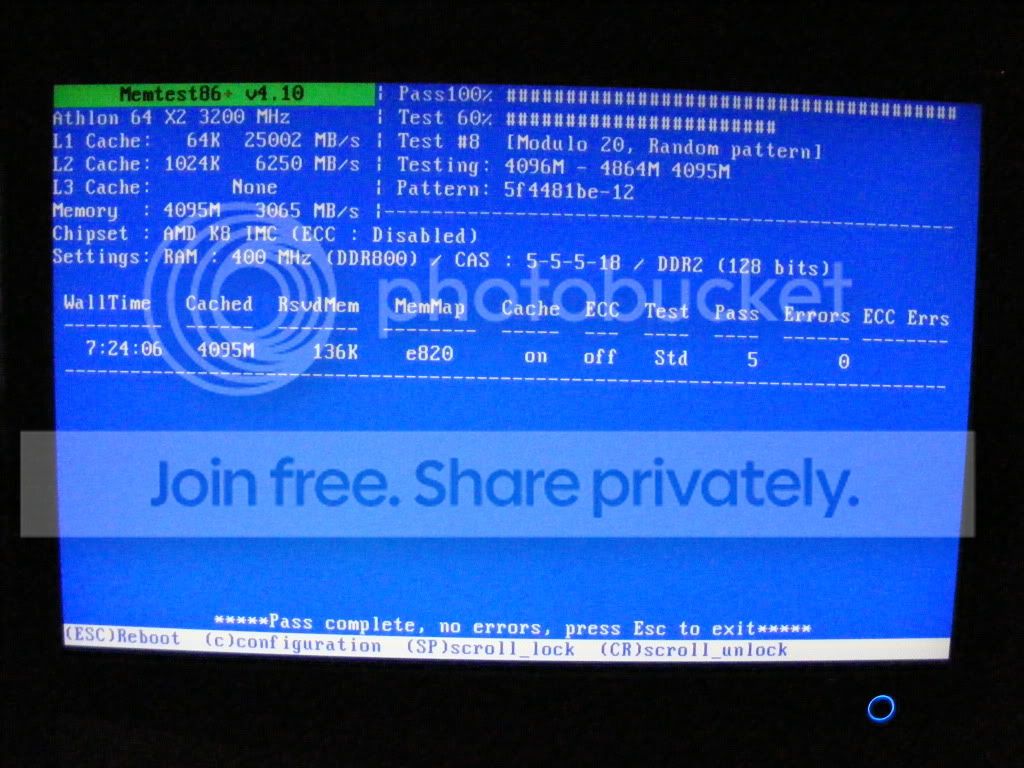
memtestx86 result:

Thanks so much one again for for the advice with this.

DSCF3136.jpg


Is this a good result, what you would hope/expect to see?

Upon rebooting afterwards as prompted by memtestx86) my machine now seems to take an age (I guess 10x longer than before) to get going. The first time rebooting it claimed that my copy of Win 7 was not genuine and needed activation? So I've activated it, rebooted and again I'm getting a long, long wait looking at a black screen between the Windows logo and the 'blue dove' screen before my desktop finally appears. At least Windows remembered it was genuinely activated this time! Any thoughts?
 

My Computer My Computer

Computer type
PC/Desktop
Computer Manufacturer/Model Number
HP xw4600 Workstation
OS
Windows 7 64bit
CPU
Intel Core 2 Duo E6850 @3GHz 3 Ghz
Memory
6.00 GB
Graphics Card(s)
NVIDIA Quadro FX 3700
Sound Card
SB Audigy Creative Technology Ltd.
Monitor(s) Displays
Samsung SyncMaster 2232BW & LG L226W
Screen Resolution
1680x1050
Hard Drives
120Gb Samsung SSD 840 Series & 1Tb WD Caviar Black (internal)

+ some 1Tb WD My Books (external)
Keyboard
basic HP (Model SK.2880)
Mouse
basic HP laser mouse
Internet Speed
up to 4MBPS, usually around 2MBPS
Antivirus
MS Essentials
Browser
Chrome
Other Info
Zune, Microsoft Security Essentials, Libre Office, Chrome, Adobe CS6, CCleaner, Radio Downloader, vlc
You need to run memtest for a minimum of five complete passes... ;)
 

My Computer My Computer

Computer type
PC/Desktop
Computer Manufacturer/Model Number
LENOVO K450 @3.0GHZ
OS
64-bit Windows 8.1 Pro
CPU
Core(TM) i5 CPU 4330 Haswell @ 3.20GHz
Motherboard
LENOVO
Memory
12.00 GB
Graphics Card(s)
Intel(R) HD Graphics
Sound Card
Intel HD integtrated
Monitor(s) Displays
HP 25' ISP Monitor
Screen Resolution
1900/1020
Hard Drives
(1) ST1000DM003-1CH162 (2) Generic STORAGE DEVICE USB Device (3) Generic STORAGE DEVICE USB Device
Internet Speed
100mb down/10mb up
Sorry, it's been a long day:o

Here's the results of 5 passes:
DSCF3137.jpg


No problems rebooting afterwards this time so far...
 

My Computer My Computer

Computer type
PC/Desktop
Computer Manufacturer/Model Number
HP xw4600 Workstation
OS
Windows 7 64bit
CPU
Intel Core 2 Duo E6850 @3GHz 3 Ghz
Memory
6.00 GB
Graphics Card(s)
NVIDIA Quadro FX 3700
Sound Card
SB Audigy Creative Technology Ltd.
Monitor(s) Displays
Samsung SyncMaster 2232BW & LG L226W
Screen Resolution
1680x1050
Hard Drives
120Gb Samsung SSD 840 Series & 1Tb WD Caviar Black (internal)

+ some 1Tb WD My Books (external)
Keyboard
basic HP (Model SK.2880)
Mouse
basic HP laser mouse
Internet Speed
up to 4MBPS, usually around 2MBPS
Antivirus
MS Essentials
Browser
Chrome
Other Info
Zune, Microsoft Security Essentials, Libre Office, Chrome, Adobe CS6, CCleaner, Radio Downloader, vlc
Talk about famous last words...

Since rebooting after running 5 passes I had 3-4 new BSODs in quick succession. The whole system is currently pretty laggy and, perhaps most annoyingly of all, it now takes well over 4 minutes to fully boot up where it would take under a minute before.

TBH, if I had the money right now I'd be looking at quitting and building a new system from scratch. Not sure how much more of this I can take.

Is backing up and running a clean install of Win 7 worth exploring or do you think I have flaky hardware and there's an end to it?

Thanks guys.
 

My Computer My Computer

Computer type
PC/Desktop
Computer Manufacturer/Model Number
HP xw4600 Workstation
OS
Windows 7 64bit
CPU
Intel Core 2 Duo E6850 @3GHz 3 Ghz
Memory
6.00 GB
Graphics Card(s)
NVIDIA Quadro FX 3700
Sound Card
SB Audigy Creative Technology Ltd.
Monitor(s) Displays
Samsung SyncMaster 2232BW & LG L226W
Screen Resolution
1680x1050
Hard Drives
120Gb Samsung SSD 840 Series & 1Tb WD Caviar Black (internal)

+ some 1Tb WD My Books (external)
Keyboard
basic HP (Model SK.2880)
Mouse
basic HP laser mouse
Internet Speed
up to 4MBPS, usually around 2MBPS
Antivirus
MS Essentials
Browser
Chrome
Other Info
Zune, Microsoft Security Essentials, Libre Office, Chrome, Adobe CS6, CCleaner, Radio Downloader, vlc
Are you doing any overclocking? The dumps are blaming amdk8.sys, which is your AMD processor driver. Try installing a fresh copy.

You should also remove Comodo completely and use the Windows Firewall instead.

...Summary of the Dumps:
Code:
[font=lucida console]
Built by: 7600.16539.x86fre.win7_gdr.100226-1909
Debug session time: Mon Jul 19 19:31:19.552 2010 (UTC - 4:00)
System Uptime: 0 days 0:27:14.191
BugCheck 7F, {d, 0, 0, 0}
Probably caused by : amdk8.sys ( amdk8!C1Halt+4 )
BUGCHECK_STR:  0x7f_d
PROCESS_NAME:  System
¨¨¨¨¨¨¨¨¨¨¨¨¨¨¨¨¨¨¨¨¨¨¨¨¨¨¨¨¨¨¨¨¨¨¨¨¨¨¨¨¨¨¨¨¨¨¨¨¨¨¨¨¨¨¨¨¨¨¨¨¨¨¨¨¨¨¨¨¨¨¨¨¨¨¨¨¨¨¨¨¨¨¨¨¨¨
Built by: 7600.16539.x86fre.win7_gdr.100226-1909
Debug session time: Mon Jul 19 19:02:56.612 2010 (UTC - 4:00)
System Uptime: 0 days 0:05:44.251
BugCheck 7F, {d, 0, 0, 0}
Probably caused by : amdk8.sys ( amdk8!C1Halt+4 )
BUGCHECK_STR:  0x7f_d
PROCESS_NAME:  System
¨¨¨¨¨¨¨¨¨¨¨¨¨¨¨¨¨¨¨¨¨¨¨¨¨¨¨¨¨¨¨¨¨¨¨¨¨¨¨¨¨¨¨¨¨¨¨¨¨¨¨¨¨¨¨¨¨¨¨¨¨¨¨¨¨¨¨¨¨¨¨¨¨¨¨¨¨¨¨¨¨¨¨¨¨¨
Built by: 7600.16539.x86fre.win7_gdr.100226-1909
Debug session time: Mon Jul 19 18:55:52.494 2010 (UTC - 4:00)
System Uptime: 0 days 0:18:17.133
BugCheck D1, {1735e892, ff, 0, 8690d05e}
Probably caused by : amdk8.sys ( amdk8!C1Halt+4 )
BUGCHECK_STR:  0xD1
PROCESS_NAME:  System
¨¨¨¨¨¨¨¨¨¨¨¨¨¨¨¨¨¨¨¨¨¨¨¨¨¨¨¨¨¨¨¨¨¨¨¨¨¨¨¨¨¨¨¨¨¨¨¨¨¨¨¨¨¨¨¨¨¨¨¨¨¨¨¨¨¨¨¨¨¨¨¨¨¨¨¨¨¨¨¨¨¨¨¨¨¨
Built by: 7600.16539.x86fre.win7_gdr.100226-1909
Debug session time: Mon Jul 19 09:33:38.506 2010 (UTC - 4:00)
System Uptime: 0 days 0:03:33.145
*** WARNING: Unable to verify timestamp for cmdguard.sys
*** ERROR: Module load completed but symbols could not be loaded for cmdguard.sys
BUGCHECK_STR:  0x5
PROCESS_NAME:  System
¨¨¨¨¨¨¨¨¨¨¨¨¨¨¨¨¨¨¨¨¨¨¨¨¨¨¨¨¨¨¨¨¨¨¨¨¨¨¨¨¨¨¨¨¨¨¨¨¨¨¨¨¨¨¨¨¨¨¨¨¨¨¨¨¨¨¨¨¨¨¨¨¨¨¨¨¨¨¨¨¨¨¨¨¨¨[/font]
 

My Computer My Computer

Computer Manufacturer/Model Number
Custom
OS
Windows 7 Professional x64
CPU
Intel i7 2600K OC'd @ 4620 MHz
Motherboard
Asus P8Z68-V Pro
Memory
16GB GSkill Sniper 2133 Mhz (4x4GB)
Graphics Card(s)
EVGA GeForce GTX 480 SuperClocked+
Sound Card
Realtek High Definition Audio
Monitor(s) Displays
2x Acer S273HLbmii 27"
Screen Resolution
2 x 1920x1080
Hard Drives
64GB Crucial M4 SSD

Storage: Hitachi 1TB 5400RPM, Samsung 1.5TB 5400RPM
PSU
Corsair HW Series 750w (modular)
Case
Cooler Master HAF 932 Advanced Blue Edition
Cooling
CM Hyper 212+ CPU cooler, 3x 230mm + 1x 140mm case fans
Keyboard
Logitech MK320 (wireless)
Mouse
Logitech MK320 (wireless)
Internet Speed
30 Mb/s : 2 Mb/s
Regarding re-installing amdk8.sys - is this the driver I'm looking for?

Code:
http://support.amd.com/us/Pages/dynamicDetails.aspx?ListID=c5cd2c08-1432-4756-aafa-4d9dc646342f&ItemID=173&lang=us
I notice there is still no mention of Win 7 support for AMD Athlon even though the driver was last updated 11/09.

I'm pretty sure I'm not overclocking. I wouldn't know how to if I wanted to, I don't have much knowledge in this area at all I'm afraid.

I'd rather avoid going back to Windows Firewall right now as it just would not work properly with Firefox, no matter how often I set the firewall to allow it through.
 
Last edited:

My Computer My Computer

Computer type
PC/Desktop
Computer Manufacturer/Model Number
HP xw4600 Workstation
OS
Windows 7 64bit
CPU
Intel Core 2 Duo E6850 @3GHz 3 Ghz
Memory
6.00 GB
Graphics Card(s)
NVIDIA Quadro FX 3700
Sound Card
SB Audigy Creative Technology Ltd.
Monitor(s) Displays
Samsung SyncMaster 2232BW & LG L226W
Screen Resolution
1680x1050
Hard Drives
120Gb Samsung SSD 840 Series & 1Tb WD Caviar Black (internal)

+ some 1Tb WD My Books (external)
Keyboard
basic HP (Model SK.2880)
Mouse
basic HP laser mouse
Internet Speed
up to 4MBPS, usually around 2MBPS
Antivirus
MS Essentials
Browser
Chrome
Other Info
Zune, Microsoft Security Essentials, Libre Office, Chrome, Adobe CS6, CCleaner, Radio Downloader, vlc
That driver is for XP, so I don't think it's the right one.

As for Comodo, it really should be removed. It was directly blamed by one dump, in fact.

I would advise removing Comodo and then posting in the Security forum for help with the Windows Firewall.
 

My Computer My Computer

Computer Manufacturer/Model Number
Custom
OS
Windows 7 Professional x64
CPU
Intel i7 2600K OC'd @ 4620 MHz
Motherboard
Asus P8Z68-V Pro
Memory
16GB GSkill Sniper 2133 Mhz (4x4GB)
Graphics Card(s)
EVGA GeForce GTX 480 SuperClocked+
Sound Card
Realtek High Definition Audio
Monitor(s) Displays
2x Acer S273HLbmii 27"
Screen Resolution
2 x 1920x1080
Hard Drives
64GB Crucial M4 SSD

Storage: Hitachi 1TB 5400RPM, Samsung 1.5TB 5400RPM
PSU
Corsair HW Series 750w (modular)
Case
Cooler Master HAF 932 Advanced Blue Edition
Cooling
CM Hyper 212+ CPU cooler, 3x 230mm + 1x 140mm case fans
Keyboard
Logitech MK320 (wireless)
Mouse
Logitech MK320 (wireless)
Internet Speed
30 Mb/s : 2 Mb/s
Maybe there just isn't support for Win 7 then as this is all I could find that relates to AMD Athlon:

Code:
http://support.amd.com/us/psearch/Pages/psearch.aspx?type=2.1&product=2.1.2&contentType=Tech%20Download%20Processor

I'm beginning to wonder if the Windows 7 Upgrade Advisor was incorrect in advising me that my system is up to running 7 OS at all?

I'll give Windows Firewall another try but I get the feeling, faulty or no, that this is not going get to the heart of the matter as I only installed Comodo last week as an alternative to AVG.
 

My Computer My Computer

Computer type
PC/Desktop
Computer Manufacturer/Model Number
HP xw4600 Workstation
OS
Windows 7 64bit
CPU
Intel Core 2 Duo E6850 @3GHz 3 Ghz
Memory
6.00 GB
Graphics Card(s)
NVIDIA Quadro FX 3700
Sound Card
SB Audigy Creative Technology Ltd.
Monitor(s) Displays
Samsung SyncMaster 2232BW & LG L226W
Screen Resolution
1680x1050
Hard Drives
120Gb Samsung SSD 840 Series & 1Tb WD Caviar Black (internal)

+ some 1Tb WD My Books (external)
Keyboard
basic HP (Model SK.2880)
Mouse
basic HP laser mouse
Internet Speed
up to 4MBPS, usually around 2MBPS
Antivirus
MS Essentials
Browser
Chrome
Other Info
Zune, Microsoft Security Essentials, Libre Office, Chrome, Adobe CS6, CCleaner, Radio Downloader, vlc
Third-party firewalls and anti-virus programs are notoriously unstable on Windows 7 and Vista. I advise removing all third-party security, and running with the anti-virus Microsoft Security Essentials, and the built-in Windows Firewall.

Really, that is all you need. Combine those two programs with some common sense about what you download, you should be infection-free.
 

My Computer My Computer

Computer Manufacturer/Model Number
Custom
OS
Windows 7 Professional x64
CPU
Intel i7 2600K OC'd @ 4620 MHz
Motherboard
Asus P8Z68-V Pro
Memory
16GB GSkill Sniper 2133 Mhz (4x4GB)
Graphics Card(s)
EVGA GeForce GTX 480 SuperClocked+
Sound Card
Realtek High Definition Audio
Monitor(s) Displays
2x Acer S273HLbmii 27"
Screen Resolution
2 x 1920x1080
Hard Drives
64GB Crucial M4 SSD

Storage: Hitachi 1TB 5400RPM, Samsung 1.5TB 5400RPM
PSU
Corsair HW Series 750w (modular)
Case
Cooler Master HAF 932 Advanced Blue Edition
Cooling
CM Hyper 212+ CPU cooler, 3x 230mm + 1x 140mm case fans
Keyboard
Logitech MK320 (wireless)
Mouse
Logitech MK320 (wireless)
Internet Speed
30 Mb/s : 2 Mb/s
OK I'll give it a go.
 

My Computer My Computer

Computer type
PC/Desktop
Computer Manufacturer/Model Number
HP xw4600 Workstation
OS
Windows 7 64bit
CPU
Intel Core 2 Duo E6850 @3GHz 3 Ghz
Memory
6.00 GB
Graphics Card(s)
NVIDIA Quadro FX 3700
Sound Card
SB Audigy Creative Technology Ltd.
Monitor(s) Displays
Samsung SyncMaster 2232BW & LG L226W
Screen Resolution
1680x1050
Hard Drives
120Gb Samsung SSD 840 Series & 1Tb WD Caviar Black (internal)

+ some 1Tb WD My Books (external)
Keyboard
basic HP (Model SK.2880)
Mouse
basic HP laser mouse
Internet Speed
up to 4MBPS, usually around 2MBPS
Antivirus
MS Essentials
Browser
Chrome
Other Info
Zune, Microsoft Security Essentials, Libre Office, Chrome, Adobe CS6, CCleaner, Radio Downloader, vlc
Yesterday my machine would not boot at all. In desperation I took it round to my local PC repair shop. The guy looked at it, gave it a good clean and noticed some of the RAM was not properly seated and duly fixed that also. Now the machine booted OK but was still way too slow. So I've backed up all essential files and am now re-formatting my C Drive prior to a clean install of Win 7 64bit and hoping to draw a line under this whole affair.

Thanks again to everyone for their input. It's really appreciated.
 

My Computer My Computer

Computer type
PC/Desktop
Computer Manufacturer/Model Number
HP xw4600 Workstation
OS
Windows 7 64bit
CPU
Intel Core 2 Duo E6850 @3GHz 3 Ghz
Memory
6.00 GB
Graphics Card(s)
NVIDIA Quadro FX 3700
Sound Card
SB Audigy Creative Technology Ltd.
Monitor(s) Displays
Samsung SyncMaster 2232BW & LG L226W
Screen Resolution
1680x1050
Hard Drives
120Gb Samsung SSD 840 Series & 1Tb WD Caviar Black (internal)

+ some 1Tb WD My Books (external)
Keyboard
basic HP (Model SK.2880)
Mouse
basic HP laser mouse
Internet Speed
up to 4MBPS, usually around 2MBPS
Antivirus
MS Essentials
Browser
Chrome
Other Info
Zune, Microsoft Security Essentials, Libre Office, Chrome, Adobe CS6, CCleaner, Radio Downloader, vlc
Sounds good, thanks for the report!

Let us know how it turns out. ;)
 

My Computer My Computer

Computer Manufacturer/Model Number
Custom
OS
Windows 7 Professional x64
CPU
Intel i7 2600K OC'd @ 4620 MHz
Motherboard
Asus P8Z68-V Pro
Memory
16GB GSkill Sniper 2133 Mhz (4x4GB)
Graphics Card(s)
EVGA GeForce GTX 480 SuperClocked+
Sound Card
Realtek High Definition Audio
Monitor(s) Displays
2x Acer S273HLbmii 27"
Screen Resolution
2 x 1920x1080
Hard Drives
64GB Crucial M4 SSD

Storage: Hitachi 1TB 5400RPM, Samsung 1.5TB 5400RPM
PSU
Corsair HW Series 750w (modular)
Case
Cooler Master HAF 932 Advanced Blue Edition
Cooling
CM Hyper 212+ CPU cooler, 3x 230mm + 1x 140mm case fans
Keyboard
Logitech MK320 (wireless)
Mouse
Logitech MK320 (wireless)
Internet Speed
30 Mb/s : 2 Mb/s
Back
Top