Reinstall help

Nfridge1

New member
Local time
10:42 AM
Messages
6
Hey people

My Windows recently refused to boot after i put a flash disk in my machine. I tried everything possible to fix it and nothing worked. Then i went for a reinstall. unfortunatly the defult location was the recovery partion of my hard drive, so it parallel installed and i couldnt do anything on that windows either because it had no disk space to work with. so i installed again to the correct partion. Its is working and i have recovered my files, but I now have three problems.
1) there are 2 operating systems on my computer. I want the one in the recovery partion to go.
2) My media wont play. Windows media player is claiming a problem with my sound card. this is a brand new pc that has only been treated well. I tried putting in the drivers disk that came with the machine and installing that but it didnt help.
3) I couldn't recover actual programs, only files. I've reinstalled office but I'm not sure about 2 things. a) is the old one still on my machine and taking up space? b) have i now used up another one of the three computers that youre allowed to install student office on?
I would really appreciate any help. This is a new machine and really shouldnt be giving me this trouble, and i can't afford to take it to someone.
 

My Computer

Computer Manufacturer/Model Number
Dell
OS
windows 7 home basic 64 bit
CPU
Core 2 duo
Memory
2gig
Hello Nfridge1, welcome to Seven Forums!


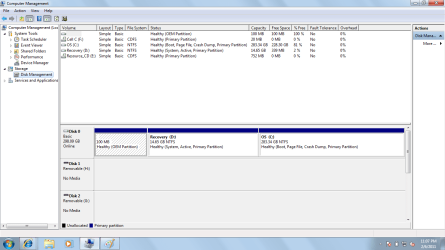
Before we make any specific recommendations will you please post a snip/screen-shot of the entire disk management drive map with a full description as to which drive/partition is which, so we can see what you have going on as there may be a fairly simple way to resolve the situation.

In the Windows start menu right click computer and click manage, in the left pane of the "Computer Management" window that opens click disk management and post a snip of that.

How to Upload and Post a Screenshot and File in Seven Forums


With Office, 3 installs means to 3 separate physical machines, you can reinstall to the same PC as many times as you like.

   Note

No matter what you do, if you do a clean install you will have to reinstall all the programs/apps that you use, they integrate themselves into the Windows registry and are not moveable from one Windows install to another so be sure to save the activation keys where applicable.


My Computer

Computer Manufacturer/Model Number
* BFK Customs *
OS
W 7 64-bit Ultimate
CPU
Intel Q9550 Yorkfield
Motherboard
ASUS P5Q Pro
Memory
8GB Dominator 8500C5D
Graphics Card(s)
ATI : XFX 5870
Sound Card
Realtek HD Audio 7-1
Monitor(s) Displays
1x 47" LCD HDMI & 3x 26" LCD HDMI
Screen Resolution
1920x1080P & 1920x1200
Hard Drives
1x 80GB Intel X25-M G2 SSD : 1x 500GB & 1x 640GB WD Caviar Black(s)
PSU
Corsair 620HX
Case
Cooler Master RC-690
Cooling
Tuniq Tower 120, 2x 140mm and 3x 120mm case fans
Keyboard
Microsoft 500
Mouse
Razer Diamondback 3G
Internet Speed
14 Mb/s
Other Info
1x Koutech 3Gb/s SATA HDD Hot Swap Rack
Have you made your Dell Recovery disks?
 

My Computer

OS
ME/XP/Vista/Win7
Screenshot

Hi

Here's the screenshot.
And no, i didn't do the dell backup disk. i did an emergency backup before the reinstall.
Thanks for the heads up with Office. Thats good to know.
 

Attachments

  • screenshot disk managment.png
    screenshot disk managment.png
    39.6 KB · Views: 24

My Computer

Computer Manufacturer/Model Number
Dell
OS
windows 7 home basic 64 bit
CPU
Core 2 duo
Memory
2gig
Hello again.


The first thing that needs done so you can remove the Windows on the 14.65GB partition is to make the OEM partition to the far left the "System Active" partition again, like it was from the factory, the system boot files have to be recreated there.

Forget about creating the Dell recovery disks now, you have destroyed the data needed to do that when you installed to the 14.65GB partition.


Starting at Option One in this tutorial at the link below, in the 283GB Windows 7 disk management, right click the OEM partition and mark it active, then restart the machine and do the 3 separate startup repairs with the restarts outlined in Option One #3 to complete the process.

Startup Repair - Run 3 Separate Times

How to Run a Startup Repair in Windows 7


After you have completed that post back another snip of disk management to be sure and I will give you the best steps to wipe the 14GB partition so it can be recovered into the Windows 7 you want to keep.
 

My Computer

Computer Manufacturer/Model Number
* BFK Customs *
OS
W 7 64-bit Ultimate
CPU
Intel Q9550 Yorkfield
Motherboard
ASUS P5Q Pro
Memory
8GB Dominator 8500C5D
Graphics Card(s)
ATI : XFX 5870
Sound Card
Realtek HD Audio 7-1
Monitor(s) Displays
1x 47" LCD HDMI & 3x 26" LCD HDMI
Screen Resolution
1920x1080P & 1920x1200
Hard Drives
1x 80GB Intel X25-M G2 SSD : 1x 500GB & 1x 640GB WD Caviar Black(s)
PSU
Corsair 620HX
Case
Cooler Master RC-690
Cooling
Tuniq Tower 120, 2x 140mm and 3x 120mm case fans
Keyboard
Microsoft 500
Mouse
Razer Diamondback 3G
Internet Speed
14 Mb/s
Other Info
1x Koutech 3Gb/s SATA HDD Hot Swap Rack
Hey

Uh the OEM partion won't give me any options when I right click on it. Just the help option.
 

My Computer

Computer Manufacturer/Model Number
Dell
OS
windows 7 home basic 64 bit
CPU
Core 2 duo
Memory
2gig
Download and burn to CD free Partition Wizard bootable CD. Back up your files and if you want a Win7 backup image externally.

Boot PW CD, rightclick OEM partition to Modify>Set to Active, OK.

Next rightclick overwritten Recovery Partition to Delete, OK.

Next rightclick on your new Win7 partition to Resize, drag left grey border all the way to the left to take up the deleted recovery space, OK. Apply all steps.

Next on Disk tab select Rebuild MBR, Apply, restart.

If Win7 doesn't start, boot the Win7 DVD Repair console or Repair Cd to run Startup Repair up to 3 separate times with reboots until Win7 starts. http://www.sevenforums.com/tutorials/105541-startup-repair-run-3-separate-times.html
 
still haveing trouble

Hey

the whole disk partion thing just didn't work out. I formatted the whole disk and just started over. So thats all fine now. The audio still isn't working though. Says no audio output device installed. ive tried installing drivers but they just fail to install every time. ideas?

Thanks
 

My Computer

Computer Manufacturer/Model Number
Dell
OS
windows 7 home basic 64 bit
CPU
Core 2 duo
Memory
2gig
Download the audio Software package from the Dell webpage for your exact model, unzip and run it's Setup file as Admin. It may be a part of your chipset, if necessary download and unzip it to read the ReadMe file.

There is no model listed so we can't advise if you might need to install in compatibility mode, but run the wizard anyway.

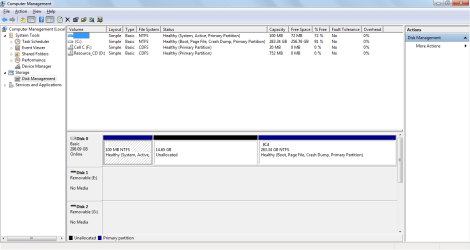
We previously gave you steps to correct the reinstall mistakenly made to the Recovery Partition, but never heard back from you for help in sorting this out. Did you delete the Recovery partition? Did you wipe the HD if you didn't need to save anything? Please post back a screenshot of your maximized full Disk Mgmt drive map with listings so we can look it over for problems.
 
hi

Hey

Yea sorry. I appreciate the help. I installed the disk partion program. after making the changes though the computer stopped booting again. so I eventually just formatted everything. The recovery partion is now just unallocated entirely.

I've downloaded the drivers from Dell. the setup won't install them though. error code oxe0000234. won't automatically install either from the drivers disk. just says installation failed. and device manager doesn't know what the sound hardware is.

screenshot is attached.
 

Attachments

  • screen shot.png
    screen shot.png
    28.3 KB · Views: 11

My Computer

Computer Manufacturer/Model Number
Dell
OS
windows 7 home basic 64 bit
CPU
Core 2 duo
Memory
2gig
If you have sound device on the your rig it will show up in Device Manager, but may be listed now as unknown device.

Are there any Sound devices listed at all, after unhiding devices in Device Manager>View tab?

Once you locate the Sound or Unknown device, browse from it to the unzipped driver package from Dell which should be in a folder in the root of C.
 
Last edited:
hi

It knows what it is now. It's under sound and other audio devices. when i browse to the driver it says the best drivers are already installed. it gives a code 10 error and has the yellow triangle next to it.
 

My Computer

Computer Manufacturer/Model Number
Dell
OS
windows 7 home basic 64 bit
CPU
Core 2 duo
Memory
2gig

My Computer

Computer Manufacturer/Model Number
* BFK Customs *
OS
W 7 64-bit Ultimate
CPU
Intel Q9550 Yorkfield
Motherboard
ASUS P5Q Pro
Memory
8GB Dominator 8500C5D
Graphics Card(s)
ATI : XFX 5870
Sound Card
Realtek HD Audio 7-1
Monitor(s) Displays
1x 47" LCD HDMI & 3x 26" LCD HDMI
Screen Resolution
1920x1080P & 1920x1200
Hard Drives
1x 80GB Intel X25-M G2 SSD : 1x 500GB & 1x 640GB WD Caviar Black(s)
PSU
Corsair 620HX
Case
Cooler Master RC-690
Cooling
Tuniq Tower 120, 2x 140mm and 3x 120mm case fans
Keyboard
Microsoft 500
Mouse
Razer Diamondback 3G
Internet Speed
14 Mb/s
Other Info
1x Koutech 3Gb/s SATA HDD Hot Swap Rack

My Computer

OS
ME/XP/Vista/Win7
I installed the disk partion program. after making the changes though the computer stopped booting again. so I eventually just formatted everything. The recovery partion is now just unallocated entirely.
Did you run the 3 Startup Repairs to rewrite the System boot files to the OEM partition? It was the final step given after deleting the Recovery partition which you mistakenly installed Win7 upon, and marking OEM partition Active again:
Download and burn to CD free Partition Wizard bootable CD. Back up your files and if you want a Win7 backup image externally.

Boot PW CD, rightclick OEM partition to Modify>Set to Active, OK.

Next rightclick overwritten Recovery Partition to Delete, OK.

Next rightclick on your new Win7 partition to Resize, drag left grey border all the way to the left to take up the deleted recovery space, OK. Apply all steps.

Next on Disk tab select Rebuild MBR, Apply, restart.

If Win7 doesn't start, boot the Win7 DVD Repair console or Repair Cd to run Startup Repair up to 3 separate times with reboots until Win7 starts. http://www.sevenforums.com/tutorials/105541-startup-repair-run-3-separate-times.html
 

My Computer

Computer Manufacturer/Model Number
* BFK Customs *
OS
W 7 64-bit Ultimate
CPU
Intel Q9550 Yorkfield
Motherboard
ASUS P5Q Pro
Memory
8GB Dominator 8500C5D
Graphics Card(s)
ATI : XFX 5870
Sound Card
Realtek HD Audio 7-1
Monitor(s) Displays
1x 47" LCD HDMI & 3x 26" LCD HDMI
Screen Resolution
1920x1080P & 1920x1200
Hard Drives
1x 80GB Intel X25-M G2 SSD : 1x 500GB & 1x 640GB WD Caviar Black(s)
PSU
Corsair 620HX
Case
Cooler Master RC-690
Cooling
Tuniq Tower 120, 2x 140mm and 3x 120mm case fans
Keyboard
Microsoft 500
Mouse
Razer Diamondback 3G
Internet Speed
14 Mb/s
Other Info
1x Koutech 3Gb/s SATA HDD Hot Swap Rack
Back
Top