Reinstall WMC from scratch. What is the best approach?

jriker1

New member
Local time
12:27 AM
Messages
5
Guess the subject says most of it. I have a Windows 7 MCE computer that is being used to record all my TV shows and stream them to multiple Xbox 360's in the house. Over time the system has become a bit more sluggish than it used to be as I used it for multiple things so have installed other things on it that I guess has effected it in time. Now that I have dedicated computers for those other things, was thinking of re-installing the entire system from scratch. Does anyone have a guide or know where I can find one that talks about how to reinstall MCE and restore all my scheduled shows without any data loss? I have done this before, but winged it so prefer a known good approach. Note I have a complete backup of the entire system so wiping and restoring random files won't be an issue. Only thing I don't backup is the recorded shows folder. Thoughts?

Thanks.

JR
 

My Computer My Computer

At a glance

Win7
OS
Win7

My Computer My Computer

At a glance

Windows 7 Pro x64 sp1i7 4770K8GB Corsair Vengeance 1600MHzonboard
Computer type
PC/Desktop
Computer Manufacturer/Model Number
self build
OS
Windows 7 Pro x64 sp1
CPU
i7 4770K
Motherboard
MSI B85M-E45
Memory
8GB Corsair Vengeance 1600MHz
Graphics Card(s)
onboard
Monitor(s) Displays
LG 27MP35
Screen Resolution
1920-1080
Hard Drives
Seagate 2TB
PSU
Cooler Master GX 750
Case
Antec 300
Cooling
Seidon 120V
Internet Speed
60/18
Antivirus
MSE
Browser
Firefox
I cannot vouch for the approach described in this article to backup/restore your current scheduled recordings when you anticipate reinstalling Windows from scratch. But is sounds plausible and correct.

My own method is to have a collection of screenshots for all my "series recordings", of which I currently have 65. At 9 lines per screen (as you page through them), that's 8 screenshots to "preserve" all of them.

Of course all I have is basically a list of names, of the shows (and probably the channel as well) in my current list of series recordings. So after the Windows reinstall is complete, I have to through the normal expected WMC configuration and setup, and then download the Guide data, and then manually recreate each series recording while viewing my screenshots to provide the reminder list of what I'm looking for.

Clearly, this approach doesn't provide a solution for a series you might have set whose current season has expired so that this show isn't present in the current Guide. And unless you take additional screenshots of the interior details of each series to refer to, you must mentally recreate whether you want NEW or NEW+RERUN, etc.

Also, it doesn't provide a solution for upcoming near-future one-off (non-series) recordings which might be set for sometime in the next week or two.

But honestly, unless you had many hundreds of series recordings and one-offs, surely this "list" of series recordings from which you can manually recreate from should be fine. Even if you miss series not currently on the schedule, presumably in a few months time when the series returns you will know about it from other sources or advertisements, and can just remember to recreate the new series recording.


Much more importantly, just remember that all your current copy-protected WTV recordings (i.e. from programs that your cable provider has marked with 5C copy-once flags) WILL NOT BE PLAYABLE WITH YOUR NEWLY REINSTALLED WINDOWS AND WMC!!! This is because of the encryption used by WMC at recording time in your current system, to store that copy-protected WTV file on your hard drive. The DRM encrypt/decrypt method prevents playback of copy-protected content by anything other than the original installed Windows and WMC that did the recording in the first place. A newly installed Windows (even on the same hardware) CANNOT read those recordings.

So, be prepared to lose all of that content when you reinstall Windows... unless you prepare for it. You really have no solution available. The only "workaround" is to view-down all of your current copy-protected recordings before you start the new Windows install, so that you don't actually lose anything.

Another "workaround" approach would be to install Windows and WMC onto a second computer, retaining the current machine and its WMC for selective connection to one or two extenders, and to continue to retain that machine and the connected selected extender arrangement until you finally finish viewing-down all of your old current copy-protected recordings.

Once you exhaust all of those old copy-protected recordings, you can ditch the old machine and re-configure your extenders to now all be connected to the new machine.

Obviously, this is not a wonderful "solution". But that's what copy-protected means, and that's how DRM works. Those are the rules. So just be aware of that, especially if your cable provider provides most/all of your content marked as copy-protected (as TWC/LA does for me). There is no longer clear QAM, and either a cablecard or STB/DVR (which has a cablecard inside) from them is required in order to view/record 100% of their content, no matter what the channel, free or premium.

 

My Computer My Computer

At a glance

Windows 7 Pro x64 (1), Win7 Pro X64 (2)i5-3350p 3.1Ghz/6MB-cache (1); E8400 3.0Ghz/6...8GB PC3-12800 DDR3 (1); 4GB PC3-10600 DDR3 (2)ATI HD7750 (1), (see TV cards); ATI R7 250 (2)
Computer type
PC/Desktop
Computer Manufacturer/Model Number
Home-built, two systems (1) and (2)
OS
Windows 7 Pro x64 (1), Win7 Pro X64 (2)
CPU
i5-3350p 3.1Ghz/6MB-cache (1); E8400 3.0Ghz/6MB-cache (2)
Motherboard
ASUS P8Z77-V Pro (1); ASUS P5Q3 (2)
Memory
8GB PC3-12800 DDR3 (1); 4GB PC3-10600 DDR3 (2)
Graphics Card(s)
ATI HD7750 (1), (see TV cards); ATI R7 250 (2)
Sound Card
Realtek ALC892 HD Audio (1); Realtek ALC1200 HD Audio (2)
Monitor(s) Displays
Eizo HD2441W LCD, Eizo S2433W (1); Eizo 24" S2433W (2)
Screen Resolution
1920x1200, 1920x1200 (1); 1920x1200 (2)
Hard Drives
(1) 1TB SATA-II (7200RPM), 2x2TB SATA-III (7200RPM), 250GB SATA-III (10000RPM) for OS; 2x2TB external USB 3.0

(2) 320GB SATA-II (7200RPM), 750GB SATA-II (7200RPM), 150GB SATA-II (10000RPM) for OS; 2TB external USB 3.0
PSU
Nesteq ECS-6001 600W (1); Nesteq ECS-5001 500W (2)
Case
Acousti-Case 360 (1) and (2)
Cooling
Noctua NH-U12P SE2 for CPU, 2x120mm case fans (1) and (2)
Keyboard
IBM PS/2 (1) and (2)
Mouse
Logitech MX Revolution wireless (1); Microsoft wired (2)
Internet Speed
100mbps down / 10mbps up
Antivirus
Microsoft Security Essentials; Malwarebyte Anti-Malware Pro
Browser
Firefox
Other Info
Ceton InfiniTV 4-tuner cablecard-enabled TV card as well as Hauppauge HVR-2250 OTA/ATSC 2-tuner TV card in (1), running under Win7 WMC
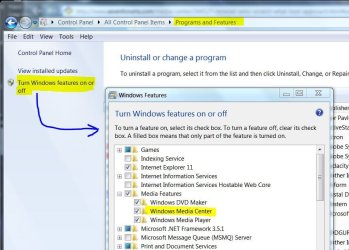
WMC is a feature that you can turn on and off. A while back, my schedule listings were hosed for some reason. All I did was turn off the feature and reboot. After that, I turned the feature back on and it rebuilt the schedule. None of the files were disturbed.
 

Attachments

  • WMC-On-Off.JPG
    WMC-On-Off.JPG
    81.7 KB · Views: 0

My Computer My Computer

At a glance

Windows 7 Pro-x64i7-2600 3.4GHz - 3.8GHz Turbo8Gb - 2x4GB, Muskin 991770 PC3-1333Integrated Intel HD 2000
Computer type
PC/Desktop
Computer Manufacturer/Model Number
Built 2/11/2011
OS
Windows 7 Pro-x64
CPU
i7-2600 3.4GHz - 3.8GHz Turbo
Motherboard
Intel DH67BL-B3
Memory
8Gb - 2x4GB, Muskin 991770 PC3-1333
Graphics Card(s)
Integrated Intel HD 2000
Sound Card
Integrated Intel 10.1 HD, RealTek ALC892
Monitor(s) Displays
Asus LCD VH222H, Haier HL24XSL2a
Screen Resolution
1920x1080, 1920x1080
Hard Drives
Crucial SSD C300-128Gb,
Western Digital WD5002AALX - 500Gb,
Western Digital WD7501AALS - 750Gb
PSU
Seasonic 650W 80+ Gold Modular
Case
Rosewill Defender
Cooling
Stock CPU, Four 120mm case fans, PCH fan added
Keyboard
Logitech EX100 Y-RBH94 Wireless
Mouse
Logitech EX100 M-RCE95 Wireless
Internet Speed
3.0/1.5 Mbs
Antivirus
Microsoft Security Essentials
Browser
Microsoft Internet Explorer 11
Other Info
Antec Veris Premier-Multimedia IR Station,
Cyber Accoustics-3602 Speakers,
AFT XM-5U Card Reader,
Hauppauge TV-HVR-2250,
Sony LX300 USB Turntable
Back
Top