Reinstalled Creative drivers now Ventrillo has issues

scferg

New member
Local time
10:30 PM
Messages
14
Hi -

After unstalling and reinstalling my drivers for my Creative X-Fi XtremeGamer soundcard in an effort to resolve my previous problem (here), Ventrillo is having some odd issues.

As expected, I had to reset all of my sound options for my drivers and other software. I have everything set up as it was before the reinstall as far as I know. I can hear Vent's connect, disconnect (and the over WAV) sounds, but TTS and the PTT key sound doesn't work and I can't hear people talk.

My speakers are a 5.1 system and that is how I had my settings set pre-reinstall. The only way I can get the aforementioned things to work now is by setting my speakers to 2.1 surround which doesn't sound very good.

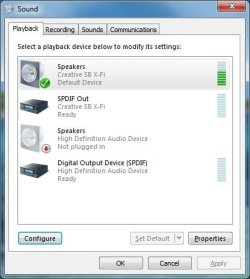
I've rebooted, reinstalled Vent but nothing is fixing it. When I have the Control Panel > Sound > Playback window open and Vent makes a sound that I can't hear through 5.1 (the PTT click for example), the green bar moves. It seems that the system is making the sound, it's just not getting out.

If anyone could let me know what's going on it'd be greatly appreciated.

Thanks in advance.
 

Attachments

  • ventsettings.jpg
    ventsettings.jpg
    49.5 KB · Views: 92
  • soundwindow.jpg
    soundwindow.jpg
    27.2 KB · Views: 10

My Computer

Computer type
PC/Desktop
OS
win7
Have you tried setting Vent to ;
Use default Device for both speakers and Mic, as well as
checking Use Direct Sound?
 

My Computer

Computer Manufacturer/Model Number
Custom (Self Build)
OS
Windows 7 Home Premium 64bit
CPU
Intel Core i7 2700k
Motherboard
eVGA P67 SLI
Memory
8GB Mushkin Redline Ridgebacks @1866
Graphics Card(s)
EVGA GTX570 SC
Sound Card
XiFi Titanium HD
Monitor(s) Displays
LG W2453V
Screen Resolution
1920x1080
Hard Drives
Intel 320 80GB -- Intel X25-V 40GB --WD Black 1TB x2 -- WD Blue 640GB
PSU
Seasonic x750
Case
Corsair 600T SE White
Cooling
eVGA Superclocked CPU Cooler
Keyboard
Saitek Cyborg
Antivirus
Kaspersky
Browser
IE
Other Info
LG BD/DVD
Just tried it. Sadly, it doesn't do anything.
 

My Computer

Computer type
PC/Desktop
OS
win7
I looked at your other thread briefly, but admittly not all of it.

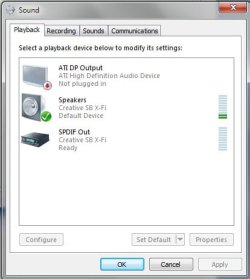
My X-Fi looks like this in the Sound properties:

The ones yours is showing (Speakers & SPDIF) as "Not plugged in" is likely the onboard sound thats still enabled.

Even though its showing as not plugged in , the drivers are still loaded. it's quite possible there could be some form of conflict with the X-Fi.


To check, go into you bios and look for on board audio and disable it.


Is Vent picking up any other Audio out options other than X-fi Speakers, Default Device?
 

Attachments

  • Untitled.jpg
    Untitled.jpg
    22 KB · Views: 5

My Computer

Computer Manufacturer/Model Number
Custom (Self Build)
OS
Windows 7 Home Premium 64bit
CPU
Intel Core i7 2700k
Motherboard
eVGA P67 SLI
Memory
8GB Mushkin Redline Ridgebacks @1866
Graphics Card(s)
EVGA GTX570 SC
Sound Card
XiFi Titanium HD
Monitor(s) Displays
LG W2453V
Screen Resolution
1920x1080
Hard Drives
Intel 320 80GB -- Intel X25-V 40GB --WD Black 1TB x2 -- WD Blue 640GB
PSU
Seasonic x750
Case
Corsair 600T SE White
Cooling
eVGA Superclocked CPU Cooler
Keyboard
Saitek Cyborg
Antivirus
Kaspersky
Browser
IE
Other Info
LG BD/DVD
Yes:

SPDIF Out (Creative SB X-Fi)
Digital Output Device (SPDIF) (
 

My Computer

Computer type
PC/Desktop
OS
win7
And after going through my BIOS, I couldn't find anything pertaining to a sound card.

Unless I'm missing it since I'm not familiar with BIOS, it's not there.

Thanks for the help so far by the way.
 

My Computer

Computer type
PC/Desktop
OS
win7
It depends on the type of bios you have, and Im not too familiar with Alienware.

But On the main Screen, it should be something like:


Onboard periphals --->> Onboard PCI Device --->> Onboard HD Audio

It could be labeled somewhat differently, or even in a diff. location.
May have to look around a bit.


Do you know what type of motherboard it is and what type of bios it has?

I think the first thing youll need to do, is find out where and how to disable onboard audio.
 

My Computer

Computer Manufacturer/Model Number
Custom (Self Build)
OS
Windows 7 Home Premium 64bit
CPU
Intel Core i7 2700k
Motherboard
eVGA P67 SLI
Memory
8GB Mushkin Redline Ridgebacks @1866
Graphics Card(s)
EVGA GTX570 SC
Sound Card
XiFi Titanium HD
Monitor(s) Displays
LG W2453V
Screen Resolution
1920x1080
Hard Drives
Intel 320 80GB -- Intel X25-V 40GB --WD Black 1TB x2 -- WD Blue 640GB
PSU
Seasonic x750
Case
Corsair 600T SE White
Cooling
eVGA Superclocked CPU Cooler
Keyboard
Saitek Cyborg
Antivirus
Kaspersky
Browser
IE
Other Info
LG BD/DVD
Yeah, the first place I looked was the peripherals section. I don't recall anything about audio, I'll go look again of course.

And here's some BIOS info I dug up:
Manufacturer: Phoenix Technologies, LTD
Name: Phoenix - AwardBIOS v6.00PG
 

My Computer

Computer type
PC/Desktop
OS
win7
Ok ,I went back and finally found the option to turn off the onboard audio and did so. It is no longer on my Control Panel > Sound > Playback window. I then proceeded to reconfigure my speakers back to 5.1 and still the same issues with Vent occur.
 

My Computer

Computer type
PC/Desktop
OS
win7
Back
Top