Solved Reinstalled twice, but Windows still won't update

sjc312

New member
Local time
2:23 PM
Messages
28
[FONT=Arial, sans-serif]Hi[/FONT]

[FONT=Arial, sans-serif]I've been having serious problems with Windows Update and initially thinking it was malware I sought help from Spybot, please see the following thread - [/FONT]

[FONT=Arial, sans-serif]https://forums.spybot.info/showthread.php?73252-Windows-won-t-update-is-it-malware[/FONT]

[FONT=Arial, sans-serif]I decided to start afresh and reinstall and have done so twice, but each time Windows just searches for updates for hours but doesn't find any. The only updates on the computer are KB976902 dated 21/11/2010 and KB2534111 dated 28/02/2016. I read somewhere that if I keep having the same problem after reinstalling then its most likely a hardware problem, but my hardware has passed all the tests by ASUS Diagnostic Utility.[/FONT]

[FONT=Arial, sans-serif]I want to keep this dual-core PC and fix it (please see my system specs) because the Mobo and Ram is new, but the CPU and hard drive is refurbished and more than 6 years old, purchased as an almost new Packard Bell computer. The hard drive has an 8GB recovery partition with Vista that I have been told cannot be removed as it would cause problems for the W7 partition. Anytime I have reinstalled Device Manager has not requested any Mobo drivers, so I guess that is the reason the recovery partition cannot be removed. [/FONT]

[FONT=Arial, sans-serif]Incidentally, my HP Mini 110 W7 Starter netbook computer is also experiencing the same problem, and searches endlessly but doesn't find any Windows updates. It was purchased brand new 5 years ago and has a recovery partition with HP bloatware. I upgraded the Ram from 1GB to 2GB, and changed the OS to basic W7 by downloading an ISO from Digital River and I followed a tutorial on this forum and things have worked well until now.[/FONT]

[FONT=Arial, sans-serif]My only Windows updating PC is a self-built W7 Core i5, with brand new parts and no recovery partition, and I was very surprised when it found updates about two weeks ago and successfully installed them. [/FONT]

[FONT=Arial, sans-serif]How do I resolve this problem on my other 2 computers?[/FONT]

[FONT=Arial, sans-serif]I have followed the Windows Update Posting Instructions and the results are -[/FONT]

[FONT=Arial, sans-serif] 1. The System Update Readiness Tool ran for hours but found and fixed nothing.[/FONT]

[FONT=Arial, sans-serif] 2. The sfcdetails are attached.[/FONT]

[FONT=Arial, sans-serif] 3. Windows Error Update codes- there aren't any. Windows Update page just shows a a red exclamation mark and [/FONT]
[FONT=Arial, sans-serif] says → Check for updates for your computer → Most recent check → Never. This is despite several hours of [/FONT]
[FONT=Arial, sans-serif] searching for updates.[/FONT]

[FONT=Arial, sans-serif] 4. The CBS.zip log file is attached. [/FONT]

[FONT=Arial, sans-serif]Thanks.[/FONT]
 

Attachments

My Computer My Computer

At a glance

Windows 7 Home Premium 32bit & 64-bit & 7 Sta...Pentium Dual Core / Intel Core i5 / Intel Ato...4 GB / 8GBNvidia GeForce 610 2GB on P5G41T-M LX
Computer type
PC/Desktop
Computer Manufacturer/Model Number
Custom Builds
OS
Windows 7 Home Premium 32bit & 64-bit & 7 Starter
CPU
Pentium Dual Core / Intel Core i5 / Intel Atom N550 Dual
Motherboard
ASUS P5G41T-M LX / ASUS B85M-G
Memory
4 GB / 8GB
Graphics Card(s)
Nvidia GeForce 610 2GB on P5G41T-M LX
Monitor(s) Displays
BenQ G2222HDL
Screen Resolution
1980 x 1080
Hard Drives
Seagate 160GB on ASUS P5G41-T
WD Caviar Black 500GB on ASUS B85M-G
PSU
Corsair CX430 (P5G41T) / Corsair CX600 (B85M-G)
Case
CIT 1015BS HD Audio / CIT Templar Black case HD Audio
Cooling
Arctic Cooling 11 GT (P5G41T) / Artic Freezer 11 LP (B85M-G)
New off the presses,
http://www.sevenforums.com/news/396236-simplifying-updates-windows-7-8-1-a.html

Yes even clean installs have been hit and miss,
Before you start download KB3020369 KB3083710 and KB3161664 KB3102810 and KB3161608 in advance, and store them on a flash drive
Start and complete the install without an internet connection
Immediately after install is complete
Manually install KB3020369 used to be KB3083710 and restart.
Manually install KB3161664 this was released I believe in May
Manually install KB3161608 used to be KB3102810 and restart.
Change your windows update settings I used Check for updates but let me decide when to download and install
Unchecked Give me recommended updates the same....

Restore the Internet connection and Activate windows
Then launch Windows Update search it shouldn't take very long 5-10 minutes for me
Only install Important updates first
Then cull through the Recommended and Optional updates for the ones you want to install.
Exclude any win-10 related updates you want too

Another thing is if you see this update make sure it is not installed with any other updates
It needs to be installed all by it's self
It was not uncheck automatically which caused many others to fail to install

This is now the first to manually install :)
https://support.microsoft.com/en-us/kb/3020369

I would also install manually net framework 4.6.14.5.2 after all the other updates have completed
https://www.microsoft.com/en-us/down....aspx?id=49982
https://www.microsoft.com/en-us/download/details.aspx?id=42642

And the most recent update client manually
https://support.microsoft.com/en-us/kb/3138612

Update,
I'd ignore the suggestion to install net framework 4.6.1 it is not good for a 32 bit system I have
I had to get rid of it and install net 4.5.2 instead,

Then turn off or change the windows update settings to Never check for updates.
Save kb3145739 to your downloads folder to install later after you restart the machine
https://technet.microsoft.com/librar...or=-2147217396

If you get an error installing kb3145739 it's because the new update settings changes did not stick.
The stand alone installer search was lightening fast and finally installed the above kb314....

After installing it restart again
Switch to Check for update but let me ..... then manually check for updates
It took about 5 minute to find the rest of the updates for April plus all of the net 4.5.2 updates
confused.png

There's no real reason this should work
I can see it as a net 4.6.1 bug on 32 bit in my case though

But the issue did not affect 2 64 bit installs with net 4.6.1 matter of fact neither had any issue finding the updates on startup or soon after without manually checking for updates
confused.png


One other note is the 32 bit system has always shown 50%++ cpu usage from our friend svchost.exe and now it's back to normal without turning off windows updates
party.gif
Latest workaround
The newest work around for May is to see if these 2 are installed
First update to manually install if it's not already is KB3145739
Main page,
https://technet.microsoft.com/library/security/MS16-039

Windows 7 sp1 32 bit download,
https://www.microsoft.com/en-us/download/details.aspx?id=51857

Windows 7 64 bit download,
https://www.microsoft.com/en-us/download/details.aspx?id=51853

Then manually download and install KB3153199
As always it helps if you switch your update settings to Never check for updates first
Then switch back after the install and manually check for updates and the rest should appear shortly.
Main page,
https://technet.microsoft.com/library/security/MS16-062

Windows 7 sp1 32 bit download
https://www.microsoft.com/en-us/download/details.aspx?id=52214

Windows 7 sp1 64 bit download
https://www.microsoft.com/en-us/download/details.aspx?id=52232
 
Last edited:

My Computer My Computer

At a glance

Win-7-Pro64bit 7-H-Prem-64biti7-5930K 2nd i9-9940x both water blocked VRM'...Trident-z 3200C14 2nd Trident-z 3600C16EVGA 1080ti ftw3 2nd Titan Xp both water blocked
Computer type
PC/Desktop
Computer Manufacturer/Model Number
Custom assembled by me :}
OS
Win-7-Pro64bit 7-H-Prem-64bit
CPU
i7-5930K 2nd i9-9940x both water blocked VRM's too
Motherboard
ASUS SABERTOOTH X99 2nd ASUS x299 Apex
Memory
Trident-z 3200C14 2nd Trident-z 3600C16
Graphics Card(s)
EVGA 1080ti ftw3 2nd Titan Xp both water blocked
Sound Card
Built-in Realtek
Monitor(s) Displays
1-AOC G2460PG 24"G-Sync 144Hz/ 2nd 1-ASUS VG248QE 24" 144Hz
Screen Resolution
1920 x 1080 144Hz
Hard Drives
2-Samsung M.2 Evo & Evo Plus
2-Samsung 850 EVO 500GB SSD's/ 3-2.5 W.D. Black 1tb-&3-1tb/3-3.5 WD Black 1tb hdd's
PSU
EVGA SuperNOVA 1000-P2 2nd 1200-P2
Case
2-Corsair Obsidian Series 450D Black ATX Mid Tower
Cooling
Custom water loops
Keyboard
Logitech G710+/ 2nd Logitech G910
Mouse
2-RedDragon M901 Perdition 16400 dpi Gaming mouse = wired
Internet Speed
Comcast Ping 19ms 89.31mbps download speed 6.12mbps upload
Antivirus
Malwarebytes Pro/ Superantispyware Pro
Browser
FireFox & Pale moon
Other Info
2nd ASUS X299 Apex/Intel i9-9940x with Custom water loop/7H-Prem-x64/Corsair 450D case/Ram Trident-z 3600C16 4x8gb / Samsung970Evo plus 500gb SSD/Dual ssd EZ swap evo/PSU EVGA SuperNova 1200w-P2 80+Platinum/GPU Titan Xp /8-ML-140 on push-pull on 2-280GTX rads
A Re install will do nothing, just let it run overnight, they should all be there in the morning, I just did a fresh install for someone and that did the trick, all subsequent updates came just fine after that.

Many people are hitting the servers :)
 

My Computer My Computer

At a glance

Windows 10 Pro x64Intel Core i7 6700KGSkill TridentZ RGB 16GB 3600 16-16-16-36EVGA GTX 980 Ti SC x2
Computer type
PC/Desktop
Computer Manufacturer/Model Number
Skylake Special #666
OS
Windows 10 Pro x64
CPU
Intel Core i7 6700K
Motherboard
Asus Sabertooth Z170 Mark 1
Memory
GSkill TridentZ RGB 16GB 3600 16-16-16-36
Graphics Card(s)
EVGA GTX 980 Ti SC x2
Sound Card
Realtek High Definition
Monitor(s) Displays
AOC G2460PG
Screen Resolution
1920 x 1080 144Hz
Hard Drives
Samsung 860 Pro 256GB, Seagate Barracuda 4TB x2
PSU
EVGA 1000 P2, EVGA White Custom Braided Cables
Case
Corsair Vengeance C70 Gunmetal Black
Cooling
Corsair H100i v2, Corsair ML120 x2, Thermal Grizzly Kryonaut
Keyboard
Logitech G910 Orion Spectrum
Mouse
Logitech G700s
Internet Speed
Verizon Fios Quantum Gateway 75/75
Antivirus
Windows Defender, Malwarebytes Free 3.8.3
Browser
Chrome
Other Info
Corsair SP120 x4, LG Blu-ray Drive, Durabrand HT-395 100 Watt Dolby Digital Amp, Corsair H2100 Wireless 7.1 Headset
A Re install will do nothing, just let it run overnight, they should all be there in the morning, I just did a fresh install for someone and that did the trick, all subsequent updates came just fine after that.

Many people are hitting the servers :)


The best answer.

It can take as many as 24 hours of continuous running to get the updates to be found and downloaded.

My advice is to reboot the computer, click update and set the PC to NEVER SLEEP or TURN OFF.
Let it run and most folks will receive those updates.
 

My Computer My Computer

At a glance

win 7 home premium 64 bitcore i5 7606 gbati 5450
Computer Manufacturer/Model Number
hp pavilion 6680t
OS
win 7 home premium 64 bit
CPU
core i5 760
Motherboard
iona (from MSI)
Memory
6 gb
Graphics Card(s)
ati 5450
Sound Card
real tek 888
Exactly, Rome wasn`t built in a day, but it sure fell fast ;)

picture.php
 

My Computer My Computer

At a glance

Windows 10 Pro x64Intel Core i7 6700KGSkill TridentZ RGB 16GB 3600 16-16-16-36EVGA GTX 980 Ti SC x2
Computer type
PC/Desktop
Computer Manufacturer/Model Number
Skylake Special #666
OS
Windows 10 Pro x64
CPU
Intel Core i7 6700K
Motherboard
Asus Sabertooth Z170 Mark 1
Memory
GSkill TridentZ RGB 16GB 3600 16-16-16-36
Graphics Card(s)
EVGA GTX 980 Ti SC x2
Sound Card
Realtek High Definition
Monitor(s) Displays
AOC G2460PG
Screen Resolution
1920 x 1080 144Hz
Hard Drives
Samsung 860 Pro 256GB, Seagate Barracuda 4TB x2
PSU
EVGA 1000 P2, EVGA White Custom Braided Cables
Case
Corsair Vengeance C70 Gunmetal Black
Cooling
Corsair H100i v2, Corsair ML120 x2, Thermal Grizzly Kryonaut
Keyboard
Logitech G910 Orion Spectrum
Mouse
Logitech G700s
Internet Speed
Verizon Fios Quantum Gateway 75/75
Antivirus
Windows Defender, Malwarebytes Free 3.8.3
Browser
Chrome
Other Info
Corsair SP120 x4, LG Blu-ray Drive, Durabrand HT-395 100 Watt Dolby Digital Amp, Corsair H2100 Wireless 7.1 Headset
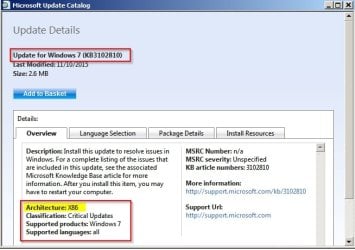
Thanks for the advice, guys. I've been at my wits end with this one. I'll start afresh and keep you posted. BTW, ThrashZone, KB3102810 is 64-bit, although I'm guessing its okay to install on my 32-bit dual core? Please advise. I appreciate all the help.:D
 

My Computer My Computer

At a glance

Windows 7 Home Premium 32bit & 64-bit & 7 Sta...Pentium Dual Core / Intel Core i5 / Intel Ato...4 GB / 8GBNvidia GeForce 610 2GB on P5G41T-M LX
Computer type
PC/Desktop
Computer Manufacturer/Model Number
Custom Builds
OS
Windows 7 Home Premium 32bit & 64-bit & 7 Starter
CPU
Pentium Dual Core / Intel Core i5 / Intel Atom N550 Dual
Motherboard
ASUS P5G41T-M LX / ASUS B85M-G
Memory
4 GB / 8GB
Graphics Card(s)
Nvidia GeForce 610 2GB on P5G41T-M LX
Monitor(s) Displays
BenQ G2222HDL
Screen Resolution
1980 x 1080
Hard Drives
Seagate 160GB on ASUS P5G41-T
WD Caviar Black 500GB on ASUS B85M-G
PSU
Corsair CX430 (P5G41T) / Corsair CX600 (B85M-G)
Case
CIT 1015BS HD Audio / CIT Templar Black case HD Audio
Cooling
Arctic Cooling 11 GT (P5G41T) / Artic Freezer 11 LP (B85M-G)
Thanks for the advice, guys. I've been at my wits end with this one. I'll start afresh and keep you posted. BTW, ThrashZone, KB3102810 is 64-bit, although I'm guessing its okay to install on my 32-bit dual core? Please advise. I appreciate all the help.:D

KB3102810 - There is an update for 32bit systems (x86)

Use IE and search for KB3102810 here:

Microsoft Update Catalog

Microsoft Update Catalog - SlimBrowser.jpg

Microsoft Update Catalog - SlimBrowser 2.jpg
 

My Computer My Computer

At a glance

Microsoft Windows 7 Home Premium 64-bit 7601 ...AMD C-60 APU with Radeon(tm) HD Graphics4.00 GBAMD Radeon HD 6290 Graphics
Computer type
Laptop
Computer Manufacturer/Model Number
ASUS
OS
Microsoft Windows 7 Home Premium 64-bit 7601 Multiprocessor Free Service Pack 1
CPU
AMD C-60 APU with Radeon(tm) HD Graphics
Motherboard
ASUSTeK COMPUTER INC. X501U
Memory
4.00 GB
Graphics Card(s)
AMD Radeon HD 6290 Graphics
Sound Card
(1) AMD High Definition Audio Device (2) Realtek High Defi
Screen Resolution
1366 x 768 x 32 bits (4294967296 colors) @ 60 Hz
Hard Drives
Hitachi HTS545050A7E380 SATA Disk Device
Antivirus
Comodo CIS & FW, SecureAplus App Whitelisting, Threatfire
Browser
Cyberfox 64bit, Opera 64bit, Airfox
Other Info
Spy-The-Spy, HitmanPro.Alert, Norton Connect Safe, MJRegWatcher, BitDefender TrafficLight, Voodoo Shield, Zemana AntiMalware

My Computer My Computer

At a glance

Win-7-Pro64bit 7-H-Prem-64biti7-5930K 2nd i9-9940x both water blocked VRM'...Trident-z 3200C14 2nd Trident-z 3600C16EVGA 1080ti ftw3 2nd Titan Xp both water blocked
Computer type
PC/Desktop
Computer Manufacturer/Model Number
Custom assembled by me :}
OS
Win-7-Pro64bit 7-H-Prem-64bit
CPU
i7-5930K 2nd i9-9940x both water blocked VRM's too
Motherboard
ASUS SABERTOOTH X99 2nd ASUS x299 Apex
Memory
Trident-z 3200C14 2nd Trident-z 3600C16
Graphics Card(s)
EVGA 1080ti ftw3 2nd Titan Xp both water blocked
Sound Card
Built-in Realtek
Monitor(s) Displays
1-AOC G2460PG 24"G-Sync 144Hz/ 2nd 1-ASUS VG248QE 24" 144Hz
Screen Resolution
1920 x 1080 144Hz
Hard Drives
2-Samsung M.2 Evo & Evo Plus
2-Samsung 850 EVO 500GB SSD's/ 3-2.5 W.D. Black 1tb-&3-1tb/3-3.5 WD Black 1tb hdd's
PSU
EVGA SuperNOVA 1000-P2 2nd 1200-P2
Case
2-Corsair Obsidian Series 450D Black ATX Mid Tower
Cooling
Custom water loops
Keyboard
Logitech G710+/ 2nd Logitech G910
Mouse
2-RedDragon M901 Perdition 16400 dpi Gaming mouse = wired
Internet Speed
Comcast Ping 19ms 89.31mbps download speed 6.12mbps upload
Antivirus
Malwarebytes Pro/ Superantispyware Pro
Browser
FireFox & Pale moon
Other Info
2nd ASUS X299 Apex/Intel i9-9940x with Custom water loop/7H-Prem-x64/Corsair 450D case/Ram Trident-z 3600C16 4x8gb / Samsung970Evo plus 500gb SSD/Dual ssd EZ swap evo/PSU EVGA SuperNova 1200w-P2 80+Platinum/GPU Titan Xp /8-ML-140 on push-pull on 2-280GTX rads
Yes even clean installs have been hit and miss,
Before you start download KB3083710 and KB3102810 in advance, and store them on a flash drive
Start and complete the install without an internet connection
Immediately after install is complete
Manually install KB3083710 and restart.
Manually install KB3102810 and restart.
Change your windows update settings I used Check for updates but let me decide when to download and install
Unchecked Give me recommended updates the same....

Restore the Internet connection and Activate windows
Then launch Windows Update search it shouldn't take very long 5-10 minutes for me
Only install Important updates first
Then cull through the Recommended and Optional updates for the ones you want to install.

i've followed your instructions
it won't go if you have slow cpu/low mem like on nettop, netbook, and so on because,
these updates will take a plenty of wasted hours watching "searching for updates" procedure:
-KB2973201
-KB2993651
-KB3078601
-KB3087039
-KB3109094
-KB3145739
so remove them if you have already installed or hide them if you haven't installed yet.
you won't need to install KB3083710
also you won't need to install KB3102810
all you have to do after clean install is disable automatic updates, and install latest windows update client which is currently KB3138612.
i have no troubles installing KB020369 with other updates or separately - this does not matter.

if you have powerfull CPU like core i5 you can install all the important updates, but the update searching process nevertheless will take more time than usual.
 

My Computer My Computer

At a glance

Windows 8.1 With Update 3
Computer type
PC/Desktop
OS
Windows 8.1 With Update 3
KB3020369 it is listed as a Known issue of causing other updates to fail
Solution is to install it by it's self.

The 2 other updates cut the search time to 5-10 minutes instead of 1....hours.

The other 6 updates I don't know I have not looked them up to see what they are related to or classified as.
 

My Computer My Computer

At a glance

Win-7-Pro64bit 7-H-Prem-64biti7-5930K 2nd i9-9940x both water blocked VRM'...Trident-z 3200C14 2nd Trident-z 3600C16EVGA 1080ti ftw3 2nd Titan Xp both water blocked
Computer type
PC/Desktop
Computer Manufacturer/Model Number
Custom assembled by me :}
OS
Win-7-Pro64bit 7-H-Prem-64bit
CPU
i7-5930K 2nd i9-9940x both water blocked VRM's too
Motherboard
ASUS SABERTOOTH X99 2nd ASUS x299 Apex
Memory
Trident-z 3200C14 2nd Trident-z 3600C16
Graphics Card(s)
EVGA 1080ti ftw3 2nd Titan Xp both water blocked
Sound Card
Built-in Realtek
Monitor(s) Displays
1-AOC G2460PG 24"G-Sync 144Hz/ 2nd 1-ASUS VG248QE 24" 144Hz
Screen Resolution
1920 x 1080 144Hz
Hard Drives
2-Samsung M.2 Evo & Evo Plus
2-Samsung 850 EVO 500GB SSD's/ 3-2.5 W.D. Black 1tb-&3-1tb/3-3.5 WD Black 1tb hdd's
PSU
EVGA SuperNOVA 1000-P2 2nd 1200-P2
Case
2-Corsair Obsidian Series 450D Black ATX Mid Tower
Cooling
Custom water loops
Keyboard
Logitech G710+/ 2nd Logitech G910
Mouse
2-RedDragon M901 Perdition 16400 dpi Gaming mouse = wired
Internet Speed
Comcast Ping 19ms 89.31mbps download speed 6.12mbps upload
Antivirus
Malwarebytes Pro/ Superantispyware Pro
Browser
FireFox & Pale moon
Other Info
2nd ASUS X299 Apex/Intel i9-9940x with Custom water loop/7H-Prem-x64/Corsair 450D case/Ram Trident-z 3600C16 4x8gb / Samsung970Evo plus 500gb SSD/Dual ssd EZ swap evo/PSU EVGA SuperNova 1200w-P2 80+Platinum/GPU Titan Xp /8-ML-140 on push-pull on 2-280GTX rads
I have not found any articles where it said that installing KB3020369 with other updates will cause to fail or an error.
If it really causes such problems, it will be automatically unchecked.
In mine case (fresh installation) it is checked along with other important updates.

KB3138612 is the latest client update, it replaces all previous client's update. It includes all patches and fixes that were listed in previous updates (KB3083710 and KB3102810). I don't really think that installing old KBs while we have more recent KB is an important opertation.
 

My Computer My Computer

At a glance

Windows 8.1 With Update 3
Computer type
PC/Desktop
OS
Windows 8.1 With Update 3
Ask me if I care :)
 

My Computer My Computer

At a glance

Win-7-Pro64bit 7-H-Prem-64biti7-5930K 2nd i9-9940x both water blocked VRM'...Trident-z 3200C14 2nd Trident-z 3600C16EVGA 1080ti ftw3 2nd Titan Xp both water blocked
Computer type
PC/Desktop
Computer Manufacturer/Model Number
Custom assembled by me :}
OS
Win-7-Pro64bit 7-H-Prem-64bit
CPU
i7-5930K 2nd i9-9940x both water blocked VRM's too
Motherboard
ASUS SABERTOOTH X99 2nd ASUS x299 Apex
Memory
Trident-z 3200C14 2nd Trident-z 3600C16
Graphics Card(s)
EVGA 1080ti ftw3 2nd Titan Xp both water blocked
Sound Card
Built-in Realtek
Monitor(s) Displays
1-AOC G2460PG 24"G-Sync 144Hz/ 2nd 1-ASUS VG248QE 24" 144Hz
Screen Resolution
1920 x 1080 144Hz
Hard Drives
2-Samsung M.2 Evo & Evo Plus
2-Samsung 850 EVO 500GB SSD's/ 3-2.5 W.D. Black 1tb-&3-1tb/3-3.5 WD Black 1tb hdd's
PSU
EVGA SuperNOVA 1000-P2 2nd 1200-P2
Case
2-Corsair Obsidian Series 450D Black ATX Mid Tower
Cooling
Custom water loops
Keyboard
Logitech G710+/ 2nd Logitech G910
Mouse
2-RedDragon M901 Perdition 16400 dpi Gaming mouse = wired
Internet Speed
Comcast Ping 19ms 89.31mbps download speed 6.12mbps upload
Antivirus
Malwarebytes Pro/ Superantispyware Pro
Browser
FireFox & Pale moon
Other Info
2nd ASUS X299 Apex/Intel i9-9940x with Custom water loop/7H-Prem-x64/Corsair 450D case/Ram Trident-z 3600C16 4x8gb / Samsung970Evo plus 500gb SSD/Dual ssd EZ swap evo/PSU EVGA SuperNova 1200w-P2 80+Platinum/GPU Titan Xp /8-ML-140 on push-pull on 2-280GTX rads
Thrash #2 Post

:D I read your #2 post. I am wondering if Win7 is worth that.
 

My Computer My Computer

At a glance

win 7 X64 Ultimate SP1I3770KG Skill F3-14900CL9-4GBXL x 4NVIDIA GeForce GTX670 + Intel 4000
Computer Manufacturer/Model Number
BGC (Bob's Garage Crew)
OS
win 7 X64 Ultimate SP1
CPU
I3770K
Motherboard
Asus P8Z77-V Deluxe
Memory
G Skill F3-14900CL9-4GBXL x 4
Graphics Card(s)
NVIDIA GeForce GTX670 + Intel 4000
Sound Card
Realtek HD 5.1 (MOB)
Monitor(s) Displays
Asus VW224T (1)
Screen Resolution
1920 x 1080
Hard Drives
SATA Corsair Force GT 2.5" 180GB (System) Sata 3
OCZ Vertex3 120GB
OCZ Vertex 2 120GB 2.5" SATA II
ST31000524AS 1000.2GB
WD15EARS (External)
PSU
CoolerMaster 1000 Watt
Case
CoolerMaster HAF X
Cooling
CPU -- CoolerMaster 520N
Keyboard
MS Wireless 3000 V2
Mouse
MS Wireless 3000 V2
Internet Speed
Cable
Antivirus
Norton Internet Security
Browser
IE9
Other Info
AMI Bios 1805
OC'd 3%
Hi Hammer
I like win-7 so if others feel the same I'd say absolutely ;)

Some people might let the system work it's way out overnight or however long it takes = Not I :)
It's bad enough waiting to download and install
Endless searching is just insult to injury.
 

My Computer My Computer

At a glance

Win-7-Pro64bit 7-H-Prem-64biti7-5930K 2nd i9-9940x both water blocked VRM'...Trident-z 3200C14 2nd Trident-z 3600C16EVGA 1080ti ftw3 2nd Titan Xp both water blocked
Computer type
PC/Desktop
Computer Manufacturer/Model Number
Custom assembled by me :}
OS
Win-7-Pro64bit 7-H-Prem-64bit
CPU
i7-5930K 2nd i9-9940x both water blocked VRM's too
Motherboard
ASUS SABERTOOTH X99 2nd ASUS x299 Apex
Memory
Trident-z 3200C14 2nd Trident-z 3600C16
Graphics Card(s)
EVGA 1080ti ftw3 2nd Titan Xp both water blocked
Sound Card
Built-in Realtek
Monitor(s) Displays
1-AOC G2460PG 24"G-Sync 144Hz/ 2nd 1-ASUS VG248QE 24" 144Hz
Screen Resolution
1920 x 1080 144Hz
Hard Drives
2-Samsung M.2 Evo & Evo Plus
2-Samsung 850 EVO 500GB SSD's/ 3-2.5 W.D. Black 1tb-&3-1tb/3-3.5 WD Black 1tb hdd's
PSU
EVGA SuperNOVA 1000-P2 2nd 1200-P2
Case
2-Corsair Obsidian Series 450D Black ATX Mid Tower
Cooling
Custom water loops
Keyboard
Logitech G710+/ 2nd Logitech G910
Mouse
2-RedDragon M901 Perdition 16400 dpi Gaming mouse = wired
Internet Speed
Comcast Ping 19ms 89.31mbps download speed 6.12mbps upload
Antivirus
Malwarebytes Pro/ Superantispyware Pro
Browser
FireFox & Pale moon
Other Info
2nd ASUS X299 Apex/Intel i9-9940x with Custom water loop/7H-Prem-x64/Corsair 450D case/Ram Trident-z 3600C16 4x8gb / Samsung970Evo plus 500gb SSD/Dual ssd EZ swap evo/PSU EVGA SuperNova 1200w-P2 80+Platinum/GPU Titan Xp /8-ML-140 on push-pull on 2-280GTX rads
Solved.....almost

[FONT=Verdana, sans-serif]Hi guys[/FONT]

[FONT=Verdana, sans-serif]Thanks for all the technical advice and help. I apologise for the long delay in response, as I planned to replace my Dual-Core PC hard drive, but relented after I found out that it only had 7000hrs of use.[/FONT]

[FONT=Verdana, sans-serif]Immediately after reinstalling the OS, I followed ThrashZone's advice to the letter, installing the Update Agents first and then leaving the PC on overnight to search for updates, which it found just after 5am in the morning. I also unchecked KB3020369 and then installed it by itself, as advised to do so, so all went well. Surprisingly, after installing Net Framework 4.5.2, the 4.6.1 version vanished from the list of available updates, and this was a big relief as I had feared it would corrupt my 32bit Dual-Core.[/FONT]

[FONT=Verdana, sans-serif]Although I did not need to reinstall the OS on my ASUS netbook, just like the Dual-Core pc, it updated at about 5.30am after I left it on all night. However, it is still showing Net Framework 4.6.1 as an optional available update. Do I really need this Net Framework 4.6.1 update? If not, I can proceed and mark this topic as solved. [/FONT]

[FONT=Verdana, sans-serif]Many, many thanks again... [/FONT]
 

My Computer My Computer

At a glance

Windows 7 Home Premium 32bit & 64-bit & 7 Sta...Pentium Dual Core / Intel Core i5 / Intel Ato...4 GB / 8GBNvidia GeForce 610 2GB on P5G41T-M LX
Computer type
PC/Desktop
Computer Manufacturer/Model Number
Custom Builds
OS
Windows 7 Home Premium 32bit & 64-bit & 7 Starter
CPU
Pentium Dual Core / Intel Core i5 / Intel Atom N550 Dual
Motherboard
ASUS P5G41T-M LX / ASUS B85M-G
Memory
4 GB / 8GB
Graphics Card(s)
Nvidia GeForce 610 2GB on P5G41T-M LX
Monitor(s) Displays
BenQ G2222HDL
Screen Resolution
1980 x 1080
Hard Drives
Seagate 160GB on ASUS P5G41-T
WD Caviar Black 500GB on ASUS B85M-G
PSU
Corsair CX430 (P5G41T) / Corsair CX600 (B85M-G)
Case
CIT 1015BS HD Audio / CIT Templar Black case HD Audio
Cooling
Arctic Cooling 11 GT (P5G41T) / Artic Freezer 11 LP (B85M-G)

My Computer My Computer

At a glance

Win-7-Pro64bit 7-H-Prem-64biti7-5930K 2nd i9-9940x both water blocked VRM'...Trident-z 3200C14 2nd Trident-z 3600C16EVGA 1080ti ftw3 2nd Titan Xp both water blocked
Computer type
PC/Desktop
Computer Manufacturer/Model Number
Custom assembled by me :}
OS
Win-7-Pro64bit 7-H-Prem-64bit
CPU
i7-5930K 2nd i9-9940x both water blocked VRM's too
Motherboard
ASUS SABERTOOTH X99 2nd ASUS x299 Apex
Memory
Trident-z 3200C14 2nd Trident-z 3600C16
Graphics Card(s)
EVGA 1080ti ftw3 2nd Titan Xp both water blocked
Sound Card
Built-in Realtek
Monitor(s) Displays
1-AOC G2460PG 24"G-Sync 144Hz/ 2nd 1-ASUS VG248QE 24" 144Hz
Screen Resolution
1920 x 1080 144Hz
Hard Drives
2-Samsung M.2 Evo & Evo Plus
2-Samsung 850 EVO 500GB SSD's/ 3-2.5 W.D. Black 1tb-&3-1tb/3-3.5 WD Black 1tb hdd's
PSU
EVGA SuperNOVA 1000-P2 2nd 1200-P2
Case
2-Corsair Obsidian Series 450D Black ATX Mid Tower
Cooling
Custom water loops
Keyboard
Logitech G710+/ 2nd Logitech G910
Mouse
2-RedDragon M901 Perdition 16400 dpi Gaming mouse = wired
Internet Speed
Comcast Ping 19ms 89.31mbps download speed 6.12mbps upload
Antivirus
Malwarebytes Pro/ Superantispyware Pro
Browser
FireFox & Pale moon
Other Info
2nd ASUS X299 Apex/Intel i9-9940x with Custom water loop/7H-Prem-x64/Corsair 450D case/Ram Trident-z 3600C16 4x8gb / Samsung970Evo plus 500gb SSD/Dual ssd EZ swap evo/PSU EVGA SuperNova 1200w-P2 80+Platinum/GPU Titan Xp /8-ML-140 on push-pull on 2-280GTX rads
Solved.

Thanks ThrashZone, this topic is now solved.
 

My Computer My Computer

At a glance

Windows 7 Home Premium 32bit & 64-bit & 7 Sta...Pentium Dual Core / Intel Core i5 / Intel Ato...4 GB / 8GBNvidia GeForce 610 2GB on P5G41T-M LX
Computer type
PC/Desktop
Computer Manufacturer/Model Number
Custom Builds
OS
Windows 7 Home Premium 32bit & 64-bit & 7 Starter
CPU
Pentium Dual Core / Intel Core i5 / Intel Atom N550 Dual
Motherboard
ASUS P5G41T-M LX / ASUS B85M-G
Memory
4 GB / 8GB
Graphics Card(s)
Nvidia GeForce 610 2GB on P5G41T-M LX
Monitor(s) Displays
BenQ G2222HDL
Screen Resolution
1980 x 1080
Hard Drives
Seagate 160GB on ASUS P5G41-T
WD Caviar Black 500GB on ASUS B85M-G
PSU
Corsair CX430 (P5G41T) / Corsair CX600 (B85M-G)
Case
CIT 1015BS HD Audio / CIT Templar Black case HD Audio
Cooling
Arctic Cooling 11 GT (P5G41T) / Artic Freezer 11 LP (B85M-G)
Solved on four laptops

I had very same problem on FOUR Windows 7 laptops (3 Dells, 1 Sony Vaio) that had been sitting idle for a period of two to nine months. Endless attempts to update with no success, alarmingly high rate of CPU usage, reinstallation of OS trying to correct problem. I kept reading of all the people having this problem and all of the very complicated fixes they were attempting. I was trying to decide which fixes I should attempt, when I came across the advice to just set the power settings to never turn off and leave the computer updating for days if necessary. Worked like a charm. All four of them updated and installed updates after a day or so.

Huh!
 

My Computer My Computer

At a glance

Windows 7 Professional 64 bit
Computer type
Laptop
Computer Manufacturer/Model Number
dell
OS
Windows 7 Professional 64 bit
As you have noticed Jujuju2 many of us have been trying to find the magic method to solve this problem.

As you, my method is just waiting and let it complete. Hopefully when this Free W-10 B/S is over, Windows 7 will update properly again.
 

My Computer My Computer

At a glance

Windows 10 Pro. 64/ version 1709 Windows 7 Pr...Intel i7-6800K @ 4.3Corsair Platinum 16 gig @2400EVGA GTX 1070 OC
Computer type
PC/Desktop
Computer Manufacturer/Model Number
Home made Desktop
OS
Windows 10 Pro. 64/ version 1709 Windows 7 Pro/64
CPU
Intel i7-6800K @ 4.3
Motherboard
ASUS X-99 Deluxe II
Memory
Corsair Platinum 16 gig @2400
Graphics Card(s)
EVGA GTX 1070 OC
Monitor(s) Displays
Asus 27" LED LCD/VE278Q
Screen Resolution
1920-1080 or 1280-720 HDMI
Hard Drives
INTEL SSD 730-240 Gb Sata 3.0/
PSU
EVGA Platium 1200W
Case
Phanteks Luxe Tempered Glass 8 fans/ one radiator
Cooling
XSPC/ Water Cooled CPU
Keyboard
Das 4 Professional
Mouse
Logitech M705/MX Anywhere 2-S
Internet Speed
100 mbits
Antivirus
Microsoft Security Essentials/ Malwarebytes Premium 3.0/ SAS
Browser
I.E. 11 default/Firefox/ ISP Time Warner Cable/Spectrum
Other Info
LG BluRay Burner/
Sound system-KLipsch-THX/
Icy Dock ssd Hot Swap bays.
Thank you very much after 2 days of getting nowhere found this topic.

Reinstall my partners laptop update did nothing for hours after reinstall again with your solution worked within 10 minutes.

Registered just to thank you.

Dennis
 

My Computer My Computer

At a glance

Windows 7 x 64bit
Computer type
PC/Desktop
OS
Windows 7 x 64bit
Back
Top