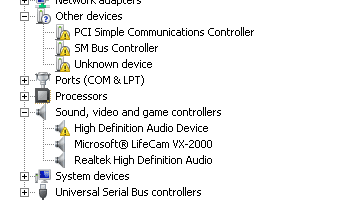
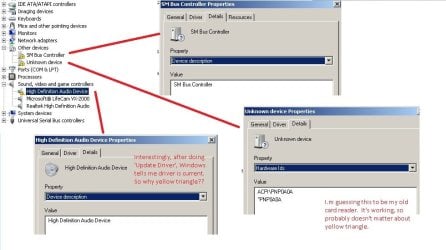
Hi. I built my PC a few months ago, all was working fine but, for reasons I won't bore you with, I had to reinstall Win7. The PC case has 2 USB3 slots (the blue ones) on the front but when I insert my USB3 memory stick, nothing happens. Yet the old card reader which I took off my old PC case (USB2) reads the USB3 stick fine. I thought there may be some BIOS option to activate USB3 but I don't see anything like that.
Can anyone suggest what the problem/cure is? Many thanks if you can.
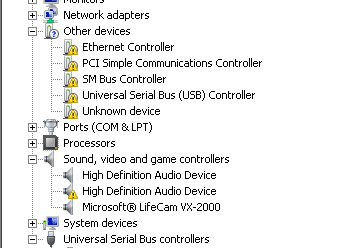
Also, how do I sort out all these warning triangles? I've right-clicked 'update drivers' but none were found by Windows. (The unknown device is probably that old card reader.) Thanks again.
Can anyone suggest what the problem/cure is? Many thanks if you can.
Also, how do I sort out all these warning triangles? I've right-clicked 'update drivers' but none were found by Windows. (The unknown device is probably that old card reader.) Thanks again.
Attachments
My Computer
At a glance
Microsoft Windows 7 Ultimate 64-bit 7601 Mult...Intel(R) Core(TM) i3-4150 CPU @ 3.50GHz8.00 GBIntel(R) HD Graphics 4400
- Computer type
- PC/Desktop
- Computer Manufacturer/Model Number
- self build
- OS
- Microsoft Windows 7 Ultimate 64-bit 7601 Multiprocessor Free Service Pack 1
- CPU
- Intel(R) Core(TM) i3-4150 CPU @ 3.50GHz
- Motherboard
- ASUSTeK COMPUTER INC. H97M-PLUS
- Memory
- 8.00 GB
- Graphics Card(s)
- Intel(R) HD Graphics 4400
- Sound Card
- (1) High Definition Audio Device (2) USB Audio Device
- Screen Resolution
- 1024 x 768 x 32 bits (4294967296 colors) @ 75 Hz
- Hard Drives
- (1) SAMSUNG HD103SI ATA Device (2) Samsung SSD 840 EVO 120GB ATA Device (3) ST31000528AS ATA Device (4) GENERIC USB Storage-CFC USB Device (5) GENERIC USB Storage-MSC USB Device (6) GENERIC USB Storage-SDC USB Device (7) GENERIC USB Stora
- PSU
- Corsair CXM 430W Modular 80 PLUS Bronze
- Antivirus
- Panda Free
- Browser
- Firefox+NoScript, AdBlockPlus, Disconnect