reinstalled windows 7 and have three partitions, which do i need.

fireman0175

New member
Local time
12:40 AM
Messages
10
Reionstalled Windows 7 ultimate on my Dell Studio XPS 1640. I "clean all" the hard drive. I followed the great tutorial and have a windows 7 (c) drive, a System Reserved (E) and renamed the remaining 132 GB "main (T)".

So, my concern is, and I assume that the C drive is for the OS and everything will go onto the E drive? Do I extend the E drive into the T drive partition? The E drive seems to be growing. Should I hide or block somehow the C drive so it is only for the OS?

THanks,
 

My Computer My Computer

At a glance

windows 7 ultimate x64
OS
windows 7 ultimate x64
Please post the following system information using the prefered method:
http://www.sevenforums.com/tutorials/9733-screenshots-files-upload-post-seven-forums.html

  • Disk Manangment
Thanks


How to post a Disk Management screen shot:
Right Click on Computer and select Manage
Click Disk Management
Maximize the window
Close the left & right panes (click the icons on either side of the help icon).
Resize the top and bottom panes to provide as much information as possible.
The top pane, showing size, freespace, and drive flags (active, boot, system,primary,logical...)
The bottom pane showing disks and partiononing.
:tip: Drag the horizontal pane bar up or down.
:tip: If you have many disks you might have to post more than one screen shot, one of just the top pane and one of just the bottom pane.

picture.php
 

My Computer My Computer

At a glance

x64 (6.3.9600) Win8.1 Pro & soon dual boot x6...AMD A6-3420M APU with Radeon(tm) HD Graphics6.00 GBAMD Radeon(TM) HD 6520G
Computer type
Laptop
Computer Manufacturer/Model Number
HP Pavilion dv6-6c10us
OS
x64 (6.3.9600) Win8.1 Pro & soon dual boot x64 (6.1.7601) Win7_SP1 HomePrem
CPU
AMD A6-3420M APU with Radeon(tm) HD Graphics
Motherboard
Hewlett-Packard 1805
Memory
6.00 GB
Graphics Card(s)
AMD Radeon(TM) HD 6520G
Sound Card
(1) AMD High Definition Audio Device (2) IDT High Definiti
Monitor(s) Displays
HP W2072a 20" LCD (1600 x 900) @ 60 Hz
Screen Resolution
1366 x 768 x 32 bits (4294967296 colors) @ 60 Hz
Hard Drives
ST640LM0 00 HM641JI SATA Disk Device
Keyboard
Logitech k520 wireless KB
Mouse
Logitech m320 wireless mouse (bundled with KB)
Internet Speed
15/5 | 54 MB Wireless 'n'
Antivirus
Realtime: Defender or Avast | On-demand: Malwarebytes, ESET
Browser
IE 11 on Win8, IE 10 on win 7
Other Info
Media: [Gimp, Audacity, VLC] || Comm: [WEmail 2012, Skype] || Productivity: [OpenOffice,| Textpad] || Utils: [Sysinternals, cCleaner, Speccy, Defraggler]
The System Reserved partition and a hidden partition shouldn't have a letter. It stores boot files . So you should be installing Windows to the C drive.

Your Partitions should look something like this

   Information

Disk 0 Partition 1 OEM (System Reserved)
Disk 0 Partition 2: RECOVERY (D: )
Disk 0 Partition 3: OS (C: )
 
Last edited:

My Computer My Computer

At a glance

Windows 7 Ultimate 32-Bit & Windows 7 Ultimat...Intel Core i7 CPU 950 @ 3.07GHzOCZ 6GB (3 x 2GB) 240-Pin DDR3 SDRAM DDR3 160...ATI Radeon HD 5700 Series
Computer Manufacturer/Model Number
Custom Built
OS
Windows 7 Ultimate 32-Bit & Windows 7 Ultimate 64-Bit
CPU
Intel Core i7 CPU 950 @ 3.07GHz
Motherboard
ASUS P6T DELUXE V2
Memory
OCZ 6GB (3 x 2GB) 240-Pin DDR3 SDRAM DDR3 1600 OCZ3X1600R2
Graphics Card(s)
ATI Radeon HD 5700 Series
Sound Card
OnBoard
Hard Drives
WD6400AACS-00M3B0 (640GB SATA )
PSU
CORSAIR 850w
Case
NZXT LEXA
Cooling
Intel Stock Heatsink Fan
Keyboard
Microsoft Wireless Laser Keyboard 7000
Mouse
Microsoft Wireless Laser Mouse 7000
xps 1640.PNG

I hope this works! :)
 

My Computer My Computer

At a glance

windows 7 ultimate x64
OS
windows 7 ultimate x64
Vista King,
That is what I would assume. However, it didn't come out that way after the clean and install. How do I get things corrected now? I have installed all my Dell drivers and 99 Window updates...
 

My Computer My Computer

At a glance

windows 7 ultimate x64
OS
windows 7 ultimate x64
@fireman0175: What tutorial did you follow? Please post a link.

Did you reinstall from a OEM recovery disc? Or did you install a fresh Win7 using the ISO (USB or Optical disc)?

Vistaking is correct, the System Reserve partition is not normally assigned a drive letter. And Windows should be installed to C:\

A little background information would also help. Why did you reinstall?
What do you mean E:\ is growing? Space is being used? This is not normal.

Do NOT extend the System Reserve drive.

The disk management screen shot will help.
 

My Computer My Computer

At a glance

x64 (6.3.9600) Win8.1 Pro & soon dual boot x6...AMD A6-3420M APU with Radeon(tm) HD Graphics6.00 GBAMD Radeon(TM) HD 6520G
Computer type
Laptop
Computer Manufacturer/Model Number
HP Pavilion dv6-6c10us
OS
x64 (6.3.9600) Win8.1 Pro & soon dual boot x64 (6.1.7601) Win7_SP1 HomePrem
CPU
AMD A6-3420M APU with Radeon(tm) HD Graphics
Motherboard
Hewlett-Packard 1805
Memory
6.00 GB
Graphics Card(s)
AMD Radeon(TM) HD 6520G
Sound Card
(1) AMD High Definition Audio Device (2) IDT High Definiti
Monitor(s) Displays
HP W2072a 20" LCD (1600 x 900) @ 60 Hz
Screen Resolution
1366 x 768 x 32 bits (4294967296 colors) @ 60 Hz
Hard Drives
ST640LM0 00 HM641JI SATA Disk Device
Keyboard
Logitech k520 wireless KB
Mouse
Logitech m320 wireless mouse (bundled with KB)
Internet Speed
15/5 | 54 MB Wireless 'n'
Antivirus
Realtime: Defender or Avast | On-demand: Malwarebytes, ESET
Browser
IE 11 on Win8, IE 10 on win 7
Other Info
Media: [Gimp, Audacity, VLC] || Comm: [WEmail 2012, Skype] || Productivity: [OpenOffice,| Textpad] || Utils: [Sysinternals, cCleaner, Speccy, Defraggler]

My Computer My Computer

At a glance

Windows 7 Ultimate 32-Bit & Windows 7 Ultimat...Intel Core i7 CPU 950 @ 3.07GHzOCZ 6GB (3 x 2GB) 240-Pin DDR3 SDRAM DDR3 160...ATI Radeon HD 5700 Series
Computer Manufacturer/Model Number
Custom Built
OS
Windows 7 Ultimate 32-Bit & Windows 7 Ultimate 64-Bit
CPU
Intel Core i7 CPU 950 @ 3.07GHz
Motherboard
ASUS P6T DELUXE V2
Memory
OCZ 6GB (3 x 2GB) 240-Pin DDR3 SDRAM DDR3 1600 OCZ3X1600R2
Graphics Card(s)
ATI Radeon HD 5700 Series
Sound Card
OnBoard
Hard Drives
WD6400AACS-00M3B0 (640GB SATA )
PSU
CORSAIR 850w
Case
NZXT LEXA
Cooling
Intel Stock Heatsink Fan
Keyboard
Microsoft Wireless Laser Keyboard 7000
Mouse
Microsoft Wireless Laser Mouse 7000
I did the reinstall because of problems I had like bluetooth didn't work with devices and printers page, it couldn't find anything I had. I was also unable to recover to an earlier date. My Dell Datasafe 2.0 was corrupt.

I used these procedures to prepare the computer:

http://www.sevenforums.com/tutorials/2674-partition-volume-create-new.html
http://www.sevenforums.com/tutorials/52129-disk-clean-clean-all-diskpart-command.html

I mean it grows as my files seem to be going into that portion of the drive.

I guess I need to remove that partition. I just want to ensure my files I am creating are going into the correct place so I don't have conflicts later.

I installed using the OEM disk Dell sent me via the optical drive.
 
Last edited:

My Computer My Computer

At a glance

windows 7 ultimate x64
OS
windows 7 ultimate x64
Thanks fireman.

Since it is a recent re-install, I suggest that you follow the advice/suggestion of VistaKing.

You could just remove the drive letter from E: (it's only 200MB you'll lose).
That leaves C: for your OS, program files, and user files (100GB is fine). You can use T:\ for data storage

I would suggest another re-install using the Clean reinstall Factory OEM tutorial. Please follow that for the best re-install using OEM disks.
 

My Computer My Computer

At a glance

x64 (6.3.9600) Win8.1 Pro & soon dual boot x6...AMD A6-3420M APU with Radeon(tm) HD Graphics6.00 GBAMD Radeon(TM) HD 6520G
Computer type
Laptop
Computer Manufacturer/Model Number
HP Pavilion dv6-6c10us
OS
x64 (6.3.9600) Win8.1 Pro & soon dual boot x64 (6.1.7601) Win7_SP1 HomePrem
CPU
AMD A6-3420M APU with Radeon(tm) HD Graphics
Motherboard
Hewlett-Packard 1805
Memory
6.00 GB
Graphics Card(s)
AMD Radeon(TM) HD 6520G
Sound Card
(1) AMD High Definition Audio Device (2) IDT High Definiti
Monitor(s) Displays
HP W2072a 20" LCD (1600 x 900) @ 60 Hz
Screen Resolution
1366 x 768 x 32 bits (4294967296 colors) @ 60 Hz
Hard Drives
ST640LM0 00 HM641JI SATA Disk Device
Keyboard
Logitech k520 wireless KB
Mouse
Logitech m320 wireless mouse (bundled with KB)
Internet Speed
15/5 | 54 MB Wireless 'n'
Antivirus
Realtime: Defender or Avast | On-demand: Malwarebytes, ESET
Browser
IE 11 on Win8, IE 10 on win 7
Other Info
Media: [Gimp, Audacity, VLC] || Comm: [WEmail 2012, Skype] || Productivity: [OpenOffice,| Textpad] || Utils: [Sysinternals, cCleaner, Speccy, Defraggler]
Thanks for the suggestions. I tried to merge the 200mb with drive C and or drive T, but merge was grayed out in each choice. So, guess I will have to leave it alone.

As for a clean install, I did a Clean All install as clean would not work. Maybe a Clean install would work now, but everything seems to be working great now. Should I hide drive C? or leave it as is?

I do need to make a recovery disc still though.
 

My Computer My Computer

At a glance

windows 7 ultimate x64
OS
windows 7 ultimate x64
I did the reinstall because of problems I had like bluetooth didn't work with devices and printers page, it couldn't find anything I had. I was also unable to recover to an earlier date. My Dell Datasafe 2.0 was corrupt.

I used these procedures to prepare the computer:

http://www.sevenforums.com/tutorials/2674-partition-volume-create-new.html
http://www.sevenforums.com/tutorials/52129-disk-clean-clean-all-diskpart-command.html

I mean it grows as my files seem to be going into that portion of the drive.

I guess I need to remove that partition. I just want to ensure my files I am creating are going into the correct place so I don't have conflicts later.

I installed using the OEM disk Dell sent me via the optical drive.

If you had used the clean or clean all command, you would have a System Reserved Partition of 100mb with NO drive letter, hidden & active.
 

My Computer My Computer

At a glance

ME/XP/Vista/Win7
OS
ME/XP/Vista/Win7
What on earth are you guys trying to do. This disk configuration is perfectly right and should not be messsed with. Especially DO NOT touch the E partition. That is your boot partition which contains the bootmgr and will NEVER change (unless you do a double boot one day). If you continue to muck around with it, your system will become unbootable.

Put your user data into the T partition and you can merrily sail along.
 

My Computer My Computer

At a glance

Vista, Windows7, Mint Mate, Zorin, Windows 8from 1.6GHz Duo to i7
Computer Manufacturer/Model Number
HP, Dell, Gateway, Toshiba - 4 laptops and 2 desktops
OS
Vista, Windows7, Mint Mate, Zorin, Windows 8
CPU
from 1.6GHz Duo to i7
Monitor(s) Displays
2x HP w2207
Hard Drives
5x HDD, 7x SSD, 12x Externals
Keyboard
with trackball - no mices
Mouse
Trackball mice
Internet Speed
DSL 6000
Thanks WHS. Yep, my computer had stuff in that partition and now the bluetooth is gone, the computer doesn't see the network, no network printers found, etc that I have not found yet. I guess I will have to reinstall it all again... :(

Theog, I did do that, but it or some step reference that I need to name the cleaned drive into new partitions.
 

My Computer My Computer

At a glance

windows 7 ultimate x64
OS
windows 7 ultimate x64
If you decide to re-install, use http://www.sevenforums.com/tutorials/219487-clean-reinstall-factory-oem-windows-7-a.html as your guide. Don't try to piecemeal it from various tutorials.

Members have posted good suggestions, but it's difficult to see where things stand. A clean install will unravel all of the uncertainties on both sides of the monitor.

Both VistaKing (except merge E:\) and WHS are correct. I was concerned that E:\ was being used as a storage drive; based on your post saying that it was growning.

Now that you've posted other things are not working, I believe that your machine is in an unstable state. The easiest thing for you (and us) is to re-install following the tutorial above. Since you recently re-installed, this should not present a great difficulty for you (time yes, difficulty no).

Pay attention and follow the steps carefully - your reward will be a very clean and stable system.

You will lose the ability to run OEM recovery or OEM diagnostics using an F key or from Bios (but you have the disk and they will run from that). The only way to avoid that is to use the OEM install - Factory Image Restore option. This puts all of the OEM software in the proper place per the OEM mfgr.
 
Last edited:

My Computer My Computer

At a glance

x64 (6.3.9600) Win8.1 Pro & soon dual boot x6...AMD A6-3420M APU with Radeon(tm) HD Graphics6.00 GBAMD Radeon(TM) HD 6520G
Computer type
Laptop
Computer Manufacturer/Model Number
HP Pavilion dv6-6c10us
OS
x64 (6.3.9600) Win8.1 Pro & soon dual boot x64 (6.1.7601) Win7_SP1 HomePrem
CPU
AMD A6-3420M APU with Radeon(tm) HD Graphics
Motherboard
Hewlett-Packard 1805
Memory
6.00 GB
Graphics Card(s)
AMD Radeon(TM) HD 6520G
Sound Card
(1) AMD High Definition Audio Device (2) IDT High Definiti
Monitor(s) Displays
HP W2072a 20" LCD (1600 x 900) @ 60 Hz
Screen Resolution
1366 x 768 x 32 bits (4294967296 colors) @ 60 Hz
Hard Drives
ST640LM0 00 HM641JI SATA Disk Device
Keyboard
Logitech k520 wireless KB
Mouse
Logitech m320 wireless mouse (bundled with KB)
Internet Speed
15/5 | 54 MB Wireless 'n'
Antivirus
Realtime: Defender or Avast | On-demand: Malwarebytes, ESET
Browser
IE 11 on Win8, IE 10 on win 7
Other Info
Media: [Gimp, Audacity, VLC] || Comm: [WEmail 2012, Skype] || Productivity: [OpenOffice,| Textpad] || Utils: [Sysinternals, cCleaner, Speccy, Defraggler]
Thanks all,

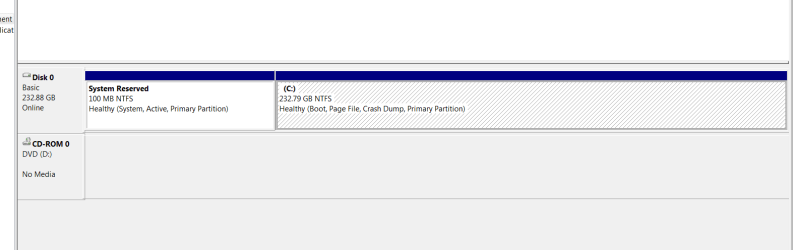
I did another complete reinstall. I let Windows set the drive. I extended the remaining balance so I have
the following: Things are working smooth.
 

Attachments

  • drives.PNG
    drives.PNG
    7.4 KB · Views: 6

My Computer My Computer

At a glance

windows 7 ultimate x64
OS
windows 7 ultimate x64
Looks great. Now leave it that way.
 

My Computer My Computer

At a glance

Vista, Windows7, Mint Mate, Zorin, Windows 8from 1.6GHz Duo to i7
Computer Manufacturer/Model Number
HP, Dell, Gateway, Toshiba - 4 laptops and 2 desktops
OS
Vista, Windows7, Mint Mate, Zorin, Windows 8
CPU
from 1.6GHz Duo to i7
Monitor(s) Displays
2x HP w2207
Hard Drives
5x HDD, 7x SSD, 12x Externals
Keyboard
with trackball - no mices
Mouse
Trackball mice
Internet Speed
DSL 6000
Looking good Fireman.

Please mark this thread as solved at your convenience.

Bill
.
 

My Computer My Computer

At a glance

x64 (6.3.9600) Win8.1 Pro & soon dual boot x6...AMD A6-3420M APU with Radeon(tm) HD Graphics6.00 GBAMD Radeon(TM) HD 6520G
Computer type
Laptop
Computer Manufacturer/Model Number
HP Pavilion dv6-6c10us
OS
x64 (6.3.9600) Win8.1 Pro & soon dual boot x64 (6.1.7601) Win7_SP1 HomePrem
CPU
AMD A6-3420M APU with Radeon(tm) HD Graphics
Motherboard
Hewlett-Packard 1805
Memory
6.00 GB
Graphics Card(s)
AMD Radeon(TM) HD 6520G
Sound Card
(1) AMD High Definition Audio Device (2) IDT High Definiti
Monitor(s) Displays
HP W2072a 20" LCD (1600 x 900) @ 60 Hz
Screen Resolution
1366 x 768 x 32 bits (4294967296 colors) @ 60 Hz
Hard Drives
ST640LM0 00 HM641JI SATA Disk Device
Keyboard
Logitech k520 wireless KB
Mouse
Logitech m320 wireless mouse (bundled with KB)
Internet Speed
15/5 | 54 MB Wireless 'n'
Antivirus
Realtime: Defender or Avast | On-demand: Malwarebytes, ESET
Browser
IE 11 on Win8, IE 10 on win 7
Other Info
Media: [Gimp, Audacity, VLC] || Comm: [WEmail 2012, Skype] || Productivity: [OpenOffice,| Textpad] || Utils: [Sysinternals, cCleaner, Speccy, Defraggler]
Back
Top