Solved Reinstalled windows7, nothing works.

Raaain

New member
Local time
10:25 AM
Messages
6
I had originally installed the wrong w7 version (ultimate), when I only had the professional key. Everything worked perfectly before I reinstalled.

Now after I reinstalled (and activated, legit copy). I seem to be missing all drivers and I am unable to connect to the internet.

Before I reinstalled I did the windows backup of my /C: (SSD) to my /E: (1tb HD), just to be sure that I wouldnt lose anything I have.

Things that Ive notice that are wrong. In the network profiles im set as ''Public'', cant change this for some reason (help me find how?)

When I try to "Network and sharing center" --> "set up a new connection or network" --> "connect to the internet" "windows did not detect any networking hardware".

Also since everything from my resolution to internet options has changed, I assume Ive lost all my drivers + I think at some point when troubleshooting it gave me a message about missing some drivers(cant find this again).

I have a laptop(linux) which can access the internet from the same connection using wireless and I could get an USB stick or something and dl drivers or anything I need and then transfer to my PC. I just need help in knowing what I need to do.

I do not have the cds which came with the hardware when my pc was built 6months ago. I could get hold of them in 2days but I would like/need to solve this quicker than that.

Ask me for more details and I will try give them, please help! Im sorry if this is in a wrong sub-forum. I have tried googling everything but could not find any specific answers.
 

My Computer

OS
Windows 7 Professional x64
CPU
Intel Core i7 2600K, LGA1155, 3.4 GHz, 8MB
Motherboard
P8P67-REV-3.0 Asus P8P67, Rev 3.0, LGA1155, Intel P67, DDR3,
Memory
2x A-Data 4GB, DDR3 1333MHz, CL9 Bulk
Graphics Card(s)
EVGA GeForce GTX 560 SuperClocked, 1GB GDDR5, 2xDVI
Hard Drives
OCZ 60GB Agility 3 Series SSD,
525/475, MLC

HD103SJ Samsung 1TB SpinPoint F3 3.5", SATAII, 32MB,
7200RPM
PSU
XFX 650W Core Edition ATX, 80+ Bronze

My Computer

Computer type
PC/Desktop
Computer Manufacturer/Model Number
Self Built
OS
Windows 7 Ultimate 64bit
CPU
AMD Phenom Quad core 9950 black edition
Motherboard
Gigabyte
Memory
16Gb
Graphics Card(s)
2x XFX Radeon 5850
Sound Card
PCI Express X-Fi Titanium / Logitech G35
Monitor(s) Displays
2x HP 2410i
Screen Resolution
1920x1080
Hard Drives
2x 500Gb Seagate
1x 300Gb Seagate
1x 1Tb Seagate
2x 1Tb Hitatchi
PSU
Jean Tech Storm 700W
Case
Cooler Master COSMOS S
Cooling
Akasa Evo Blue Pro
Keyboard
Logitech G15
Mouse
Mad Catz M.M.O. 7
Internet Speed
12mb
Win7 is mostly driver-complete. Put your network driver on a stick so you can install it to get online to get newer drivers via optional Windows Update. After several rounds of Updates, you can then import any drivers missing in Device Manager from the Support Downloads webpage for your computer or the device model.

To change the type of network, open Network and SHaring Center by clicking on the connection icon in bottom right system tray. Click on the Public network blue link and change it to Home, enter Homegroup key if you want to network easily with other home computers which are already set up that way.

You can start over and follow these steps to get a perfect clean reinstall: Clean Reinstall Windows 7 Factory OEM
 
You are missing drivers.
Please follow this guide all the way to part 1 step 2.
http://www.sevenforums.com/tutorials/97061-driver-install-device-manager.html
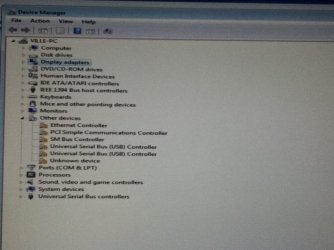
Take a screenshot using Windows 7 snipping tool save it to a USB drive and upload it.

We need to know which ones you are missing.
Once you know which ones you are missing you follow Poomans advice and download :).

You may want to start out with the LAN.
Once you download your network drivers perform a windows updates and hopefully the rest of your drivers will be downloaded along.
 

My Computer

Computer type
PC/Desktop
Computer Manufacturer/Model Number
Gateway / Slight Modifications
OS
Windows 8 64 bit PRO
CPU
AMD Phenom X4 9100e
Motherboard
Gateway RS780
Memory
2GB X2 DDR2
Graphics Card(s)
Sapphire HD 6850
Sound Card
Integrated
Monitor(s) Displays
Gateway 19" + Dell 19"
Screen Resolution
1440X900 sometimes 2880 by 900
Hard Drives
WD 80GB
WD 640GB
WD 1,000GB
PSU
Antec BP 550watts
Case
Antec 300
Cooling
Stock Cooling
Keyboard
Saitek Eclipse II
Mouse
Gigabyte GM-M6800
Internet Speed
D: 30Mbps U:4Mbps
Antivirus
Avast version 8
Browser
Internet Explorer ver 10 64 bit
Other Info
This is my work computer.
I have another laptop running Windows 7 64 bit.
Another PC running Windows 8 64 bit pro.
Total of 3
You are missing drivers.
Please follow this guide all the way to part 1 step 2.
http://www.sevenforums.com/tutorials/97061-driver-install-device-manager.html
Take a screenshot using Windows 7 snipping tool save it to a USB drive and upload it.

We need to know which ones you are missing.
Once you know which ones you are missing you follow Poomans advice and download :).

You may want to start out with the LAN.
Once you download your network drivers perform a windows updates and hopefully the rest of your drivers will be downloaded along.

Ill get back to the other comments after I get my USB stick and try to dl the drivers I(think I) need.


EDIT: thankyou, got my inet working. Now I'll try to dl all the other drivers I need. Will update this later as solved if I get everything working properly.
 

Attachments

  • kuva.JPG
    kuva.JPG
    62.1 KB · Views: 43
Last edited:

My Computer

OS
Windows 7 Professional x64
CPU
Intel Core i7 2600K, LGA1155, 3.4 GHz, 8MB
Motherboard
P8P67-REV-3.0 Asus P8P67, Rev 3.0, LGA1155, Intel P67, DDR3,
Memory
2x A-Data 4GB, DDR3 1333MHz, CL9 Bulk
Graphics Card(s)
EVGA GeForce GTX 560 SuperClocked, 1GB GDDR5, 2xDVI
Hard Drives
OCZ 60GB Agility 3 Series SSD,
525/475, MLC

HD103SJ Samsung 1TB SpinPoint F3 3.5", SATAII, 32MB,
7200RPM
PSU
XFX 650W Core Edition ATX, 80+ Bronze
Check optional Updates first for drivers delivered by Win7.

If any remain missing afterwards, import your latest mobo chipset located above by PooManUK.
 
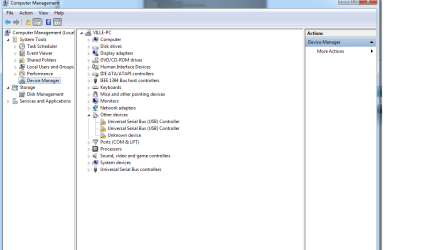
apart from not getting these to work, everything else seems to be solved.
 

Attachments

  • devicemanager.png
    devicemanager.png
    26.3 KB · Views: 29

My Computer

OS
Windows 7 Professional x64
CPU
Intel Core i7 2600K, LGA1155, 3.4 GHz, 8MB
Motherboard
P8P67-REV-3.0 Asus P8P67, Rev 3.0, LGA1155, Intel P67, DDR3,
Memory
2x A-Data 4GB, DDR3 1333MHz, CL9 Bulk
Graphics Card(s)
EVGA GeForce GTX 560 SuperClocked, 1GB GDDR5, 2xDVI
Hard Drives
OCZ 60GB Agility 3 Series SSD,
525/475, MLC

HD103SJ Samsung 1TB SpinPoint F3 3.5", SATAII, 32MB,
7200RPM
PSU
XFX 650W Core Edition ATX, 80+ Bronze
Double click on each of the devices without driver and from the Driver tab, browse to the unzipped chipset folder, see if it will pick up a driver.

If not you can get the make/model of the device using this Hardware Identification then go to the manufacturer's Support Downloads webpage to get the driver. Google may also help.

As a last resort I use the excellent freeware DriverMax which will allow you to Download and Install 1 free driver per day, after scanning your System and reliably finding the latest drivers - start with the missing ones.

You needn't bother with replacing any others unless performance points to a particular driver, or Windows Update provides one which Win7 prefers.
 
Last edited:
ok thx
 

My Computer

OS
Windows 7 Professional x64
CPU
Intel Core i7 2600K, LGA1155, 3.4 GHz, 8MB
Motherboard
P8P67-REV-3.0 Asus P8P67, Rev 3.0, LGA1155, Intel P67, DDR3,
Memory
2x A-Data 4GB, DDR3 1333MHz, CL9 Bulk
Graphics Card(s)
EVGA GeForce GTX 560 SuperClocked, 1GB GDDR5, 2xDVI
Hard Drives
OCZ 60GB Agility 3 Series SSD,
525/475, MLC

HD103SJ Samsung 1TB SpinPoint F3 3.5", SATAII, 32MB,
7200RPM
PSU
XFX 650W Core Edition ATX, 80+ Bronze
Hi, currently in the same situation. I'll try to follow the guidelines, but incase I fail I need help.
 

My Computer

Computer type
Laptop
Computer Manufacturer/Model Number
Hp
OS
Windows 7 Home SP1 x64
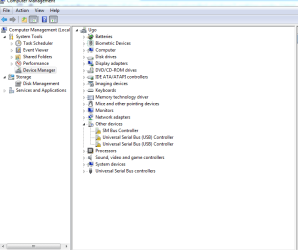
i attached it
 

Attachments

  • Capture.PNG
    Capture.PNG
    20.1 KB · Views: 2

My Computer

Computer type
Laptop
Computer Manufacturer/Model Number
Hp
OS
Windows 7 Home SP1 x64
How would we know what drivers to find for those devices if you haven't told us your computer make and model?

Look over these steps to get a perfect Clean Reinstall - Factory OEM Windows 7 to see if you did it correctly.

Have you enabled Automatically deliver drivers via Windows Update (Step 3) then run all Important and Optional Windows Updates until there are no more? Most drivers will be delivered this way, so do that now before anything else.

Follow the rest of the tutorial steps to get and keep a perfect install.
 
Sorry, I use a HP Pavilon dv6-6145dx
 

My Computer

Computer type
Laptop
Computer Manufacturer/Model Number
Hp
OS
Windows 7 Home SP1 x64
Did you enable Automatically deliver drivers via Windows Update (Step 3) then run all Important and Optional Windows Updates, keep checking back after reboots until there are no more?

Then if USB are still missing you can find them here under Chipset: Software & driver downloads HP Pavilion dv6-6145dx Entertainment Notebook PC | HP® Support

If the Storage controller is still missing use the Check Your System to scan for Updates button, installing the requested download until it scans and reports back. Don't reimport any of the HP crapware unless it provides a function that is missing and that you know you want.

If it's still missing after that install the manufacturers chipset by scanning your system for it using Automatically Detect and Install at http://support.amd.com/en-us/download if it's AMD or Intel Driver downloads if it's Intel. Or ask back here for further help.

If you're left with a Standard VGA driver, import the Video driver from the same HP downloads page above.

Capiche?
 
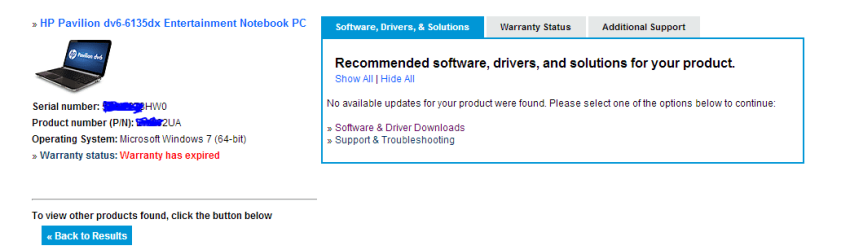
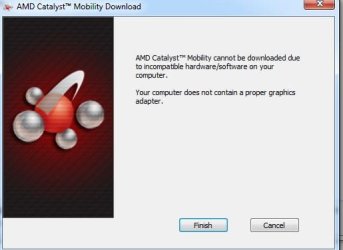
Hi, I've done all of those already. Updated about 150 drivers, and i checked the update "page" again, and it said the computer was up to date.
Using the amd detect and install, gave me an error message which i'll post.
The Hp update page also said that there was no new update.
 

Attachments

  • Capture.PNG
    Capture.PNG
    13.2 KB · Views: 1
  • Capture.JPG
    Capture.JPG
    25.4 KB · Views: 15

My Computer

Computer type
Laptop
Computer Manufacturer/Model Number
Hp
OS
Windows 7 Home SP1 x64
Then the problem may be you changed out a bunch of drivers which Win7 wants. THis is a driver-complete OS which provides the drivers it wants first, via the installer and then after enabling Auto-driver updating to run all WIndows Updates. Only then should missing drivers be imported. If you updated 150 drivers you likely changed a bunch of drivers that WIn7 wanted to ones it doesn't like. So I'd do it over and this time follow the steps to get and keep a perfect Clean Reinstall - Factory OEM Windows 7which compile what has worked best helping tens of thousands of installs without a single complaint.
 
Back
Top