Solved Reinstalling Graphics Drivers Problem

farzadso

New member
Local time
9:50 AM
Messages
15
Hi

A third-party application called Air Display totally ruined my display settings on my switchable graphics card and it's stuck on a basic windows seven look
the last time this happened i fixed it by fiddling around with it
but this time it wont work
is there a way that i can completely delete all of the display drivers i have and install the appropriate ones again?
 

My Computer

Computer Manufacturer/Model Number
Lenovo Y460
OS
Windows 7 Home Premium 64 bit + Ultimate 32 Bit + Starter Edition
CPU
Intel(R) Core(TM) i5 CPU M430 @ 2.27GHz
Memory
8gb DDR3
Graphics Card(s)
Ati 5650 + Intel
Hard Drives
500GB WD Sata

My Computer

Computer type
PC/Desktop
Computer Manufacturer/Model Number
Custom
OS
windows 10 pro 64 bit
CPU
i5 4690K@4500 COOLER MASTER Seidon 120M water cooler
Motherboard
ASUS SABERTOOTH Z87 LGA 1150 Intel
Memory
16gb Kingston HyperX DDR3 1600
Graphics Card(s)
EVGA GTX 1070 sc
Monitor(s) Displays
BenQ GL2760H Black 27" 2ms HDMI Widescreen LED 1920X1080
Screen Resolution
DSR 2103X1183
Hard Drives
ADATA 256 gig SSD + 4 junk
PSU
EVGA supernova 750
Case
coolermaster
Cooling
many...
Keyboard
z merc
Mouse
Logitech wireless G602
Internet Speed
2.5mbs cable

My Computer

Computer Manufacturer/Model Number
Lenovo Y460
OS
Windows 7 Home Premium 64 bit + Ultimate 32 Bit + Starter Edition
CPU
Intel(R) Core(TM) i5 CPU M430 @ 2.27GHz
Memory
8gb DDR3
Graphics Card(s)
Ati 5650 + Intel
Hard Drives
500GB WD Sata
Hi

A third-party application called Air Display totally ruined my display settings on my switchable graphics card and it's stuck on a basic windows seven look
the last time this happened i fixed it by fiddling around with it
but this time it wont work
is there a way that i can completely delete all of the display drivers i have and install the appropriate ones again?

You could open Device Manager, right click on the device and click on Uninstall. Reboot your computer and Windows 7 will search for the appropriate driver(s). Or, you could try restoring your computer to a date/time prior to when the problem began.

http://www.sevenforums.com/tutorials/700-system-restore.html
 

My Computer

Computer type
Laptop
Computer Manufacturer/Model Number
Sony Vaio VPCEB47GM Laptop
OS
Win 7 Pro 64-bit
CPU
Intel i5 2.4 Ghz
Memory
8GB DDR3
Graphics Card(s)
Intel HD 3000
Sound Card
IDT High Definition
Monitor(s) Displays
15.6 WGXA Anti-Glare LED
Screen Resolution
1280x800
Hard Drives
640Gb 7200rpm
Antivirus
MSE
Browser
Opera (primary) with IE9 backup
Hi

A third-party application called Air Display totally ruined my display settings on my switchable graphics card and it's stuck on a basic windows seven look
the last time this happened i fixed it by fiddling around with it
but this time it wont work
is there a way that i can completely delete all of the display drivers i have and install the appropriate ones again?

You could open Device Manager, right click on the device and click on Uninstall. Reboot your computer and Windows 7 will search for the appropriate driver(s). Or, you could try restoring your computer to a date/time prior to when the problem began.

http://www.sevenforums.com/tutorials/700-system-restore.html

well first of all i already tried uninstall and it didn't work ..
and the main reason for this happening is that i had to restore my laptop back to a date and the only restore point i had was this one that had this problem
so a restore is not an option for me
 

My Computer

Computer Manufacturer/Model Number
Lenovo Y460
OS
Windows 7 Home Premium 64 bit + Ultimate 32 Bit + Starter Edition
CPU
Intel(R) Core(TM) i5 CPU M430 @ 2.27GHz
Memory
8gb DDR3
Graphics Card(s)
Ati 5650 + Intel
Hard Drives
500GB WD Sata
i just restored my laptop to the factory default version .. it's all new and still it isn't working
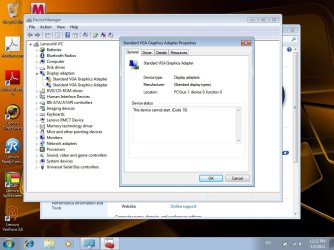
i can't switch my graphics cards and one of them(the intel one) seems to be working and the other(the ATI one) seems to have problems as shown in the screenshot

Untitled.jpg
 

My Computer

Computer Manufacturer/Model Number
Lenovo Y460
OS
Windows 7 Home Premium 64 bit + Ultimate 32 Bit + Starter Edition
CPU
Intel(R) Core(TM) i5 CPU M430 @ 2.27GHz
Memory
8gb DDR3
Graphics Card(s)
Ati 5650 + Intel
Hard Drives
500GB WD Sata
i just restored my laptop to the factory default version .. it's all new and still it isn't working
i can't switch my graphics cards and one of them(the intel one) seems to be working and the other(the ATI one) seems to have problems as shown in the screenshot

Looks like you have only the default graphics drivers installed now.

Seems odd that the factory restore didn't include the proper drivers.

Lenovo has all sorts of graphics drivers available for download. (Too many, if you're unsure which GPUs are present in your Y460.)

Just out of curiosity: I'm unfamiliar with "Air Display" Google comes up with it as a utility for the Mac OS. What?
 

My Computer

Computer Manufacturer/Model Number
homegrown
OS
Windows 7 Pro X64 SP1
CPU
Intel Core I7-3930k
Motherboard
Asus P9X79 Pro
Memory
16 GB Gskill DDR3-2133
Graphics Card(s)
eVGA GTX680
Sound Card
Creative X-Fi Titanium
Monitor(s) Displays
As PA246Q
Screen Resolution
1920 X 1200
Hard Drives
Corsair Force GT, 120 GB
WDC 1.5TB Caviar Black
PSU
PCP&C Silencer 750 Crossfire
Case
Silverstone FT02
Cooling
Noctua NH-D14
Keyboard
cheap Logitech USB
Mouse
Microsoft Intellimouse Explorer (old optical) USB
Internet Speed
6Mb cable
Other Info
Pioneer BDR-205
Samsung SH-203B
Monsoon 5.1 speakers
i just restored my laptop to the factory default version .. it's all new and still it isn't working
i can't switch my graphics cards and one of them(the intel one) seems to be working and the other(the ATI one) seems to have problems as shown in the screenshot

Looks like you have only the default graphics drivers installed now.

Seems odd that the factory restore didn't include the proper drivers.

Lenovo has all sorts of graphics drivers available for download. (Too many, if you're unsure which GPUs are present in your Y460.)

Just out of curiosity: I'm unfamiliar with "Air Display" Google comes up with it as a utility for the Mac OS. What?

i dont even have the default graphics installed now .. coz the default supports aero and this one doesn't
it's really weird .. i've done a factory restore before and everything was up and running
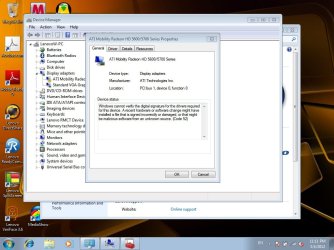
well now i fiddled around with it but i got up to the screenshot here :

sdfsdgdgd.jpg

and air display is a software for mirroring your desktop onto ur pc/mac .. there are two versions .. i feel like it's stuck on the air display mode :(
 

My Computer

Computer Manufacturer/Model Number
Lenovo Y460
OS
Windows 7 Home Premium 64 bit + Ultimate 32 Bit + Starter Edition
CPU
Intel(R) Core(TM) i5 CPU M430 @ 2.27GHz
Memory
8gb DDR3
Graphics Card(s)
Ati 5650 + Intel
Hard Drives
500GB WD Sata
thank god i have other laptops at home otherwise i would have to wait for years to get an answer here :)))) lol
 

My Computer

Computer Manufacturer/Model Number
Lenovo Y460
OS
Windows 7 Home Premium 64 bit + Ultimate 32 Bit + Starter Edition
CPU
Intel(R) Core(TM) i5 CPU M430 @ 2.27GHz
Memory
8gb DDR3
Graphics Card(s)
Ati 5650 + Intel
Hard Drives
500GB WD Sata
Air Display Support Software for Windows description, Peripherals Downloads List By 30 Day Change | PCWorld | PCWorld

Is this the tool?

I think we should isolate the problem by NOT installing the extra software at the moment.
If you have done so please uninstall it.
It seems to me that your trying to use both your ON-BOARD graphics and your PCI-E Graphics card. You can only use one. I recommend you use the ATI 5650 as it is not integrated. Integrated are really slow and are not that great.

You will need to download ATI 5650 drivers and saved them. Uninstall Intel graphics completely from device manager. Reboot, enter your bios and disable integrated/onboard graphics.
Save and exit.

Check device manager if the error continues please install the downloaded drivers

Side note:
The members in this forum are just volunteers. They do this on their free time, we have lives and we try to help.
 
Last edited:

My Computer

Computer type
PC/Desktop
Computer Manufacturer/Model Number
Gateway / Slight Modifications
OS
Windows 8 64 bit PRO
CPU
AMD Phenom X4 9100e
Motherboard
Gateway RS780
Memory
2GB X2 DDR2
Graphics Card(s)
Sapphire HD 6850
Sound Card
Integrated
Monitor(s) Displays
Gateway 19" + Dell 19"
Screen Resolution
1440X900 sometimes 2880 by 900
Hard Drives
WD 80GB
WD 640GB
WD 1,000GB
PSU
Antec BP 550watts
Case
Antec 300
Cooling
Stock Cooling
Keyboard
Saitek Eclipse II
Mouse
Gigabyte GM-M6800
Internet Speed
D: 30Mbps U:4Mbps
Antivirus
Avast version 8
Browser
Internet Explorer ver 10 64 bit
Other Info
This is my work computer.
I have another laptop running Windows 7 64 bit.
Another PC running Windows 8 64 bit pro.
Total of 3
Air Display Support Software for Windows description, Peripherals Downloads List By 30 Day Change | PCWorld | PCWorld

Is this the tool?

I think we should isolate the problem by NOT installing the extra software at the moment.
If you have done so please uninstall it.
It seems to me that your trying to use both your ONBOARD graphics and your PCI-E Graphics card. You can only use one. I recommend you use the ATI 5650 as it is not integrated. Integrated are really slow and are not that great.

You will need to download ATI 5650 drives and saved them. Uninstall Intel graphics completely from device manager. Reboot, enter your bios and disable integrated/onboard graphics.
Save and exit.

Check device manager if the error continues please install the downloaded drivers
yes .. that's the tool
i don't have anything installed .. 1 hour ago i did another factory restore and it's still the same ...
can u tell me exactly where to get the drivers for the ati 5650 please? i would very much appreciate it
 

My Computer

Computer Manufacturer/Model Number
Lenovo Y460
OS
Windows 7 Home Premium 64 bit + Ultimate 32 Bit + Starter Edition
CPU
Intel(R) Core(TM) i5 CPU M430 @ 2.27GHz
Memory
8gb DDR3
Graphics Card(s)
Ati 5650 + Intel
Hard Drives
500GB WD Sata

My Computer

Computer type
PC/Desktop
Computer Manufacturer/Model Number
Gateway / Slight Modifications
OS
Windows 8 64 bit PRO
CPU
AMD Phenom X4 9100e
Motherboard
Gateway RS780
Memory
2GB X2 DDR2
Graphics Card(s)
Sapphire HD 6850
Sound Card
Integrated
Monitor(s) Displays
Gateway 19" + Dell 19"
Screen Resolution
1440X900 sometimes 2880 by 900
Hard Drives
WD 80GB
WD 640GB
WD 1,000GB
PSU
Antec BP 550watts
Case
Antec 300
Cooling
Stock Cooling
Keyboard
Saitek Eclipse II
Mouse
Gigabyte GM-M6800
Internet Speed
D: 30Mbps U:4Mbps
Antivirus
Avast version 8
Browser
Internet Explorer ver 10 64 bit
Other Info
This is my work computer.
I have another laptop running Windows 7 64 bit.
Another PC running Windows 8 64 bit pro.
Total of 3
Sorry I just realized that you had a laptop, and that you were indeed running TWO different display drivers at ONCE. This is very rare.
http://consumerdl.lenovo.com.cn/Use...ds and Drivers/Y460&Y560/WIN7/IN2VDO30WW6.exe

See if this does anything they are drivers for intel Onboard graphics, Lenovo does not supply any drivers for AMD

Intel Onboard Graphics Driver
IN2VDO30WW6.exe
34.2 MBWindows 7 64bit8.15.10.211916 Sep 2010

Actually that is quite common now:geek:....not for your laptop model but useful general information about switchable graphics http://www.wfu.edu/~yipcw/lenovo/t400/switchable_gfx/

Now this page is as close as I can get to you laptop drivers with the information in your system spec's some are right and some are for different models Lenovo Ideapad Support & downloads - Drivers & Downloads Pay attention to all the special notices....Make sure it's the right drivers....You may have to go into the bios to reset the graphics options....The system might resist installing the drivers
 

My Computer

Computer type
PC/Desktop
Computer Manufacturer/Model Number
Custom
OS
windows 10 pro 64 bit
CPU
i5 4690K@4500 COOLER MASTER Seidon 120M water cooler
Motherboard
ASUS SABERTOOTH Z87 LGA 1150 Intel
Memory
16gb Kingston HyperX DDR3 1600
Graphics Card(s)
EVGA GTX 1070 sc
Monitor(s) Displays
BenQ GL2760H Black 27" 2ms HDMI Widescreen LED 1920X1080
Screen Resolution
DSR 2103X1183
Hard Drives
ADATA 256 gig SSD + 4 junk
PSU
EVGA supernova 750
Case
coolermaster
Cooling
many...
Keyboard
z merc
Mouse
Logitech wireless G602
Internet Speed
2.5mbs cable
Also found this AMD site for the ATI 5650. In the upper right corner there's a "Find a Driver" link with an autodetect capability.

ATI Mobility Radeon

One caution from personal experience. I was recently advised by Windows Update that a new driver was available for my Intel HD Graphics. After installing I started getting BSODs so I had to revert back to the previous version. I contacted Intel and they said they provide generic drivers to Windows Update and OEMs like Sony, Dell, Acer, etc. The OEMs are then free to customize the generic driver. Intel told me to always get new drivers from the OEM site and not from Intel or Windows Update because any customizations might make the generic driver incompatible.

So I guess it's possible that even a newer driver from AMD might be incompatible with your computer if Lenovo uses customized drivers. If you decide to try it, don't forget to make a new restore point before installing so you can roll everything back just in case.
 

My Computer

Computer type
Laptop
Computer Manufacturer/Model Number
Sony Vaio VPCEB47GM Laptop
OS
Win 7 Pro 64-bit
CPU
Intel i5 2.4 Ghz
Memory
8GB DDR3
Graphics Card(s)
Intel HD 3000
Sound Card
IDT High Definition
Monitor(s) Displays
15.6 WGXA Anti-Glare LED
Screen Resolution
1280x800
Hard Drives
640Gb 7200rpm
Antivirus
MSE
Browser
Opera (primary) with IE9 backup
Thanks Marsmimar, i been reluctant to get drivers from both intel or AMD and been sticking with pure Lenovo.
I went to their site look up video drivers and offer only Intel, not a single AMD, it's listed but no download. Maybe the latest intel will fix it.

THANKS a lot Ivan, your post and information is quite useful
 

My Computer

Computer type
PC/Desktop
Computer Manufacturer/Model Number
Gateway / Slight Modifications
OS
Windows 8 64 bit PRO
CPU
AMD Phenom X4 9100e
Motherboard
Gateway RS780
Memory
2GB X2 DDR2
Graphics Card(s)
Sapphire HD 6850
Sound Card
Integrated
Monitor(s) Displays
Gateway 19" + Dell 19"
Screen Resolution
1440X900 sometimes 2880 by 900
Hard Drives
WD 80GB
WD 640GB
WD 1,000GB
PSU
Antec BP 550watts
Case
Antec 300
Cooling
Stock Cooling
Keyboard
Saitek Eclipse II
Mouse
Gigabyte GM-M6800
Internet Speed
D: 30Mbps U:4Mbps
Antivirus
Avast version 8
Browser
Internet Explorer ver 10 64 bit
Other Info
This is my work computer.
I have another laptop running Windows 7 64 bit.
Another PC running Windows 8 64 bit pro.
Total of 3
thank you everyone for the help
i finally found the solution on another forum
some guy had modded a driver for the 5600/5700 series and my display driver is back and working
here are the steps :
Working Catalyst 11.2 Switchable Graphics Driver (64bit only)

USE THIS DRIVER AT YOUR OWN RISK, I TAKE NO RESPONSIBILITY FOR ANY MAYHEM CAUSED. BEFORE REPORTING AN ISSUE PLEASE READ BUGS SECTION


UPDATE 30/3/2011 Another update, if I had of known it would be this quick, wouldn't have bothered with yesterdays, again this is just a HARDWARE ID update, this time for the acer laptops, so if your driver is already working, don't bother with this one.

UPDATE 29/3/2011 A new version, this one is only to include new HARDWARE IDs for the intel chipsets (as provided by users in the thread) there are no new versions of driver in this release (so if it's working for you, no need to upgrade).

UPDATE 22/3/2011 Success, new drivers uploaded with latest Intel HD drivers NEW INSTALL INSTRUCTIONS, EVEN IF UPGRADING, will now work on including the DEVICE_IDs people have provided in the below thread.

UPDATE 14/3/2011 Apologies for the delay, only have the chance to work on the drivers on my train rides to and from work, I have a beta version of the 11.2 and latest intel igfx drivers and switching software functioning, still have some bugs to sort out (HDMI audio) and driver signing is looking to be impossible as you have to modify the INF to much with the custom registry entries that whatever arbitrary signature boundaries microsoft sets on it's driver cat file are breached (I am still pondering how to solve this one)


ISSUES:
1)If you have a 5600 or 5700 series card, It will now register as a 5600/5700 series card in device manager, this still should work fine as they both use the Manhattan driver variant , am working on a fix (see technical section)

2) The Intel driver is unsigned, so you will have to hit F8 every time you cold boot your PC and scroll down to Disable driver signature enforcement for the driver to work (See Technical Section for why and updates on the issue)
There are now two solutions to this issue:
1) Thanks to Black_ice_Spain for a solution if your willing to modify your boot partition.
or
2) Thanks to randomizer:
This works without having to press F8 on bootup to disable driver signing.
Go to the Start menu and type cmd.exe in the Search Bar. Right click on cmd.exe and choose Run as Administrator.
If you have the UAC turned on, choose Yes to proceed. Otherwise, you should see the command windows opened already. In the shell window, copy paste the following and hit Enter.
bcdedit.exe -set loadoptions DDISABLE_INTEGRITY_CHECKS
bcdedit.exe -set TESTSIGNING ON
After you reboot you will get a see a new stamp in the bottom right of the screen "Test Mode, Windows 7, Build 7600"
Now all of the unsigned drivers you have for x64 will work and load fine.


3) I have gotten as many Intel Graphics chipsets into v08 as I have the HARDWARE IDs for, please continue to let me know if I am missing yours.


I got sick of waiting on vendors to fix the abysmal situation of updating their outdated and buggy ATI Drivers for switchable graphics laptops ಠ_ಠ so I modified the current driver in 11.2 catalyst (8.821.0.0) to include the igfx proxy calls (Intel HD Graphics) which is what makes the older manufacturer drivers work properly. This download includes everything in the 11.2 64bit download (including CCC2) as well as the modified 8.821.0.0 driver and HDMI sound driver.
This was tested on my HP DV6 running Windows 7, a HD5650 and a full video driver wipe (including Intel HD drivers). So far has been stable on Borderlands and Battlefield BC2 with switchable graphics working fine.
Hope this helps out some of you that have found yourself in the same predicament. Please let me know of any bugs/issues that arise and I will attempt to address them (honestly my technical skill is just above that of a shaved monkey, it was just a text copy, pasta job to get the correct calls into the inf, then quite a few rounds of restore point testing before I got it working. So please bear with me.)


DOWNLOAD:

11-2_mobility_win7_64_Youzen_mod_v08.zip

Previous Version:
11-2_mobility_win7_64_Youzen_mod_v05.zip


INSTRUCTIONS:
1) Download and install Driver Sweeper from Guru3D and ccleaner


2) Open Control Panel -> Uninstall a Program and remove the following:

-ATI Catalyst Install Manager

-Intel Management Software


3) Reboot and mash F8 to enter safe mode.


4) Run Driver Sweeper and remove ATI drivers,


5)Open Control Panel -> Hardware and Sound -> Device Manager -> Display adapters, Make sure both graphics cards are showing as "Standard VGA adapter". If they still aren't, right mouse click on it and select "Remove"


6) Reboot, Mash F8 and select "Disable driver signature enforcment"


7) Run ccleaner and select the registry tab and clear the registry, repeat again as the first clean leaves orphaned activex objects.


8) Unzip and Install driver by running setup.exe in folder, reboot making sure you hit F8 on startup and select "Disable driver signature enforcment".

TECHNICAL
It would appear that the 5600/5700 cards are identified by their SUBSYSTEM ID rather than DEVICE ID, so it may be just a case of gathering the various subsystem ID's from known working drivers (as AMD/ATI provide zero documentation) and adding them to the driver, have not had a chance to implement this as it will break the driver for cards who's SUBSYSTEM ID I do not have.

The Driver Signature enforcement fix is currently impossible as the modified intel driver needs to reference ATI DLLs which break the driver signature, I currently don't see any way around this as I need a Microsoft signature to co-sign the new drivers which costs quite a bit of money (I see now why manufacturers don't bother to update their drivers).


BUGS
When reporting an issue, please include in your report the Hardware ID of both your ATI card and Intel HD Graphics card. (By going to Device Manager, selecting the card and right mouse click Properties, go to the detail tab, select Hardware ID from the drop down box copy those numbers). Also a massive help for me would be a direct link to your last known working manufacturer drivers.

Make sure you are using just this driver and no other mod's on top as I currently do not have time to support them.
 

My Computer

Computer Manufacturer/Model Number
Lenovo Y460
OS
Windows 7 Home Premium 64 bit + Ultimate 32 Bit + Starter Edition
CPU
Intel(R) Core(TM) i5 CPU M430 @ 2.27GHz
Memory
8gb DDR3
Graphics Card(s)
Ati 5650 + Intel
Hard Drives
500GB WD Sata
Back
Top