Reinstalling Windows

Martin Dendev

Software Lover
Power User
Local time
10:19 PM
Messages
170
Location
Oostkamp
Hi!

My computer is running slower and slower and it hangs sometimes. :sick:

I would like to completely reinstall the system (clean install).

Now, is it possible to reinstall the system, but then install a 64-bit version? Now I have Windows 7 32-bit (upgrade from vista) and I've seen that 64-bit is working faster.

What is the most simple way to do this?

Thx!

Martin
 

My Computer

Computer type
Laptop
Computer Manufacturer/Model Number
HP Probook 4710s
OS
Windows 7 Home Premium 32 bit
Hard Drives
Fujitsu
Mouse
Touchpad
Do you have the 64-bit installation disc?

Do you know if your hardware is 64-bit compatible?

If yes to both questions, you would then just backup personal data, boot from the 64-bit disc, and run the installer.

But you might not notice any difference.
 

My Computer

Computer type
PC/Desktop
Computer Manufacturer/Model Number
Ignatz Special; 4 speed manual gearbox; factory air conditioning; one of one
OS
Windows 7 Home Premium SP1, 64-bit
CPU
Intel Skylake i5-6600K, not overclocked
Motherboard
AsRock Z170M Extreme 4, micro ATX
Memory
8 GB HyperX DDR4-2666 (2 x 4 GB)
Graphics Card(s)
none; graphics are integrated on CPU
Sound Card
onboard: Realtek ALC1150; external: USB Behringer UF0-202
Monitor(s) Displays
Dell S2340M 23 inch IPS
Screen Resolution
1600 x 900
Hard Drives
System: Crucial MX100 series SSD, 128 GB;
Data: Samsung Spinpoint 103SJ, 1 TB;
Backup: WD Caviar Green WD30EZRX-00D8PB0, 3 TB
PSU
Rosewill SilentNight 500 watt fanless, semi-modular
Case
Antec Solo II
Cooling
Noctua NH-U12S; Noctua F12 intake, Noctua S12A exhaust
Keyboard
Microsoft 200 6JH-00001 USB
Mouse
Dell or Microsoft optical wired; USB
Antivirus
Microsoft Security Essentials and Malwarebytes Premium
Browser
Pale Moon
Other Info
All fans PWM; speeds at idle: CPU circa 500 rpm; intake circa 600 rpm; exhaust circa 600 rpm; CPU temps 27 idle and 47 C load in a warm room (27 C/81 F) when running Intel Extreme Tuning Utility stress test.
Your processor handles 64bit right?
 

My Computer

Computer Manufacturer/Model Number
Alienware
OS
Windows 7 Ultimate x64
CPU
I7
Motherboard
GA-X58-USB3
Memory
6 x 1.5V DDR3 DIMM sockets supporting up to 24 GB of system
Graphics Card(s)
GeForce GTX 580
Sound Card
Realtek ALC892 codec 2/4/5.1/7.1-channel
Monitor(s) Displays
NEC Display Solutions E321 Black 32"
Screen Resolution
1366 x 768
Hard Drives
OCZ Colossus LT Series OCZSSD2-1CLSLT1T 3.5" 1TB SATA II MLC Internal Solid State Drive
PSU
XFX Black Edition XPS-850W-BES 850W ATX12V
Case
Antec
Cooling
Zalman
Keyboard
Microsoft
Mouse
Microsoft
Now, is it possible to reinstall the system, but then install a 64-bit version?


You don't re-install and THEN install the 64 bit version, you install the 64 bit version.

But yes, your key is valid for either version.
 

My Computer

Computer Manufacturer/Model Number
self-built
OS
Windows 7 Ultimate x64
CPU
Phenom II x4 965
Motherboard
GA-MA785GT-UD3H
Memory
4gb
Graphics Card(s)
Asus GTX 460 768mb
Sound Card
Asus Xonar DX
Monitor(s) Displays
BenQ G2222HDL
Hard Drives
OCZ Vertex 2E 60gb

WD 1TB Caviar Green
PSU
Antec True Power New 650w
Case
CM 690 II
Cooling
Hyper 212+
Hi all!

Where do I check if my hardware is compatible?

And is it really worth it, to upgrade to 64 bit?

Martin
 

My Computer

Computer type
Laptop
Computer Manufacturer/Model Number
HP Probook 4710s
OS
Windows 7 Home Premium 32 bit
Hard Drives
Fujitsu
Mouse
Touchpad
Check here, you'll need to click the hardware tab: Windows 7 Compatibility: Software Programs & Hardware Devices: Find Updates, Drivers, & Downloads

There isn't much in the way of newer applications that won't run under Windows 7 x64.

One thing to watch for if you do decide to install the 64-bit version (and I think you should) is this:

Under All Programs you will find a Program Files folder and a Program Files (x86) folder.

The former is the container for any 64-bit applications on your computer, whilst the latter is the container for 32-bit applications.

Also, if you use Internet Explorer as your default browser you'll find you have the choice of using a 32-bit version and a 64-bit version.

If you use the 64-bit version you need to be aware that Adobe have not yet released a fully-tested version of Adobe Flash x64 so some websites will lose functionality. However, Adobe have released a Beta version of Flash x64 so you could use that.

Stonebear's comment referring to RAM on a 32-bit system is correct.
 

My Computer

Computer Manufacturer/Model Number
HP Pavilion Elite 495UK
OS
Windows 7 Ultimate SP1 64-Bit
CPU
Intel Core i7 870 @ 2.93GHz
Motherboard
MSI 2A9C (CPU1)
Memory
8Gb Dual-Channel DDR3 @ 664MHz
Graphics Card(s)
nVidia GeForce GTX 460 1024MB dedicated RAM
Sound Card
Realtek HD Audio
Monitor(s) Displays
HP2310i
Screen Resolution
1920 x 1080
Hard Drives
1x1954GB Hitachi HDS22020ALA 330 (RAID), 1x1954GB Hitachi External for backup and storage
PSU
460W
Case
HP Elite
Cooling
Air cooled
Keyboard
Logitech K750 solar-powered keyboard
Mouse
Logitech Wireless M180 mouse
Internet Speed
2Mb
Other Info
Pure Avanti Flow Internet Radio with iPod Dock, 64Gb iPod, HP USB Speakers, Sony MDR-V500 Headphones, Sony Vaio F-Series Laptop
Ok thanks!

So now: move all my files from my user folder to my Portable Hard Drive, buy a 64-bit disc and install it on my C: Drive and then move it back?

Thx!

Martin
 
Last edited:

My Computer

Computer type
Laptop
Computer Manufacturer/Model Number
HP Probook 4710s
OS
Windows 7 Home Premium 32 bit
Hard Drives
Fujitsu
Mouse
Touchpad
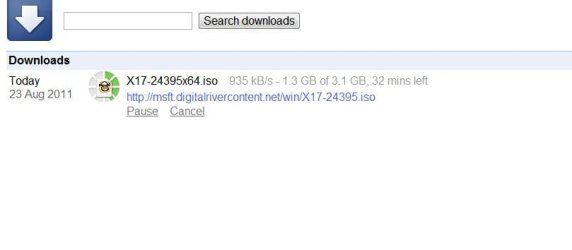
I just found this link for downloading Windows 7 SP1....I am downloading one myself, I hope it's OK. What do people think?

Link removed by Dwarf


My Computer

Computer Manufacturer/Model Number
self-built
OS
Windows 7 Ultimate x64
CPU
Phenom II x4 965
Motherboard
GA-MA785GT-UD3H
Memory
4gb
Graphics Card(s)
Asus GTX 460 768mb
Sound Card
Asus Xonar DX
Monitor(s) Displays
BenQ G2222HDL
Hard Drives
OCZ Vertex 2E 60gb

WD 1TB Caviar Green
PSU
Antec True Power New 650w
Case
CM 690 II
Cooling
Hyper 212+

My Computer

Computer Manufacturer/Model Number
* BFK Customs *
OS
W 7 64-bit Ultimate
CPU
Intel Q9550 Yorkfield
Motherboard
ASUS P5Q Pro
Memory
8GB Dominator 8500C5D
Graphics Card(s)
ATI : XFX 5870
Sound Card
Realtek HD Audio 7-1
Monitor(s) Displays
1x 47" LCD HDMI & 3x 26" LCD HDMI
Screen Resolution
1920x1080P & 1920x1200
Hard Drives
1x 80GB Intel X25-M G2 SSD : 1x 500GB & 1x 640GB WD Caviar Black(s)
PSU
Corsair 620HX
Case
Cooler Master RC-690
Cooling
Tuniq Tower 120, 2x 140mm and 3x 120mm case fans
Keyboard
Microsoft 500
Mouse
Razer Diamondback 3G
Internet Speed
14 Mb/s
Other Info
1x Koutech 3Gb/s SATA HDD Hot Swap Rack
I just found this link for downloading Windows 7 SP1....I am downloading one myself, I hope it's OK. What do people think?

Removed


This would be a better source, be sure to select the correct bit-rate. ;)


Download Details - Microsoft Download Center - Windows 7 and Windows Server 2008 R2 Service Pack 1 (KB976932)

Is there a Microsoft source that has Windows 7 + SP1?

Just to be clear, my link is for Windows 7 + SP1, not just SP1 by itself.

I am taking a chance using my link I know, but it is from digital river so maybe it is OK?
 

Attachments

  • win 7.JPG
    win 7.JPG
    21.1 KB · Views: 5
Last edited by a moderator:

My Computer

Computer Manufacturer/Model Number
self-built
OS
Windows 7 Ultimate x64
CPU
Phenom II x4 965
Motherboard
GA-MA785GT-UD3H
Memory
4gb
Graphics Card(s)
Asus GTX 460 768mb
Sound Card
Asus Xonar DX
Monitor(s) Displays
BenQ G2222HDL
Hard Drives
OCZ Vertex 2E 60gb

WD 1TB Caviar Green
PSU
Antec True Power New 650w
Case
CM 690 II
Cooling
Hyper 212+
Ok thanks!

So now: move all my files from my user folder to my Portable Hard Drive, buy a 64-bit disc and install it on my C: Drive and then move it back?

Thx!

Martin

Yes, that's correct. You will need to re-install all your applications though.
 

My Computer

Computer Manufacturer/Model Number
HP Pavilion Elite 495UK
OS
Windows 7 Ultimate SP1 64-Bit
CPU
Intel Core i7 870 @ 2.93GHz
Motherboard
MSI 2A9C (CPU1)
Memory
8Gb Dual-Channel DDR3 @ 664MHz
Graphics Card(s)
nVidia GeForce GTX 460 1024MB dedicated RAM
Sound Card
Realtek HD Audio
Monitor(s) Displays
HP2310i
Screen Resolution
1920 x 1080
Hard Drives
1x1954GB Hitachi HDS22020ALA 330 (RAID), 1x1954GB Hitachi External for backup and storage
PSU
460W
Case
HP Elite
Cooling
Air cooled
Keyboard
Logitech K750 solar-powered keyboard
Mouse
Logitech Wireless M180 mouse
Internet Speed
2Mb
Other Info
Pure Avanti Flow Internet Radio with iPod Dock, 64Gb iPod, HP USB Speakers, Sony MDR-V500 Headphones, Sony Vaio F-Series Laptop
Is there a Microsoft source that has Windows 7 + SP1?

Just to be clear, my link is for Windows 7 + SP1, not just SP1 by itself.

I am taking a chance using my link I know, but it is from digital river so maybe it is OK?

Sorry mate, I thought your link was just for the Service Pack.

It is against forum policy to post dl links to Windows 7 installers.
 

My Computer

Computer Manufacturer/Model Number
* BFK Customs *
OS
W 7 64-bit Ultimate
CPU
Intel Q9550 Yorkfield
Motherboard
ASUS P5Q Pro
Memory
8GB Dominator 8500C5D
Graphics Card(s)
ATI : XFX 5870
Sound Card
Realtek HD Audio 7-1
Monitor(s) Displays
1x 47" LCD HDMI & 3x 26" LCD HDMI
Screen Resolution
1920x1080P & 1920x1200
Hard Drives
1x 80GB Intel X25-M G2 SSD : 1x 500GB & 1x 640GB WD Caviar Black(s)
PSU
Corsair 620HX
Case
Cooler Master RC-690
Cooling
Tuniq Tower 120, 2x 140mm and 3x 120mm case fans
Keyboard
Microsoft 500
Mouse
Razer Diamondback 3G
Internet Speed
14 Mb/s
Other Info
1x Koutech 3Gb/s SATA HDD Hot Swap Rack
Is there a Microsoft source that has Windows 7 + SP1?

Just to be clear, my link is for Windows 7 + SP1, not just SP1 by itself.

I am taking a chance using my link I know, but it is from digital river so maybe it is OK?

Sorry mate, I thought your link was just for the Service Pack.

It is against forum policy to post dl links to Windows 7 installers.


OK, sorry about that. :zip:
 

My Computer

Computer Manufacturer/Model Number
self-built
OS
Windows 7 Ultimate x64
CPU
Phenom II x4 965
Motherboard
GA-MA785GT-UD3H
Memory
4gb
Graphics Card(s)
Asus GTX 460 768mb
Sound Card
Asus Xonar DX
Monitor(s) Displays
BenQ G2222HDL
Hard Drives
OCZ Vertex 2E 60gb

WD 1TB Caviar Green
PSU
Antec True Power New 650w
Case
CM 690 II
Cooling
Hyper 212+

My Computer

Computer Manufacturer/Model Number
self-built
OS
Windows 7 Ultimate x64
CPU
Phenom II x4 965
Motherboard
GA-MA785GT-UD3H
Memory
4gb
Graphics Card(s)
Asus GTX 460 768mb
Sound Card
Asus Xonar DX
Monitor(s) Displays
BenQ G2222HDL
Hard Drives
OCZ Vertex 2E 60gb

WD 1TB Caviar Green
PSU
Antec True Power New 650w
Case
CM 690 II
Cooling
Hyper 212+
Bare Foot Kid,
I just bought an Install disc in my computer dealer shop.
I don't think it will be necesarry anymore.

thx though

Martin
 

My Computer

Computer type
Laptop
Computer Manufacturer/Model Number
HP Probook 4710s
OS
Windows 7 Home Premium 32 bit
Hard Drives
Fujitsu
Mouse
Touchpad
How much did they charge you for just the installer disk?

Nothing, a friend of mine works there :-) He said I should try it with the OEM key on my laptop. But I'll wait for a few days to reinstall since I need it every moment now...

Martin
 

My Computer

Computer type
Laptop
Computer Manufacturer/Model Number
HP Probook 4710s
OS
Windows 7 Home Premium 32 bit
Hard Drives
Fujitsu
Mouse
Touchpad
Bare Foot Kid,
I just bought an Install disc in my computer dealer shop.
I don't think it will be necesarry anymore.

thx though

Martin


Hello Martin, good for you mate, I hope all goes well for you!
 

My Computer

Computer Manufacturer/Model Number
* BFK Customs *
OS
W 7 64-bit Ultimate
CPU
Intel Q9550 Yorkfield
Motherboard
ASUS P5Q Pro
Memory
8GB Dominator 8500C5D
Graphics Card(s)
ATI : XFX 5870
Sound Card
Realtek HD Audio 7-1
Monitor(s) Displays
1x 47" LCD HDMI & 3x 26" LCD HDMI
Screen Resolution
1920x1080P & 1920x1200
Hard Drives
1x 80GB Intel X25-M G2 SSD : 1x 500GB & 1x 640GB WD Caviar Black(s)
PSU
Corsair 620HX
Case
Cooler Master RC-690
Cooling
Tuniq Tower 120, 2x 140mm and 3x 120mm case fans
Keyboard
Microsoft 500
Mouse
Razer Diamondback 3G
Internet Speed
14 Mb/s
Other Info
1x Koutech 3Gb/s SATA HDD Hot Swap Rack
Back
Top