
Scorge120
New member
Hi,
About 3-4 months ago I started having issues where multimedia software would stop launching (i.e. Cubase, Premiere Pro, After Effects). It sort of happened gradually from what I remember, and during this period I did not make any major hardware or software changes -- if any at all.
I’ve done a few reformats, even trying Windows 10 (problems were apparent right away), before eventually rolling back to Windows 7 (clean install again). I was running fine for two weeks after reformatting before all the errors began happening again, programs hanging, crashing, not opening. This time the errors all happened simultaneously after a restart this weekend, the computer was running stable before this. I hadn’t made any software changes for a week prior to this and I’m not connected to the internet on this computer either.
Many of the applications I have are installed through backups on an external hard drive, I don’t keep CD’s or re-download software through the internet.
If I wait for a program that has crashed and not force quit it will usually work again after waiting about 10-20 minutes.
Here is a list of the most common errors:
- Auto-OC will occasionally fail when booting.
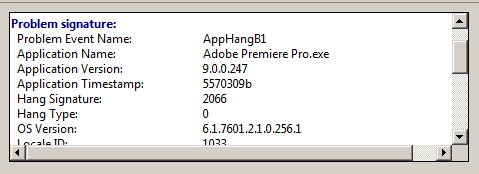
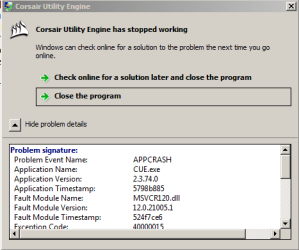
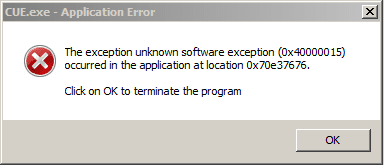
- Many programs will crash when opening.
- Programs wont initialize at all (clicking icons on the taskbar does nothing).
- When performing actions in software, Sony Vegas for example, occasionally the program will close instantly with no error message.
- Previously W7 would hang occasionally when loading Windows. The splash screen with the windows logo would freeze and I would have to restart.
- Previously W7 when booting would display a black screen with a flashing underscore and fail to boot.
- W10 would often freeze when logging in not letting me get past the login screen, and if I did get in I would get a “Windows Desktop Manager has stopped working”.
- Having to manually refresh Windows explorer to view modified files/folders.
- Ending process in task manager doesn’t always close the application immediately.
Here are my computer specs, the computer itself is <2 years old:
- Intel Core i7, 5930K CPU, OC using Auto-OC in BIOS.
- Asus X99-A Mobo
- Asus GTX Strix 970 GPU.
- Seagate X850 PSU.
- 32GB RAM: Corsair HyperX Predator DDR4 2133mHz (x4 8gb sticks)
- Sandisk SDSSDXPS480G, 480GB SSD (for OS and program files).
- 4TB HDD (for media files and software backups).
- Windows 7 Ultimate SP 1 64-bit. 6.1, Build 7601.
Here are a few ideas I've been thinking might be causing this:
- Virus on an external HDD that I haven't detected.
- Hardware issue.
- SSD.
If anyone has input, even from prior experience maybe dealing with these symptoms, I would appreciate any feedback. I have attached some pictures with specific examples of errors.
Thanks in advance,
Zach
About 3-4 months ago I started having issues where multimedia software would stop launching (i.e. Cubase, Premiere Pro, After Effects). It sort of happened gradually from what I remember, and during this period I did not make any major hardware or software changes -- if any at all.
I’ve done a few reformats, even trying Windows 10 (problems were apparent right away), before eventually rolling back to Windows 7 (clean install again). I was running fine for two weeks after reformatting before all the errors began happening again, programs hanging, crashing, not opening. This time the errors all happened simultaneously after a restart this weekend, the computer was running stable before this. I hadn’t made any software changes for a week prior to this and I’m not connected to the internet on this computer either.
Many of the applications I have are installed through backups on an external hard drive, I don’t keep CD’s or re-download software through the internet.
If I wait for a program that has crashed and not force quit it will usually work again after waiting about 10-20 minutes.
Here is a list of the most common errors:
- Auto-OC will occasionally fail when booting.
- Many programs will crash when opening.
- Programs wont initialize at all (clicking icons on the taskbar does nothing).
- When performing actions in software, Sony Vegas for example, occasionally the program will close instantly with no error message.
- Previously W7 would hang occasionally when loading Windows. The splash screen with the windows logo would freeze and I would have to restart.
- Previously W7 when booting would display a black screen with a flashing underscore and fail to boot.
- W10 would often freeze when logging in not letting me get past the login screen, and if I did get in I would get a “Windows Desktop Manager has stopped working”.
- Having to manually refresh Windows explorer to view modified files/folders.
- Ending process in task manager doesn’t always close the application immediately.
Here are my computer specs, the computer itself is <2 years old:
- Intel Core i7, 5930K CPU, OC using Auto-OC in BIOS.
- Asus X99-A Mobo
- Asus GTX Strix 970 GPU.
- Seagate X850 PSU.
- 32GB RAM: Corsair HyperX Predator DDR4 2133mHz (x4 8gb sticks)
- Sandisk SDSSDXPS480G, 480GB SSD (for OS and program files).
- 4TB HDD (for media files and software backups).
- Windows 7 Ultimate SP 1 64-bit. 6.1, Build 7601.
Here are a few ideas I've been thinking might be causing this:
- Virus on an external HDD that I haven't detected.
- Hardware issue.
- SSD.
If anyone has input, even from prior experience maybe dealing with these symptoms, I would appreciate any feedback. I have attached some pictures with specific examples of errors.
Thanks in advance,
Zach
Attachments
My Computer
At a glance
Windows 7 Ultimate x64Intel i7 5930KKingston HyperX Predator DDR4 2133mHz (32GB, ...ASUS GTX 970 Strix
- Computer type
- PC/Desktop
- OS
- Windows 7 Ultimate x64
- CPU
- Intel i7 5930K
- Motherboard
- ASUS X99-A
- Memory
- Kingston HyperX Predator DDR4 2133mHz (32GB, 8GB x4)
- Graphics Card(s)
- ASUS GTX 970 Strix
- Sound Card
- RME Babyface
- Monitor(s) Displays
- LGW2242PA x2, BenQ GW2265
- Screen Resolution
- 1920x1080
- Hard Drives
- Sandisk SDSSDXPS480G, 480GB SSD (OS, applications). X2 4TB 7200RPM media & backup drives
- PSU
- Seagate X850
- Case
- Fractal Design Define R5
- Cooling
- Noctua NH-D15
- Keyboard
- Corsair K95 RGB
- Mouse
- Logitech G502
- Internet Speed
- Slow AF
- Browser
- Google Chrome


