Relocate System Files on a Dual Boot

Neophile

New member
Power User
Local time
11:50 AM
Messages
171
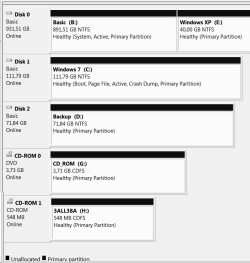
I've replaced Win7-32 with 64 a few days ago after formatting the drive. I have four partitions on three discs. The largest dusk has two – a very small one with XP and a very large where I save all my stuff.

The problem appeared when I tried to use Windows Backup to save an image file of Win7. It only allows me to save the backup on the smallest partitions without enough free space, not with Win7 or on the largest one where I have over 600GB free. I checked and found the reason is probably because this partition contains the system files for both XP and 7, So the Backup forbids saving the image file on it as well as on the one with Win7.

I think I need to relocate the Win7 system files from the large partition to the partition containing Win7. I downloaded and installed EasyBCD, as sometime ago recommended to me in this forum to use instead of VistaBoot Pro (now DualBoot PRO), but I never used it. Could someone tell me how to proceed before I spoil the installation, please?
 
Last edited:

My Computer My Computer

Computer type
PC/Desktop
Computer Manufacturer/Model Number
Home assembled
OS
Windows 7 Ultimate 64-bit SP1
CPU
AMD Athlon 64 II X3 440
Motherboard
M4A785TD-V EVO
Memory
Kingston kit 4GB DDR3 1333MHz (KVR1333D3N9K2/4)
Monitor(s) Displays
ASUS AS VH198S
Screen Resolution
1440x900
Hard Drives
Crucial MX300 2.5" SSD SATA,
Western Digital Caviar Black WD1002FAEX SATA-III,
Samsung HD161HJ SATA-II,
Seagate Barracuda ST3120022A ATA,
Western Digital WD800BB ATA.
Case
Standard
Cooling
Standard
Keyboard
Safeway SW-20
Mouse
Logitech Anywhere, Logitech MX Anywhere 2S, Technet M006
Internet Speed
130 Mbs fiber
Antivirus
Avast Premier
Browser
Firefox, Ice Dragon and Opera
Other Info
PCI ATA-133 Adapter,
Parallel Port Card PCI - PU005V2.
Please post back a screenshot of your full Disk Mgmt drive map and listings, using Snipping Tool in Start Menu.

You are trying to save a Win7 backup image to another HD and it wants to save both XP and Win7? This means that they share some system files. We can help you recover those into Win7 if this is what you want.

It should become apparently why it won't let you save the image to the larger partition. Can you try one more time and post back the exact error message?
 
Hi gregrocker,

Thank you very much for trying to help again.

The configuration is almost the same as on my other thread. I just changed 3 drive letters. After that I could make it work, but never properly again and never knew what it was. Last week I reinstalled, but this time the 64-bit version. I want to make a disk image just in case… and I don’t understand why the system files fell on the only drive with enough space.

If I start by clicking on “Create a system image” I can chose the destination on D: or E. only (both too small), and it wants to backup both B: (Win7 system files on the root) and C: (Win7 OS).
If I start by clicking on “Setup backup” only the same smaller D: and E: are available for saving the backup, but I can chose what to backup (“Let me chose”).

I can't understand how the system files happened to go to another disk because I followed the previous configuration, and also because B: and C: are on separate physical disks :confused:. Maybe I should have disconnected the other disks when installing.


This means that they share some system files. We can help you recover those into Windows 7 if this is what you want.
Exactly! I want to separate the system files, placing them with their respective OSs – Windows 7 (Disk 1) on C:, and XP (Disk 0, Partition 2) on E:.


You are trying to save a Windows 7 backup image to another HD and it wants to save both XP and Windows 7?
That’s right. And only to the smaller partitions.


- - - - - - - - - - / / / / / - - - - - - - - - - / / / / / - - - - - - - - - -


Diskpart information.
Disk Mgmt snapshot at the bottom.


System configuration as per the other thread (3 changed drive letters):

Disk # . . . . Size. . . . . . Type . . . .[Names]
------- . . . . -------- . . . ----- . . . .-----------------------------------
Disk 0 . . . . 112 GB . . . SCSI . . . C: Windows 7 /64-bit
Disk 1 . . . . . 72 GB . . . SCSI . . . D: Backup (No OS, no root files)
Disk 2 . . . . 963 GB . . . ATA . . . . E: Windows XP /32-bit & B: Basic

B: has all system files, and plenty of free space.
D: is nearly full, and E: is a very small partition also nearly full.
Windows Backup only lets me save the image on the two smaller partitions (D: and E: ).


Detail Disk 0

DISKPART> DETAIL DISK

WDC WD1002FAEX-00Z3A0 ATA Device
Disk ID: 47257801
Type : ATA
Status : Online
Path : 0
Target : 0
LUN ID : 0
Location Path : PCIROOT(0)#PCI(1100)#ATA(C00T00L00)
Current Read-only State : No
Read-only : No
Boot Disk : No
Pagefile Disk : No
Hibernation File Disk : No
Crashdump Disk : No
Clustered Disk : No

Volume ### Ltr Label Fs Type Size Status Info
---------- --- ----------- ----- ---------- ------- --------- -------
Volume 2 B Basic NTFS Partition 891 GB Healthy System
Volume 3 E Windows XP NTFS Partition 39 GB Healthy


Detail Disk 1

DISKPART> DETAIL DISK

ST312002 2A SCSI Disk Device
Disk ID: 0ADF0ADF
Type : SCSI
Status : Online
Path : 0
Target : 0
LUN ID : 0
Location Path : PCIROOT(0)#PCI(1404)#PCI(0600)#SCSI(P00T00L00)
Current Read-only State : No
Read-only : No
Boot Disk : Yes
Pagefile Disk : Yes
Hibernation File Disk : No
Crashdump Disk : Yes
Clustered Disk : No

Volume ### Ltr Label Fs Type Size Status Info
---------- --- ----------- ----- --------- ------- --------- -----
Volume 4 C Windows 7 NTFS Partition 111 GB Healthy Boot


Disk Mgmt Snapshot


Attachments

  • List.PNG
    List.PNG
    9 KB · Views: 6
  • CompManager.PNG
    CompManager.PNG
    14.6 KB · Views: 12

My Computer My Computer

Computer type
PC/Desktop
Computer Manufacturer/Model Number
Home assembled
OS
Windows 7 Ultimate 64-bit SP1
CPU
AMD Athlon 64 II X3 440
Motherboard
M4A785TD-V EVO
Memory
Kingston kit 4GB DDR3 1333MHz (KVR1333D3N9K2/4)
Monitor(s) Displays
ASUS AS VH198S
Screen Resolution
1440x900
Hard Drives
Crucial MX300 2.5" SSD SATA,
Western Digital Caviar Black WD1002FAEX SATA-III,
Samsung HD161HJ SATA-II,
Seagate Barracuda ST3120022A ATA,
Western Digital WD800BB ATA.
Case
Standard
Cooling
Standard
Keyboard
Safeway SW-20
Mouse
Logitech Anywhere, Logitech MX Anywhere 2S, Technet M006
Internet Speed
130 Mbs fiber
Antivirus
Avast Premier
Browser
Firefox, Ice Dragon and Opera
Other Info
PCI ATA-133 Adapter,
Parallel Port Card PCI - PU005V2.
Unplug XP HD, swap it's cable to Win7 HD or set Win7 HD as first HD to boot in BIOS setup.

Boot the Win7 DVD Repair console or Repair CD, accept any offered repair. If it doesn't start boot back in to Recovery Tools list to run Startup Repair up to 3 separate times with reboots until Win7 starts up on its own. http://www.sevenforums.com/tutorials/105541-startup-repair-run-3-separate-times.html

Now plug back in the XP HD, try booting it from Asus one-time BIOS Boot menu key which is F8, ESC, or DEL. If it still has a Windows Dual Boot menu, remove Win7 listing in XP msconfig>Boot tab by highlighting and deleting, or by installing EasyBCD 2.0 to XP to delete Win7 entry on Edit OS tab.

Try this method for awhile with Win7 starting by default, or by tapping one-time BIOS Boot menu key at bootup to trigger XP HD instead. This keeps the HD's independent to come and go as you please.

If you decide you'd prefer having a Windows-managed Dual Boot screen then install EasyBCD 2.0 to Win7, add XP on Add OS tab.

Be aware that your XP boot files are stored on B partition rather than on E as they should be. If you'd like to move them while Win7 HD is unplugged, mark XP partition Active then use bootsect from Win7 DVD Repair console or EasyBCD>Useful Tools>Command Line to run bootsect /nt52 E: after confirming the drive letter as viewed by diskpart.
 
Good answer.

Except he apparently has a hard time with booting 7 dvd - any other ideas?
 

My Computers My Computers

System One System Two

  • Computer type
    PC/Desktop
    OS
    7 X64
    CPU
    i5 8400
    Motherboard
    gigabyte b365m ds3h
    Memory
    2x8gb 3200mhz
    Hard Drives
    various
    PSU
    pure power 11 400w cm
    Case
    Coolermaster
    Cooling
    cryorig m9i
  • Computer type
    PC/Desktop
    OS
    7x64
    CPU
    g5400
    Motherboard
    ga b365m ds3h
    Memory
    8gb ddr4 2400
    PSU
    xfx pro 450w
I cannot find the report of failure to boot DVD. You want to give him commands to run to write System boot files to Win7?

Since you may need it, you can also burn a Win7 Repair CD: http://www.sevenforums.com/tutorials/2083-system-repair-disc-create.html

Or extract the 7 DVD ISO using ImgBurn, write it to flash stick using Ultra ISO trial version: On File tab open ISO, on Bootable tab Write Disk Image, Format, then Write. Boot under USB or HD's.
 
Last edited:
Every time I use the Windows 7 DVD (for the Windows 7 OS, of course) I have to load drivers because, as I have not enough motherboard sockets for my older drives (3 HDDs + CD + DVD = 5) I had to connect two HDDs through an adapter.


Try using easybcd command line to fix boot files on 7 and XP, then shutdown pc and change bios boot order.

(I don't think it can be done from xp commandline)


Just noticed your MVP badge - is that new , or am I very unobservant - Congratulations, Greg.:party:
 

My Computers My Computers

System One System Two

  • Computer type
    PC/Desktop
    OS
    7 X64
    CPU
    i5 8400
    Motherboard
    gigabyte b365m ds3h
    Memory
    2x8gb 3200mhz
    Hard Drives
    various
    PSU
    pure power 11 400w cm
    Case
    Coolermaster
    Cooling
    cryorig m9i
  • Computer type
    PC/Desktop
    OS
    7x64
    CPU
    g5400
    Motherboard
    ga b365m ds3h
    Memory
    8gb ddr4 2400
    PSU
    xfx pro 450w
From EasyBCD>Useful Tools>Command Line type:

bcdboot c:\windows /s c:

bootsect /nt60 c:

Or plug in your DVD drive to use DVD Repair with steps given earlier.

Thanks, Si.
 
Last edited:
Thanks. Here are the results, only now because it has taken me a lot of time, so I made several daily trials.

I started as per your first post, and also relocated all boot files and directory that were on Disk 2 (B: Basic and E: XP). First, it offered immediately to repair after reboot. I accepted and came back for the second and third repair session, but here there was a problem.

After loading the drivers to the PCI SCSI adapter for Disk 0 (C: (Windows 7) and Disk 1 (D: Backups disk – not important – not OS), Windows 7 appeared on the small window to choose the system to repair. When trying to follow to the Startup Repair menu I got a message telling the version of System Recovery Options was not compatible with the version of Windows I was trying to repair :confused:. Why?

I have done lots and lots of this, as you may remember from my other thread where you helped, so I have some experience here. I went around to the system image repair (bottom choice on the small window to choose the system to repair), then cancelled twice on the two following windows and the Startup Repair menu appeared. I run it. On the message to send report it said there was no OS installed, and on the detailed description, at the end was this:

Boot cause found:
No OS files found in disk.

Repair action: Partition table repair.
Result: Failed. Error = 0x490.


I rebooted and repeated two more times with the same result. I rebooted again, but now to the HDD with Disk 2 (B: Basic, and E: Windows XP) still unplugged and the system started in Windows 7. Then I rebooted and before starting I plugged in Disk 2. It didn’t start, the BCD file was missing. I rebooted, unplugged Disk 2 again and Windows 7 (C: Disk 0) started.

Then I tried your suggestions on your last post. The first command (bcdboot c:\windows /s c: ) is executed, but after the second (bcdboot c:\windows /s c: ) I get this answer:
Updated NTFS filesystem bootcode. The update may be unreliable since the volume could not be locked during the update:
Access is denied.

Starting up behaviour didn’t change.

Conclusion:
The computer does not start with Disk 2 plugged in. I can plug it in after starting and scan for hardware changes, but this is not what the way to do it and it does not solve my problem of backups on my first post. It is also possible that it will start if I put the the put files and directory that I removed from Disk 2 back to where they were: It would boot either on either, but again, it doesn't solve the same problem.

I believe the MBR should be rebuilt and other things changed to avoid startup being redirected to the old way. Maybe rebuild everything regarding the startup to have it clean. Here I need a hand please, because I don't know EasyBCD and I can't find any tutorial explaining what the options on app do, even on its developer's site. Do you know of any tutorial deserving that name?
 
Last edited:

My Computer My Computer

Computer type
PC/Desktop
Computer Manufacturer/Model Number
Home assembled
OS
Windows 7 Ultimate 64-bit SP1
CPU
AMD Athlon 64 II X3 440
Motherboard
M4A785TD-V EVO
Memory
Kingston kit 4GB DDR3 1333MHz (KVR1333D3N9K2/4)
Monitor(s) Displays
ASUS AS VH198S
Screen Resolution
1440x900
Hard Drives
Crucial MX300 2.5" SSD SATA,
Western Digital Caviar Black WD1002FAEX SATA-III,
Samsung HD161HJ SATA-II,
Seagate Barracuda ST3120022A ATA,
Western Digital WD800BB ATA.
Case
Standard
Cooling
Standard
Keyboard
Safeway SW-20
Mouse
Logitech Anywhere, Logitech MX Anywhere 2S, Technet M006
Internet Speed
130 Mbs fiber
Antivirus
Avast Premier
Browser
Firefox, Ice Dragon and Opera
Other Info
PCI ATA-133 Adapter,
Parallel Port Card PCI - PU005V2.
I'm not sure why you copied boot files manually since that wasn't included in steps given and is performed by Startup Repair.

Can you unplug all other HD's besides Disk1, make sure it is set first to boot in BIOS setup, mark Win7 partition active and run Startup Repair three times again to see if it will repair? If not, boot back into Command Line to type bootrec.exe /fixmbr and bootrect.exe /fixboot then try the repairs again.

Next boot free Partition Wizard bootable CD to make sure Win7 is marked Active, then from Disk tab Rebuild MBR.

If this fails again plug back in all drives and post back a screenshot of your full Disk Management drive map and listings from Win7?
 
I'm not sure why you copied boot files manually since that wasn't included in steps given and is performed by Startup Repair.
It was just like when we save the registry before making chinges in it, but it wasn’t really necessary, I agree.


Can you unplug all other HD's besides Disk1, make sure it is set first to boot in BIOS setup, mark Windows 7 partition active and run Startup Repair three times again to see if it will repair?
I had already done this, as I wrote, but I repeated, passed to the next step (fixmbr and fixboot) and did it again, same result. Unfortunately booting results didn’t change since my last post.


Disk 1. After the previous proceedings the configuration changed from what I posted. Disk 1 became Disk 0 (C: Windows 7) as you can see from the updated information at the end of this post. I think the difference depends on what booting data is read. Probably, Computer Management reads the latest data and Diskpart the old one. This difference between them happens only when I plug in the SATA disk after booting, of course, because if the SATA is not plugged in (where all boot files used to be) they show both the same information.

Yes, Windows 7 has always been active on Partition Wizard, Computer Management and Diskpart.

Still doesn't boot with the SATA disk connected. Message: \boot\bcdedit.

On the disk with B: (Basic) and E: (Windows XP) the first is active but not the second. Should I invert them? XP is on second partition and had its boot directory and files on the first, which I deleted right at the beginning of this fix.


- - - - - - - - - - / / / / / - - - - - - - - - - / / / / / - - - - - - - - - -


Previous system configuration (Windows 7 alone or SATA disk plugged minutes after booting booting and using Search for hardware changes):

Disk # . . . . Size. . . . . . Type . . . .[Names]
------- . . . . -------- . . . ----- . . . .-----------------------------------
Disk 0 . . . . 112 GB . . . SCSI . . . C: Windows 7 /64-bit
Disk 1 . . . . . 72 GB . . . SCSI . . . D: Backup (No OS, no root files)
Disk 2 . . . . 963 GB . . . ATA . . . . E: Windows XP /32-bit & B: Basic


Present system configuration (SATA disk plugged while booting the OS):

Disk # . . . . Size. . . . . . Type . . . .[Names]
------- . . . . -------- . . . ----- . . . .-----------------------------------
Disk 0 . . . . 963 GB . . . ATA . . . . E: Windows XP /32-bit & B: Basic
Disk 1 . . . . 112 GB . . . SCSI . . . C: Windows 7 /64-bit
Disk 2 . . . . . 72 GB . . . SCSI . . . D: Backup (No OS, no root files)


Diskpart information.
Diskpart and Bcdedit
Disk Mgmt snapshot at the bottom.


DISKPART


Detail Disk 0

WDC WD1002FAEX-00Z3A0 ATA Device
Disk ID: 47257801
Type : ATA
Status : Online
Path : 0
Target : 0
LUN ID : 0
Location Path : PCIROOT(0)#PCI(1100)#ATA(C00T00L00)
Current Read-only State : No
Read-only : No
Boot Disk : No
Pagefile Disk : No
Hibernation File Disk : No
Crashdump Disk : No
Clustered Disk : No

Volume ## Ltr Label . . . . . Fs . . .Type. . . . Size . . . Status . Info
---------- --- ----- ------------ ------ ------------- ---------- --------- ------
Volume 2 . B . Basic . . . . . NTFS . Partition . 891 GB . Healthy
Volume 3 . E . Windows XP .NTFS . Partition . .39 GB . Healthy


Detail Disk 1


ST312002 2A SCSI Disk Device
Disk ID: 0ADF0ADF
Type : SCSI
Status : Online
Path : 0
Target : 0
LUN ID : 0
Location Path : PCIROOT(0)#PCI(1404)#PCI(0600)#SCSI(P00T00L00)
Current Read-only State : No
Read-only : No
Boot Disk : Yes
Pagefile Disk : Yes
Hibernation File Disk : No
Crashdump Disk : Yes
Clustered Disk : No

Volume ## Ltr Label . . . . Fs . . . Type. . . . .Size . . . Status . . Info
--------- --- --- -------------- -------- ----------- ----------- ----------- ---------
Volume 4 . C . Windows 7 . NTFS . Partition . 111 GB . Healthy . System


Detail Disk 1, Partition 1 seen when booted with Win7 DVD:

Partition 1
Type : 07
Hidden: No
Active: Yes
Offset in Bytes: 32256

Volume ## . Ltr Label . . . . . Fs . . .Type . . . .Size . . . Status . Info
---------- --- ---- -------------- -------- ------------ ---------- --------- -----
* Volume 3 . F . Windows 7 . NTFS . Partition . 111 GB . Healthy


Detail Disk 2

WDC WD80 0BB-00JHA0 SCSI Disk Device
Disk ID: D0465FA8
Type : SCSI
Status : Online
Path : 0
Target : 1
LUN ID : 0
Location Path : PCIROOT(0)#PCI(1404)#PCI(0600)#SCSI(P00T01L00)
Current Read-only State : No
Read-only : No
Boot Disk : No
Pagefile Disk : No
Hibernation File Disk : No
Crashdump Disk : No
Clustered Disk : No

Volume ## Ltr Label. . .Fs . . . Type. . . . Size . . Status . Info
--------- --- -------------- -------- ----------- --------- --------- -----
Volume 5 . D . Backup . NTFS . Partition . 71 GB . Healthy


BCDEDIT shows only this (booted with other disks disconnected):

Windows Boot Manager
--------------------
identifier {bootmgr}
device partition=C:
path \bootmgr
description Windows Boot Manager
locale en-us
inherit {globalsettings}
default {current}
resumeobject {eb076f0c-3081-11e0-8797-000272a472e7}
displayorder {current}
toolsdisplayorder {memdiag}
timeout 30

Windows Boot Loader
-------------------
identifier {current}
device partition=C:
path \windows\system32\winload.exe
description Windows 7
locale en-us
inherit {bootloadersettings}
osdevice partition=C:
systemroot \windows
resumeobject {eb076f0c-3081-11e0-8797-000272a472e7}
nx OptIn
detecthal Yes


Disk Mgmt Snapshot


Attachments

  • List.PNG
    List.PNG
    5.9 KB · Views: 2
  • CompManager.PNG
    CompManager.PNG
    15.8 KB · Views: 5
Last edited:

My Computer My Computer

Computer type
PC/Desktop
Computer Manufacturer/Model Number
Home assembled
OS
Windows 7 Ultimate 64-bit SP1
CPU
AMD Athlon 64 II X3 440
Motherboard
M4A785TD-V EVO
Memory
Kingston kit 4GB DDR3 1333MHz (KVR1333D3N9K2/4)
Monitor(s) Displays
ASUS AS VH198S
Screen Resolution
1440x900
Hard Drives
Crucial MX300 2.5" SSD SATA,
Western Digital Caviar Black WD1002FAEX SATA-III,
Samsung HD161HJ SATA-II,
Seagate Barracuda ST3120022A ATA,
Western Digital WD800BB ATA.
Case
Standard
Cooling
Standard
Keyboard
Safeway SW-20
Mouse
Logitech Anywhere, Logitech MX Anywhere 2S, Technet M006
Internet Speed
130 Mbs fiber
Antivirus
Avast Premier
Browser
Firefox, Ice Dragon and Opera
Other Info
PCI ATA-133 Adapter,
Parallel Port Card PCI - PU005V2.
Are you sure Win7 HD was set first to boot in BIOS setup? Try booting it with BIOS Boot menu key to make sure.

This time try swapping DISK0 cable to Win7, make sure it is set first to boot in BIOS setup, then run repairs again.

For XP HD, if you want to write the System files to XP I gave you the commands earlier in the thread, confirmed by SIW2. Or you can run an XP Repair Install to achieve this. Again I would unplug all other HD's and makes sure XP is set to boot first.
 
Eureka! That was it. Working now. Well, nearly.

I forgot that my motherboard mixes up the boot drives order every time I plug or unplug anything, even a USB flash drive. They have to be reordered every time a change is made.

I have entered XP in the C: Windows 7 bootmanager.
I made B: Basic drive inactive and E: XP active.
The system configuration is different again.
Both Windows 7 and XP installations work.
I made a boot menus for both Windows 7 and XP.
Both boot OK from their respective menus or from BIOS menu, but not from the other one’s menu.
I can make a backup and a system image.

Boot settings were applied with the other HDs disconnected.

Nearly everything solved thanks to your help, but something still needs a touch. A few things are not behaving as expected. This is what happens when booting from BIOS menu.

When I boot from Win7 HD, and pick Windows 7 from the menu or just let the time pass and it goes on by itself, works marvellously. But when I choose XP from this menu, instead of starting gives this message and stops:
Windows could not start because the following file is missing or corrupt:
<Windows root>\System32\ntoskrnl.exe.
Please reinstall a copy of the above file.


Strange because of what follows.

When I boot from the Win XP HD and pick Windows XP from the menu all is well. But when I choose Windows 7 from the menu, instead of starting it gives this message and reboots:
Invalid boot.ini file
Booting from c:\windows\


Also strange because of what follows.

At the beginning, there was no boot.ini. I deleted too early the backup you mentioned. I had to make a new one, a lot of work and wasted time. XP’s CD recovery didn’t find an OS! I Installation did’t show the XP Repair Install either, no luck. This temporarily missing boot.ini corrupted XP’s ntoskrnl.exe file (was posted at booting and didn’t boot), and I had to replaced it from the XP CD, so it was corrected: there was a boot.ini and ntoskrnl.exe was replaced. Nevertheless, the boot problem persists. I checked both disks and Chkdsk found no errors, but I didn’t replace the file ntoskrnl.exe on Win7 because I couldn’t find it on the DVD as I did on XP’s CD.

What is wrong?


I just didn't find an EasyBCD tutorial or description of the app functions. I know some but not all, but give up EasyBCD because it makes special folders on the system and I find it abusive, may bring consequences if the program fails, and probably we can’t make any repair if needed. Anyway, I’m not sure if I’m right, but I give it up.

Just to make a point clear about an SIW2's comment above.
On my other thread mentioned here, I did have problems booting with the DVD and loading the SCSI adapter drivers is still time consuming. However, if I can do nothing to quicken driver installation, the trouble I had before was because of the previous installation. This is a new one and that issue didn't show up... until now. I use a USB flash drive now to boot from Win7 DVD, somewhat quicker.


- - - - - - - - - - / / / / / - - - - - - - - - - / / / / / - - - - - - - - - -


Edited

Present settings


Boot.ini on Disk 0, Partition 2, E: Windows XP

[boot loader]
timeout=10
default=multi(0)disk(0)rdisk(0)partition(2)\WINDOWS
[operating systems]
multi(0)disk(0)rdisk(0)partition(2)\WINDOWS="Windows XP Professional" /fastdetect
multi(0)disk(0)rdisk(1)partition(1)\WINDOWS="Windows 7 Ultimate" /fastdetect


Present system configuration (all disks plugged in)

Disk # . . . Size. . . . Type. . .[Names and partitions]
------- . . . -------- . . ------ . . ---------------------------------------------------
Disk 0 . . . 963 GB . . ATA. . . Part1 (B: Basic) – Part2 (E: Win XP 32-bit)
Disk 1 . . . 112 GB . . SCSI . . Part1 (C: Windows 7 /64-bit)
Disk 2 . . . . 72 GB . . SCSI . . Part1 (D: Backup (No OS, no root files))


Bcdedit

Windows Boot Manager
--------------------
identifier . . . . . . . {bootmgr}
device . . . . . . . . . partition=C:
path . . . . . . . . . . .\bootmgr
description . . . . . . Windows Boot Manager
locale . . . . . . . . . .en-us
inherit . . . . . . . . . {globalsettings}
default . . . . . . . . .{current}
resumeobject . . . . {eb076f0c-3081-11e0-8797-000272a472e7}
displayorder . . . . . {current}
. . . . . . . . . . . . . . {ntldr}
toolsdisplayorder . . {memdiag}
timeout . . . . . . . . .4
displaybootmenu . . Yes

Windows Boot Loader
-------------------
identifier . . . . . . . . {current}
device . . . . . . . . . . partition=C:
path . . . . . . . . . . . \windows\system32\winload.exe
description . . . . . . . Windows 7
locale . . . . . . . . . . .en-us
inherit . . . . . . . . . . {bootloadersettings}
osdevice . . . . . . . . .partition=C:
systemroot . . . . . . .\windows
resumeobject . . . . . {eb076f0c-3081-11e0-8797-000272a472e7}
nx OptIn
detecthal Yes

Windows Legacy OS Loader
------------------------
identifier . . . . . . . . . {ntldr}
device . . . . . . . . . . . partition=E:
path . . . . . . . . . . . . \ntldr
description . . . . . . . .Windows XP


Root files on Windows 7

bootmgr
bootsqm.dat
hiberfil.sys
pagefile.sys


Root files on Windows XP

boot.ini
hiberfil.sys
ntdetect.com
ntldr
pagefile.sys
 
Last edited:

My Computer My Computer

Computer type
PC/Desktop
Computer Manufacturer/Model Number
Home assembled
OS
Windows 7 Ultimate 64-bit SP1
CPU
AMD Athlon 64 II X3 440
Motherboard
M4A785TD-V EVO
Memory
Kingston kit 4GB DDR3 1333MHz (KVR1333D3N9K2/4)
Monitor(s) Displays
ASUS AS VH198S
Screen Resolution
1440x900
Hard Drives
Crucial MX300 2.5" SSD SATA,
Western Digital Caviar Black WD1002FAEX SATA-III,
Samsung HD161HJ SATA-II,
Seagate Barracuda ST3120022A ATA,
Western Digital WD800BB ATA.
Case
Standard
Cooling
Standard
Keyboard
Safeway SW-20
Mouse
Logitech Anywhere, Logitech MX Anywhere 2S, Technet M006
Internet Speed
130 Mbs fiber
Antivirus
Avast Premier
Browser
Firefox, Ice Dragon and Opera
Other Info
PCI ATA-133 Adapter,
Parallel Port Card PCI - PU005V2.
It appears that you wisely wish to boot via the BIOS with no intervening Windows-managed Dual Boot menus interrupting smooth BIOS boot to Win7 or XP. This keeps the HD's independent to come and go as you please.

It appears you have also previously configured a Windows Dual boot menu on both the XP and Win7 HD's. To remove these, install EasyBCD 2.0 to each and remove the other's listing on Edit OS tab.

If this fails, please post back screenshots of full Disk Mgmt drive map and listings, along with EasyBCD listings using Snipping Tool in Start menu.
 
Yes, I did configure both HDs for dual boot, but unsuccessfully, with the results I explained. I wonder why, so I posted the data that I supposed could give you the idea to correct it and asked what is wrong. Can you help to correct it, please? It seems the issue is not on the boot menus themselves, but rather somewhere else.

I tried sfc /scannow. It found corrupt files but was unable to fix some of them. I can't read the log. It is attached. Could you tell me what I have to do, please?
 

My Computer My Computer

Computer type
PC/Desktop
Computer Manufacturer/Model Number
Home assembled
OS
Windows 7 Ultimate 64-bit SP1
CPU
AMD Athlon 64 II X3 440
Motherboard
M4A785TD-V EVO
Memory
Kingston kit 4GB DDR3 1333MHz (KVR1333D3N9K2/4)
Monitor(s) Displays
ASUS AS VH198S
Screen Resolution
1440x900
Hard Drives
Crucial MX300 2.5" SSD SATA,
Western Digital Caviar Black WD1002FAEX SATA-III,
Samsung HD161HJ SATA-II,
Seagate Barracuda ST3120022A ATA,
Western Digital WD800BB ATA.
Case
Standard
Cooling
Standard
Keyboard
Safeway SW-20
Mouse
Logitech Anywhere, Logitech MX Anywhere 2S, Technet M006
Internet Speed
130 Mbs fiber
Antivirus
Avast Premier
Browser
Firefox, Ice Dragon and Opera
Other Info
PCI ATA-133 Adapter,
Parallel Port Card PCI - PU005V2.
Hello Neophile.


Have a look at this tutorial at the link below to see of running the sfc /scan this way will repair the files and be sure to post back with any further questions you may have and to keep us informed.


SFC /SCANNOW : Run in Command Prompt at Boot
 

My Computer My Computer

Computer Manufacturer/Model Number
* BFK Customs *
OS
W 7 64-bit Ultimate
CPU
Intel Q9550 Yorkfield
Motherboard
ASUS P5Q Pro
Memory
8GB Dominator 8500C5D
Graphics Card(s)
ATI : XFX 5870
Sound Card
Realtek HD Audio 7-1
Monitor(s) Displays
1x 47" LCD HDMI & 3x 26" LCD HDMI
Screen Resolution
1920x1080P & 1920x1200
Hard Drives
1x 80GB Intel X25-M G2 SSD : 1x 500GB & 1x 640GB WD Caviar Black(s)
PSU
Corsair 620HX
Case
Cooler Master RC-690
Cooling
Tuniq Tower 120, 2x 140mm and 3x 120mm case fans
Keyboard
Microsoft 500
Mouse
Razer Diamondback 3G
Internet Speed
14 Mb/s
Other Info
1x Koutech 3Gb/s SATA HDD Hot Swap Rack
You don't need to configure either OS for Dual Boot if both contain System files, but can boot Win7 by setting it first to boot in BIOS setup, then if you want to boot XP use the one-time BIOS Boot menu key which every computer or mobo has.

Can you now boot either OS this way? Please try now.

If so, then install EasyBCD 2.0 to each OS and delete the other OS on Edit OS tab so that you have no boot menus starting up but just Win7, or XP if you select it from BIOS Boot menu.
 
Hi Barefoot.

Thank you for your tip. I tried to run SFC according to your tutorial, but it didn't start. This was the answer:
Windows Resource Protection could not start the repair service.

Why? And without stating the reason and no further explanation I couldn't go any further.

Reading the CBS.log attached to my last post with the help of the link on your tutorial I found this line at the end of the log repeated twice:

2011-02-07 00:59:40, Info CSI 000002f2 [SR] Cannot repair member file [l:28{14}]"iassdo.dll.mui" of Microsoft-Windows-Networking-Internet_Authentication_Service_Iassdo.Resources, Version = 6.1.7600.16385, pA = PROCESSOR_ARCHITECTURE_INTEL (0), Culture = [l:10{5}]"en-US", VersionScope = 1 nonSxS, PublicKeyToken = {l:8 b:31bf3856ad364e35}, Type neutral, TypeName neutral, PublicKey neutral in the store, hash mismatch

I found the iassdo.dll.mui file in two locations, each one with a different size:
C:\Windows\System32\en-US . . . . . 46 KB
C:\Windows\SysWOW64\en-US . . . . .5 KB

Well, if in doubt I can replace both, but with what and which is which? Can you tell me how, please?


gregrocker

Yes, I can boot the way you say and I understand it is a much cleaner option, but sometimes would like to have the opportunity of having both on the Windows 7 boot menu.

I think I must repair the corrupt files before gonig on here, so let's correct what is wrong in first place, please. From the results I think that making the boot menu work will be also a test for the system files health. And Win7 DVD boot finds the OS after loading the SCSI drivers, but does not recognise it for repairing (with XP disk unplugged). Probably because of the problem with the corrupted files above in this post.
 

My Computer My Computer

Computer type
PC/Desktop
Computer Manufacturer/Model Number
Home assembled
OS
Windows 7 Ultimate 64-bit SP1
CPU
AMD Athlon 64 II X3 440
Motherboard
M4A785TD-V EVO
Memory
Kingston kit 4GB DDR3 1333MHz (KVR1333D3N9K2/4)
Monitor(s) Displays
ASUS AS VH198S
Screen Resolution
1440x900
Hard Drives
Crucial MX300 2.5" SSD SATA,
Western Digital Caviar Black WD1002FAEX SATA-III,
Samsung HD161HJ SATA-II,
Seagate Barracuda ST3120022A ATA,
Western Digital WD800BB ATA.
Case
Standard
Cooling
Standard
Keyboard
Safeway SW-20
Mouse
Logitech Anywhere, Logitech MX Anywhere 2S, Technet M006
Internet Speed
130 Mbs fiber
Antivirus
Avast Premier
Browser
Firefox, Ice Dragon and Opera
Other Info
PCI ATA-133 Adapter,
Parallel Port Card PCI - PU005V2.
Run a Repair Install of Win7 from desktop since you report it will start. This will reinstall the OS to repair the irreparable System Files, and reconfigure the Dual Boot with XP if you leave XP HD plugged in. http://www.sevenforums.com/tutorials/3413-repair-install.html?ltr=R

If not, install EasyBCD 2.0 to Win7 and Add XP, accept offered boot files, autoconfigures, Save.

You may have to install Easy to XP to remove Dual Boot Menu on XP.
 
Since you are dual booting did you try Method Two of the tutorial?


Greg's suggestion for a repair install is the better idea at this point.
 

My Computer My Computer

Computer Manufacturer/Model Number
* BFK Customs *
OS
W 7 64-bit Ultimate
CPU
Intel Q9550 Yorkfield
Motherboard
ASUS P5Q Pro
Memory
8GB Dominator 8500C5D
Graphics Card(s)
ATI : XFX 5870
Sound Card
Realtek HD Audio 7-1
Monitor(s) Displays
1x 47" LCD HDMI & 3x 26" LCD HDMI
Screen Resolution
1920x1080P & 1920x1200
Hard Drives
1x 80GB Intel X25-M G2 SSD : 1x 500GB & 1x 640GB WD Caviar Black(s)
PSU
Corsair 620HX
Case
Cooler Master RC-690
Cooling
Tuniq Tower 120, 2x 140mm and 3x 120mm case fans
Keyboard
Microsoft 500
Mouse
Razer Diamondback 3G
Internet Speed
14 Mb/s
Other Info
1x Koutech 3Gb/s SATA HDD Hot Swap Rack
Back
Top