Solved remember pass for sites

s00

New member
Member
VIP
Local time
10:35 PM
Messages
220
Location
SISTAN
I activated ability to remember passwords Firefox
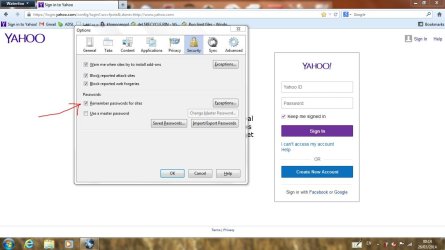
1.JPG

but when I enter the password the password is not stored
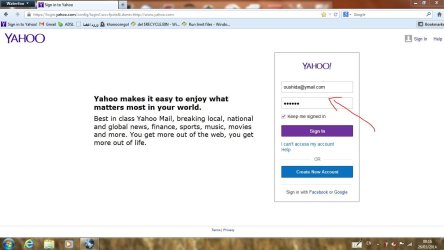
2.JPG
 
Last edited by a moderator:

My Computer

Computer Manufacturer/Model Number
dell 1558
OS
windows 7 home preminm x64
CPU
i7
Motherboard
dell
Memory
DDR3 4G
Graphics Card(s)
ATI HD 5470 1G
Monitor(s) Displays
15.6 LED
Hard Drives
Hitachi 500G
Yahoo password is not saved in my Firefox either, or banks as well..

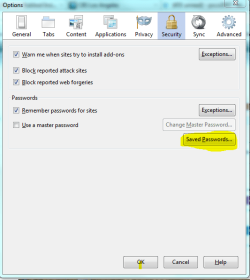
Go to tools>options>security and click saved passwords and see if your other passwords are saved.
 

Attachments

  • FIREFOX PIC.PNG
    FIREFOX PIC.PNG
    20 KB · Views: 27

My Computer

Computer type
PC/Desktop
Computer Manufacturer/Model Number
Self-Built
OS
Windows 7 Professional X64
CPU
Core i7 (2nd gen) i7-2600K / 3.40GHz
Motherboard
ASUS P8Z77-V Intel 7 Series Motherboard
Memory
DDR3 2400MHz (OC) 16gb
Graphics Card(s)
Intel(R) HD Graphics 3000, -1988 Mb
Sound Card
8 ChannelsAudio Chipset Realtek ALC892
Monitor(s) Displays
LG 29UM65 Black 29"
Screen Resolution
2560 x 1080
Hard Drives
840 EVO 250 GB SSD ;2tb (2);Seagate;1tb Seagate; 750 gb Seagate; wd ext (2) 750 gb,WD 2tb X 2;WD 3TB Black
PSU
750 watt
Case
Thermaltake RX -1
Cooling
2120mm Fans Included 1Other Fan Ports 5x 200mm Fan Ports
Keyboard
Microsoft Digital Media Pro
Mouse
Microsoft Wireless 6000
Internet Speed
U-verse 18 mbps
Antivirus
MSE
Browser
Firefox, Chrome and my favorite: Pale Moon
Other Info
HdHomerun Dual Tuner.
SRS Audio Lab,
Pioneer BDR 208-DBK
PS3-What a difference in my Surround Sound Receiver!
HP 4540s - My new Toy.
Epson R280 Printer- To personalize my Dvds.
Canon MP 560 - For scanning.
Yahoo password is not saved in my Firefox either, or banks as well..

Go to tools>options>security and click saved passwords and see if your other passwords are saved.

@s00,
Please do not post another screenshot of the window that you see after pressing "Saved Passwords". Your third image/screenshot in your original post was removed by the forum's kind admins because it showed your account names for various websites. Admittedly, you did not show the actual password - it is still not a good idea to give away the account part of security related info.


You can tell Firefox to remember passwords, but websites like Yahoo do not allow Firefox to save the password. It is not a problem with Firefox or any setting that you can change (as far as I know).
 

My Computer

Computer type
Laptop
Computer Manufacturer/Model Number
Employer provided Dell Latitude
OS
W7 Pro SP1 64bit
CPU
i7
Memory
8GB
Graphics Card(s)
Intel HD Graphics
Hard Drives
crappy SSD
Antivirus
Employer mandated Symantec Endpoint Protection
Browser
Pale Moon 64bit, IE11 64bit & Chrome 64bit
FF Passwords

Well for secure (https) sites like banking sites or Yahoo it's possible to use a macro to remember passwords. Obviously it's not a brilliant idea to store important passwords anywhere other than in a securely encrypted application.

You can use a Firefox add on:

https://addons.mozilla.org/en-US/firefox/addon/imacros-for-firefox/

You can set a master password or if you only want to use it to log into Yahoo and the like - visit the login page then start iMacro's by clicking on the toolbar icon and set it to "Record" what you're typing. Once you've logged in - save the Macro and give it a name like "Yahoo login".

Next time you want to log in - display iMacros by clicking the icon, then highlight the required macro and click "Play".

You'll be logged in automatically.
 

My Computer

Computer type
Laptop
Computer Manufacturer/Model Number
ASUS
OS
Microsoft Windows 7 Home Premium 64-bit 7601 Multiprocessor Free Service Pack 1
CPU
AMD C-60 APU with Radeon(tm) HD Graphics
Motherboard
ASUSTeK COMPUTER INC. X501U
Memory
4.00 GB
Graphics Card(s)
AMD Radeon HD 6290 Graphics
Sound Card
(1) AMD High Definition Audio Device (2) Realtek High Defi
Screen Resolution
1366 x 768 x 32 bits (4294967296 colors) @ 60 Hz
Hard Drives
Hitachi HTS545050A7E380 SATA Disk Device
Antivirus
Comodo CIS & FW, SecureAplus App Whitelisting, Threatfire
Browser
Cyberfox 64bit, Opera 64bit, Airfox
Other Info
Spy-The-Spy, HitmanPro.Alert, Norton Connect Safe, MJRegWatcher, BitDefender TrafficLight, Voodoo Shield, Zemana AntiMalware
Back
Top