Hello All
Windows 7 Prof 32 bit
Today my husband got a phone call from someone claiming to be from Microsoft, telling him that they were automatically notified that his computer was at risk for viruses. We did a stupid thing and gave him Remote Access to the computer. This was before we realized that it was nothing but a scam to sell us a "Personal Technician" to clean his computer and get it running good again.
But that aside, there is now a Generic Credential, in Credential Manager, that was created today....has to be from this scammer. We tried to "remove from vault", but it keeps coming back. We ran Norton 360 virus scan and Malwarebytes virus scan and neither showed any problems. BUT my husband does not want this credential on his system.
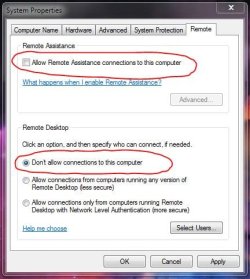
Not knowing much about Remote Access, is this a way for some hacker to get into my husband's computer without his knowledge?
Anyhow, how does he remove this from Credential Manager permanently???? I've read posts from others asking the same thing, but can't find an answer....IS there an answer?
Thanks in advance for your time and help
Barb
Windows 7 Prof 32 bit
Today my husband got a phone call from someone claiming to be from Microsoft, telling him that they were automatically notified that his computer was at risk for viruses. We did a stupid thing and gave him Remote Access to the computer. This was before we realized that it was nothing but a scam to sell us a "Personal Technician" to clean his computer and get it running good again.
But that aside, there is now a Generic Credential, in Credential Manager, that was created today....has to be from this scammer. We tried to "remove from vault", but it keeps coming back. We ran Norton 360 virus scan and Malwarebytes virus scan and neither showed any problems. BUT my husband does not want this credential on his system.
Not knowing much about Remote Access, is this a way for some hacker to get into my husband's computer without his knowledge?
Anyhow, how does he remove this from Credential Manager permanently???? I've read posts from others asking the same thing, but can't find an answer....IS there an answer?
Thanks in advance for your time and help
Barb
My Computer
- OS
- Windows 7 Prof 32 Bit